
Insignia NS-C3111 Bedienungsanleitung

Car Stereo with CD/MP3 Player
Autoradio stéréo avec lecteur de CD/MP3
Estéreo para automóvil con reproductor de CD/MP3
NS-C3111
User Guide | Guide de l’utilisateur | Guía del Usuario
www.insignia-products.com 1
Welcome
Congratulations on your purchase of a high-quality Insignia product.
Your NS-C3111 represents the state of the art in car stereo design
and is designed for reliable and trouble-free performance.
Contents
Safety information. . . . . . . . . . . . . . . . . . . . . . . . . . . . . . . . . . .1
Features . . . . . . . . . . . . . . . . . . . . . . . . . . . . . . . . . . . . . . . . . .2
Installing your radio. . . . . . . . . . . . . . . . . . . . . . . . . . . . . . . . . .4
Using your car stereo . . . . . . . . . . . . . . . . . . . . . . . . . . . . . . . .9
Specifications . . . . . . . . . . . . . . . . . . . . . . . . . . . . . . . . . . . . .14
Troubleshooting. . . . . . . . . . . . . . . . . . . . . . . . . . . . . . . . . . . .15
Maintaining . . . . . . . . . . . . . . . . . . . . . . . . . . . . . . . . . . . . . . .15
Français . . . . . . . . . . . . . . . . . . . . . . . . . . . . . . . . 18
Español. . . . . . . . . . . . . . . . . . . . . . . . . . . . . . . . . 37
Safety information
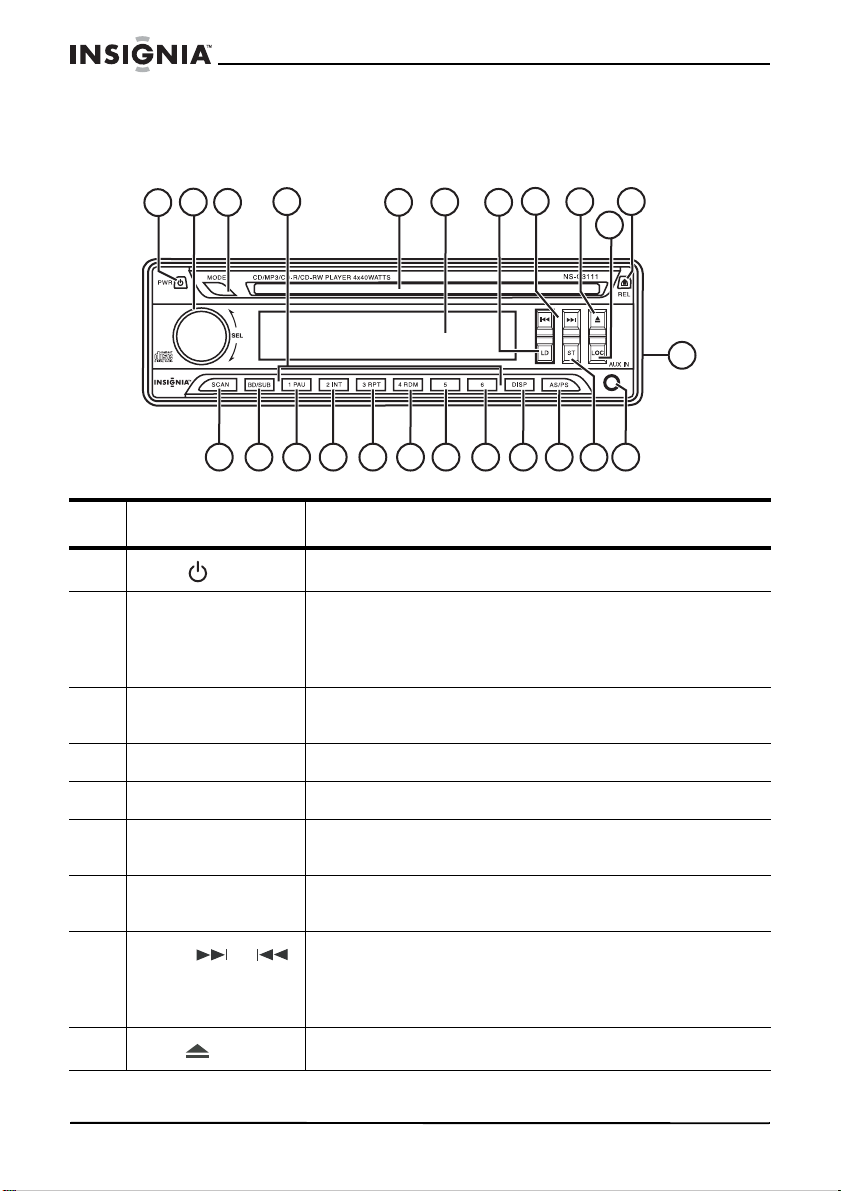
This symbol is intended to alert you to the presence of important
operating and maintenance (servicing) instructions in the literature
accompanying your radio.
Warning To prevent fire or shock hazards, do not expose this unit to rain or
moisture.
Warning This product utilizes a Class 1 laser to read CDs. It is very
important that you avoid direct exposure to the laser beam at all
times. Do not attempt to defeat or bypass the safety switches.
Any use of the controls or an adjustment to the procedures other
than those specified herein may result in hazardous radiation.
2
NS-C3111 Car Stereo CD/MP3 Player
www.insignia-products.com
Features
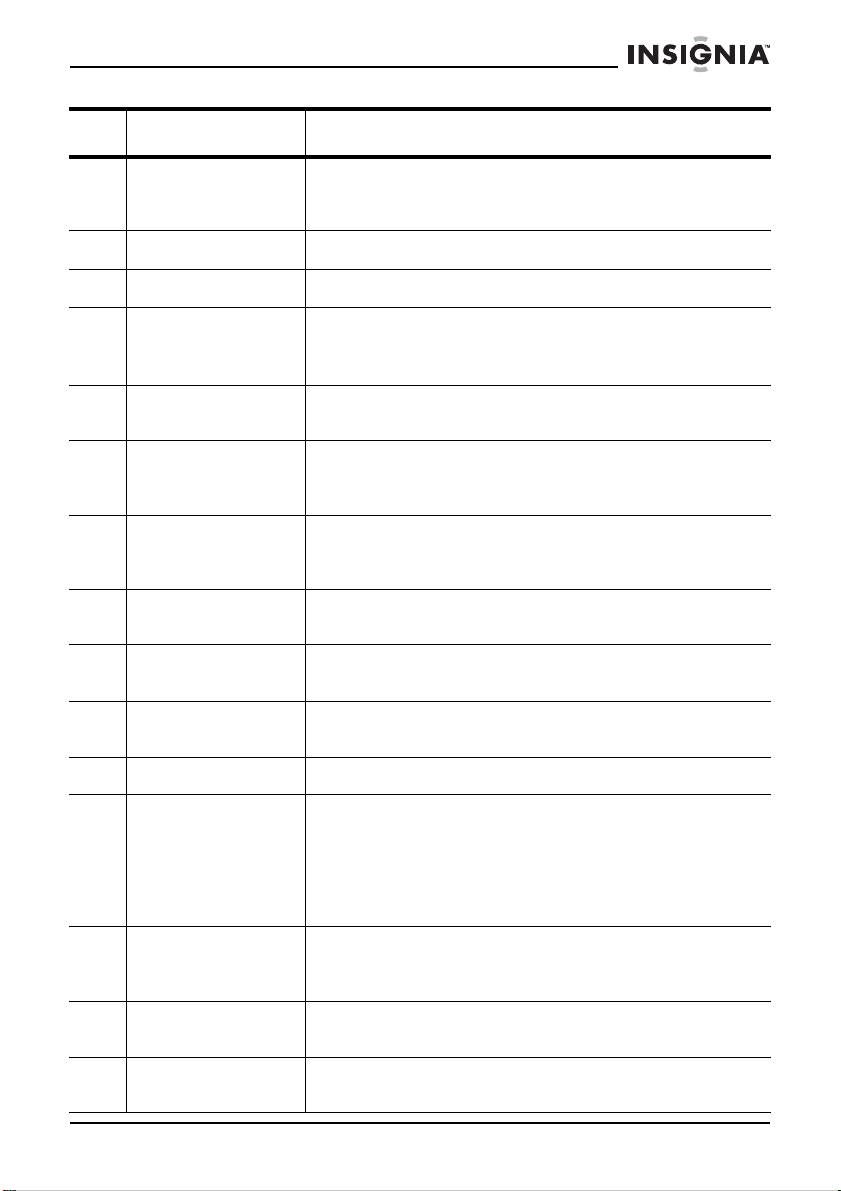
Front
# Feature Description
1PWR button Press to turn your car stereo on and off.
2 SEL knob Turn to increase or decrease the volume.
Press the knob to select a function, then turn the knob
to review available options. For more information, see
“Making adjustments and setting the mode” on page 10.
3 MODE button Press repeatedly to cycle through available modes
(RADIO, CD PLAYER, and AUX IN).
4 Preset buttons In radio mode, press to tune to radio presets.
5 Disc slot Insert a CD or MP3 disc into this slot.
6 LCD screen Displays avariety of information about the radio and the
CD player.
7 LD button Press to boost bass response. Press again to return to
normal operation.
8Tuning or
buttons In radio mode, press to go to the next or previous
station.
In CD mode, press to go the next or previous track, or to
search for a track.
9Eject button Press to remove a CD from the player.
124
3567891011
12 13 14 15 16 17 18 19 20
21 22 23
24
3
NS-C3111 Car Stereo CD/MP3 Player
www.insignia-products.com
10 LOC button Press to toggle between local and distant reception. Set
to LOC in areas with many strong signals so the radio
only stops at strong stations during manual tuning.
11 REL button Press to release the front panel from the radio.
12 SCAN button Press to scan tune the radio.
13 BD/SUB button Press to cycle through the available radio bands (FM1,
FM2, FM3, AM1, or AM2.
Press and hold to turn subwoofer output on and off.
14 1 PAU button In CD mode, press to pause the playback, then press
again to resume play.
15 2 INT button In CD mode, press to play the first several seconds of
each track on the disc. When active, “INT ON” appears
on the display.
16 3 RPT button In CD mode, pressto repeat thecurrent track. The track
repeats until the button is pressed again. When active,
“RPT” appears on the display.
17 4 RDM button In CD mode, press to random play all tracks. When
active, “RDM” appears on the display.
18 5 button In CD mode, when playing an MP3 disc, functions as 10
Track Down select. Press to skip backward 10 tracks.
19 6 button In CD mode, when playing an MP3 disc, functions as 10
Track Up select. Press to skip forward 10 tracks.
20 DISP button Press to display the time.
21 AS/PS button Press and release the button once. The radio plays, in
sequence, the stations that are preset in memory for 5
seconds. Press again to stop at the station you want.
(Similar to the "Intro" function of a CD.)
Press and hold (over one second) to set the six
strongest stations available to the six presets.
22 ST button Press to select stereo or mono sound. Improves the
reception of weak stereo stations. When active, “ST”
appears on the display.
23 AUX IN jack Plug external devices, such as iPods or other digital
MP3 players into this front panel jack.
24 RESET button (on
back) Press when the error symbol appears on the display, or
when the other buttons do not operate correctly.
# Feature Description

4
NS-C3111 Car Stereo CD/MP3 Player
www.insignia-products.com
Installing your radio
Precautions
• Choose the mounting location carefully so that the car stereo
will not interfere with the normal driving.
• Avoid installing the car stereo where it would be subject to high
temperatures, such as from direct sunlight or hot air from the
heater, or where it would be subject to dust, dirt, or excessive
vibration.
• Use only the supplied mounting hardware for a safe, secure
installation.
• Make sure that you remove the front panel before installing the
car stereo. (See “To detach the front panel:” on page 8.)
Adjusting the mounting angle
Adjust the mounting angle to less than 20° from the vertical. If the
angle is greater than 20°, the front panel will not open.
Installing the car stereo
To install the car stereo:
1Remove and discard the two shipping screws from the top of the
stereo.
2Insert the release keys into the sides of the mounting bracket until
they stop, then slide the car stereo out of the mounting bracket.
3Find or make a 7.17 × 2.09 inch (182 × 53 mm) rectangular
opening in your dashboard.
4Insert the mounting bracket into the opening, then use a
screwdriver to bend enough of the bracket mounting tabs to
secure the mounting bracket into the opening.
Note Keep the release keys in a safe place, becauseyou may need them
later to remove the car stereo from the car.
Shipping screws

5
NS-C3111 Car Stereo CD/MP3 Player
www.insignia-products.com
5Pull the ends of the speaker, amplifier, and antenna wires out of
the dashboard, through the mounting bracket.
Warning Be careful when securing the mounting bracket into the opening.
The mounting bracket is made of sheet metal and has sharp edges.
If you slip while bending the mounting tabs or adjusting the bracket,
you could injure yourself.
7.17 in. (182 mm)
2.09 in. (53 mm)

6
NS-C3111 Car Stereo CD/MP3 Player
www.insignia-products.com
6Use the wiring diagram below to connect the antenna cable and
amplifier cables directly to the car stereo and to wire the ISO plug
for power, antenna power (if you have a power antenna), memory,
ground, ignition switch, and speakers.
7Plug the ISO plug into the back of the car stereo unit, then slide
the car stereo into the mounting bracket until it clicks into place.
Subwoofer (green)
Antenna
connector
White (L)
Red (R)
Line IN (Black)
Front: Line OUT (Brown)
Rear: Line OUT (Gray)
Power antenna
Memory back up
Ground (-)
Ignition switch (B+)
+ White
- White/Black
+ Green
- Green/Black
+ Gray
- Gray/Black
+ Violet
- Violet/Black
Blue
Yellow
Black
Red
Red (R)
White (L)
Red (R)
White (L)
Fuse 1A
Fuse 1A
Front left
speaker
Rear left
speaker
Front right
speaker
Rear right
speaker
Choke
box
ISO Plug

7
NS-C3111 Car Stereo CD/MP3 Player
www.insignia-products.com
8Working from under the dashboard, attach the rear supporting
strap to the back of the car stereo.
1Radio
2 M5 × 15 hex bolt
3 Mounting bracket
4 Dashboard
5 Lock washer
1
23
45
6
7
89
10
11
10
9
8
12

8
NS-C3111 Car Stereo CD/MP3 Player
www.insignia-products.com
9Use the provided self-tapping screw to attach the supporting strap
to a convenient part of the car body or dashboard support.
Detaching and attaching the front panel
The front panel of this stereo can be removed to prevent your car
stereo from being stolen.
To detach the front panel:
1Turn off the stereo.
2Press the REL (panel release) button on the right front of the
stereo.
3Pull the right side of the front panel out and away from the stereo
and remove it.
To attach the front panel:
1Make sure that the front panel is oriented correctly (it can’t be
attached upside down), then insert the left edge of the front panel
into the stereo.
6Hexnut
7 Support bracket
8Flatwasher
9 Lock washer
10 Hex nut
11 Self-tapping screw
12 Car body or dashboard support

9
NS-C3111 Car Stereo CD/MP3 Player
www.insignia-products.com
2Gently press on the right side of the front panel until it clicks into
place.
Using your car stereo
Turning on your car stereo
To turn on your car stereo:
1Install the removable front panel if it is not already in place.
2Press the PWR button to turn on your car stereo.
3If you are turning on your car stereo for the first time, press the
RESET button on the back of the car stereo unit.
Listening to your radio
To listen to your radio:
1Press the PWR button to turn on your car stereo.
Note • Do not force the front panel into place. It should press easily
into place. If it doesn't easily press into place, make sure that
the front panel is oriented correctly.
• When you carry the front panel with you, put it in the supplied
front panel case.
• Do not press on the display window when attaching the front
panel to the stereo.
Note Do not remove thefront panel when the car stereo is on. The power
remains on even when the car is turned off.
Radio Front panel
Inhaltsverzeichnis
Sprachen:
Andere Insignia Autoradiosystem Handbücher

Insignia
Insignia NS-C4113 Bedienungsanleitung

Insignia
Insignia NS-C3112 Bedienungsanleitung

Insignia
Insignia NS-HD5113 Bedienungsanleitung

Insignia
Insignia NS-C4113 Bedienungsanleitung

Insignia
Insignia NS-HD5113 Bedienungsanleitung

Insignia
Insignia NS-C5111 Bedienungsanleitung

Insignia
Insignia NS-HD5113 Bedienungsanleitung


