
ISHIDA Astra Bedienungsanleitung

OPERATION MANUAL
Manual No. 0137A
ISHIDACO.,LTD.
WARNING
•Do not carry out installation, operation, service,
or maintenance until thoroughly understanding
the contents of this manual.
•Keep this manual available at all times for instal-
lation, operation, service, and maintenance.
Counter ScalePrinter
KgEuropean Version

Contents
ASTRA
• Operation ManualEuropean VersionManual No. 0137A
CONTENTS
Chapter1 Precautions
1.1 CautionsforInstallation ................................................................................................. 2
1.1.1 Installation Areas........................................................................................................ 2
1.1.2 Power Supply ............................................................................................................. 2
1.1.3 Level Adjustment........................................................................................................ 3
1.1.4 Handling Precautions ................................................................................................. 3
Chapter2 ProductOverview
2.1 Appearance ...................................................................................................................... 6
2.2 Display(kg) ...................................................................................................................... 6
2.3 OperationKeySheet ....................................................................................................... 7
2.3.1 Basic Function Keys................................................................................................... 7
2.4 ProgramKeySheet ......................................................................................................... 8
2.5 Loading/UnloadingLabelRoll ........................................................................................ 9
2.5.1 Loading ...................................................................................................................... 9
2.5.2 Unloading................................................................................................................. 10
2.6 ASTRAHardwareSpecifications ................................................................................. 11
Chapter3 SetupMode
3.1 SetupModeEntry .......................................................................................................... 14
3.2 LabelPrint ...................................................................................................................... 15
3.3 LabelFormat .................................................................................................................. 17
3.4 POSCode ....................................................................................................................... 20
3.5 BarCode ......................................................................................................................... 22
3.6 DefaultSetup ................................................................................................................. 23
3.7 Total ................................................................................................................................24
3.8 OpenPriceSetup ........................................................................................................... 25
Chapter4 RegistrationMode
4.1 RegistrationModeEntry ............................................................................................... 28
4.2 PLU ................................................................................................................................. 29
4.3 CommodityName .......................................................................................................... 32
4.4 Price ................................................................................................................................33
4.5 PresetKey ...................................................................................................................... 34

ASTRA
• Operation ManualEuropean VersionManual No. 0137A Contents
4.6 ShopName/Address ..................................................................................................... 37
4.7 Date/Time ....................................................................................................................... 38
4.8 ExtraMessage ............................................................................................................... 39
4.9 OpenPLU ....................................................................................................................... 40
4.10 ItemList ........................................................................................................................ 41
4.11 Communication ........................................................................................................... 42
4.11.1 PC to ASTRA Connection ........................................................................................ 42
4.11.2 ASTRA to ASTRA Connection ................................................................................. 42
Chapter5 TextEditing
5.1 EditKeys ........................................................................................................................ 46
5.2 KeyDefinition ................................................................................................................ 46
5.3 EditDisplay .................................................................................................................... 47
5.4 EditExamples ................................................................................................................ 47
5.5 7-SegmentCharacters .................................................................................................. 48
5.6 WordwrapFunction ....................................................................................................... 49
Chapter6 NormalMode
6.1 NormalModeOperations .............................................................................................. 52
6.2 TareWeightSubtraction ............................................................................................... 54
6.3 PresetFunctionKeys .................................................................................................... 56
Chapter7 TotalMode
7.1 TotalModeOperations .................................................................................................. 58
Chapter8 SubtractionMode
8.1 SubtractionModeOperations ...................................................................................... 62
Chapter9 Troubleshooting
9.1 BeforeUsingtheTroubleshootingChart .................................................................... 66
9.2 TroubleshootingChart .................................................................................................. 66
Chapter10 DailyMaintenance
10.1 Maintenance ................................................................................................................ 68

page 4
ASTRA
• Operation ManualEuropean VersionManual No. 0137A
Chapter 1. Precautions
page 2
ASTRA
• Operation ManualEuropean VersionManual No. 0137A
Chapter 1. Precautions
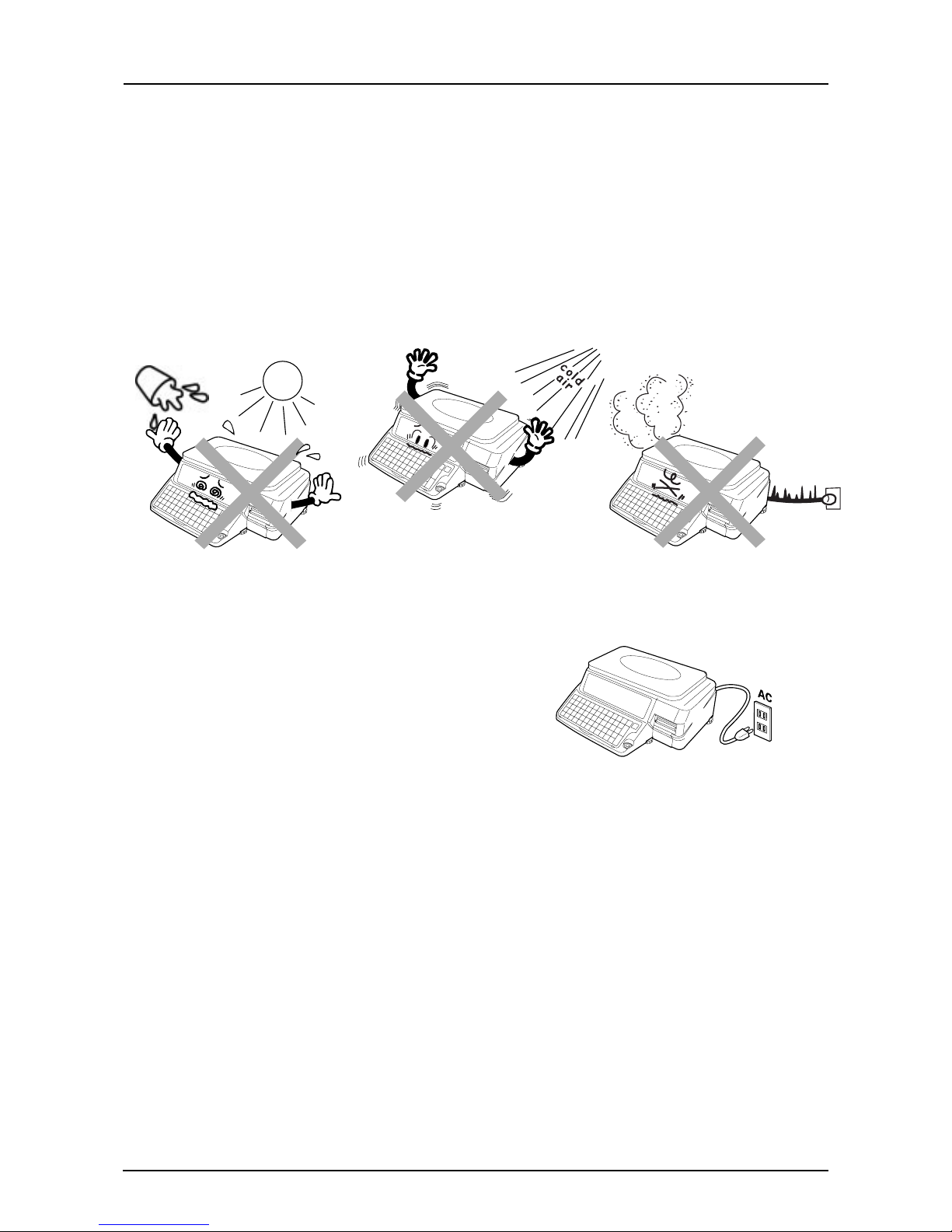
●Areas subject to high
temperatures or high humidity
●Areas exposed to direct sunlight
●Areas where water or other
liquids are easily spilled on the
machine
1.1 Cautions for Installation
1.1.1 Installation Areas
Avoid the following areas when installing the machine.
●Areas subject to excissive
vibration or unstable surfaces
●Areas exposed to direct cold air
●Areas subject to low
temperatures
●Areas subject to a lot of dust or
dirt
●Areas with large voltage
fluctuations
1.1.2 Power Supply
●Use the appropirate voltage after referring to the specification
plate located on the machine
●Use a dedicated power source
(Voltage fluctuation can cause the machine to malfunction)
●Do not stand on, or place heavy objects on the power cord
(If the cord is damaged and still used, it may cause an accident or
other problems)

ASTRA
• Operation ManualEuropean VersionManual No. 0137A page 3
Chapter 1. Precautions
1.1.4 Handling Precautions
●Do not disassemble the
machine
●When cleaning the machine,
only use a soft dry cloth or a
cloth wetted with a neutral
cleanser. Never use thinner or
other volatile liquids
●Do not drop or apply strong jolts
to the machine
M
U
S
T
B
E
L
E
V
E
L
I
N
U
S
E
M
U
S
T
B
E
L
E
V
E
L
I
N
U
S
E
LevelUnlevel
➜
1.1.3 Level Adjustment
●Always ensure that the machine is level.
If the machine is not level, weighing may not
be accurate.
●Adjust the machine to a level position using the
four level adjusters, located on the buttom of the
machine, until the bubble is completely centered in
the round level indicator.

page 6
ASTRA
• Operation ManualEuropean VersionManual No. 0137A
Chapter 2. Product Overview
2.2 Display (kg)
2.1 Appearance
ZERO
Max 15 kg Min 0.1 kg e = 0.005 kg T = –9.995 kg
NET SAVE AUTO PLU
WEIGHT kgTARE kg
UNIT PRICE
$/kg TOTAL PRICE $
Display
Key sheet
Level
Level adjuster
Label printer
Weigh platter
Side view Power switch
AC power

ASTRA
• Operation ManualEuropean VersionManual No. 0137A page 7
Chapter 2. Product Overview
2.3.1 Basic Function Keys
NUMERIC ENTRY
Keys0through9areusedtoenternumeric
data.
CLEAR
Usedtocancelincorrectlyentered numeric
data.
TARE
Usedtosetthetareweighttobesubtracted
from the total weight on the weigh platter.
PLU SELECT
Used to access PLU data.
FEED
Used to advance labels to the correct
printing position.
ZERO ADJUSTMENT
Used to reset the weight to zero.
MODE SELECT
Used to return to normal operation mode
or to enter a desired mode after 4 digit
password entry.
PRINT
Used to issue a label.
RESET
Used to initialize the machine.
RESE
T
FEED
ZER
O
TAR
E
MOD
E
CLR
2.3 Operation Key Sheet
FEED
PRINT
PLU
ZERO
TARE
MODE
98
65
32
7
4
1
0
RESET
CLR
Preset keys
Sheet stopper Handling tab
PLU
09
PRIN
T

page 8
ASTRA
• Operation ManualEuropean VersionManual No. 0137A
Chapter 2. Product Overview
2.4 Program Key Sheet
The Program Key Sheet is located underneath the Operation Key Sheet. It can be accessed by lifting up the
cover film and removing the Operation Key Sheet.
FEED
PRINT
PLU
ZERO
TARE
MODE
98
65
32
Q
!
A
=
W
"
S
Z
,
E
#
D
X
.
R
°
F
C
*
T
%
G
V
ÅÄÖÈ
Y
&
H
B
Ü
U
'
J
+
N
I
(
K
;
O
)
P
—
L
:
M
7
4
1
0
➝
➝
➝
➝
LOWER
CASE
SYMBOL
FUNCTION
INSERT
COPY SPACE SIZE
END
DELETE
NEW
LINE
BACK
SPACE
ENTER CLR
RESET
Cover film
Key sheet

ASTRA
• Operation ManualEuropean VersionManual No. 0137A page 9
Chapter 2. Product Overview
1. Open the side cover.
2. Release the printer head by pushing down the
release lever (D).
3. Check that the stopper lever (A) of the roll holder
(B) is set straight.
If the lever is in an up position, push down to a
straight position.
4. Load the label roll around the roll holder (B).
2.5 Loading/Unloading Label Roll
2.5.1 Loading
5. Insert the label paper from (1) through (4).
6. Pull up the stopper lever (A), then slide it in inner
or outer direction depending on the width of the roll
for fixing.
7. Turn the winding bobbin (E) counter-clockwise so
that the hook (G) is positioned up, push in lever
(F), then insert the tip of the paper in the hook (G).
F
4
B
A
G E F
DC
Andere Handbücher für Astra
3
Inhaltsverzeichnis
Andere ISHIDA Drucker Handbücher

ISHIDA
ISHIDA AC-3OOO Bedienungsanleitung

ISHIDA
ISHIDA AC-4000 Series Bedienungsanleitung

ISHIDA
ISHIDA AC-4000 Series Bedienungsanleitung

ISHIDA
ISHIDA AC-4000H Bedienungsanleitung

ISHIDA
ISHIDA BC-4000TEC Bedienungsanleitung

ISHIDA
ISHIDA AC-4000H Bedienungsanleitung

ISHIDA
ISHIDA AC-4000B Bedienungsanleitung

ISHIDA
ISHIDA BC-3000 Bedienungsanleitung

ISHIDA
ISHIDA AC-4000 Series Bedienungsanleitung

ISHIDA
ISHIDA 100-040-3749-00 Betriebsanleitung


