
junger e07 Bedienungsanleitung

DIGITAL
FILTER
PROCESSOR
model e07
operation manual
rev. 0.41
Rudower Chaussee 5 (Geb. 9.51), D -12489 Berlin, Germany
Telefon +49 (030) 677721- 0 · Fax +49 (030) 677721- 46
Studiotechnik GmbH

INTRODUCTION
The digital filter processor e07 is a high quality studio device for
audio production and mastering. It brings the sound of the best
analogue filters into the digital world.
The primary feature of this new unit lies in it's ability to process
audio in the digital domain using digital filters operating at
higher sample rates. Increasing the sample rate to 88.2 or 96
kHz, the "High Sampling Mode" does not limit the magnitude and
phase response of the filtering process to 22 or 24 kHz as most
digital filters do. Doubling the sample rate increases the audio
range that can be processed. High frequencies are faithfully
reproduced in the same vibrant and natural manner as the finest
analogue filters.
The digital filter processor Model e07 is a 4-band parametric
equaliser. It is possible to use each filter band as a normal
parametric or as a dynamic equaliser, ie. a digital de-esser.
An integral digital limiter prevents clipping of boosted signals.
The Model e07 is a 24 bit device sampling at 96kHz and is
designed specifically for the highest quality, high resolution
recording and reproduction.
* Outstanding signal quality achieved by high sampling
processing
* Conventional operation from the front panel with rotary
knobs for direct control of all parameters
* Each filter band can be used as a dynamic filter,
ie. de-esser
* Integral digital limiter prevents clipping
* Stereo or dual channel mode
* Timecode snapshot automation
* User-friendly preset and recall functions
* Ready for integration into 96 kHz systems
0

CONTENTS
2. Installation .............................................................................
2.1 Unpack the unit ...............................................................
2.2 Power supply ...................................................................
2.3 Connections ....................................................................
2.4 Rack mounting ................................................................
2.5 Operation safety ..............................................................
3. Location of parts and controls ...............................................
3.1 Front panel ......................................................................
3.2 Rear panel .......................................................................
4. Operation ..............................................................................
4.0 Description of operations related to functions .................
4.1 Equaliser .........................................................................
Filter bands ......................................................................
Output ..............................................................................
4.2 Dynamic equaliser ...........................................................
Filter bands .......................................................................
Output ..............................................................................
Dynamic mode .................................................................
4.3 Equaliser (2-channel mode) .............................................
Status display ..................................................................
Mode setting ...................................................................
Filter bands .......................................................................
Output ..............................................................................
Selection left channel / right channel ...............................
4.4 Low cut / high cut filters ...................................................
Status display ..................................................................
Setting for adjustment .....................................................
Low cut .............................................................................
High cut ...........................................................................
5
5
5
5
5
5
6
6
6
8
8
9
9
9
10
10
10
10
11
11
11
11
11
11
12
12
12
12
12
1

4.5 A/B comparison ...............................................................
Status display .................................................................
Memory selection ............................................................
Loading of adjustments into A or B memory ...................
4.6 Presets ............................................................................
Status display ..................................................................
Saving presets ................................................................
Loading presets into A or B .............................................
Loading factory preset into B ..........................................
Copy presets ...................................................................
Rename presets ..............................................................
4.7 Snapshot automation .......................................................
Generating snapshots by capture mode .........................
Disactivating capture mode .............................................
Creating snapshots by edit mode ....................................
Editing snapshots by edit mode .......................................
Deleting of snapshots ......................................................
Copying snapshots by edit mode ....................................
Playback an EDL by play mode (autoplay) ......................
Playback an EDL stepwise (without timecode) ................
Clearing an EDL ..............................................................
4.8 Utilities ..............................................................................
Selection of 2-channel mode ...........................................
Selection of timecode ......................................................
Selection of channel status ..............................................
Data saving .....................................................................
Saving preset and EDL data ...........................................
Loading preset and EDL data .........................................
Showing number and name of stored data block ............
4.9 Remote control .................................................................
GPI Remote control .........................................................
Serial remote control .......................................................
5. Boot display and trouble shooting .........................................
5.1 Boot display .....................................................................
5.2 Error display and trouble shooting ...................................
13
13
13
13
14
14
14
15
15
16
17
18
18
18
19
19
20
21
22
22
23
24
24
25
26
27
27
28
29
30
30
31
32
32
32

6. Application notes ...................................................................
6.1 Digital filter at 96 kHz .......................................................
6.2 Dynamic equaliser ...........................................................
6.3 Working in high sampling mode (96 kHz) ........................
6.4 Influence of signal delay time ..........................................
7. Technical specifications ........................................................
8. Warranty and service information .........................................
33
33
34
35
36
37
39

5
INSTALLATION
The digital filter processor e07 was carefully packed in the
factory and the packaging was designed to protect the
equipment from rough handling. Please examine carefully the
packaging and its contents for any signs of physical damage,
which may have occured in transit.
The digital filter processor e07 is manufactured under the safety
category Schutzklasse 1 in keeping with the VDE 0804
standards.
Check the voltage details printed at the rear panel are the same
as your local mains electricity supply.
The digital filter processor e07 is equipped with standard
connectors (see chapter 3).
Before connecting the digital filter processor e07 switch the
power off at all connected units.
The digital filter processor e07 is made as standard 19“ unit (EIA
format). It occupies 1 RU (44 mm height) space in a rack.
Please allow at least addititonal 3“ depth for the connectors on
the rear panel.
When installing the unit in a 19“ rack the rear side of the unit
needs some support, especially for mounting in flight cases.
The filter processor should not be installed near units which
produce strong magnetic fields or extreme heat. Do not install
the filter processor directly above or below power amplifiers.
If, during operation, the sound is interrupted or displays no
longer illuminate, or if abnormal odor or smoke is detected
immediately disconnect the power cord plug and contact your
dealer or Jünger Audio.
2.1
UNPACK THE UNIT
2.2
POWER SUPPLY
2.3
CONNECTIONS
2.4
RACK MOUNTING
2.5
OPERATION
SAFETY
2
6
LOCATION OF PARTS AND
CONTROLS
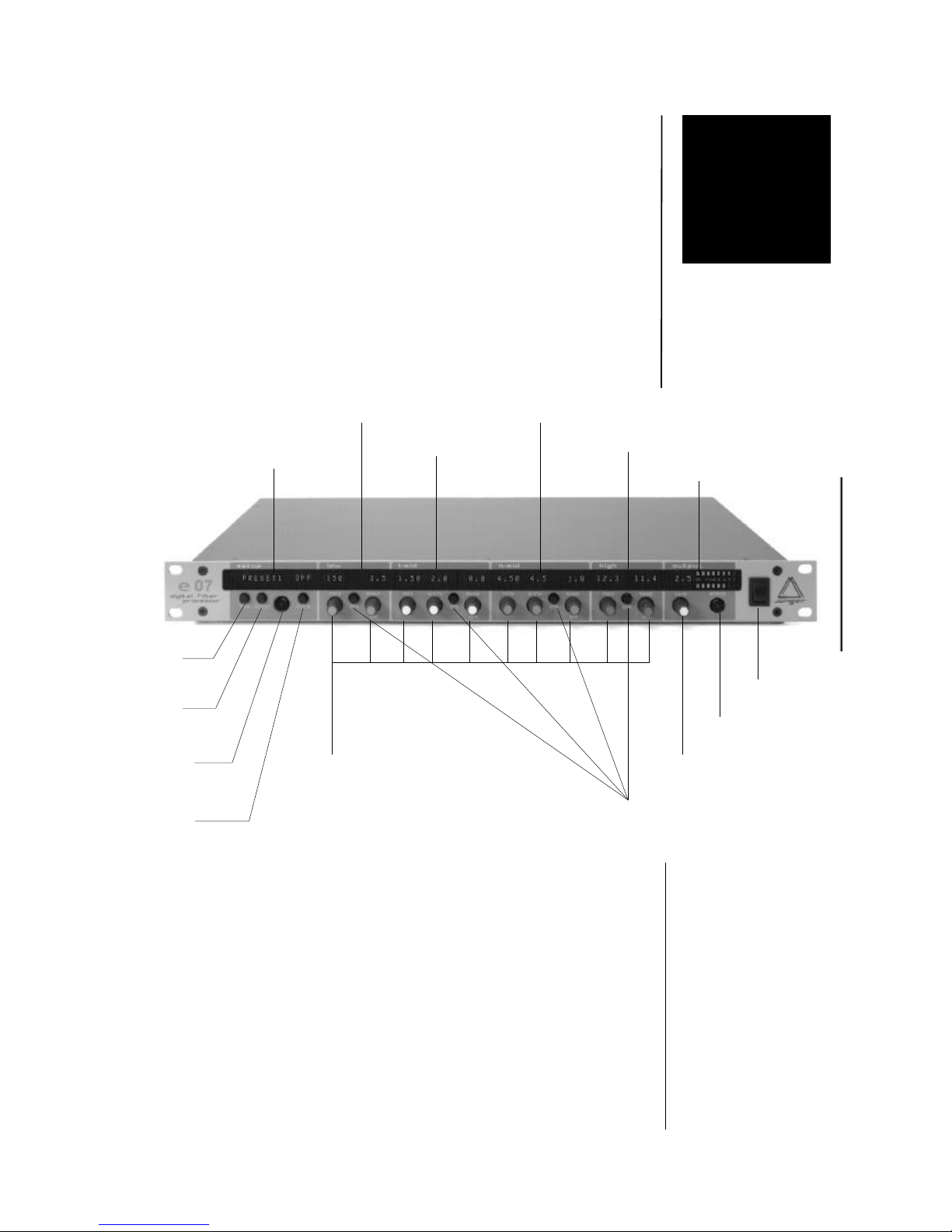
All control elements give direct access.
In menu modes the alphanumeric display above the related
button or rotary knob shows the specific function.
MODE switches between normal user mode (4 band EQ)
and MENU mode
A/B switches between A and B memory (see 4.5)
CAPTURE activates capturing of snapshots (see 4.7)
L/R switches between left/right channel in
2-channel mode (see 4.3)
FILTER switches between normal user mode (4 band EQ)
and low and high cut filter adjustment (see 4.4)
3.1.
FRONT PANEL
SETUP SECTION
3
setup
section
low section
l-mid section
h-mid section
high section
output section
mode
button
A/B
button
Capture
& L/R
button
filter
button
mains
switch
bypass
button
output gain
control
dynamic
button
rotary controls
for
frequency,
width, range

3. LOCATION OF PARTS AND CONTROLS
7
digitalfiltere07
230 V
50 Hz
200 mA
Nr
DIGITALAUDIO
OUT
IN
S/PDIFS/PDIFAES/EBU AES/EBU
TIMECODE
LTC-IN
REMOTE
RS-232 GPI
POWER INPUT
IEC mains input connector 230 V, 50 Hz (UK: 240 V, 50 Hz; JAPAN: 100 V,
60 Hz; USA: 127 V, 60 Hz) with integrated fuse
DIGITAL IN
input for AES/EBU standard format
input: XLR female panel jack
1- open, 2-3 signal, balanced, max. 5 Vpp
input for S/PDIF standard format
RCA socket
DIGITAL OUT
output for AES/EBU standard format
output: XLR male panel jack
1- open, 2-3 signal, balanced, max. 5 Vpp
output for S/PDIF standard format
RCA socket
TIMECODE IN
input for LTC timecode format
input: XLR female panel jack
1- open, 2-3 signal, balanced, more than -10 dBu
REMOTE
serial remote interface RS-232
connector: 9pin SUB-D, male
GPI remote interface
connector: 15pin SUB-D, female
3.2.
REAR PANEL
DIGITAL
IN
DIGITAL OUT
SERIAL REMOTE
GPI REMOTE
TIMECODE IN

8
OPERATION
The operation of the digital filter processor e07 is described in
the following chapters.
The description is made related to the main functions of the
unit.
4.1 equaliser
4.2 dynamic equaliser
4.3 equaliser (2-channel mode)
4.4 low cut / high cut filters
4.5 A / B comparison
4.6 presets
4.7 snapshot automation
4.8 utilities
Following syntax is used:
SYMBOL NAME ACTIVITY
DISPLAY:
4.0
DESCRIPTION OF
OPERATIONS
RELATED TO
FUNCTIONS
describes
action or function
by use of button or
rotary knob
describes
the name of
button or
rotary knob
NAME
name, as printed on
front panel
NAME
name, as displayed
on alphanumeric
display above
button or knob
describes
how to use
button or
rotary knob
describes the status or information shown on the display
name status/name as displayed
<NAME> sort of status/name on display
4
push
push + turn
turn

4. OPERATION
9
For use as 4-band parametric equaliser in stereo mode.
All settings are identical for each of the two channels.
Each section can be switched off individual.
A/B comparison is available for two stereo parameter sets.
Limiter is working in stereo mode.
All adjustments are storable in presets.
FREQ fine resolution frequency adjustment,
related to max. boost/cut
low (20 ...500 Hz),
display:20 ... 500
l-mid (50 ... 20.000 Hz)
(mid1) display: 50 ... 20.00
h-mid (50 ... 20.000 Hz)
(mid2) display: 50 ... 20.00
high (2.000 ... 20.000 Hz)
display: 2.00 ... 20.00
FREQ selection of filter type for low and high filter
and adjustment of Q-factor
shelving filter or
peak filter Q = 0.4 ...8
(minimum center frequency for
low peak filter is 50 Hz.)
RANGE boost/cut control (-15 ...+15 dB),
display: -15.0 ...15.0
RANGE bypass for the filter band,
display: OFF
GAIN output level control (-15 ...+15 dB),
display: -15.0 ...15.0
GAIN bypass for gain control (gain = 0dB)
display: OFF
FILTER BANDS
4.1
EQUALISER
OUTPUT
turn
push
turn
push
turn
push+turn
Inhaltsverzeichnis
Andere junger Prozessor Handbücher


