KACIFIC MDM2010 Bedienungsanleitung

M2010 – ILB3210 Installation Guide
1 | Page
Installation Guide
Satellite Modem
MDM2010 – ILB3210
with 0.75m NEWTEC Antenna
(ANT2010)

MDM2010 – ILB3210 Installation Guide
Contents
1Preparation ........................................................................................................................1
1.1 Modem MDM2010 ....................................................................................................1
1.2 Transceiver ILB3210 Setup.........................................................................................2
1.2.1Transceiver ILB3210..............................................................................................2
1.2.2 Adjustment of Transceiver Polarization (if needed).............................................3
1.3 Coaxial Cable and Connectors ...................................................................................4
2Terminal Installation ..........................................................................................................5
2.1 Azureshine Antenna ANT2010 Ka-Band 75 cm..........................................................5
2.1.1 Antenna Components...........................................................................................5
2.1.2 Step-by-Step Antenna Assembly ..........................................................................6
2.2 Coaxial Cable Installation between Modem and Transceiver ...................................8
2.2.1 Cable Preparation .................................................................................................8
2.2.2 Cable Path...........................................................................................................10
3Terminal Commissioning and Qualification.....................................................................11
3.1 Power on the Modem..............................................................................................11
3.2 Antenna Alignment Using Power and Play Apps .....................................................11
3.2.1 WiFi Router Installation......................................................................................11
3.2.2 Point&Play Application Connection ...................................................................13
3.2.3 Antenna Pointing ................................................................................................13
3.2.4 Antenna Rigidity Check.......................................................................................18
3.3 Terminal Certification ..............................................................................................19
3.4 Terminal Testing ......................................................................................................20
3.4.1 Modem to Laptop Connection ...........................................................................20
3.4.2 Satellite Network Connection Test.....................................................................22
Annex 1: List of Beams and Polarization..................................................................................23

MDM2010 – ILB3210 Installation Guide
1 | Page
1 Preparation
Check the following components before site installation:
1. Modem: MDM2010 with AC power supply adaptor
2. Transceiver (TRX): ILB3210
3. Cable: Single coaxial cable (RG6 75Ohm) (Length 30m)
4. Antenna: Azureshine ANT2010 (75cm)
Modem set
TRX and Coaxial cable
Antenna set
1.1 Modem MDM2010
Manufactured by ST Engineering iDirect (formerly Newtec) and delivered with its AC power
adaptor.
Figure 1. Modem MDM2010

MDM2010 – ILB3210 Installation Guide
2 | Page
Figure 2. AC power adaptor with AC power plug
1.2 Transceiver ILB3210 Setup
1.2.1 Transceiver ILB3210
The ILB3210 is a cost-efficient 2W Ka-band interactive LNB with support for
polarization selection.
Note: The modem power adaptor is delivered with a standard Australian power
plug. Kacific does not recommend using an adaptor for the power plug.
Instead, users should get a local power plug.

MDM2010 – ILB3210 Installation Guide
3 | Page
1.2.2 Adjustment of Transceiver Polarization (if needed)
Refer to polarization/beam table in Annex 1. If needed, adjust the transceiver to the
right polarization – either position A or B.
The procedure to convert the transceiver to position A/B is as follows:
1. Using a 3mm hex wrench, loosen the four captive screws on the polarizer adaptor
plate, as shown in the illustrations below. Do not remove these screws; just loosen
them until the complete feed horn and polarizer assembly can rotate. There is no
need to remove the feed horn and polarizer assembly from the transceiver.
2. Rotate the complete feed horn and polarizer assembly 180 degrees until the
adaptor plate aligns with the corresponding polarization indicator (Position B is
shown in the illustration below corresponding with RHCP).
Position A
Position B

MDM2010 – ILB3210 Installation Guide
4 | Page
3. Using a 3mm hex wrench, re-tighten the four captive screws shown.
1.3 Coaxial Cable and Connectors
A single 30-meter-long coaxial cable with connectors is provided.
1. 30 m single coaxial cable roll
2. F coaxial connectors (2 + 2 spare connectors)

MDM2010 – ILB3210 Installation Guide
5 | Page
2 Terminal Installation
2.1 Azureshine Antenna ANT2010 Ka-Band 75 cm
2.1.1 Antenna Components
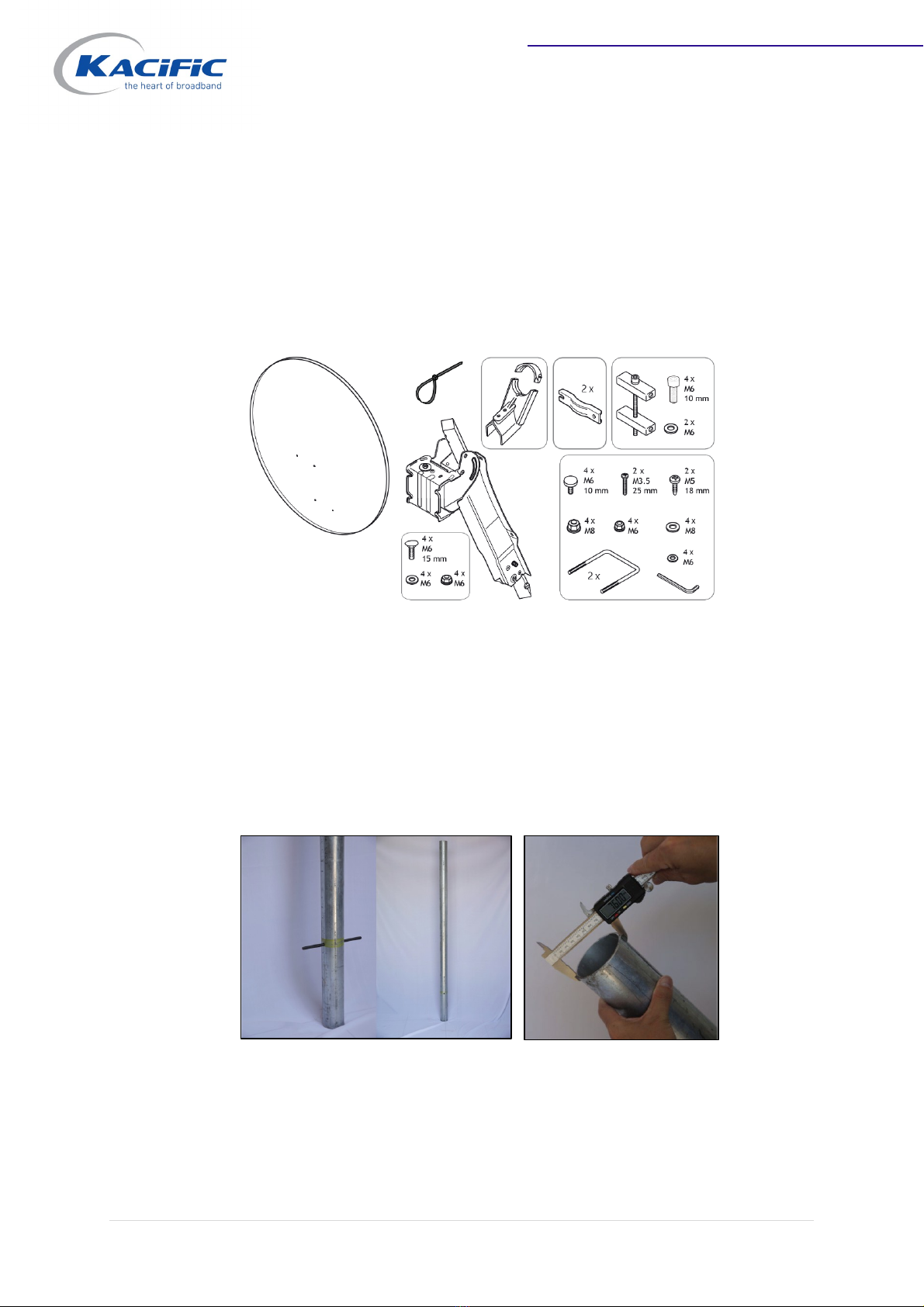
Manufactured by Azureshine, it is a metal plate antenna delivered in a box – see
pictures below:
Picture of detailed antenna components
Ka-band terminals require a rigid antenna fixation so that the antenna remains well
pointed to the satellite even during windy conditions. The pipe must not be too long
to prevent vibrations or flexibility.
Kacific recommends an easy and cheap ground installation that requires only a hot
galvanized pipe and some cement.
Mast specification:
1. Hot galvanized steel or aluminium
2. Maximum length 180 cm with 90 cm above ground
3. Outer diameter between 60 mm and maximum 70mm (3 inches)
4. Thickness 2mm or greater

MDM2010 – ILB3210 Installation Guide
6 | Page
2.1.2 Step-by-Step Antenna Assembly
1. Open back structure and boom arm, then tighten the boom arm:
2. Elevation pivot assembly:

MDM2010 – ILB3210 Installation Guide
7 | Page
3. Mast mounting:
4. Reflector assembly:

MDM2010 – ILB3210 Installation Guide
8 | Page
5. Feed clamp assembly:
6. ILB3210 mounting to feed clamp
2.2 Coaxial Cable Installation between Modem and Transceiver
2.2.1 Cable Preparation
Tx and Rx of the iLNB are connected by a single coaxial cable.
Dieses Handbuch passt für folgende Modelle
1
Inhaltsverzeichnis
Beliebte Modem Handbücher anderer Marken

Davicom
Davicom DM562AP Bedienungsanleitung

EpiValley
EpiValley TATA indicom SXC-1080 Bedienungsanleitung

Zte
Zte WiMAX Bedienungsanleitung

Intelimax
Intelimax MA-2060 Bedienungsanleitung

SMC Networks
SMC Networks D3CM1604V Gebrauchs- und Pflegehandbuch

Telstra
Telstra Wi-Fi 4G Advanced Pro X Bedienungsanleitung

US Robotics
US Robotics 3453C Bedienungsanleitung

MaxTech
MaxTech Plug & Play Internal Voice/FAX/Data/SVD... Bedienungsanleitung

Zte
Zte MF823 Bedienungsanleitung

Four-Faith
Four-Faith F1403 Bedienungsanleitung

Sierra Wireless
Sierra Wireless AIRLINK MP595W Bedienungsanleitung

Gemtek
Gemtek WiMAX WIXFBR-103 Bedienungsanleitung