
KBR multimess F144-PQ Bedienungsanleitung

28592_EDEKZA0044-0224-1_EN
System Ienglish
Quick guide
Installation guidelines
In our download center you will nd the
appropriate instructions for KBR devices.
https://www.kbr.de/de/dienstleistungen/
download-center
Power Quality Analyser
multimess F144-PQ

28592_EDEKZA0044-0224-1_EN
2
1. Notes..................................................................................................................................................4
1.1 General information .....................................................................................................................4
1.2 Revisions...........................................................................................................................................4
1.3 Waranty............................................................................................................................................. 4
2. Safety .................................................................................................................................................5
2.1 Safety Instructions......................................................................................................................... 5
2.2 Structure of the warnings...........................................................................................................6
2.3 Graduation of warnings .............................................................................................................. 6
2.4 Intended use ...................................................................................................................................7
2.5 Other applicable ............................................................................................................................ 7
2.6 Target group.................................................................................................................................... 7
2.7 Cleaning............................................................................................................................................8
2.8 Meaning of the symbols used on the device ......................................................................8
3. Commissioning ..............................................................................................................................9
KBR Kompensationsanlagenbau GmbH does not accept any liability for any loss or
damage resulting from printing errors in or changes to this manual.
In addition, KBR Kompensationsanlagenbau GmbH does not accept any liability for
any loss or damage caused by defective devices or devices manipulated by the user.
Copyright 2024 by KBR Kompensationsanlagenbau GmbH
Subject to change.
Table of contents

28592_EDEKZA0044-0224-1_EN
3
Table of contents
3.1 multimess F144-PQ Summary description...........................................................................9
3.2 Lieferumfang...................................................................................................................................9
3.3 Fitting...............................................................................................................................................10
3.4 Protection earth...........................................................................................................................11
3.5 Supply voltage..............................................................................................................................12
3.6 Mains connection for multimess F144-PQ .........................................................................14
3.6.1 3-phase / 4-wire connection....................................................................................................15
3.6.2 3-Phase / 4-wire connection without neutral current....................................................17
3.6.3 4-wire / 1-phase ...........................................................................................................................18
3.6.4.1 Connection tranformer for feature........................................................................................19
3.6.4.2 Connection to voltage sensors...............................................................................................20
3.6.4.3 Aron / V circuit ..............................................................................................................................21
4. Operation of the multimess F144-PQ...................................................................................22
4.1 Getting started .............................................................................................................................22
4.2 Initial Setup - Operation of the Assistant............................................................................22
4.3 First commissioning - wizard - procedure ..........................................................................23
4.3.1 Wizard setting Language..........................................................................................................23
4.3.2 Wizard setting Power Quality standard...............................................................................23
4.3.3 Wizard setting Net type.............................................................................................................24
4.3.4 Wizard setting Net frequency .................................................................................................24
4.3.5 Wizard setting Voltage Transformer......................................................................................25
4.3.6 Wizard setting Voltage Grid.....................................................................................................25
4.3.7 Wizard setting Current Transformer......................................................................................26
4.3.8 Wizard setting Rated Current..................................................................................................26
4.3.9 Wizard setting Date, Time and Timezone ...........................................................................27
4.3.10 Wizard setting Interface............................................................................................................28
4.3.11 Wizard setting Security Mode.................................................................................................29
4.3.13 Wizard End of commissioning ................................................................................................30
5. Technical Data...............................................................................................................................31
5.1 Dimensions / Weight..................................................................................................................31
5.2 Electrical safety – environmental parameter.....................................................................31
5.3 Power supply.................................................................................................................................32
5.4 Voltage Inputs...............................................................................................................................32
5.5 Current Inputs...............................................................................................................................33
5.6 Binary inputs .................................................................................................................................33
5.7 Binary outputs ..............................................................................................................................34
5.8 Temperature Input......................................................................................................................34
5.9 Electrical safety.............................................................................................................................35
5.10 Connection / terminals..............................................................................................................36

28592_EDEKZA0044-0224-1_EN
4
1. Notes
1.1 General information
These installation instructions contain all-important information for mounting and com-
missioning. Read the manual carefully and completely, it contains important information
about the product. Observe the notes and follow the safety and warning instructions in
particular. Keep the manual carefully and ensure that it is always available and can be
viewed by the user of the product.
The company KBR Kompensationsanlagenbau GmbH does not accept any liability for
damage or loss of any kind resulting from failure to observe the product information or
resulting from printing errors or changes in this installation guidelines. The company KBR
Kompensationsanlagenbau GmbH does not accept any liability for damage or loss of any
kind resulting from faulty devices or from devices that have been modied by the user.
1.2 Revisions
Please note that these installation instructions may not always represent the most up-
to-date information on the device. If, for example, you have changed the rmware of the
device in the direction of a later rmware version, the present installation instructions
may no longer be suitable in every point.
In this case, either contact us directly or use the latest version of the installation instruc-
tions available on our website (www.kbr.de) and the other documents available for the
device.
Copyright 2024 KBR Kompensationsanlagenbau GmbH
Subject to change without notice
1.3 Waranty
We guarantee that every product KBR Kompensationsanlagenbau GmbH is free
from material and manufacturing defects under normal use.
The detailed conditions for the warranty can be found in our general terms and
onditions of business under: https://www.kbr.de
Introduction

28592_EDEKZA0044-0224-1_EN
5
2. Safety
2.1 Safety Instructions
IT IS IMPORTANT FOR PERSONAL SAFETY TO FOLLOW THESE INSTRUCTIONS.
THESE INSTRUCTIONS MUST BE KEPT IN A SAFE PLACE!
Observe operating instructions.
Always keep the operating instructions with the appliance.
Ensure that the machine is only operated in perfect condition.
Never open the device.
Ensure that only qualied personnel operate the device.
Only connect the device according to instructions.
Ensure that the device is only operated in its original condition.
Only operate the device with recommended accessories.
Ensure that the device is not operated above its rated data
(see technical data in chapter 5)
Ensure that the original accessories are not operated above the rated data.
Do not operate the device in environments where explosive gases,
dust or vapours are present.
The installation instructions do not represent a complete list of all safety instructions
necessary for the operation of the device. Special operating conditions may require
further instructions. The installation instructions contain information that you must
observe for your personal safety and to prevent damage to property.
Introduction

28592_EDEKZA0044-0224-1_EN
6
2.2 Structure of the warnings
Warnings are structured as follows:
SIGNAL WORD
Nature and source of the danger!
Consequences if not observed.
Steps to avoid the danger.
2.3 Graduation of warnings
Warnings dier according to the type of danger as follows:
DANGER!
Warns of an imminent danger which, if not avoided,
will result in death or serious injury.
WARNING!
Warns of a potentially dangerous situation that can result
in death or serious injuries when not avoided.
CAUTION!
Warns of a potentially dangerous situation that can result
in fairly serious or minor injuries when not avoided.
NOTICE! Warns of a potentially dangerous situation that if not
avoided could result in material or environmental damage.
Refers to processes where there is no risk of injury or
damage to property, but which must be observed for reliable
operation of the device!
Introduction

28592_EDEKZA0044-0224-1_EN
7
2.4 Intended use
The product is designed exclusively for the measurement and evaluation of voltage and
current signals in the energy network. If the measuring device is used in a way which
is not specied by the manufacturer, the protection supported by the device can be
severely limited. The device is intended for use for measurement in the low voltage range
in CAT IV (300 V) up to a maximum of 690 V (conductor/conductor). Other voltage levels
such as medium- or high-voltages must be connected to the instrument via voltage
transformers. All technical connection values and rated data must be observed!
The multimess F144-PQ is suitable for the following installation location and should,
should only be operated in this environment.
Mounting in a control cabinet and compact distribution board
2.5 Other applicable
For the safe and correct use of the device, please also observe the other documents
such as the complete operating instructions and the additional documents supplied,
as well as the relevant standards and laws.
2.6 Target group
These installation instructions are intended for trained specialist sta as well as trained
and tested operating personnel. The contents of these installation instructions must
be made available to the persons entrusted with the installation and operation of the
system. In order to avoid damage to property and personal injury, the qualied personnel
must be trained electro technically and have the following knowledge.
Knowledge of national accident prevention regulations
Knowledge of safety engineering standards
Knowledge of installation, commissioning and operation
Introduction

28592_EDEKZA0044-0224-1_EN
8
Introduction
2.7 Cleaning
Use a soft, slightly moistened and lint-free towel. Make sure that no moisture penetrates
the housing. Do not use window cleaners, household cleaners, sprays, solvents, cleaners
containing alcohol, ammonia solutions or scouring agents for cleaning. Please use only
water for cleaning.
2.8 Meaning of the symbols used on the device
Nature and source of the danger!
Read the safety instructions inside the manual!
Functional earth of the measuring device
USB-Interface
TCP-IP Interface
CE marking guarantees compliance with the European directives
and regulations regarding Electromagnetic Compatibility (EMC).
Alternating voltage (AC)
Direct voltage (DC)

28592_EDEKZA0044-0224-1_EN
9
Commissioning
3. Commissioning
3.1 multimess F144-PQ Summary description
The Power Quality Analyser and Fault Recorder multimess F144-PQ for low, medium and
high voltage networks is the central component of a system with which all measurement
tasks in electrical networks can be solved.
The multimess F144-PQ can be used as a Power Quality Interface according to power
quality standards such as IEC61000-2-2 / EN50160 or to check the technical con-nection
guidelines such as DIN VDE AR 4110 and DIN VDE 4120 and many more. Due to the availa-
ble SCADA interfaces such as Modbus RTU/TCP as well as IEC 61850, the device can also
be used as a highly accurate measurement transducer for all physically dened measured
variables in 3-phase systems parallel to the continuous recording of measured values
over a very long period.
In addition to the possibility of standard evaluations, the multimess F144-PQ also has a
high-speed disturbance recorder with a recording rate of 40.96 kHz/10.24 kHz and a 10ms
TRMS eective value recorder. This allows a detailed evaluation of grid disturbances.
3.2 Lieferumfang
multimess F144-PQ
Installations guidlines
Ethernet cable
Calibration certicate
28592_EDEKZA0044-0224-1_EN
10
Commissioning
3.3 Fitting
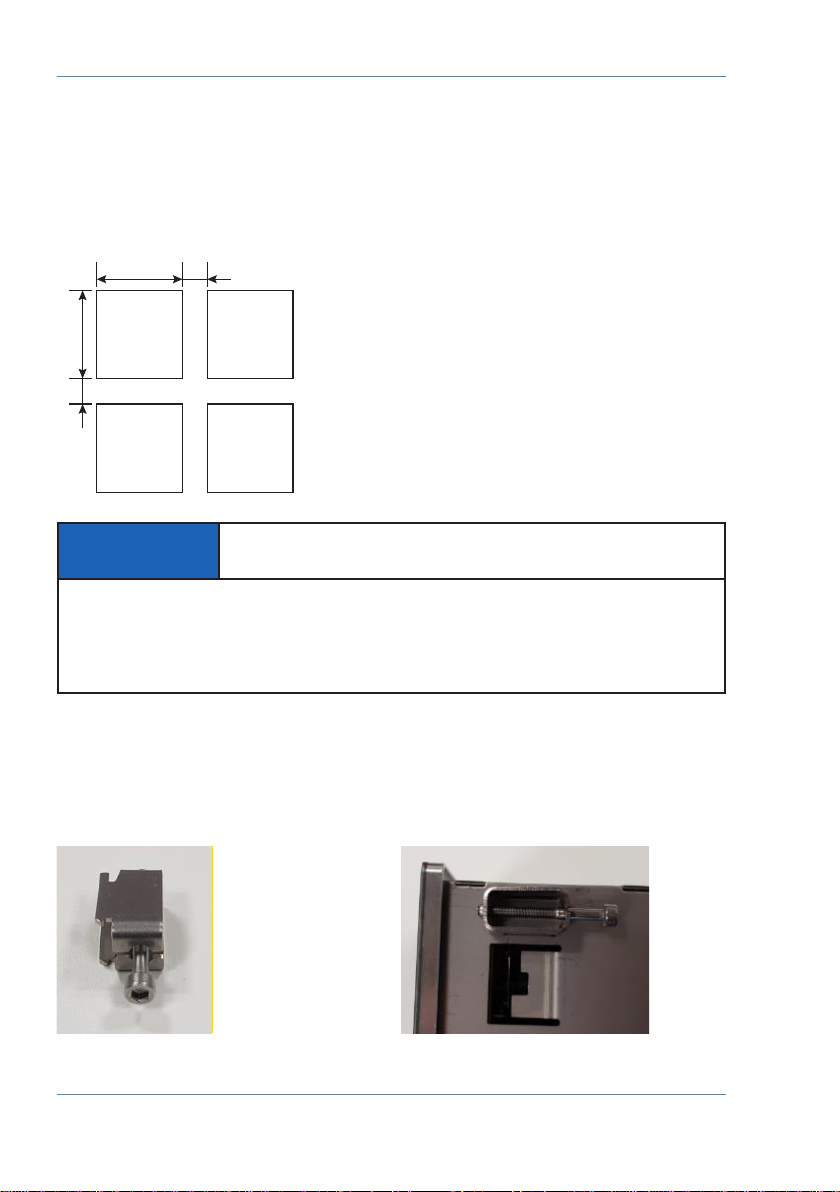
The multimess F144-PQ is used as a panel-mounted device and fulls IP54 in the installed
condition. Mounting must be carried out with the following cut-outs and mini-mum dis-
tances (see following gure). The maximum thickness of the panel for PQI-DE installation
is 8mm.
For mounting the multimess F144-PQ, four mounting brackets are included in the scope
of delivery. These must be snapped into the housing of the multimess F144-PQ at all four
corners (see picture below). The clamps must then be screwed against the panel with a
maximum torque of ve Nm using an Allen key (2.5 mm) on the back of the PQI-DE to
ensure that the PQI-DE is securely mounted in the panel cut-out.!
138+1 min. 40
min. 40 138+1
Panel cut-out
Mounting bracket
for multimess F144-PQ
Mounting bracket engaged
on multimess F144-PQ
NOTICE! Material damage due to non-observance
of the installation instructions!
Non-observance of the installation instructions or incorrect installation can damage
the device!
Pay attention to the audible snapping of the mounting elements
Inhaltsverzeichnis
Beliebte Prüfgeräte Handbücher anderer Marken

SMART
SMART KANAAD SBT XTREME 3G Series Bedienungsanleitung

Agilent Technologies
Agilent Technologies BERT Serial Bedienungsanleitung

Agilent Technologies
Agilent Technologies N3280A Bedienungsanleitung

Vernier
Vernier Go Direct Voltage Bedienungsanleitung

Lifeloc
Lifeloc R.A.D.A.R. Bedienungsanleitung

Fluke
Fluke T5-600 Bedienungs- und Montageanleitung


PCB Piezotronics
PCB Piezotronics 8159-0112A Bedienungsanleitung

BW Technologies
BW Technologies MicroDock II Bedienungsanleitung

Sun Nuclear
Sun Nuclear 1027 Bedienungsanleitung

Biomark
Biomark HPR LITE READER Bedienungsanleitung

Hioki
Hioki 3169-20 Bedienungsanleitung

Ashcroft
Ashcroft ATE-100 Bedienungsanleitung