
KC N901 Bedienungsanleitung
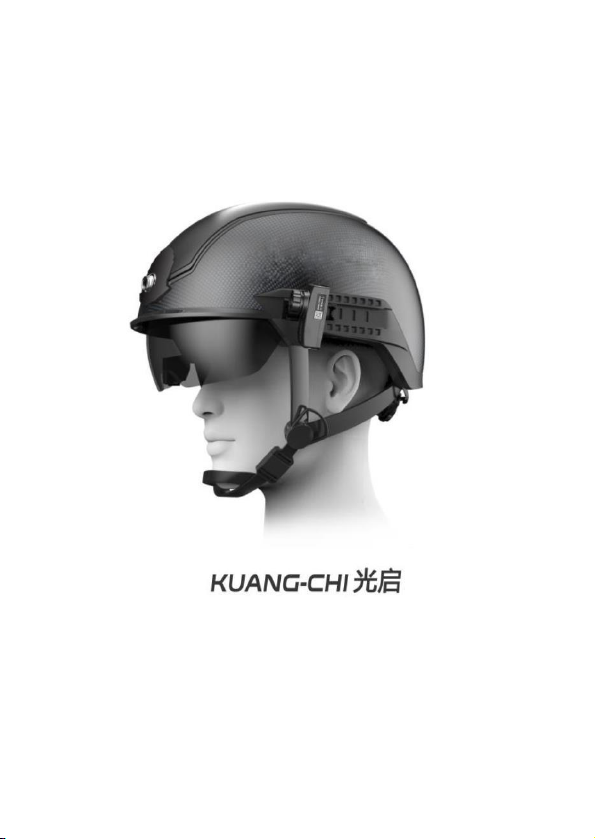
Smart Helmet
N901 User Manual
Release Version: V1.09

Table Of Content
1. INTRODUCTION....................................................................... 3
2. PRODUCT OVERVIEW ............................................................ 4
2.1. PRODUCT DEFINITION................................................................ 4
2.2. PRODUCT FEATURES .................................................................. 4
2.3. PRODUCT SPECIFICATION........................................................... 6
2.4. PRODUCT COMPOSITION ........................................................... 7
3. WEAR AND ADJUST ................................................................. 9
3.1. WEAR THE SMART HELMET....................................................... 9
3.2. RETRACT AND EXTEND THE SAFETY GOGGLES .......................... 9
3.3. ADJUST THE AR GLASSES........................................................... 9
4. USER GUIDE ........................................................................... 11
4.1. POWER ON............................................................................... 11
4.2. BLUETOOTH CONNECTION....................................................... 11
4.3. ONE-CLICK CALIBRATION ....................................................... 12
4.4. MANUAL CALIBRATION............................................................ 13
4.5. SELECTION OF COLOR PALETTE .............................................. 14
4.6. WORKING MODES .................................................................... 14
4.6.1. SINGLE-PERSON TEMPERATURE MEASUREMENT MODE ............... 15
4.6.2. LARGE-CROWD TEMPERATURE MEASUREMENT MODE ................ 16
4.6.3. QR CODE &TEMPERATURE MEASUREMENT MODE...................... 17
4.6.4. QR CODE RECOGNITION MODE ................................................... 18
4.6.5. LICENSE PLATE RECOGNITION MODE .......................................... 18
4.6.6. LICENSE PLATE RECOGNITION &TEMPERATURE MEASUREMENT
MODE ................................................................................................... 22
4.6.7. THERMOGRAPHIC DIAGNOSTIC IMAGING MODE.......................... 22
4.6.8. NIGHT-VISION/FACILITY INSPECTION MODE................................ 23
4.6.9. FACE RECOGNITION MODE .......................................................... 23
4.7. PROJECTION DISPLAY............................................................... 25
4.8. SCREEN RECORDING................................................................ 25
4.8.1. SCREEN RECORDING................................................................... 25
4.8.2. EXPORT VIDEO ........................................................................... 25
4.9. POWER DOWN .......................................................................... 26

5. CAUTIONS............................................................................... 27
5.1. BATTERY USAGE ...................................................................... 27
5.2. MAINTENANCE......................................................................... 27
6. FREQUENTLYASKED QUESTIONS ..................................... 28
6.1. HARDWARE FAQ...................................................................... 28
6.1.1. UNABLE TO BOOT ....................................................................... 28
6.1.2. NOAR DISPLAY.......................................................................... 28
6.1.3. ONLY SYSTEM INTERFACE SHOWN OF THE AR DISPLAY .............. 28
6.1.4. THERMAL IMAGING SCREEN IS STUCK OR GHOSTING OR
SMEARING ............................................................................................ 28
6.1.5. SHORT BATTERY LIFE .................................................................. 28
6.1.6. NO HEADPHONES OUTPUT........................................................... 29
6.2. FUNCTIONALAND OPERATIONAL FAQ ..................................... 29
6.2.1. QUESTIONS ABOUT BATTERY ...................................................... 29
6.2.2. QUESTIONS ABOUT STARTING THE HELMET................................. 29
6.2.3. QUESTIONS ABOUT WEARING ADJUSTMENT ................................ 30
7. NOTICES AND AFTER-SALES SERVICE.............................. 31
7.1. AFTER-SALE SERVICE TERMS AND CONDITIONS ...................... 31
7.2. CUSTOMER SERVICE POLICY UNDER WARRANTY ...................... 31

1. Introduction
⚫Please read this manual carefully to learn the functions, operations
and precautions before using the KC Smart Helmet N901.
⚫All illustrations in this manual are for reference only, please refer
to the actual product.
⚫Due to the differences of the field environment, the functions
described in this manual might be inconsistent with the actual
situation. Please refer to the actual product.
2. Product Overview
2.1. Product Definition
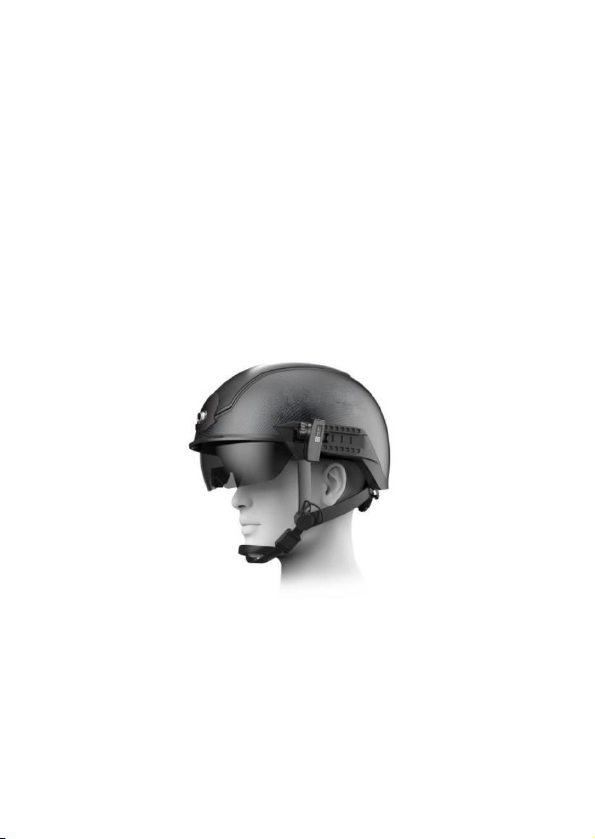
KC Smart Helmet N901 is a wearable intelligent helmet for the
actual combat needs of epidemic control and control in public places.This
helmet is designed based on KC intelligent metamaterial technology, and
integrates multiple advanced technologies such as infrared thermal
imaging, artificial intelligence, AR (augmented reality) display, big data,
communication sensing, and advanced aerospace technology. It is the first
to implement mobile deployment-based control scenarios. The unaware
and contactless temperature measurement is portable, safe and effective in
epidemic prevention.
Figure 1. Appearance of the Smart Helmet.
2.2. Product Features
KC Smart Helmet N901 exhibits the following characteristics:
⚫Highly integrated, mobile deployment
The helmet integrates a variety of functional modules such as data
processing, communication and AR displays. It does not require external
power supplies, displays, and external black bodies. The helmet is
lightweight, comfortable to wear, easy to deploy, and especially suitable
for individual equipment.

⚫Long temperature measurement distance and high accuracy
The over-temperature alarm distance is up to 7 meters, and the
temperature measurement error is ±0.3℃.
⚫Fast temperature measurement and strong environmental
adaptability
Automatic temperature measurement of multiple targets both indoors
and outdoors.
⚫Powerful AI capabilities
The helmet has a built-in AI system, which can access database of
facial features and vehicle license plates to realize the functions of face
recognition and license plate recognition in mobile scenes. This will fulfill
the management demands in public security and commercial application
scenes.
⚫Ultra-long battery life
Equipped with high-energy density battery and high efficiency energy
system to meet the long-running operation requirements in mobile
scenarios.
⚫AR augmented reality display technology
Adopting leading AR display technology, the helmet is characterized
by large field of view, high resolution, high definition, high contrast, small
blind spot, large-scale eye movement, and natural appearance.
⚫Lightweight
The helmet is made of the advanced composite meta-materials.
Through the modular design and aerospace-level weight reduction design,
while ensuring safety and protection, it achieves high productivity, easy
maintenance, and lightweight goals.
⚫Low radiation
The conformal antenna technology realizes high gain and low
radiation of antenna radiation, and by combining with the electromagnetic
shielding technology, it greatly reduces the radiation to the human body. It
is tested by a third-party authority that, the radiation intensity of the
electronic components of the working smart helmet to the heads is only
1/40 of the national standard, and 1/20 of the radiation intensity of general
cell phone, which ensures human safety in all aspects.
⚫Ergonomic design, comfortable to wear
Design of gravity center balancing, modified Lycra lining, high-
strength nylon strap and safety magnetic buckle, ensure comfort and safety
for all-day wearing.

2.3. Product specification
Basic Information
Apperance
Length×width×height : (293±5)mm * (236±5)mm * (185±5)mm
1080±10g
Weights
lining
L: thickness 3mm M: thickness 5mm S: thickness 7mm
;
;
AR display
Resolution
1280×720
Field of view
Virtual screen
Rated brightness
35°
Equivalent to watching 74-inch TV from 3m away
300nits
Visible light camera
Maximum
Maximum
13 megapixel
F2.0
Field of view
Resolution
78°
1080P@30fps
Data Communication
Wi-Fi
,
Dual Frequency IEEE 802.11 b/g/n 2.4GHz/5GHz
Bluetooth
BT 4.2, backward compatible with 3.0, 2.1, supporting BLE
Electrical Characteristics
Battery capacity
5000mAh
Temperature measurement mode: up to 8 hrs*
QR code mode/License plate recognition mode/Face recognition
mode: 3 hrs
Battery life
Standby time: 24 hrs
Battery voltage
Charging
~
DC3.7 4.2V
DC5.0V ±5%
Fast Charge
Storage
Supporting 2A Fast Charging
-20℃60℃
~
Operating
~
-10℃40℃
Infrared thermal imaging module
Resolution
384×288
33.4°
Field of view
Response wave
Image
8μm/14μm
25 Hz
Temperature
Margin of error
;
Temperature measurement mode: 36℃~42℃thermal imaging
±0.3℃
* Note: In the temperature measurement mode, the battery life as AR display always on
is about 5 hours, and can be extended to 8 hours by turning off the screen.
2.4. Product Composition
KC smart helmet N901 is mainly composed of helmet body, hardware
platform, AR display module, infrared thermal imaging module and battery.
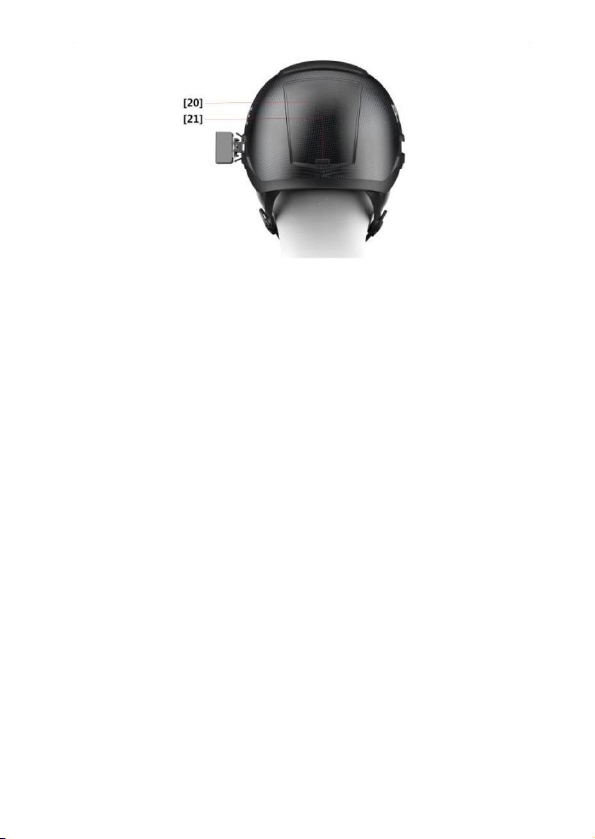
Figure 2. Appearance of the Smart Helmet.
[1]
[2]
[3]
[4]
[5]
[6]
[7]
Visible light camera
Overlay
[12]
[13]
[14]
[15]
[16]
[17]
[18]
The bluetooth key
TYPE-C port
Safty goggles .
AR display module
Strap
Microphone port
SIM card slot
Power indicator
Power on key
Microphone
Strap Buckle
Volume button
Mounts of Thermal imaging
module
[8]
[19]
Headphone port
[9]
Thermal imaging module
[20]
[21]
Battery cover
[10]
[11]
Lining
Battery cover lock
Lining adjustment knob

3. Wear and Adjust
3.1. Wear the Smart Helmet
1) Select appropriate-thickness liner in the helmet according to
your head size.
2) Adjust the tightness of the helmet strap.
3) Put on the smart helmet and fasten the buckle.
4) Turn the head lock knob to an appropriate position.
5) Put on the earphone.
3.2. Retract and Extend the Safety Goggles
Gently lift the safety goggles from both sides to open the goggles;
Gently lift the safety goggles from both sides and then push the
goggles into the helmet to retract the goggles.
3.3. Adjust the AR Glasses.
1) The AR glasses adapt the right monocular only, which is fixed
to the interior of the safety goggles. The position of AR display
screen can be fine-tuned by adjusting the arms of the AR glasses
to ensure that the AR display screen is in complete and clear
vision.
Note: When extending and retracting the safety goggles, be
gentle and avoid the collision of the lens of AR glasses with
other objects (as the space for extending and retracting of the
AR glasses is limited, large-range adjustment of the AR glasses
on the safety goggles should be avoided).
2) If the AR glasses require adjustment within a wide range, the
AR glasses should be adjusted after the helmet is removed. And
after adjustment, the safety goggles should be extended or
retracted for several times to test whether collision occurs.
9
Inhaltsverzeichnis
Beliebte Motorradzubehör Handbücher anderer Marken

SRC
SRC B-TRK502-01-01-SL Bedienungsanleitung

3M
3M Speedglas 9100 MP Bedienungsanleitung

hepco & becker
hepco & becker 6307520 00 01 Bedienungsanleitung

HOMCOM
HOMCOM AA0-077 Bedienungsanleitung

hepco & becker
hepco & becker 6307558 00 01 Bedienungsanleitung

Wunderkind Custom
Wunderkind Custom 106503-F15 Benutzerhandbuch


