KE2 Efficiency Bedienungsanleitung

Parts List
The following parts are included in the
KE2 Evaporator Eciency (KE2 Evap) controller kits:
Kit #20178 with 120/208-240 VAC controller
Kit #20844with 120/208-240 VAC controller
Kit #20631with 120/208-240 VAC controller
Kit #21096with 120/208-240 VAC controller
Kit #20222Beacon® I & II replacement controller
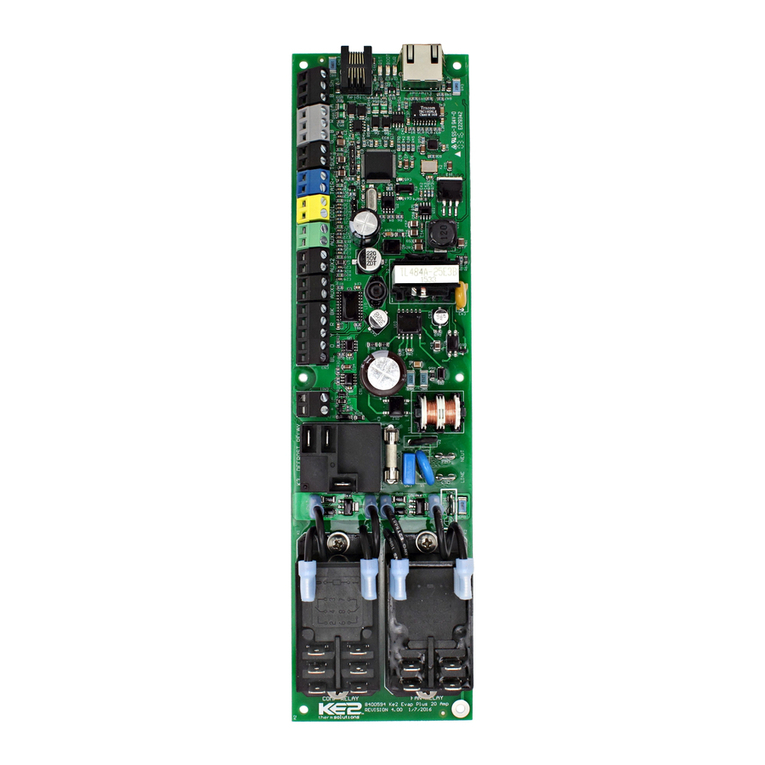
(1) KE2 Evaporator Eciency controller
(1) high voltage safety shield
(3) 10’ temperature sensors
(4) 90 degree quick disconnects
(5) self-tapping screws
(2) course thread screws (1) ne thread machine screw with
lock washer
(1) KE2 Terminal Board
(1) KE2 Evap Navigation sticker
(2) 1/2” plastic knockout plugs
(4) wire ties (rated for low temp)
(1) Air sensor mount
(1) 5-position screw down terminal (for EEV)
(4) 3-position screw down terminals (for power in, transducer
and 3A relay)
(9) 2-position screw down terminals (for sensors and digital
input, analog output)
1) 120 Voltage jumper
(1) 208-240V Voltage jumper (already on back of KE2 Evap)
© Copyright 2015 KE2 Therm Solutions, Inc., Washington, Missouri 63090
Q.1.3
July 2015
KE2 EvaporatorEfciency
Quick Start Guide
Supplies List
The KE2 Evap is supplied with all of the accessories required for the con-
troller to work, however, standard truck stock items will also be required
to install the controller. To simplify the installation, a list of items has
been provided.
Conduit to go between the controller and the evaporator
(2) Conduit connectors (straight or elbow as required)
(11) High voltage wires matched to the load of the heaters, fans,
liquid line solenoid, alarm (if used), and the controller.
(8) Spade Connectors matched to gauge of high voltage wires
Wire labeling (numbers, colors, etc.)
Additional wire ties
18 gauge twisted shielded pair (if extending sensor wires)
Foam insulation if running wires outside the space.
Silicone (for sealing any box penetrations)
Accessories to Aid in Installation
The following parts are available separately:
10’Wire Harness pn 20736,
25’Wire Harness pn 20670
40’Wire Harness pn 20737
KE2 Evap Mounting Box pn 20687
Further information on the Wire Harness and Mounting Box can be found in
literature Q-1-21.
L M N
DE
OP
F
B
Left Arrow & Right Arrow
Use to move between Menus columns
Up Arrow & Down Arrow
Scroll through Menu Parameters
ENTER
Press and hold ENTER for 3 seconds, when
display is blinking changes can be made.
BACK
Press BACK to return to the previous view.
Press and hold ENTER for 3 seconds.
Change settings:
Save changes:
Moving through controller menus:
Return to Main Menu:
Lights: Red - critical alarm (system not running)
Yellow- non-critical alarm (system running)
Green - compressor should be on
- compressor waiting on timer to start/stop
ENTER
Press ENTER to go from parameter to value.
Togglebeween
description & value :
Menu Layout:
Variables Manual*
(view only)
Alarms
(view only)
ENTER
Setpoints Enter
Password
NO ALARM
EMAIL FAILURE
ROOMTEMP
DERIVATIVE
ROOMTEMP
FIRMWAREVERSION
MANUALCONTROL
CLEAR MD
Controller Navigation
ENTER
ENTER
BACK
Press BACK 3 - 4 times
If you lose your place:
*For manual defrost use MANUAL CONTROL
BACK
24-hour Emergency Support: 1.888.337.3358 www.ke2therm.com
pn 21061 9-14
AC
G H
IJ
K
This reference should remain on site with the installed KE2 Evaporator Eciency controller.
A
C
D
E
F
G
H
I
J
K
L
M
N
B
O
P
20844 KE2 Ultimate Install kit includes KE2 Mounting Box pn 20687 and 40’
colored temperature sensors
20631 kit does not include temperature sensors
21096 KE2 Supermarket Retrot kit also includes KE2 Mounting Box pn 20687,
10’ Wire Harness pn 20736, Ethernet Adaptor pn 20938, & Door Switch 20543
20222 Beacon® kit includes an extra temperature sensor, and pressure
transducer with cable.
Now with
Smart Access!
Get your controller
online in 3 easy steps.
See page16

© Copyright 2015 KE2 Therm Solutions, Inc., Washington, Missouri 63090
Q.1.3 July 2015
Page 2
KE2 EvaporatorEfciency
Quick Start Guide
for low temperature applications and 8-10 degrees for medium
temperature.
Subcooling - There should be a solid column of liquid at the inlet of
the valve. This can be veried by looking at the sight glass, however,
the proper method requires measuring the subcooling of the liquid
entering the valve.
Verify Temperature Dierence
A typical Temperature Dierence (TD) between the coil temperature
and the air temperature is between 5 and 15°F. An insucient TD,
between the coil and air temperature, indicates a system issue that
needs to be addressed before installing the KE2 Evap Eciency.
Understanding Frost
The air exiting side of the evaporator is often the coldest spot on the
coil due to the load eecting the temperature. As air travels through
the ns of the evaporator, the Relative Humidity will reach 100%.
Moisture will begin to drop out of the air and deposit on the coil
surfaces to form frost. Although frost typically has a negative con-
notation when discussed in refrigeration, initial frost formation has
a positive eect. Some may even say “frost is our friend.” It is not un-
common to see a small amount of frost on the coils that have KE2
Evaporator Eciency (KE2 Evap) controllers installed. The KE2 Evap
is continually measuring, monitoring, and managing the frost to as-
sist in maximum energy eciency. When the eciency of the coil is
reduced due to excessive frost, the KE2 Evap will initiate a defrost.
Liquid/Vapor Mix
Restrictor,
TEV or EEV
Warm Liquid
Cold Vapor
Hot Vapor
Warm Air
Cold Air
Evaporator
Compressor
Condenser
Saturation Temp °F
(from receiver pressure)
Liquid Temp at Valve °F
Subcooling °
Suction Pressure PSI
Suction Temp °F
(evaporator outlet)
Saturation Temp °F
(calculated from Suct. Pressure)
Superheat °
Temp Dierence (TD) °F
(return air minus coil temp)
Coldest point in evap °F
AMPS
Trouble Shooting Diagram
Discharge Pressure PSI
Refrigerant
Arriving at the Jobsite
When arriving at any jobsite, it is good practice to verify the correct
operation of the system. Even systems running for a considerable
amount of time without requiring a service call may not be running
properly.
Inspect the coil to see the current frost pattern. If the unit has not
recently performed a defrost, look for the heaviest area of frost. This
will be used to locate the coil sensor.
Installers should account for a full system diagnostic in the installa-
tion estimate for the controller.
Although it may seem unnecessary, identifying system issues before
the controller is installed will save time overall. It will also allow the
controller to provide the highest energy savings.
Verify the system is running correctly. Taking several measurements
will help determine the current health of the system. Using the dia-
gram below, ll in the necessary information.
Two of the most critical indicators of system health are the super-
heat and subcooling.
Superheat - Superheat is the most overlooked ineciency in exist-
ing systems. Typically the superheat on a TEV is set when there is not
product in the controlled space, if it is set at all.
When applying the controller to an existing system with a mechani-
cal expansion valve, the superheat should be between 6-8 degrees

Q.1.3 July 2015
Page 3
© Copyright 2015 KE2 Therm Solutions, Inc., Washington, Missouri 63090
KE2 EvaporatorEfciency
Quick Start Guide
A
IMPORTANT Preliminary Steps
Determine the coil sensor location
To determine the most appropriate sensor location, when arriving on
site, put the system into defrost.
The location where frost is last to disappear is where the coil sensor
should be placed. Monitor both the air entering side, as well as the air
exiting side, of the evaporator coil. Don’t be surprised if the last place
for frost to disappear is on the air exiting side. It is usually near the
right or left end of the coil.
It is important to verify all heating elements are working properly.
B
C
Steps to Ensure Proper Coil Sensor Location
More often than not on coils, the location of the sensor is a short
distance from the end, approximately 1 to 1-1/2”away from the right
and left edges of the active coil surface. The ice tends to grow from
these edges towards the center. Therefore, the sensor location is best
situated approximately 1 to 1-1/2”from the outer edges and typically
near the bottom 1/3rd portion of the evaporator. The sensor needs to
be as far away from the defrost heat sources as possible.
This is most easily located by viewing the current frost pattern. The
last place frost disappears during the defrost cycle is the correct sen-
sor location.
Note: Insert plug (Item I from parts list) into coil housing when
mounting sensor wire to prevent damage to the sensor from
sharp edges. Two plugs are provided. One plug should be inserted
into the inner housing to access the coil, and the other into the outer
housing to exit the coil. Installer must puncture plug to insert sensor.
As with any wiring installation, it is appropriate to leave a service
loop. Enough wire should be left to move the sensor to the opposite
end of the evaporator.
DMake note of the locations you have determined for placement
of the coil sensors.
Typically last spots to defrost
B
Locate sensor approx.
1-1/2” from end, in the
bottom third of coil
Item I from Parts List on page 1
C

© Copyright 2015 KE2 Therm Solutions, Inc., Washington, Missouri 63090
Q.1.3 July 2015
Page 4
KE2 EvaporatorEfciency
Quick Start Guide
KE2EvaporatorEfficiency
TM
thermsolutions
ENTER
BACK
2
2
KE2EvaporatorEfficiency
TM
thermsolutions
ENTER
BACK
2
2
KE2EvaporatorEfficiency
TM
thermsolutions
ENTER
BACK
2
2
At the entrance
On the wall
On the evaporator
11 Determining Location
The controller is designed to be as versatile as possible. The loca-
tion should be discussed with the end users to determine if they have
a preference. It is designed so it can be installed inside or outside the
controlled space.
The controller can also be located at the condenser, but should not
be installed outdoors without an enclosure to protect it from sun-
light and moisture (must be within operating range -40°F to 140°F)
KE2 EvaporatorEfficiency
TM
thermsolutions
ENTER
BACK
2
2
Evaporator
?
Cut a length of conduit to go from the controller to the evaporator
Measure the distance between the controller and evaporator to ac-
count for the extra length necessary to properly route conduit.
Determine the number of wires to go to the controller.
Controller power (3 wires)
Fan control (2 wires)
Defrost (heater) control (2 wires)
Liquid line solenoid (2 wires)
If the Aux Relay is used, the installer will need to supply an ad-
ditional pair of wires to the controller
Aux relay (2 wires)
Note: Install in accordance with local wiring codes. KE2 Therm
does not accept responsibility for incorrect or unsafe wiring.
2
2
Cut wires to length
Once the number of wires is determined, cut the wires to length.
The wire should be long enough to account for the necessary con-
nections in the controller and evaporator.
Use the optional KE2 Wire Harness, or select dierent colored wires,
(blue - fan, orange - heaters, yellow - solenoid, purple - alarm). This
will simplify the installation and troubleshooting. If only a single
color is available, both ends of the wires should be labeled with a
matching number. This will save time when wiring the evaporator.
33
Determine the current draw of the unit.
Using the nameplate to determine the Amp rating of the unit. This
information should be used to select the proper sized wire. It should
also be used to verify the unit does not exceed the relay rating on the
KE2 Evaporator Eciency controller.
4
4

Q.1.3 July 2015
Page 5
KE2 EvaporatorEfciency
Quick Start Guide
© Copyright 2015 KE2 Therm Solutions, Inc., Washington, Missouri 63090
Preparing conduit
Feed the wires through the conduit.
The conduit connectors can be added at this time. Determine if a
straight or 90 degree connector is most appropriate for the installa-
tion, and attach to the conduit.
Securely connect one end of the conduit to the controller.
5 5
120V 208-240V
6
Controller Power
Strip the end of the wires used to provide power to the controller (If
using the KE2 Wire Harness the wires are pre-stripped)
Locate a 3 position terminal in the accessories kit.
Fasten to the 3 position pluggable connector*.
Plug into the board as indicated in Wiring Schematic.
*All terminal screws should be tightened to 5 ft-lbs.
7
7
Wiring the controller
Locate the second Voltage Jumper in the accessory kit.
It is a 4 position plug with 2 red jumper already installed.
Use the plug with 1 jumper for 208-240V power or the jumper with
2 jumpers for 120V power.
Power is not connected to Voltage selector, it is a selector only.
Power for the controller is connected to the Power In location us-
ing a 3 position connector.
Controller still illuminates display when 120V is applied with 208-
240V selected, however controller will not function properly.
6
Fan Relay
Strip the end of the 2 wires used for fan control.
Locate 2 female spade connectors in the accessories kit.
Crimp on the female spade connectors.
Plug the connectors to the COM and NO positions of the Fan Relay.
Fan Relay Using the KE2 Wire Harness
The blue wires are used for fan control.
They are blue with a black stripe, and the black with a blue stripe.
Plug the black with a blue stripe to the COM terminal.
Plug the blue with a black stripe to the NO position of the Fan Relay
Conrm combined fan motor load is not over 10 amps
88
Defrost (Heater) Relay
Strip the end of the 2 wires used for the defrost control.
Locate the remaining 2 female spade connectors in accessories kit.
Crimp on the female connectors.
Plug the connectors to COM and NO positions of the Defrost Relay.
Defrost (Heater) Relay Using the KE2 Wire Harness
The orange wires are used for the heater control.
Locate the orange with black stripe, and black with orange stripe.
Plug the black with orange stripe to the COM terminal.
Plug the orange w. black stripe to the NO position of Defrost Relay.
Conrm combined heater load is not over 20 amps.
99

Q.1.3 July 2015
Page 6
KE2 EvaporatorEfciency
Quick Start Guide
© Copyright 2015 KE2 Therm Solutions, Inc., Washington, Missouri 63090
Liquid Line Solenoid /Compressor Relay
the liquid line solenoid pluggable connector is supplied with an
in-line fuse to protect the controllers circuitry.
Locate a 3-position connector from the accessories kit.
Fasten the incoming power to the fused lead and the lead from the
liquid line solenoid to the NO terminal position.
Plug into the location as indicated in Wiring Schematic.
Liquid Line Solenoid (LLS)/Comp. Relay Using KE2 Wire Harness
The yellow wires are used for Liquid Line Solenoid control.
Locate a 3-position connector from the accessories kit.
Fasten the black with yellow stripe to the fused lead.
Fasten yellow w. black stripe from the LLS to NO terminal position.
Plug into the location as indicated in Wiring Schematic.
Max relay rating is 3A.
10 10
Auxiliary Relay
If using the Auxiliary Relay, the installer will need to supply an ad-
ditional pair of wires to the controller.
Strip approx. 1/4”wire insulation on end of the 2 wires for the alarm
Locate a 3-position connector from the accessories kit.
Plug into the location as indicated in Wiring Schematic.
Max relay rating is 3A.
11
11
Preparing the Evaporator
The evaporator wiring will require access to the high voltage termi-
nal block on the coil.
Turn o power to the system.
Verify power is no longer present using a multimeter.
Note: Before installing the safety cover, plug in any remaining connec-
tors to store for future use.
Install Safety cover
Once all of the high voltage wiring is complete, install the metal
cover on the controller.
Locate the cover and 3 small screws from the accessories kit.
Position the cover over the 3 mounting posts.
Using 2 course thread screws attach controller to the plastic posts.
Use the ne threaded machine screw with lock washer to fasten the
controller to the metal post.
Set the controller in a safe place.
12 12
13 13
14
Evaporator wiring
Now that the conduit is prepared, it can be connected to the
evaporator.
Locate the proper sized knockout and carefully remove knockout.
Connect conduit to the evaporator
14

Q.1.3 July 2015
Page 7
KE2 EvaporatorEfciency
Quick Start Guide
© Copyright 2015 KE2 Therm Solutions, Inc., Washington, Missouri 63090
Study the existing wiring.
Determine the location of the fol-
lowing: incoming power, fan leads,
heater leads, defrost termination
leads, and fan delay leads.
15
Evaporator wiring – Controller
Strip the end of the wires used to
power the controller.
Attach to the line power to provide
continuous power to the controller.
Attach ground wire.
Note: Ground is required for the inter-
nal safeties to operate properly.
16
Evaporator wiring – Fans
Strip the ends of the wires (con-
nected to the KE2 Evap) used to con-
trol the evaporator fans.
The fan wires can be attached
to the terminal block using either
screw down terminals or spade
connectors.
Attach one of wires to the L1/Line.
This wire will be connected to COM
of fan relay on the controller.
Attach the wire connected to the
NO terminal on the Fan Relay to one
of the fan leads.
Connect L2/Neutral to remaining
fan lead.
17 17
16
KE2 Terminal Board
KE2 Terminal Board

Q.1.3 July 2015
Page 8
KE2 EvaporatorEfciency
Quick Start Guide
© Copyright 2015 KE2 Therm Solutions, Inc., Washington, Missouri 63090
Evaporator wiring – Heater
Strip the ends of the wires being
used for heater control.
The heater wires can be attached to
the terminal block using either screw
down terminals or spade connectors.
18
Evaporator wiring – Liquid Line
Solenoid /Compressor
Strip the ends selected to control
the liquid line solenoid.
Attach the wire from the NO termi-
nal on the L.L. Solenoid/Compressor
relay to one of the solenoid leads.
Attach the wire from the COM on the
L.L. Solenoid/Compressor relay to the
L1/Line Voltage.
Connect L2/Neutral to the remain-
ing L.L. Solenoid/Compressor lead.
20
Remove defrost termination
(Klixon®) from circuitry
Attach one of wires to the L1/Line.
This wire will be connected to COM of
defrost relay on the controller.
Attach the wire connected to the
NO terminal on the Defrost Relay to
one of the defrost leads.
Connect L2/Neutral to the remain-
ing defrost lead.
The defrost safety should not be re-
moved from the circuit. Its purpose is
to prevent the heaters from over heat-
ing and causing damage.
19
18
20
KE2 Terminal Board
KE2 Terminal Board

Q.1.3 July 2015
Page 9
KE2 EvaporatorEfciency
Quick Start Guide
© Copyright 2015 KE2 Therm Solutions, Inc., Washington, Missouri 63090
Wiring Schematic - Controller New Installation

Q.1.3 July 2015
Page 10
KE2 EvaporatorEfciency
Quick Start Guide
© Copyright 2015 KE2 Therm Solutions, Inc., Washington, Missouri 63090
Evaporator Fan Motors
Con1 Max HP & Amp Ratings (Total All Fans)
Voltage Max HP Max AMPS
230 3Ø 15 42
460 3Ø 30 40
575 3Ø 30 32
Wiring Schematic - Controller with KE2 Contactor Box
Existing Defrost Heaters Max Current Ratings
(Amps are Total All Heaters)
Relay Box P/N 230V 3Ø460V 3Ø575V 3Ø
20217 54 Amps 52 Amps 52 Amps
20218 68 Amps 65 Amps 62 Amps
20219 80 Amps 77 Amps 62 Amps
Legend
EFM - Evaporator Fan Motor
DH - Defrost Header
LLS - Liquid Line Solenoid
AUX - Auxiliary
PT - Pressure Transducer
T1 SUCTION - Suction Temperature
T2 AIR - Return Air Temperature
T3 COIL - Evaporator Coil Temperature
T4 AUX - Auxiliary Temperature
EEV - Electric Expansion Valve
ECM - Electronically Commutated Motor
D1 - Digital Input 1
D2 - Digital Input 2
D3 - Digital Input 3
- - - By others
All eld wiring must conform to
local codes
Contactor ratings per UL508 CSA 22.2
Wiring Schematic - Controller with KE2 Contactor Box
P/N: 20217 - 50A
20218 - 65A
20219 - 80A
Inhaltsverzeichnis
Andere KE2 Controller Handbücher