
Keysight Technologies E36731A Bedienungsanleitung

E36731A Battery Emulator
Quick Start Guide
Setup the Instrument
Place the instrument's feet on a flat, smooth horizontal surface.
Connect output to the front panel, being careful not to short the
leads together. Attach the power cable to the rear panel, then
plug it into main power. Connect GPIB, LAN or USB cables as
desired.
Using the Power Supply and Eload Function
NOTE: When E36731A is used as an electronic load, the input terminals are referred to as "outputs" throughout this document.
Using the
Load mode: Toggle between the Scope and Datalog function.
Power Supply mode: Access to Datalog function only.
1. Select function:
-Power supply: Press
Function P. Supply.
-Eload: Press Function
Eload.
2. Configure the instrument.
For more information, refer to
the User’s Guide.
View the output.
Set the output.
3 methods:
1. Turn the knobs to set the output.
2. Use the navigation keys to select the Set field;
use the numeric entry keys to enter value. The
value becomes active when you press [Enter].
3. Go to Settings (function-dependent). Use the
navigation keys to highlight the fields. Then
enter the values with the numeric keys.
Power on the instrument.
Connect the outputs.
(4-wire)
TWIST LEADS
TWIST LEADS
Enable the outputs.

Menu at a Glance
Software Control and Visualization
You can monitor and control the instrument from a Web browser by
using the instrument's Web interface. To connect, simply enter the
instrument's IP address or hostname in your browser's address bar and
press Enter.
To remotely control the instrument, click the Control Instrument tab and
enter the password (default is keysight).
For detailed operating information, refer to the E36731A User’s Guide.
Menu heading
Description
Function
Switches the instrument function to Power Supply mode (P.Supply) or Load mode (Load).
When function is set to Power Supply mode:
Source Settings >
Sense
Configures the output sense to 2-wire or 4-wire.
Out Pref
Configures the preferred mode for output on/off transitions.
Protection >
Configures the protection settings for the output.
Voltage Slew >
Configures the voltage slew rate.
When function is set to Load mode:
Load Settings >
Mode >
Configures the operating mode to CC, CV, CR, or CP.
Sense
Configures the input sense to 2-wire or 4-wire.
Protection >
Configures the protection setting for the load input.
Range >
Configures the measurement range for the load input.
Short
Enable or disable the input short.
Common menu for both Power Supply and Load mode
Output Settings > or Input Settings >
On/Off Coupling >
Enables or disables the output coupling or synchronization between multiple input/output channels.
Output Inhibit >
Configures the inhibit input mode and Digital IO Pin 3.
Utilities >
Store/Recall >
Saves and recalls instrument states.
I/O Config >
Displays and configures the I/O parameters for remote operations over the USB, LAN, GPIB, or digital
IO interface.
Test/Setup >
Accesses the self-test, calibration, and help function as well as configures the user preferences, and
sets date and time.
Error >
Displays the instrument's error queue. Errors will be cleared after viewing or instrument reset.
Manage Files >
Creates, copies, deletes, and renames files and folders on the USB drive attached to the front panel.
Also allows you to capture the current screen to either a bitmap (*.bmp) or portable network graphics
(*.png) file.
Unlock | Lock
Locks and unlocks the display.
Battery Profiling, Emulation, and Cycler Function
The E36731A works with Keysight BV9211B Pathwave BenchVue Advanced Battery Test and
Emulation application software. This software allows you to easily run battery tests, generate
battery models and perform battery emulation.
Download the BV9211B at: www.keysight.com/find/BV9211B.
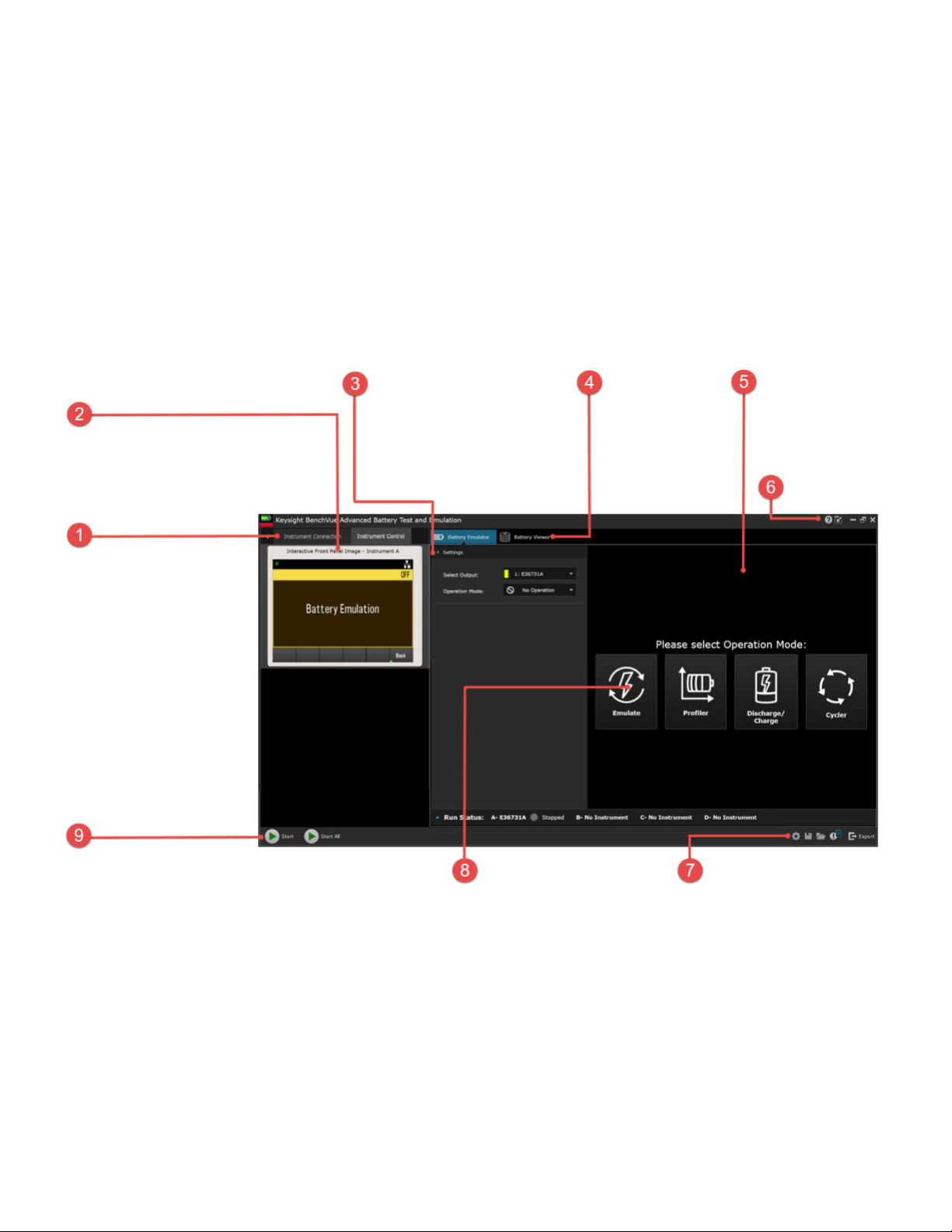
Overview of BV9211B application software
NOTE: Before running the BenchVue Advanced Battery Test and Emulation application, you must
have installed and connected the Keysight E36731A to a computer with the appropriate interface
cable.
Instrument connection area
Lets you connect up to four
instruments.
-Select Search and Connect
to Instruments to search for
all instruments on the
network and VISA
resources.
-For manual configuration,
select New Manual
Configure.
Instrument connection area
Lets you operate the instrument
using the controls on this display.
Battery Emulator –Settings area
Lets you configure the settings of
the selected output and operation.
The available modes are Emulate,
Profiler, Discharge/Charge,
Cycler, and No Operation.
Battery Viewer
Displays the
datalog information
when the specified
operation was run.
Display area
Displays the battery
chart information for
selected operating
mode.
Opens the
Help file
Start button
Lets you start the operation of
the selected output, or all
operations when multiple
outputs are configured.
Operation Icons
Only displayed at start-up.
Let you select an operation.
Application controls
Lets you configure settings.
Save instrument states and
export measurement data.

Instrument setup
Refer to the help file for more information on how to use the Keysight BV9211B Pathwave
BenchVue Advanced Battery Test and Emulation application software.
Generate battery profile
Generating a battery profile ensures that you are getting the most accurate models for battery life
emulations used in your devices and working scenarios. The Pathwave BenchVue Advanced Battery
Test and Emulation application creates the battery profile by discharging or charging a physical
battery with either a static current condition or a previously created dynamic loading profile. The
battery that you want to emulate must be new or fully charged.
As shown in the following flowchart, there are several steps required to generate a profile.


Perform battery emulation
The Pathwave BenchVue Advanced Battery Test and Emulation application follows the battery
model in real-time and emulates the battery behavior. Two methods are available for battery
emulation —open profiles generated by the software, or importing previously created external
battery models. For simplicity, you will only need to enter four parameters to emulate a battery –
capacity rating, current limit, initial SoC, and a cut-off condition.
As shown in the following flowchart, there are several steps required to emulate a battery.

Perform battery cycler
The Pathwave BenchVue Advanced Battery Test and Emulation application's cycler function lets
you create a custom sequence of charging, resting, and discharging a battery at various test
conditions. The applicatioin allows up to 1000 cycle operations on the battery to determine the
battery's age effect and reliability under sequence test conditions.
As shown in the following flowchart, there are several steps required to cycle a battery.

Product Safety
For important safety information, see the For Your Safety leaflet that comes with the instrument and
the Keysight E36731A User's Guide.
Latest Information
To get the latest firmware, software, manuals, and support information, go to
www.keysight.com/find/E36731A.
This information is subject to change
without notice.
© Keysight Technologies 2022
Edition 1, August 2022
Printed in Malaysia
E36731-90008
www.keysight.com
Inhaltsverzeichnis
Andere Keysight Technologies Computerhardware Handbücher


Beliebte Computerhardware Handbücher anderer Marken

EMC2
EMC2 VNX Series Betriebsanleitung

Panasonic
Panasonic DV0PM20105 Bedienungsanleitung

Mitsubishi Electric
Mitsubishi Electric Q81BD-J61BT11 Bedienungsanleitung

Gigabyte
Gigabyte B660M DS3H AX DDR4 Bedienungsanleitung

Raidon
Raidon iT2300 Bedienungsanleitung

National Instruments
National Instruments PXI-8186 Bedienungsanleitung


