
Konka KDG32MX665AN2 Bedienungsanleitung
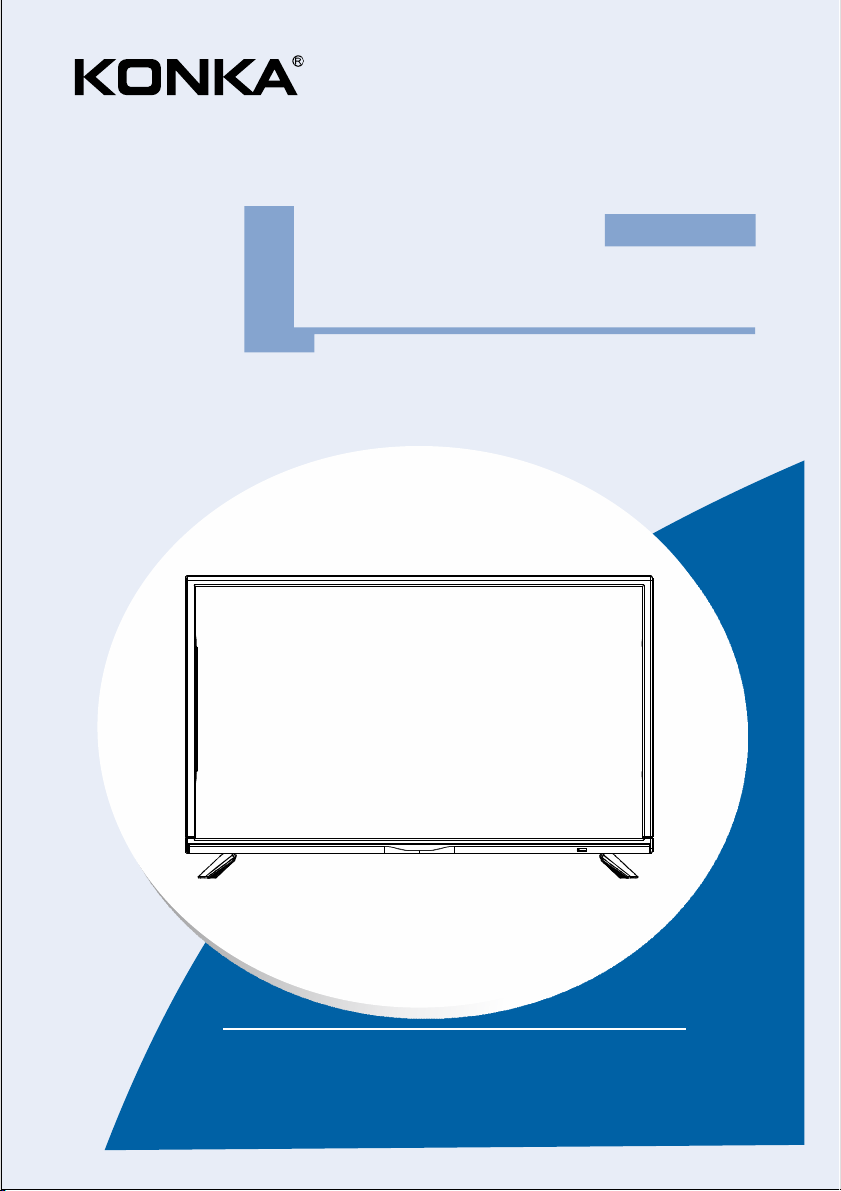
OWNER'S MANUAL
LED TV
KDG32MX665AN2
Please read this manual carefully before TV operation.
Retain it for future reference.
Dolby, Dolby Audio and the double-D symbol are trademarks
of Dolby Laboratories.

High Voltage
Do not open
Risk of electronic shock, do not open.Do not
attempt to service this product yourself as
opening or removing covers may expose you
to dangerous voltage or other hazards. Refer
all servicing to qualified service personnel.
CAUTION
Important Safety Instructions and Maintenance
Important Safety Instructions
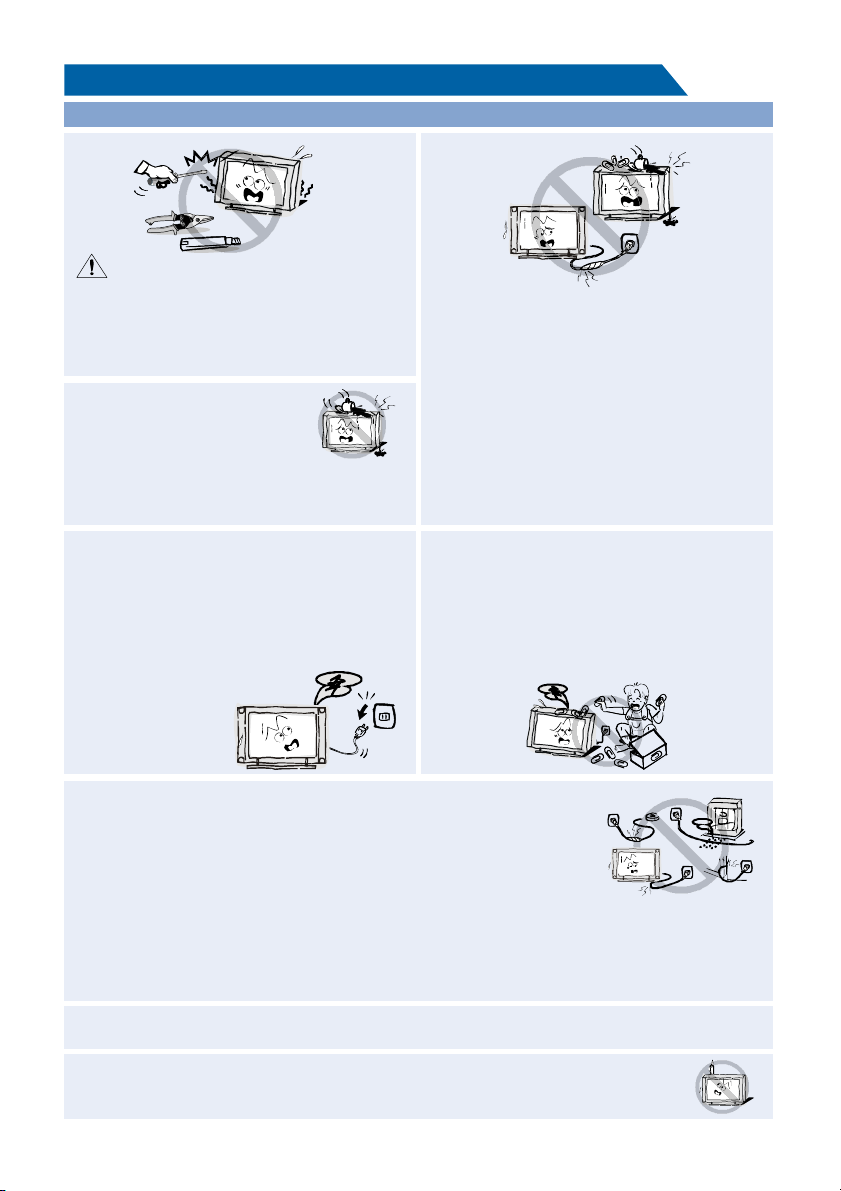
If the following problems occur:
Turn off the TV set and unplug the AC power
cord immediately if any of the following
problems occur. Ask your dealer or service
centre to have it checked by qualified service
personnel.
When:
- AC power cord is damaged.
- Poor fitting of AC power outlet.
- TV set is damaged by being dropped, hit or
having something thrown at it.
- Any liquid or solid object falls through
openings in the cabinet.
The screen and cabinet get warm when the
TV is in use. This is not a malfunction.In case
of smoke, strange noise or strange smell
from the unit:
Turn off the power switch immediately;·
Disconnect the power plug from the power ·
outlet;
Contact your dealer or service ·
centre. Never attempt to make
repairs yourself
because this could
be dangerous.
Do not overload wall outlets, extension cords or adaptors beyond their capacity,
this can result in fire or electrical shock.Power-supply cords should be
routed so that they are not likely to be walked on or pinched by items
placed upon or against them, paying particular attention to cords at plug
end, adaptors and the point where they exit from the appliance. The mains
plug is used as the disconnect device. It shall remain readily accessible and
should not be obstructed during intended use. Make sure to plug the power
cord in until it is firmly inserted. When removing the power cord, make sure to hold the power
plug when pulling the plug from the outlet, do not pull the plug out by the wire. NEVER touch the
plug or power cord with wet hands. To disconnect the apparatus from the mains power, the plug
must be pulled out from the mains socket, therefore make sure the mains plug is always easily
accessible.
To reduce the risk of fire or
electric shock, do not expose
this product to rain or moisture.
The apparatus shall not be
exposed to dripping or splashing and
no objects filled with liquids, such as vases,
shall be placed on the apparatus.
Never push objects of any kind into the set
through the cabinet slots as they may touch
dangerous voltage points or short-circuit
parts that could result in a fire or electric
shock. Never spill liquid of any kind on the
set. Use special caution in households where
children are present. The apparatus is not
suitable for children under 3-year to operate.
1
To avoid the fire, no naked flame source, such as lighted candles, should be placed
on the apparatus.
Do not push or scratch the front filter, or place any objects on top of the TV set. The image may
be uneven or the screen may be damaged.
Important Safety Instructions and Maintenance
Important Safety Instructions
2
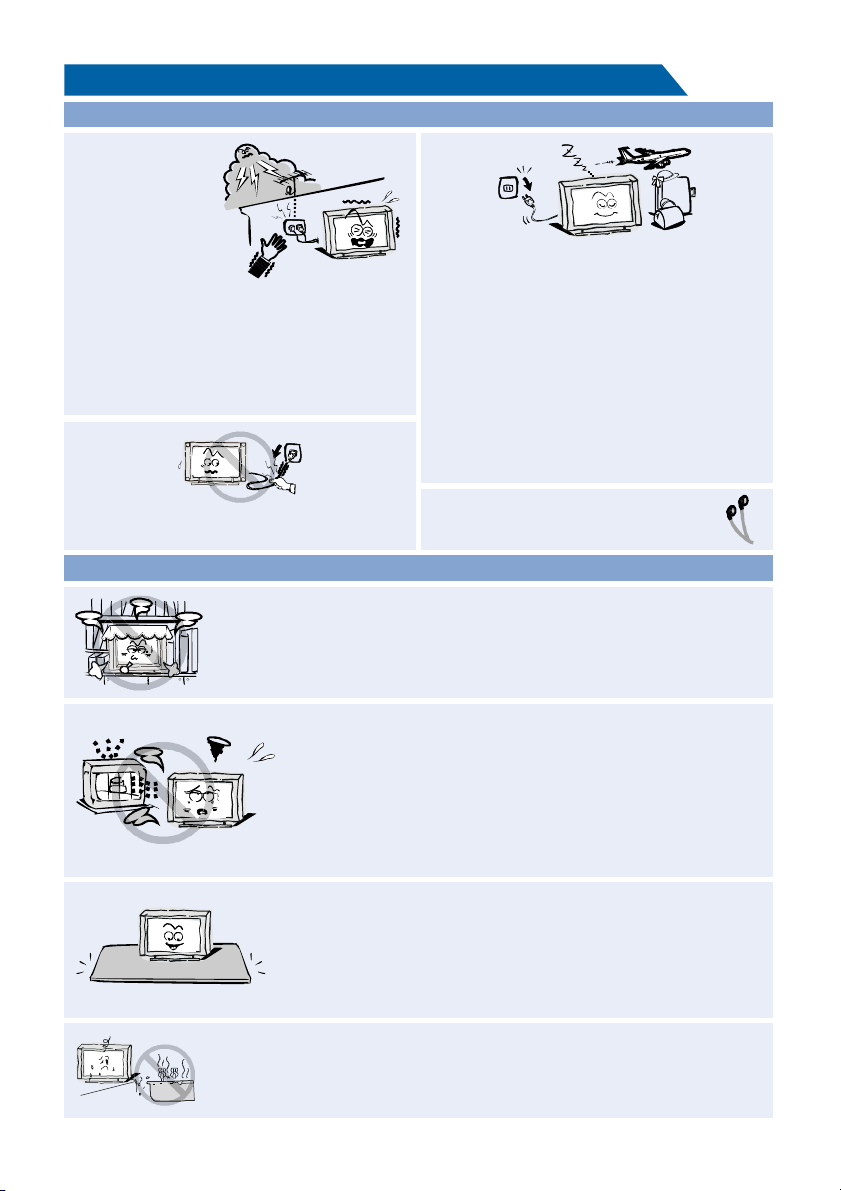
An outside antenna
system should not
be located in the
vicinity of overhead
power lines or other
electric light or power
circuits, or where it can
fall into such power
lines or circuits. When installing an outside
antenna system, extreme care should be
taken to keep from touching such power
lines or circuits as contact with them might
be fatal Ensuring the television is not .
overhanging the edge of the supporting
furniture.
When not in use
If you will not be using the TV set for several
days, the TV set should be disconnected from
the AC mains for environmental and safety
reasons. As the TV set is not disconnected from
the AC power when the TV is turned off at the
standby switch, pull the plug from the AC power
outlet to disconnect the TV completely. However,
some TV sets may have features that require the
TV set to be left in standby to function correctly.
In the case of lightning, unplug the TV set from
the outlet immediately. Never touch the antenna
wire during lightning.
Do not pull the plug out by the wire; Never
touch the plug with wet hands.
Excessive from earphones and volume
headphones can cause hearing loss.
Installation
The ventilation should not be impeded by covering the ventilation
opening with items, such as newspapers, tablecloths, curtains, etc.
At least 10 cm space should be left around the apparatus for sufficient
ventilation.
The product should be situated away from heat sources such as
radiators, heat registers, stoves, or other products
(including amplifiers) that produce heat. Place the apparatus in
such a position that the screen
is not exposed to direct sunlight. It is best to have soft indirect
lighting while watching and avoid completely dark environments
and reflection from the screen as these may cause eye fatigue.
Keep the TV set away from any equipment emitting
electromagnetic radiation.
Do not place the set on an unstable cart, stand, table or shelf. The
set may fall, causing serious personal injury as well as damage to
the product. Use only with the cart, stand, tripod, bracket, or table
specified by the manufacturer, or sold with the apparatus. An
appliance and cart combination should be moved with care. Quick
stops, excessive force, and uneven surfaces may cause the
appliance and cart combination to overturn.
Do not place this apparatus near water, for example, near a bath
tub, wash bowl, kitchen sink, or laundry tub; in a wet basement; or
a swimming pool; and the like;
solvent thinner
Important Safety Instructions and Maintenance
3
Installation
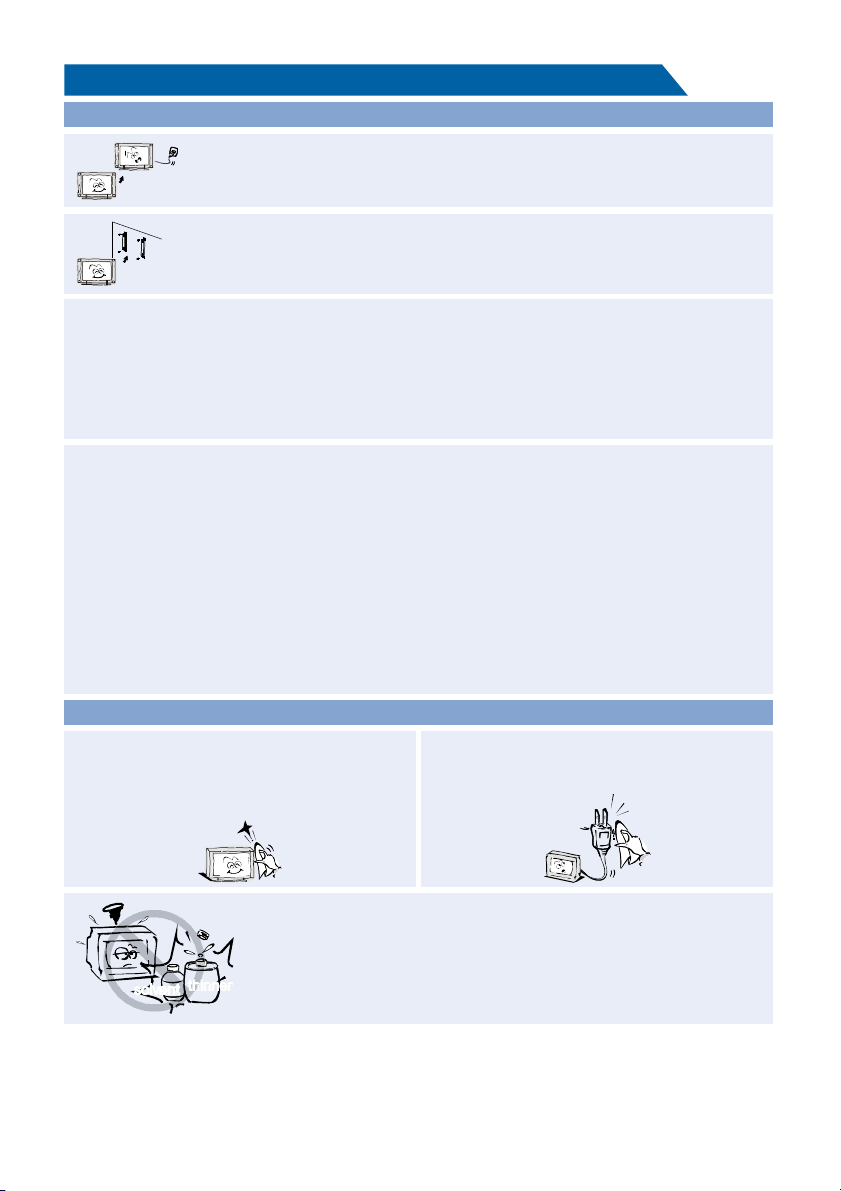
Move
When the TV being moved in from cold place, it needs some right time for dew
inside unit evaporating fully before turn on the unit;
To prevent injury, this apparatus must be securely attached to the floor/wall in
accordance with the installation instructions.
LED Screen
Although the LED screen is made with high precision technology and 99.99% or more of the
pixels are effective, black dots may appear or bright points of light (red, blue or green) may
appear constantly on the LED screen. This is a structural property of the LED screen and is not
a malfunction.If the surface of the LED panel cracks, do not touch it until you have unplugged
the AC power cord. Otherwise electric shock may result. Do not throw anything at the TV set.
The LED panel may break from the impact and cause serious injury.
Precautions When Displaying a Still Image
A still image may cause permanent damage to the TV screen.
Do not display still images and partially still images on the LED panel for more than 2 hours as it
can cause screen image retention. This image retention is also known as "screen burn". To
avoid such image retention, reduce the degree of brightness and contrast of the screen when
displaying a still image.
Watching the LED TV in 4:3 format for a long period of time may leave traces of borders
displayed on the left, right and centre of the screen caused by the difference of light emission on
the screen. Playing a DVD or a game console may cause a similar effect to the screen.
Damages caused by the above effect are not covered by the Warranty.
Displaying still images from Video games and PC for longer than a certain period of time may
produce partial after-images. To prevent this effect, reduce the 'brightness' and 'contrast' when
displaying still images.
Cleaning
Cleaning and handling the screen surface
and cabinet. Disconnect the unit from the AC
outlet before cleaning. To remove dust, wipe
gently with a soft, lint free cloth. If required
use a slightly damp cloth.
MAINS PLUG
Wipe the mains plug with a dry cloth at
regular intervals. Moisture and dust may lead
to fire or electrical shock.
Use care not to subject the TV's surfaces to detergent. (A liquid inside
the TV could lead to product failure, fire or electrical shock.)
Use care not to subject surfaces to bug repellent, solvent, thinner, or
other volatile substances as this may deteriorate the surface and finish
of the cabinet.

4
Table of Contents
Important Information
If a television is not positioned in a sufficiently stable location, it can be potentially hazardous
due to falling. Many injuries, particularly to children, can be avoided by taking simple precautions
such as:
• Using cabinets or stands recommended by the manufacturer os the television.
• Only using furniture that can safely support the television.
• Ensuring the television is not overhanging the edge os the supporting furniture.
• Not placing the television on tall furniture (for example, cupboards or bookcases) without
anchoring both the furniture and the television to a suitable support.
• Not standing the televisions on cloth or other materials placed between the television and
supporting furniture.
• Educating children about the dangers of climbing on furniture to reach the television or its
controls.
• Keep small accessories out of reach of children so they are not mistakenly swallowed.
Accessories................. 5.....................................................................................................
Introduction
Features.............................................................................................................................6
Basic Functions....... ...................................6........................................................................
Specifications......... ............................................................................................................ 7
Stand and wall-mounting instructions (optional) ................................................ 8.........
General Description
Overview of back panel ........................................................................ 9......... ....................
Overview of front panel ........................................................................ 10......... ....................
Overview of remote control ........................................................................ 11......... ..............
Installing Batteries in the Remote Control ............................................................... 14.........
External Connection
Antenna connection ........................................................................ 14......... .........................
Connecting VCR ........................................................................ 15......... ..............................
Connecting a Camcorder ........................................................................ 16......... .................
Connecting DVD Player/Set-Top Box via HDMI.............................................. 17................
Connecting Digital Audio System ........................................................................ 18......... .....
Connecting PC ........................................................................ 19......... ................................
Supporting signals ........................................................................ 19......... .........................
Basic Operations
Menu Operation................................................................................................................ 20
Menu system instruction
Picture.......... 22.....................................................................................................................
Sound................................................................................................................................ 23
Function............................................................................................................................. 24
Time .................................................................................................................................. 28
Option................................................................................................................................ 29
Lock................................................................................................................................... 30
Channel............................................................................................................................. 31
................................................................................................................33Network Setting
..............................................................................................................................36Internet
Digital Media Player
Introduction........... . .......................................................................................................... .. 40
...............Troubleshooting ................................................................................................ 41
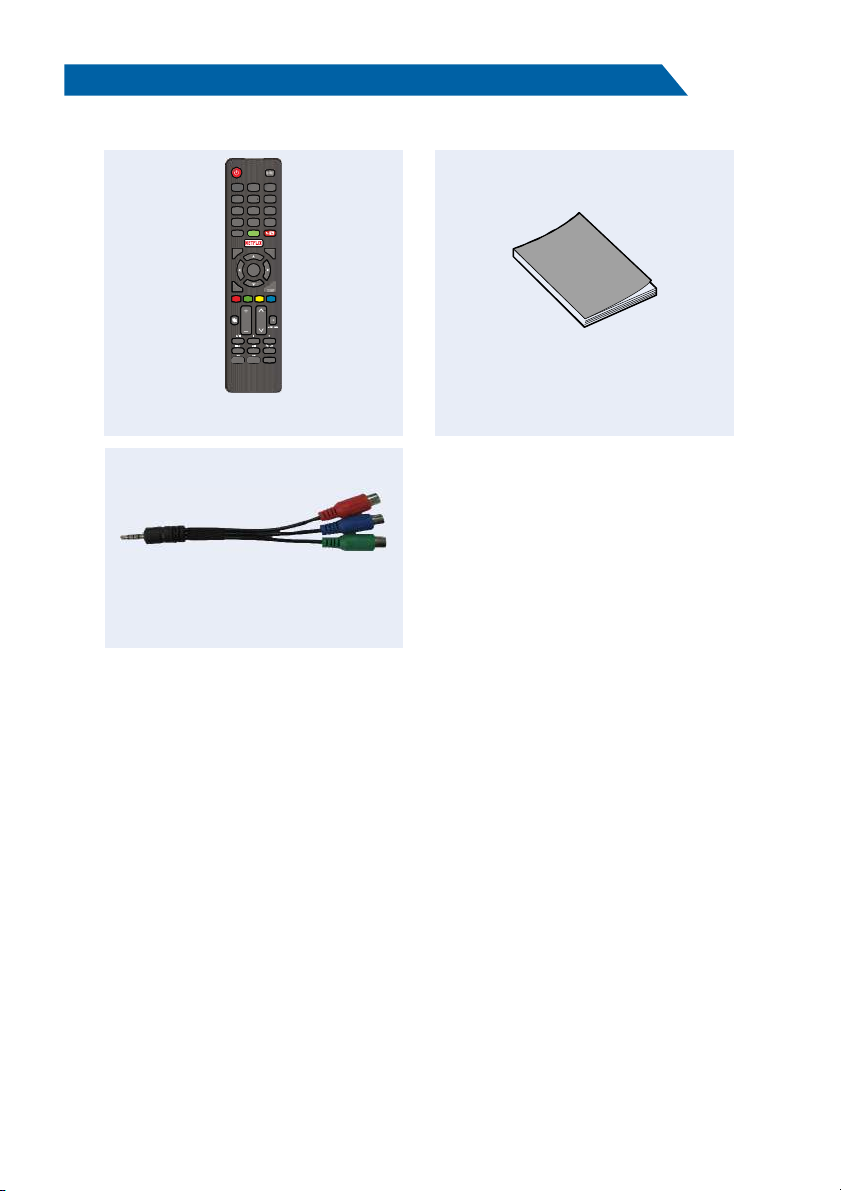
Accessories
Please make sure the following items are included with your LED TV. If any items are missing,
contact your dealer.
Remote Control
Owner’s
Instructions
5
INPU T
HOME
0
789
456
123
Q.MENU
MENU
EXIT
VOL
RECALL
BACK/
GUIDE
CH
TEXT
SU BTITL E
INFO
INDEX HOLD MIX
SIZE TIME
REVEAL C ANCEL
SUBCODE
Pg Dn
ENTER
/LIST
Mini YPbPr Cable

6
TV adopts 32" TFT LED display screen
Zero X radiation complies to green environment protection requirement
Connect to computer directly to realize TV/monitor combo.
USB 2.0
16:9 wide screen
Auto tuning and fine tuning
HDMI input
Component Compatible (480i; 480P; 576i; 576P; 720P; 1080i; 1080P)
Programmable sleep timer
Wide range voltage input
No-signal automatic power off
Introduction
Features
Basic Functions
Input terminals used for external equipment connection
1 x RF input
1 x Computer PC-RGB input
2 x USB inputs
3 x HDMI inputs
1 x COMPONENT input
1 x AV input
1 x OPTICAL output
1 x Headphone output
1 x DVB-S2 input
1 x RJ-45 NET
1 x CI input
7
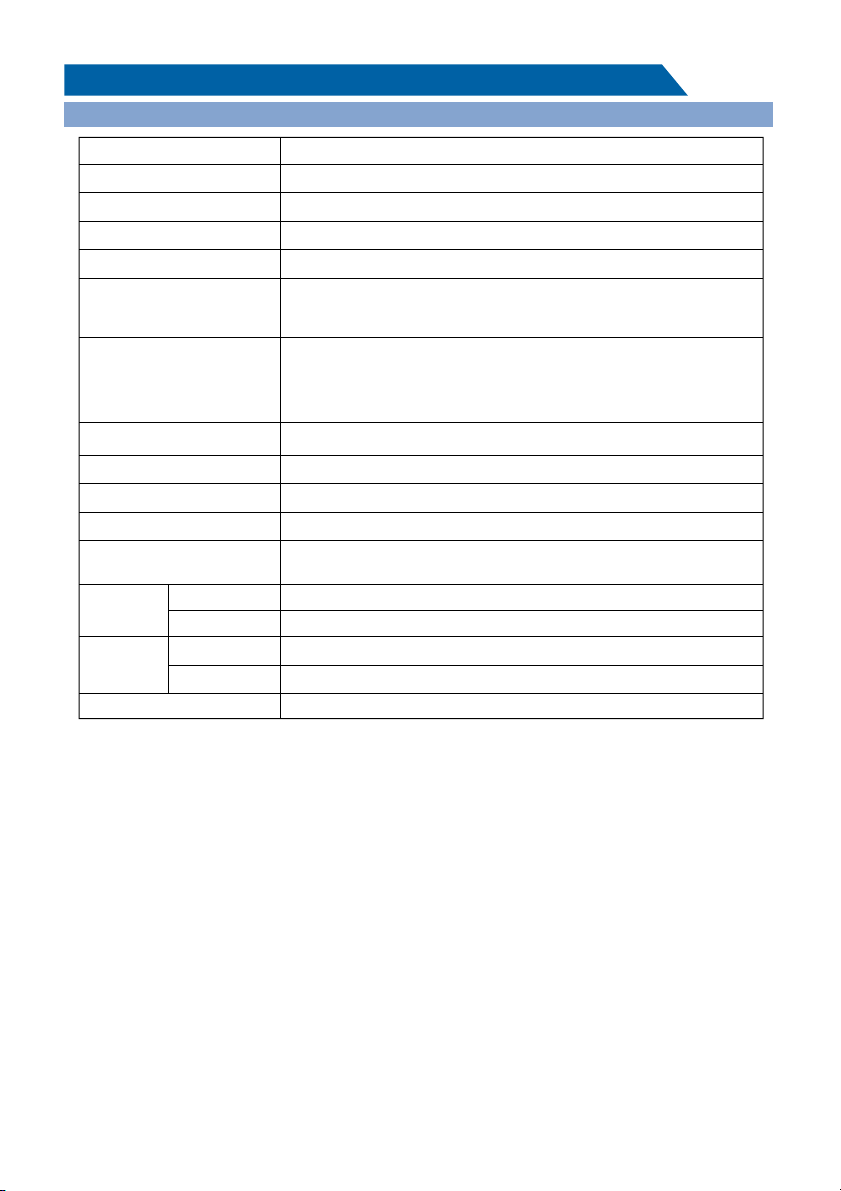
Digital: DVB-T/T2, DVB-C, DVB-S/S2
Analog: PAL: BG, I, DK,
SECAM: BG, D/K
PAL/NTSC/SECAM
NOTES:
• Design and specifications are subject to change without notice.
• Weight and Dimension shown are approximate.
1366X768
TV receive system
TV with stand
TV without stand
TV with stand
TV without stand
≤1W
Standby comsumption
Weight
(Net weight)
Dimensions
(LxWxH)
Model
LED panel resolution
≥5 X2W
Speaker output power
110-240V~, 50/60Hz
Power supply
Frequency range
Video in
Power consumption
DC 3V
(Two AAA size batteries)
Controller power
0 C-40 C
o o
Work temperature
Display size
Antenna input 75 ohms, unbalanced
32" Diagonal (max.)
KDG32MX665AN2
55W
Analog: Antenna: 46.25MHz-855.25MHz
Digital:
DVB-T/T2: 5-12,21-69
DVB-C: 113MHz~898MHz
DVB-S/S2: 950MHz-2150MHz
Introduction
Specifications
4.3Kg
4.23Kg
731.8×184.5×475.2mm
731.8×87.3×435.1mm
8
Stand and wall-mounting instructions (optional)
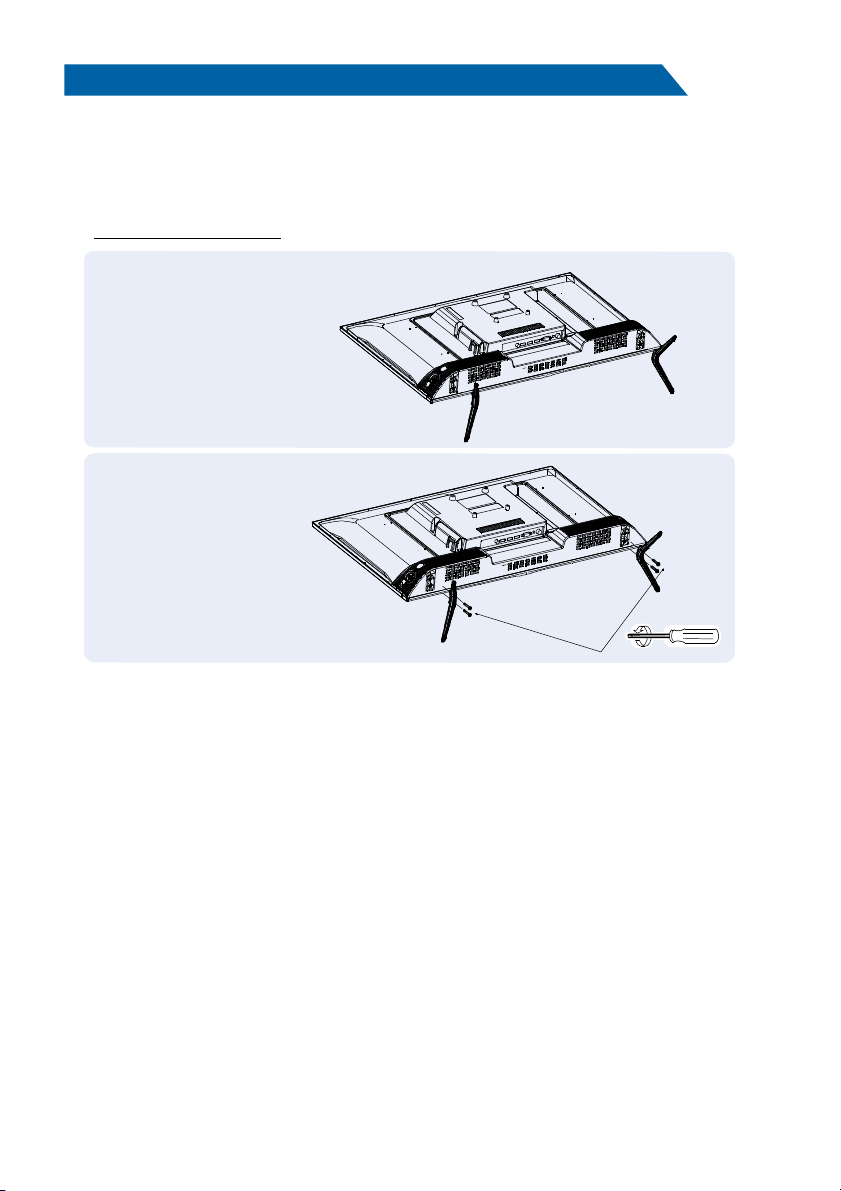
How to assemble the stand
If you need to remove or assemble the stand please read the following instructions.
- Before attaching/detaching the stand, make sure to turn off the TV.
- Before performing work, spread cushioning over the base area to lay the LED TV on.
This will prevent it from being damaged.
Assembling instruction:
Step1: Take out two stands from package,
and insert them into bottom of TV;
Step2: Take out four screws provided with
TV set and tighten them into screw
holes;
- To disconnect the stand from the TV, perform the above steps in reverse order.
Note:
4 screws for 32" model
Note: The product and illustrations in this user's manual is only for explanation purposes and may
vary depending on model.
Inhaltsverzeichnis
Andere Konka LED-Fernseher Handbücher

Konka
Konka KDG43XE559AN2 Bedienungsanleitung

Konka
Konka KUD55GT776AN Bedienungsanleitung

Konka
Konka KDG40XE530AN2 Bedienungsanleitung

Konka
Konka KUD55GT775AN Bedienungsanleitung

Konka
Konka KDG49JT542A Bedienungsanleitung

Konka
Konka KDG40MX558AN2 Bedienungsanleitung

Konka
Konka KDG32MX665AN2-B Bedienungsanleitung

Konka
Konka KUD49ST720AN Bedienungsanleitung

Konka
Konka KUD43WT808AN Bedienungsanleitung

Konka
Konka KDG40MX665AN2 Bedienungsanleitung


