
KTI Networks KVB-311 Bedienungsanleitung

KVB-311 Broadband VoIP Router
User’s Manual
Version 101a.

Preface..........................................................................................................................................V
Part I: VoIP Gateway Overview................................................................................................1
1.1 Overview................................................................................................................2
1.2 Software Specifications..........................................................................................3
1.3 Hardware Specifications.........................................................................................4
Part II: Start-UP............................................................................................................................7
2.1 Software Installation Guide ....................................................................................8
2.1.1 Default Settings of VOIP gateway............................................................................8
2.1.2 Additional Installation Requirements........................................................................8
2.1.3 Essential Configuration via Web Management interface......................................9
2.1.3.1 Save Data and Reboot .......................................................................................9
2.1.3.2 Setup Network....................................................................................................12
2.1.3.3 Application mode-Proxy/Peer-to-Peer Mode.................................................15
2.1.4 Essential Configuration via Telnet Command Line interface .............................18
2.1.4.1 Save Data and Reboot .....................................................................................18
2.1.4.2 Setup Network....................................................................................................18
2.1.4.3 Application mode-Proxy/Peer-to-Peer Mode.................................................20
2.1.5 Essential Configuration via Installation Wizard....................................................22
2.1 Special Housing Installation Guide.......................................................................23
2.1.1 Horizontal Type..........................................................................................................23
2.1.1.1...............................................................................................................................23
2.1.1.2...............................................................................................................................23
2.1.1.3...............................................................................................................................23
2.1.2 Vertical Type ..............................................................................................................24
2.1.2.1...............................................................................................................................24
2.1.2.2...............................................................................................................................24
2.1.2.3...............................................................................................................................24
Part III: Special Applications and Features........................................................................25
3.1 Behind IP-Sharing................................................................................................26
3.1.1 IP Sharing Configuration..........................................................................................26
3.1.1.1 One VOIP Gateway behind KVB-311.............................................................26
3.1.1.2 More than one VoIP gateway behind the same IP Sharing Device...........29
3.2 NAT mode (PPPoE) .............................................................................................31
3.3 Call Hold, Transfer and Forward ..........................................................................33
List of Table II

3.3.1 Call Hold – press [FLASH].......................................................................................33
3.3.2 Call Transfer – press [FLASH], then [transferring number]................................33
3.3.3 Call Forward: .............................................................................................................33
3.4 Upgrade Your VOIP GATEWAY............................................................................35
3.4.1 Upgrade via Web management interface .............................................................35
3.4.1.1 Before start.........................................................................................................35
3.4.1.2 Upgrade Version................................................................................................35
3.4.2 Upgrade via Telnet Command interface................................................................37
3.5 KVB-311 PSTN Line Application ..........................................................................39
3.5.1 PSTN Outgoing Call.................................................................................................39
3.5.1.1 Make PSTN call from TEL Phone set.............................................................39
3.5.1.2 PSTN Backup.....................................................................................................39
3.5.2 PSTN Incoming Call.................................................................................................39
3.5.2.1 VoIP TEL is busy................................................................................................39
3.5.2.2 VoIP TEL is available ........................................................................................39
3.5.3 VoIP Outgoing Call....................................................................................................39
3.5.4 VoIP Incoming Call....................................................................................................39
3.6 Hotline mode........................................................................................................40
Part IV: Web Management Interface.....................................................................................41
4.1 Login and welcome screen...................................................................................42
4.2 Save and Reboot .................................................................................................43
4.3 Web Management Configuration..........................................................................44
4.3.1 Network Interface......................................................................................................44
4.3.2 SIP Information Screen............................................................................................46
4.3.3 System Configuration...............................................................................................48
4.3.4 PPPoE Configuration Screen..................................................................................49
4.3.5 Voice Configuration Screen.....................................................................................50
4.3.6 Phone Configuration Screen...................................................................................51
4.3.7 Support Configuration Screen.................................................................................53
4.3.8 Phone Book Configuration.......................................................................................54
4.3.9 Prefix Configuration Screen....................................................................................55
4.3.10 DSCP Configuration Screen.................................................................................56
4.3.10 Password Configuration Screen...........................................................................58
4.3.11 ROM Configuration Screen...................................................................................59
4.3.12 Flash Clean Screen................................................................................................60
4.3.13 Commit Configuration Data Screen.....................................................................61
List of Table III

4.3.14 Reboot VOIP GATEWAY System screen............................................................62
Part V: Telnet Command Interface .......................................................................................63
5.1 Login ....................................................................................................................64
5.2 Save and Reboot .................................................................................................64
5.3 System Commands Overview..............................................................................65
5.3.1 [help] ...........................................................................................................................65
5.3.2 [quit].............................................................................................................................66
5.3.3 [debug]........................................................................................................................66
5.3.4 [reboot]........................................................................................................................67
5.3.5 [commit]......................................................................................................................68
5.3.6 [ifaddr].........................................................................................................................68
5.3.7 [time] ...........................................................................................................................71
5.3.8 [ping] ...........................................................................................................................71
5.3.9 [pbook]........................................................................................................................72
5.3.10 [pppoe]......................................................................................................................74
5.3.11 [flash].........................................................................................................................75
5.3.12 [sysconf]...................................................................................................................76
5.3.13 [sip]............................................................................................................................78
5.3.14 [security]...................................................................................................................81
5.3.15 [voice] .......................................................................................................................82
5.3.16 [support] ...................................................................................................................84
5.3.17 [tos] ...........................................................................................................................85
5.3.18 [phone]......................................................................................................................86
5.3.19 [bureau] ....................................................................................................................90
5.3.20 [rom]..........................................................................................................................91
5.3.21 [passwd]...................................................................................................................94
5.3.22 [prefix].......................................................................................................................95
List of Table IV

Preface
About this User’s Manual
This user’s guide includes specifications, installation guide, web management and
command line configuration interface for the KVB-311 VoIP Gateway.
Revision History:
Version Date Author Modified Contents
1.0 Sep., 17th, 2004 Sabrina 1st Revision for KVB-311 SIP Gateway.
1.1 Dec., 4th, 2004 Eason 1. Add “Prefix” function in CLI and Web
Management Interface.
2. Modify the PSTN line application.
3. Modify “call id” function.
4. Add the description of Installing from
Installation Wizard.
5. Modify the description of Forward function
1.2 Feb, 2005 Eason
Revision for KVB-311 SIP Gateway for Rom
Application version 101a.
List of Table V

KVB-311 Broadband VoIP Router User Manual
Part I:VoIP Gateway Overview
This part introduces the software/hardware specifications and default settings of the
Gateway.
- 1 -

KVB-311 Broadband VoIP Router User Manual
1.1 Overview
The KVB-311 is a one-port telephone extension and three ports SOHO Router to
IP network gateway. It provides Data transfer by 10/100Mbps, telephone services and
T.38 fax over IP network with easily operation and configuration. It is most suitable for
SOHO and small-to-medium enterprise in Internet communication environment.
The KVB-311 provides IP telephone number for end users with FreeTalk voice
service. User can make phone call via Internet now. No more long distance and
international telephony fee! It also connects three computers without another IP
sharing as showed as following diagram.
The KVB-311 provides two telephone numbers that one is IP telephone number
and the other is PSTN telephone number in one device for end users. You can make
phone call via Internet or PSTN in one telephone set now. No more long distance and
international telephony fee! Especially, User still can make phone call when external
power is failure.
The KVB-311 also can connect three computers with embedded IP sharing and
DHCP server function.
- 2 -

KVB-311 Broadband VoIP Router User Manual
1.2 Software Specifications
KVB-311 Gateway Features
Provide Voice over IP and Fax over IP features.
SIP RFC 3261 compliance
Built-in NAT/IP sharing function
Provided call features: Hold, forward and transfer
Automatic FAX detection (Support T.38 protocol)
Codec: G.711 a/μlaw, G.723.1, G.729A
PPPoE connection
VAD (Voice Activity Detection), CNG (Comfort Noise Generate)
G.168/165 echo cancellation
FSK and DTMF Caller ID
Provide both IP telephone number and PSTN telephone number in one
device for end users
PSTN backup: user still can make phone call when external power is failure
Audio feature
Codec: G.711 a/μlaw, G.723.1 (6.3kbps), G.729A
VAD (Voice Activity Detection)
CNG (Comfort Noise Generation)
G.168/165-compliant adaptive echo cancellation
Dynamic Jitter Buffer
Bad Frame Interpolation
Voice/DTMF Gain Settings
System Monitoring
System status (WAN, LAN, TEL, Status, Power)
Remote Firmware Upgrade
You can use FTP/TFTP to perform firmware upgrade for the VOIP Gateway from
a remote location.
Security
Password protection for system management
Built-in NAT function.
Certification
CE, FCC
- 3 -
KVB-311 Broadband VoIP Router User Manual
1.3 Hardware Specifications
Chassis
190mm(W) x 110mm(D) x 51.5mm(H)
Weight (unit): 0.3 kg
Interface
Four 10/100 Base-T Ethernet RJ-45 ports (Auto LAN MDI/MDIX).
Input AC 100V-240V, Output DC 12V.
Two RJ11 Telephone Port.
Special Housing
The plastic housing can be adjustable by manual (Vertical type or Horizontal
type)
Environment
Operational Humidity: 10 to 90 % (Non-condensing)
Operational Temperature: 0 to +40 °C
Storage Humidity: 10 to 90 % (Non-condensing)
Storage Temperature: -10 to +50 °C
Front Panel
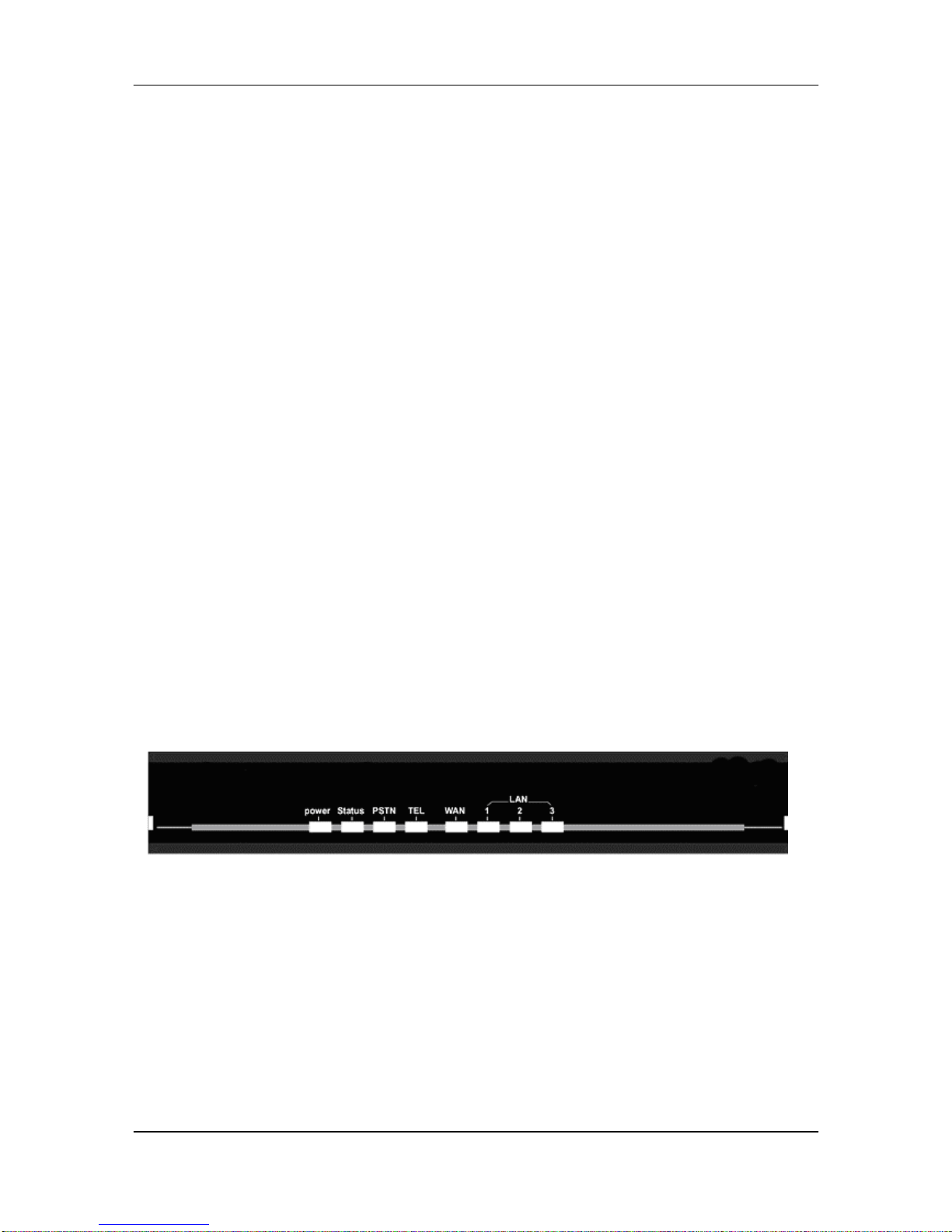
The LEDs on the front panel indicate the operational status of the Gateway.
Power (Green):
(1) Light on: The gateway is connected with power adapter correctly and
power on.
(2) Light off: The gateway is not connected with power adapter correctly or
not power on.
Status (Green):
(1) Light on: The gateway is under Proxy mode and successfully register to
Proxy.
- 4 -
KVB-311 Broadband VoIP Router User Manual
(2) Light off: Under Peer-to-Peer mode.
(3) Light Blanking: The gateway is under Proxy mode and not successfully
registers to the Proxy.
TEL (Orange):
(1) Light Blinking: The IP side has incoming call.
(2) Light On: The IP side is in communication.
(3) Light Off: IP Line of gateway is in standby mode.
WAN/LAN (Green):
(1) Light on: Ethernet port successfully connected with network.
(2) Light Blanking: Ethernet port is transmitting or receiving data.
PSTN (Orange):
(1) Light Blinking: The IP side has incoming call.
(2) Light On: The PSTN side is in communication.
(3) Light Off: PSTN Line of the gateway is in standby mode.
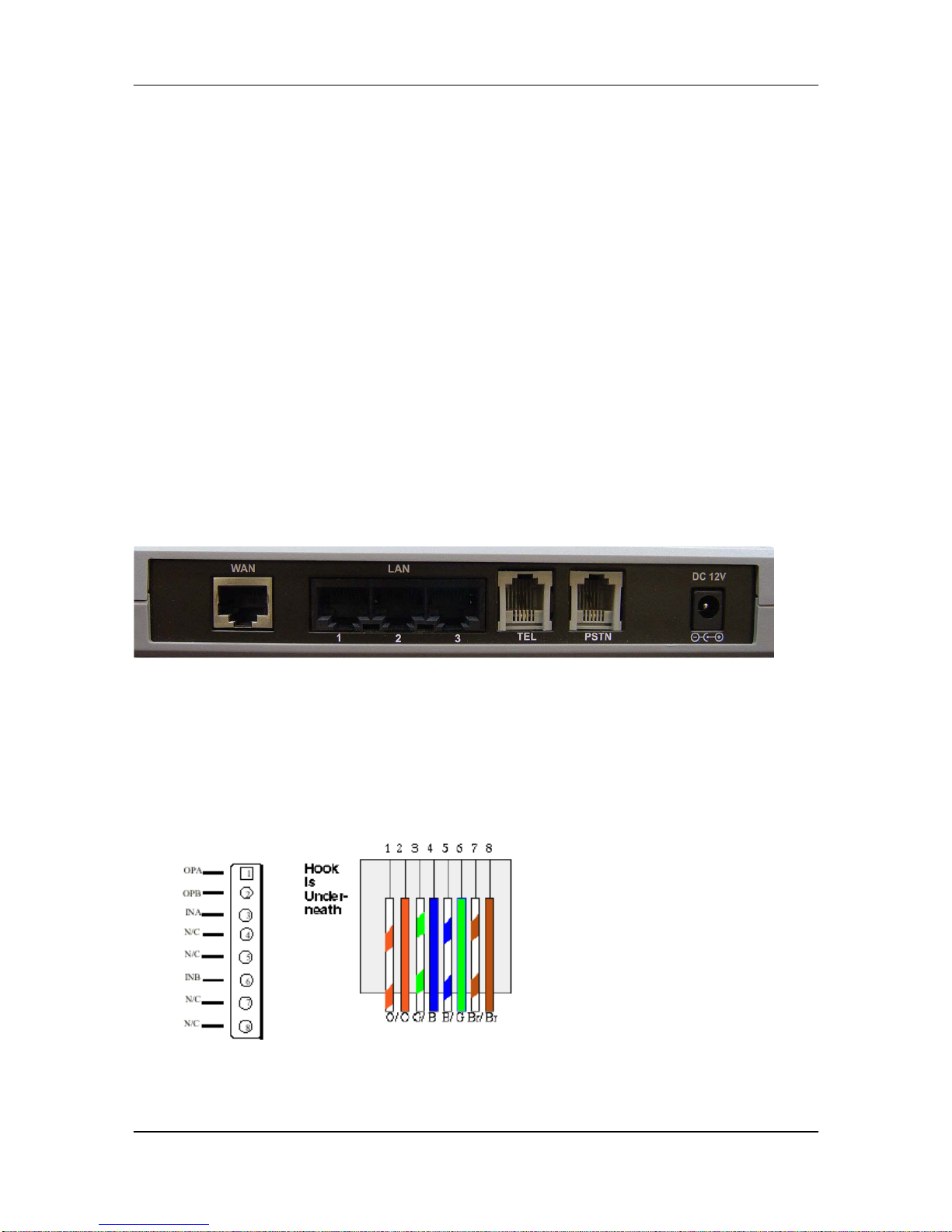
Back Panel
Ethernet Port:
Ethernet port is for connecting VoIP Gateway to network, transmit rate
supports 10/100 Base-T.
- 5 -
Inhaltsverzeichnis
Andere KTI Networks WLAN-Router Handbücher


