
LEAD dynamic WCC Bedienungsanleitung

VERSION 2.1 10/15
BEDIENUNGSANLEITUNG
OPERATING MANUAL
MANUEL D’UTILISATION
HANDLEIDING
BRUKSANVISNING
NÁVOD KOBSLUZE
NÁVOD NA POUŽITIE
INSTRUCŢIUNI DE UTILIZARE
WALL CONTROL DYNAMIC COLOR
WCC
WCC Art. Nr. 70100015
ON / OFF
RUNNING MODERUNNING MODE
COLOR WHEEL
4 ZONES / SCENES

DEUTSCH
Vielen Dank, dass Du Dich für ein Produkt der LEAD
energy AG entschieden hast. Falls Du unseren
Service erreichen möchtest, sind wir für Dich auf
unserer Homepage und per E-Mail erreichbar.
?
service@lead-energy.com
www.lead-energy.com
LEAD ENERGY AG Am Stadtbad 37 45219 Essen-Kettwig Irrtümer und Änderungen vorbehalten Informationen/ technischer Support: www.lead-energy.com
LN
110V-230VAC
N
L
Bestimmungsgemäße Verwendung Hinweis
Beachte vor der Installation zwingend die beilie-
genden Warnhinweise!
Diese Wandsteuerung ist Zubehör zu den steuer-
baren LED DYNAMIC COLOR Produkten der Marke
LEAD DYNAMIC. Die Wandcontroller sind für den
Einbau in übliche Schalterdosen mit einem Durch-
messer bzw. Schraubenabstand von 60 mm gedacht.
Nicht zum Einbau in Schalterleisten gedacht.
Montage
1
N
L
DEUTSCH
LEAD ENERGY AG Am Stadtbad 37 45219 Essen-Kettwig Irrtümer und Änderungen vorbehalten Informationen/ technischer Support: www.lead-energy.com
1 x
On
+
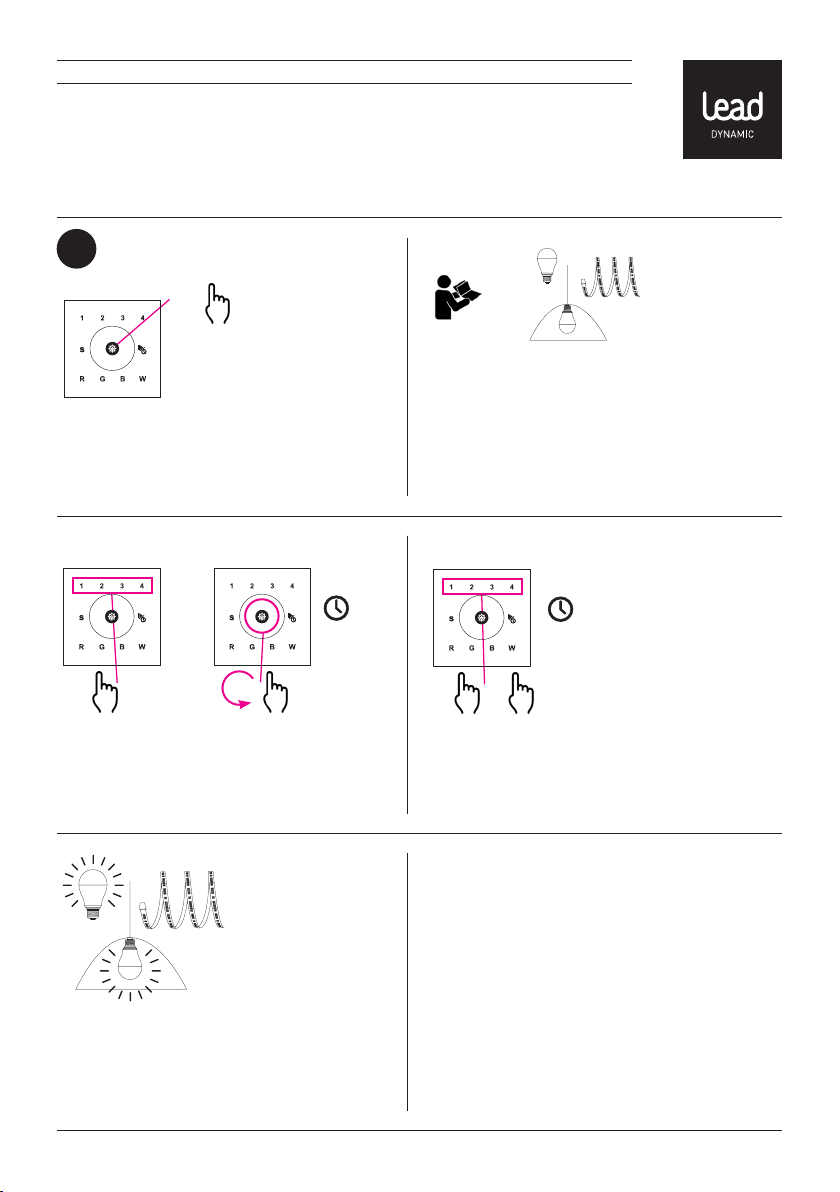
2.3.a Drücke auf einen der Knöpfe 1-4 um die
Leuchte dieser Zone zuzuordnen und bestätige
mit einem Wisch über das Farbrad. Schließe den
gesamten „Lernen“–Vorgang innerhalb von 15
Sekunden ab.
Lernen-Funktion 1
2 x
Lernen-Funktion 2
Installation
2
15 sec.
2.1 Schalte Deinen Wandcontroller ein.
2.2 Beachte die Schritte zur Installation aus der
Bedienungsanleitung Deines LED DYNAMIC COLOR
Produktes der Marke LEAD DYNAMIC. Und starte
die „LERNEN“-Funktion auf Deinem LED DYNAMIC
COLOR Produkt. Wenn es über einen „Lernen“-Knopf
verfügt drücke den Knopf und befolge die Anwei-
sungen in Punkt 2.3.a. Ansonsten schalte Dein Produkt
ein und fahre mit dem Punkt 2.3.b fort.
2.4 Dein Leuchte blinkt einmal zur Bestätigung,
dass es der gewählten Lichtzone zugewiesen wurde
und nun mit Deinem Wandcontroller ferngesteuert
werden kann. Wiederhole den „Lernen“-Vorgang,
wenn Deine Leuchte nicht blinkt.
2.3.b Drücke innerhalb von 2 Sekunden hinterei-
nander 2x kurz und dann 1x lange auf einen der
Tasten 1-4 um die Leuchte dieser Zone zuzuordnen.
Schließe den gesamten „Lernen“-Vorgang inner-
halb von 15 Sekunden ab.
15 sec.
1 x

DEUTSCH
LEAD ENERGY AG Am Stadtbad 37 45219 Essen-Kettwig Irrtümer und Änderungen vorbehalten Informationen/ technischer Support: www.lead-energy.com
3.2 Dimmen
Du dimmst Deine Leuchte indem Du Sie mit einer
Taste 1-4 anwählst und anschließend so lange
auf die Multifunktionstaste drücks, bis Du Deinen
Dimmwert erreicht hast.
3.3 Farben steuern
Du veränderst dich Lichtfarbe Deiner Leuchte
indem Du Sie mit einer der Tasten 1-4 anwählst
und anschließend über das Farbrad wischt.
Steuerung
3
3.1 EIN/AUS
Drücke für mehr als 2 Sekunden auf einen der
Knöpfe 1-4 um die Leuchten, die Du dieser Zone
zugewiesen hast, ein- oder auszuschalten. Ein
blaues Licht signalisiert Dir eine angeschaltete und
ein gelbes eine ausgeschaltete Zone. Du kannst
einer Zone beliebig viele Leuchten zuweisen.
> 2 sec.
3.4 Lauflicht
Du startest eines von zehn Lauflicht-Programmen
für Deine Leuchte indem Du sie mit einer der Tasten
1-4 anwählst und anschließend kurz auf die Lauf-
licht-Taste drückst. Wenn Du es nochmal ein- und
ausschaltest, startet das nächste Programm. Mit
einem langen Druck auf diese Taste kannst Du die
Geschwindigkeit des Lauflichts verändern.

DEUTSCH
LEAD ENERGY AG Am Stadtbad 37 45219 Essen-Kettwig Irrtümer und Änderungen vorbehalten Informationen/ technischer Support: www.lead-energy.com
3.5 Szenen speichern
Du kannst jeder Deiner Zonen bis zu 4 verschiedene
Szenen zuweisen. Hierzu wählst Du eine Zone 1-4,
dann die gewünschten Einstellungen und spei-
cherst es als Szene ab, indem Du die Szenentaste
„S“ länger als 2 Sekunden gedrückt hältst (Status
Led: Lila) und dann eine Taste 1-4 drückst. Deine
Leuchte blinkt einmal zur Bestätigung.
3.6 Szenen abrufen
Um eine gespeicherte Szene abzurufen wähle erst die
Zone mit der Taste 1-4, dann die Szenentaste „S“ und
anschließend die gespeicherte Szene mit der Taste 1-4.
3.6 Farbe wählen
Du kannst entweder über das Farbrad stufenlos
zwischen 16 Millionen Farben wählen oder über die
Tasten R, G, B und W die entsprechenden Farben
direkt einstellen.
1. 2. 1. 2.
> 2 sec.

ENGLISH
Thank you for choosing a product from LEAD energy
AG. If you would like to get in touch with our service
team, please contact them via our website or by
e-mail.
?
service@lead-energy.com
www.lead-energy.com
LEAD ENERGY AG Am Stadtbad 37 45219 Essen-Kettwig Subject to errors and amendments Information / Technical support: www.lead-energy.com
LN
110V-230VAC
N
L
Intended use Note
Please observe the warnings prior to installation.This remote control is an accessory for the control-
lable LED DYNAMIC COLOR products in the LEAD
DYNAMIC range. The wall controllers are designed
for installation in standard switch boxes with a diam-
eter or screw distance of 60 mm. Not designed for
installation in switch panels.
Mounting
1
N
L

ENGLISH
LEAD ENERGY AG Am Stadtbad 37 45219 Essen-Kettwig Subject to errors and amendments Information / Technical support: www.lead-energy.com
1 x
On
+
2.3.a Press one of the buttons 1-4 to assign the
luminaire to the respective zone and confirm by
swiping the colour wheel. Complete the entire
‘learning’ process within 15 seconds.
Learn-Function 1
2 x
Learn-Function 2
Installation
2
15 sec.
2.1 Switch your wall controller on.
2.2 Note the installation steps from the operating
manual for your LED DYNAMIC COLOR product from
LEAD DYNAMIC. Start the ‘LEARN’ function on your
LED DYNAMIC COLOR product. If it has a ‘LEARN’
button, press the button and follow the instructions in
Section 2.3.a. Otherwise switch your product on and
continue with Section 2.3.b.
2.4 Your luminaire will flash once to confirm that it
has been assigned to the selected zone and can now
be controlled using your wall controller. Repeat the
‘Learn’ process if your luminaire does not flash.
2.3.b Press one of the keys 1-4 twice quickly within a
space of 2 seconds and then once for a longer period
to assign the luminaire to this zone. Complete the
entire ‘learning’ process within 15 seconds.
15 sec.
1 x

ENGLISH
LEAD ENERGY AG Am Stadtbad 37 45219 Essen-Kettwig Subject to errors and amendments Information / Technical support: www.lead-energy.com
3.2 Dimming
Dim your luminaire by selecting one of the buttons
1-4 and then pressing the multi-function button
until you have reached your dimming level.
3.3 Control colours
Change the colour of your luminaire by selecting a
zone 1-4 and then swiping over the colour wheel.
Control
3
3.1 ON/OFF
Press one of the buttons 1-4 for more than 2 sec-
onds to switch the luminaires you have assigned to
this zone on or off. A blue light signals a switched on
zone and a yellow light signals a switched off zone.
You can assign any number of luminaires to a zone.
> 2 sec.
3.4 Chaser light
Start one of ten chaser light programmes for your
luminaire by selecting them using one of buttons 1-4
and then pressing briefly on the chaser light button.
If you switch on and off again, the next programme
starts. You can change the speed of the chaser light
by holding this button down for longer.

ENGLISH
LEAD ENERGY AG Am Stadtbad 37 45219 Essen-Kettwig Subject to errors and amendments Information / Technical support: www.lead-energy.com
3.5 Save scenes
You can assign each of your zones up to 4 different
scenes. Select a zone 1-4 then the required settings
and save it as a scene by holding down the scene
button ‘S’ for at least 2 seconds (Status Led: purple)
and then press a button 1-4. Your luminaire flashes
once as confirmation.
3.6 Retrieve scenes
To retrieve a saved scene, first select zone 1-4, then the
scene button ‘S’ and then the saved scene with button
1-4.
3.6 Select colour
You can select between 16 million colours on a con-
tinuously variable basis using the colour wheel or
set the appropriate colour directly using the keys
R, G, B and W.
1. 2. 1. 2.
> 2 sec.

FRANÇAIS
Merci d’avoir choisi un produit LEAD energy AG. Si
vous avez besoin de notre SAV, vous pouvez nous
joindre sur notre page d’accueil et par e-mail à
l’adresse suivante:
?
service@lead-energy.com
www.lead-energy.com
LN
110V-230VAC
N
L
Utilisation conforme Remarque
Avant l‘installation, veuillez observer impérativement
les avertissements énoncés!
Cette commande murale est un accessoire des
produits contrôlables LED DYNAMIC COLOR de la
marque LEAD DYNAMIC. Les contrôleurs muraux
sont conçus pour la pose dans des boîtiers d’inter-
rupteur courants d’un diamètre ou d’un espacement
de vis de 60mm. Non conçu pour la pose dans des
bandeaux de commutateurs.
Montage
1
N
L
LEAD ENERGY AG Am Stadtbad 37 45219 Essen-Kettwig Sous réserves d‘erreurs ou modifications Informations/assistance techniquecom: www.lead-energy.com
Dieses Handbuch passt für folgende Modelle
1
Inhaltsverzeichnis
Sprachen:
Andere LEAD dynamic Controller Handbücher


