
Leptons ST314 Bedienungsanleitung

1
User Manual
Rel. 1.2
DATAPROCESS EUROPE S.p.A.
Viale Dell’Artigianato, 19
Binasco (MI)
Tel. +39- 02- 900221
Fax +39- 02- 90091353
UV515 GB

2
1. GENERAL INSTRUCTIONS............................................................................................................................3
2. DESCRIPTION OF THE PRINTER.................................................................................................................4
3. UNPACKING AND INSPECTION...................................................................................................................6
4. LOADING THE LABEL ROLL AND THE RIBBON......................................................................................7
5. CLEANING THE PRINTHEAD AND MECHANICAL PARTS.....................................................................9
6. THE TEST LABEL..........................................................................................................................................10
7. AUTOCALIBRATION....................................................................................................................................11
8. CALIBRATION...............................................................................................................................................11
9. TECHNICAL CHARACTERISTICS..............................................................................................................12

3
1. GENERAL INSTRUCTIONS
This manual should be read to take advantage of all the features of the printer and should then be kept for
future reference.
It is important to undertake periodic maintenance and, if necessary, any repairs should be undertaken at our
Head office or authorised Distributors, as they have the necessary equipment and properly trained staff to
undertake the work in accordance with instructions received from the factory.
DATAPROCESS EUROPE S.p.A. cannot be held responsible for any incorrect repairs or intervention by
unauthorised technicians nor for any damage resulting from the use of non original parts.
DATAPROCESS EUROPE S.p.A. is not responsible for any damage which can result, directly or indirectly,
to persons or things from an installation or use of the ST314 printer which is not in accordance with the
instructions contained in this manual.
WARNING
DO NOT DISMANTLE AND DO NOT MODIFY. Such actions can cause damage, fires or create electric
shocks.
USE REPLACEMENT FUSES WITH THE CORRECT AMPS. Otherwise a fire or electric shocks could
result.
STOP USING THE PRINTER THE MOMENT A PROBLEM ARISES. When a problem arises, for
example, any object getting into the printer, smoke or strange smells, stop using the printer
immediately and contact the Distributor who supplied the printer. Not doing so could create
additional damage and injury.
DO NOT INSERT ANY OBJECTS IN THE OPENINGS OR GAPS. Any such action could damage the
printer or result in injury.
DO NOT OBSTRUCT THE VENTILATORS. Blocking the ventilators results in overheating and could
lead to fires.
WARNING
This symbol and the “WARNING” message are used to indicate important instructions for the use of the printer.
Serious damage can be caused by not adhering to these instructions.

4
2. DESCRIPTION OF THE PRINTER
The ST314 is a 4 inch thermal transfer and thermal direct printer having the following main characteristics:
•Ease of use. Thanks to the driver which allows for it to be used with any Windows application.
•Small footpad. The smallest industrial 4 inch printer with a label roll of 150mm. diameter and
300metres of ribbon.
•Robustness. Housing and mechanical parts all in metal to meet the stress found in industrial
environments.
There is no need for special equipment or knowledge to install the printer however, to ensure that all security
aspects are covered, the instructions in Chapter 1 must be adhered to,
The use of the printer is very easy and does not require any preliminary operations other than the loading of
the label roll and ribbon as shown in the relevant paragraphs.
The flap should be opened before
raising the cover.
The diagram below shows the rear
panel of the printer. The standard
model contains the power point and
serial port.
Cover
Flap
Panel
RS232
WARNING
Use only similar fuses

5
1. Rubber roller.
2. Ribbon rewind roller.
3. Label unwinder roller.
4. Paper guide roller.
5. Printhead raising lever.
6. Backing paper rewind roller.
7. Paper positioning guide.
8. Ribbon unwinder roller.
9. Thermal printhead.
10. Fixing fork for backing paper and
ribbon.
11. Pin for fixing ribbon roll rewind.
12. Label roll flange.
1
2
3
4
5
6
7
8
9
10
11
12

6
3. UNPACKING AND INSPECTION
Open the carton and make sure that the following items are included for the standard printer.
Qty. Description
1User manual
1ST314 printer
1Power supply lead
2Label roll flange
1Ribbon roll rewind pin
1Fixing fork for ribbon
1Fixing fork for backing paper
WARNING
ENSURE THAT THE USER MANUAL IS IN THE CARTON AS THIS IS AN INTEGRAL PART OF SAFETY
REGULATIONS.
Keep all of the packaging materials and carton as these will be necessary if the printer has to be transported or shipped
at a future date.
Inspect the printer for any damage during transport and in particular :
•Check the external parts of the printer
•Open the cover and check for any internal damage
In the event of any damage:
1. Notify the transporter immediately of any damage.
2. Keep all of the packaging materials for inspection by the transporter.
3. Prepare a report detailing the damage and the transporter used and send a copy, for information purposes, to
DATAPROCESS EUROPE S.p.A. and / or the Distributor.
WARNING
DATAPROCESS EUROPE S.p.A is not responsible for any damage during transport and will not repair the printer
“under warranty”

7
4. LOADING THE LABEL ROLL AND THE RIBBON
Load the label roll as follows:
1. Remove the ribbon roll flange (12)
2. Load the label roll onto the unwinder (3)
3. Feed the labels under the label guide roller (4)
4. Raise the printhead by using the printead raising lever (5)
5. Feed the labels under the roll positioning guide (7) and between the thermal printhead (9) and the rubber roller (1)
making sure that the paper goes under the end-paper photosensor (13) and in between the photosensor prongs (14)
If the printer is to be used in peel-off
mode, the backing paper is rewound on
the roller (6)
To load the ribbon:
1. Load the ribbon (16) onto the
unwinder (8)
2. Feed the ribbon under the printhead
after having raised it and make sure that
it is evenly spread over the rollers (17),
(18), (19) as shown in the following
picture.
3. Ensure that the ribbon is positioned
in between the end ribbon sensor (15)
and the roller (17).
So that the ribbon is rewound without
problems, the rollers (17), (18), (19)
must move freely. If this is not the case
remove the obstruction.
14 13
15
16
17
18
6
3
4
5
7
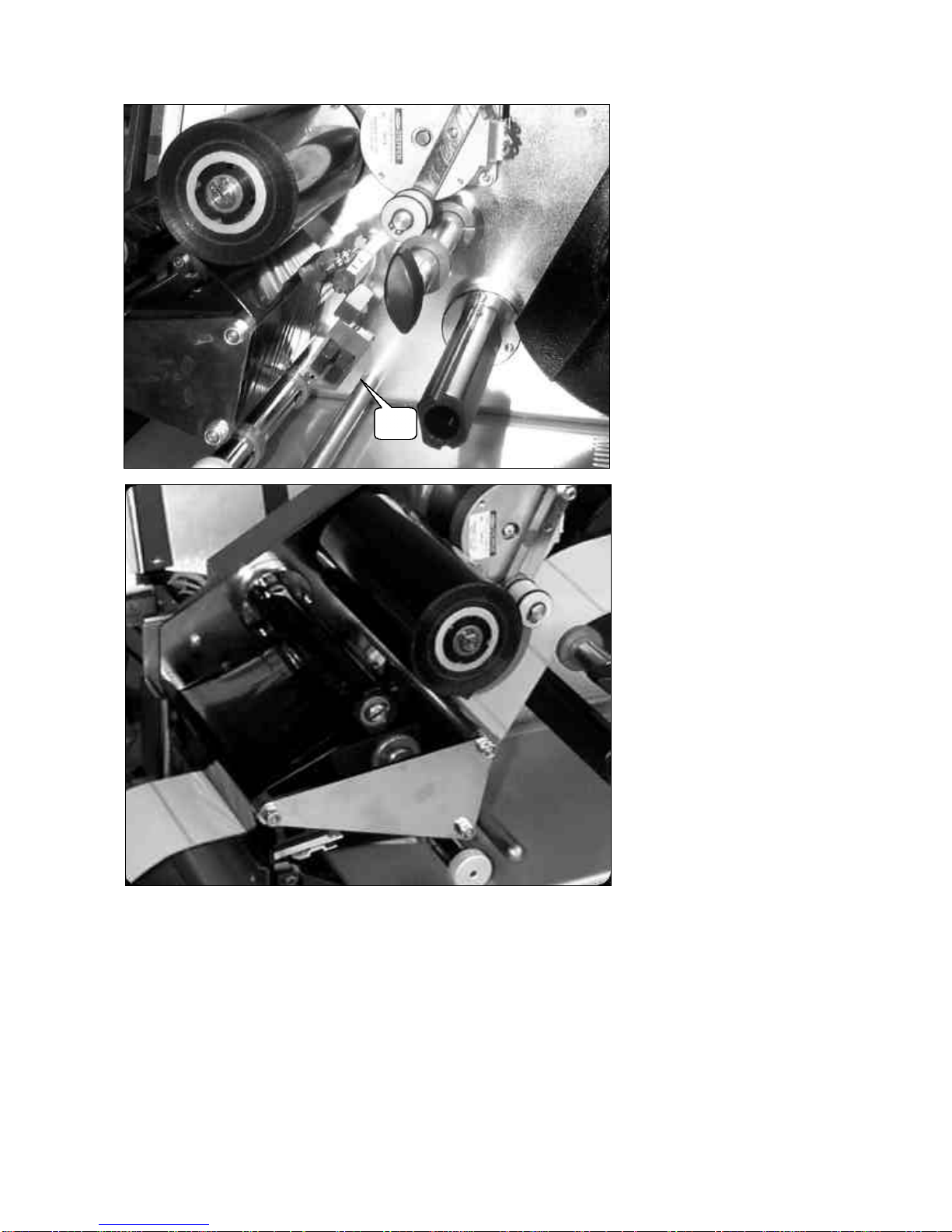
8
The picture at the side shows the
ribbon before it is fed under the
thermal printhead.
After feeding it under the
printhead the ribbon must be
rewound on the ribbon rewinder
(2).
If, in rewinding the ribbon on the
roller, the friction spring is loaded,
it will turn and unwind the ribbon
when released.
To avoid this happening:
1.Raise the printhead from the
rubber roller.
2.Switch the printer on before
starting to place the ribbon on the
rewinder.
3.After rewinding the ribbon and
loading the spring, put the printer
OFF-LINE and press FEED.
4.The roller can now be released.
This procedure will start the motor
which will automatically rewind
the ribbon.
2

9
5. CLEANING THE PRINTHEAD AND MECHANICAL PARTS
To maintain a good print quality it is necessary to periodically clean all the mechanical parts which are in contact with
the ribbon and label roll. This is because the ribbon and the label roll leave deposits which create a resistance to the
free moving of the labels. The time intervals between cleaning are dependent on the working environment and the
quality of the ribbons and labels. The cleaning should be done with a soft cloth soaked in alcohol. This cloth should be
passed under the printhead in a left to right direction making sure that it is not scratched with any sharp objects.
The other parts which should be cleaned are :
1. the rollers ( 17), (18), (19)
2. the rubber roller (1)
3. the paper positioning guide (7)
4. the shaft (20)
The alcohol soaked pad is applied
to this area in an action from left
(Sx) to right (Dx)
Dx
Sx
19
17
181
20
7

10
6. THE TEST LABEL
Every time the printer is switched on it will print a label with a whole series of data on the status of the printer. The
following is a sample of a test label and the most important points are explained. The Programming Manual gives a
complete description of each of the values contained in the test label.
ST314 E1.4 00000
25 066 003 047
07:47:43 Mer 08-Mar-2000
>T314210423792B583808100004390439 Ymax:297 mm. Mem:512 kb
>S64001040101000 >B28N1 >A00 >C/ >L000
P150150255255255 P150H0256
G00330000N00000000 *02
K1001J1510V08105600 PWM:623 – 20.49 mV.
$&%0000000000000000
The effective print power is different to that set if the temperature control is activated. Activating the temperature
control continually regulates the printing power.
The Programming manual gives an extensive explanation of the significance of all of the above parameters.
It is advisable to keep a test label once the printer has been installed . This will be useful in the event that the printer
configuration changes for any reason and it will then be possible to reconfigure it using the information from the test
label.
EPROM
Version
Printer serial
number
Value of selected
photosensor
Label
offset
Photosensor
selected
08:print speed
10:paper feed speed
5: strobe speed
600:print power set
623:effective print power
20.49:printhead tension in mV
Serial
speed
Max. label
length
Inhaltsverzeichnis


