
LogiLink wl0143 Gebrauchsanweisung

Size: 84 x 118.4mm
* 100P 雪銅紙
* 騎馬釘裝訂, 一本德文(在前)英文手冊,
另一本西班牙文(在前)波蘭文手冊
* 兩面, 正四色反四色彩色印刷

- 1 -
According to the European WEEE directive, electrical and
electronic equipment must not be disposed with consumers waste.
Its components must be recycled or disposed apart from each other.
Otherwise contaminative and hazardous substances can pollute
our environment.
You as a consumer are committed by law to dispose electrical and electronic
devices to the producer, the dealer, or public collecting points at the end of the
devices lifetime for free. Particulars are regulated in national right. The symbol
on the product, in the user's manual, or at the packaging alludes to these
terms. With this kind of waste separation, application, and waste disposal of
used devices you achieve an important share to environmental protection.
1.0 Safety Instruction
Put the Device always on a stable and straight Surface. In case
of falling it can be damaged.
Don’t place the Device into direct Sunlight or in Places with high
Temperature. This can damage the Device or shorten his
average useful Life.
Don’t place it in the near of Heat Sources, like Radiators or other
heat producing Devices.
Don’t expose the Device to Rain, Water, Wetness or high Humidity.
Don’t place it in the Bathroom or the Kitchen in the near of a Sink.
Avoid the direct Contact with Water.
Don’t try to open the Device.
Prior to the first use of our product make a backup of your data.
We are not liable for any loss of data, unless you can accuse us
intention or gross negligence.
In any case, liability for loss of data is limited to the effort that is
necessary to restore from existing backup copies.
Congratulations to the Purchase of WL0143!
Please read the Manual and Safety Instructions before using the
product for the first time. Otherwise damage can be the result.

- 2 -
2.0 Introduction
2.1 Specification
3T3R 2.4 / 5GHz dual band concurrent with 300/450Mbps PHY
data rate
Compliant with IEEE 802.11a/n/g/b standards
Supports Wi-Fi ON/OFF switch button
Supports Wi-Fi WPS switch button
20/40 MHz channel bandwidth
Supports long and short preamble modes
Compliant with transmit modulation accuracy and transmit
power spectral density
IEEE 802.11i . Security: WEP 64/WEP
28/TKIP/AES/WPA/WPA2/MAC/IPAddress Filter
Supports Multi-SSID
IEEE 802.11e QoS enhancement (WMM)
Supports SPQ/WRR QoS
Ethernet port supports ingress and egress rate limiting
Supports VLAN and Dual Images
MAC clone and Broadcast storming
Hardware NAT (Bi-direction LAN to LAN throughput 475Mbps)
APS remote firmware updates function through FTP server
Webpage configuration support levels (Admin and user)
2.2 Package Contents
1 x Wireless Dual-Band Concurrent Gigabit AP Router
1 x Ethernet Cable (RJ-45)
1 x Power Adapter
3 x Detachable Antennas
1 x CD (Driver + Manual)
1 x Quick Installation Guide
- 3 -
3.0 Installation & Setup
Follow each STEP carefully and only go to the next step once you
have completed the previous STEP.
STEP 1
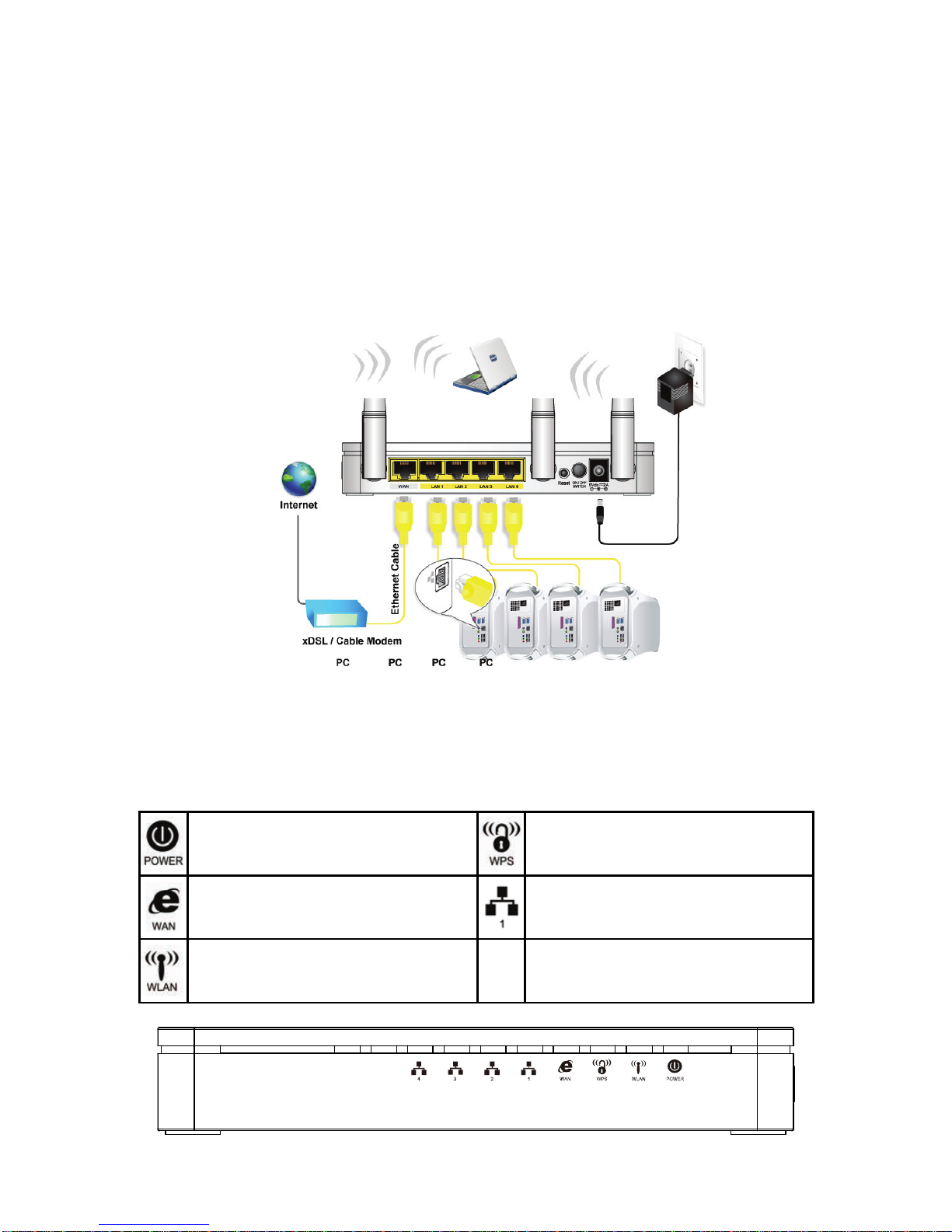
Connection of WL0143
LED Meaning
The WL0143 has indicator lights on the front side. Please see
below for an explanation of the function of each indicator light.
Power indicator WPS Active indicator
WAN Active indicator Ethernet Active indicator
Wireless Active indicator
- 4 -
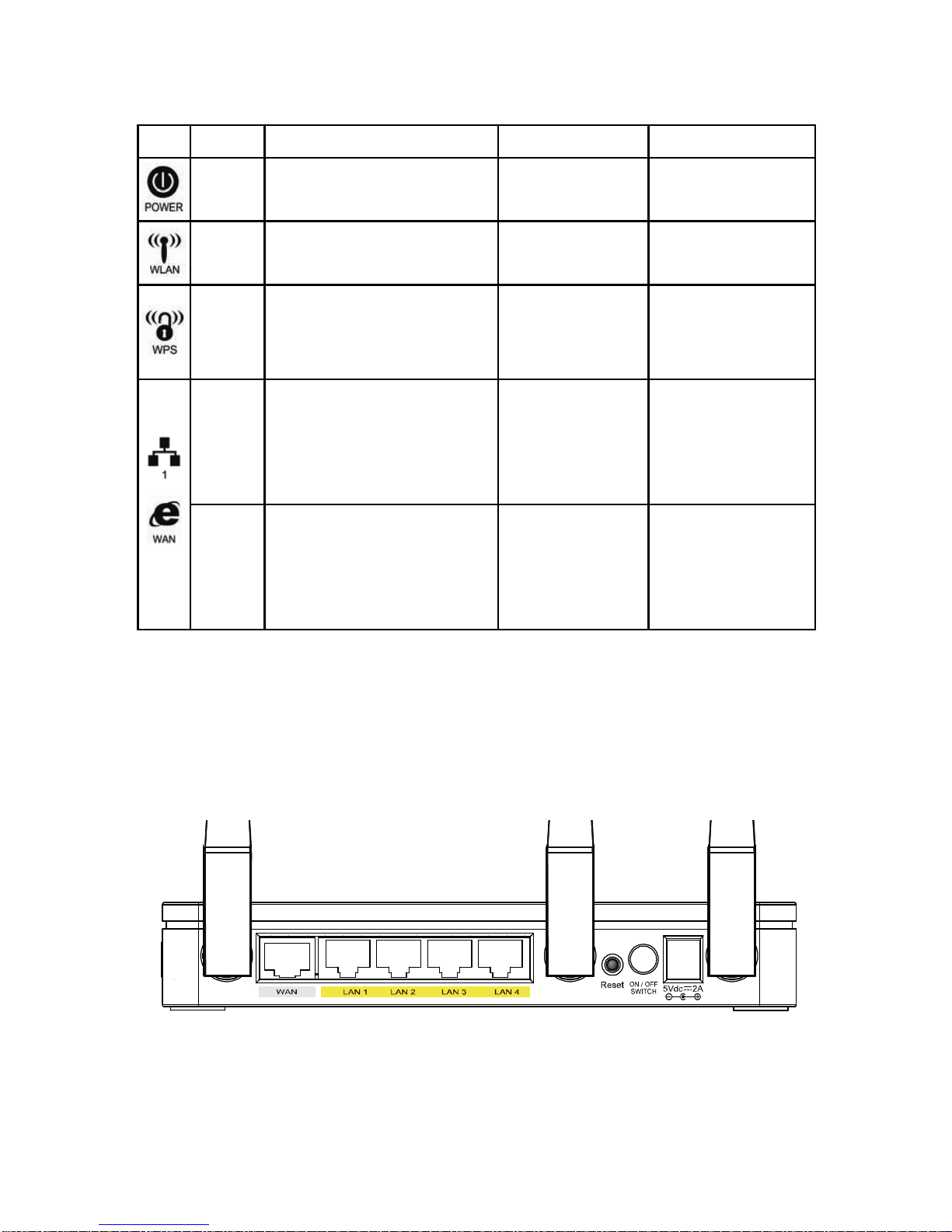
LED Function
LED Color On Flash Off
Green Ready Waiting for
device ready Power Off
Green WLAN Ready Transmit /
Receive Data WLAN Off
Green N/A Start WPS
pairing within
2 minutes WPS Idle
Green
10/100MB Ethernet
Ethernet connection
established and
active
Transmit /
Receive Data Ethernet
Disconnected
Amber
1000MB Ethernet
Ethernet connection
established and
active
Transmit /
Receive Data Ethernet
Disconnected
The icons appear on the products are for application indication
only.
The trademark or intellectual property is belonging to their
respective owners.
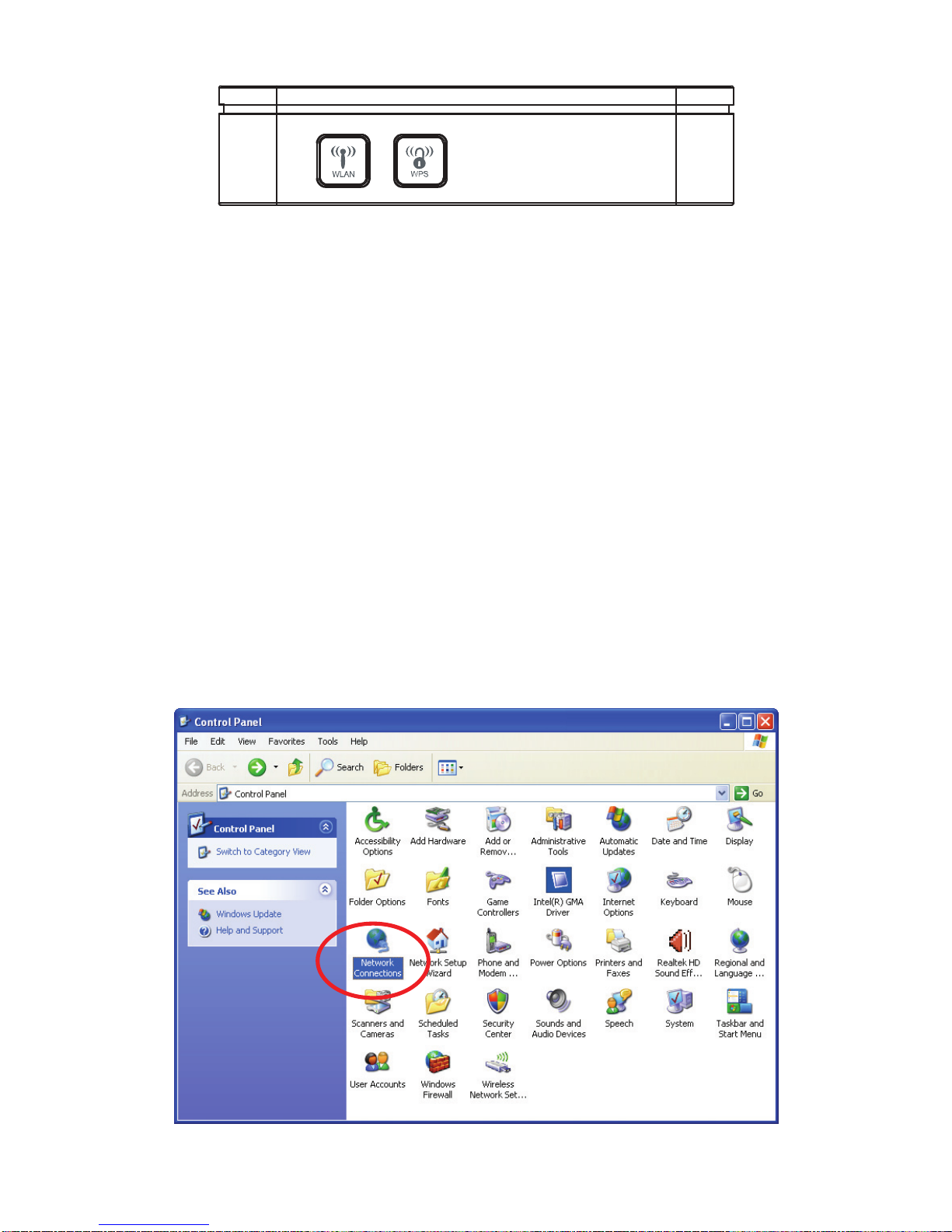
Rear View of the WL0143
Note: ActualANTENNAmay vary depending on model.
- 5 -
WPS and WLAN button
Note: WPS button is for 5G wireless only.
Please press WPS button 0.5 seconds at least to active
WPS pairing.
STEP 2
Configuration Procedures
Before starting The WL0143 configuration, please kindly
configure the PC computer as below, to have automatic IP
address / DNS Server.
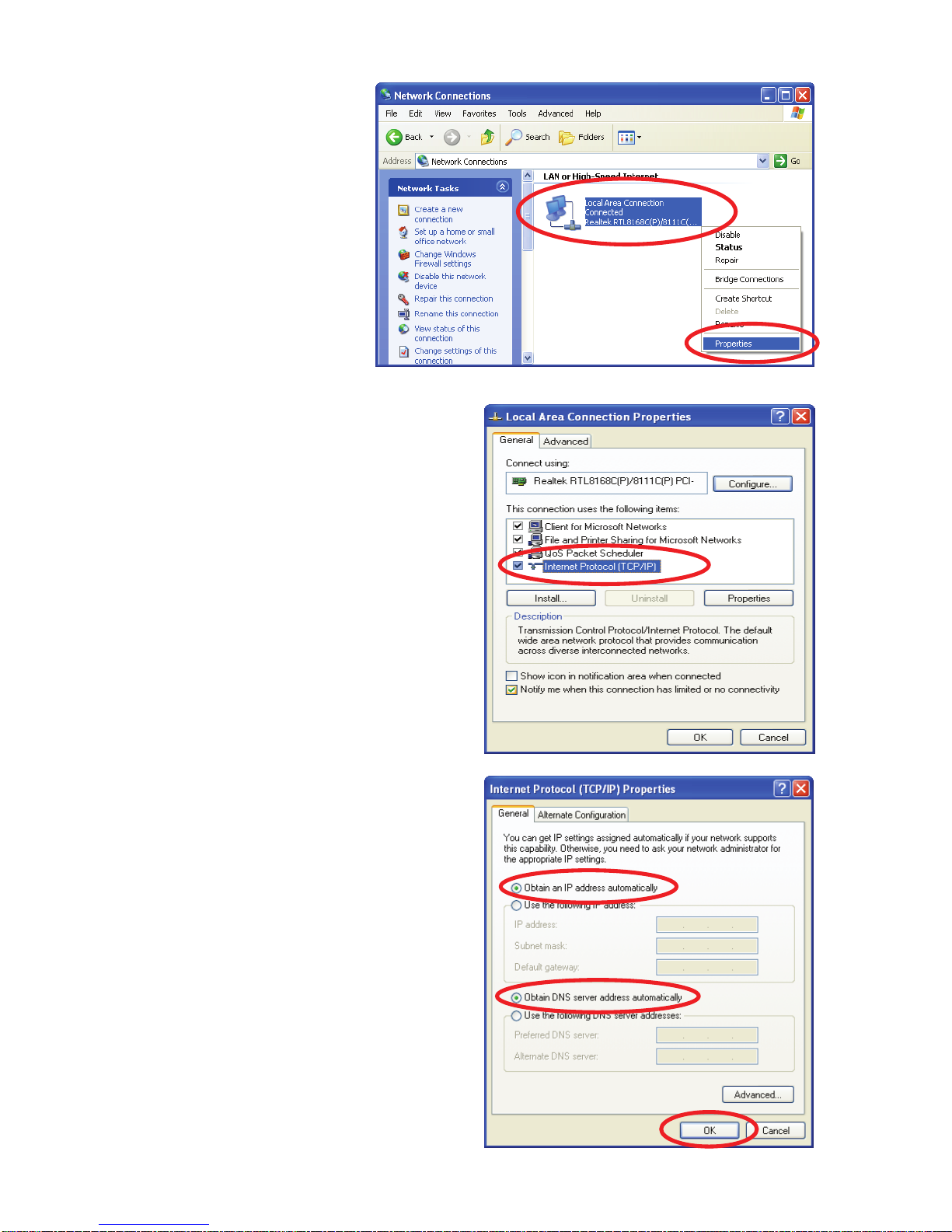
For Windows 98SE/ME/2000/XP
Click on "Start" -> "Control Panel" (in Classic View). In the Control
Panel, double click on "Network Connections" to continue.
- 6 -
Single RIGHT click
on "Local Area
connection", then
click "Properties".
Double click on "Internet
Protocol (TCP/IP)".
Check "Obtain an IP address
automatically" and "Obtain
DNS server address
automatically" then click on
"OK" to continue.
Click "Show icon in notification
area when connected" (see
screen image in 3. above) then
Click on "OK" to complete the
setup procedures.

- 7 -
For Windows 7-32/64
Click on "Start" ->
"Control Panel" (in
Category View) ->
"View network status
and tasks".
In the Control Panel
Home, click on
"Change adapter
settings" to continue.
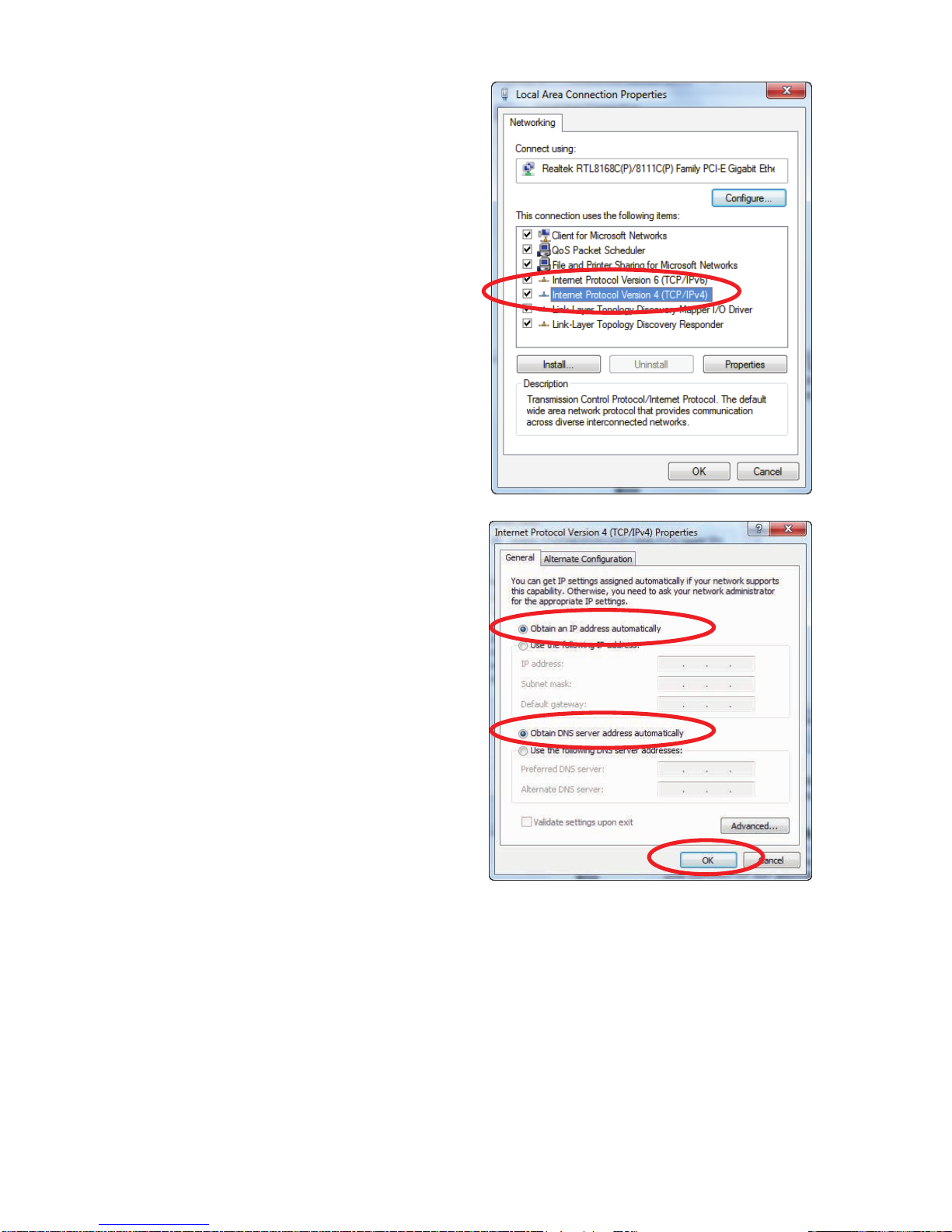
Single RIGHT click on "Local Area connection", then click
"Properties".
- 8 -
Double click on "Internet
Protocol Version 4 (TCP/IPv4)".
Check "Obtain an IP address
automatically" and "Obtain DNS
server address automatically"
then click on "OK" to continue.
STEP 3
WL0143 Configuration
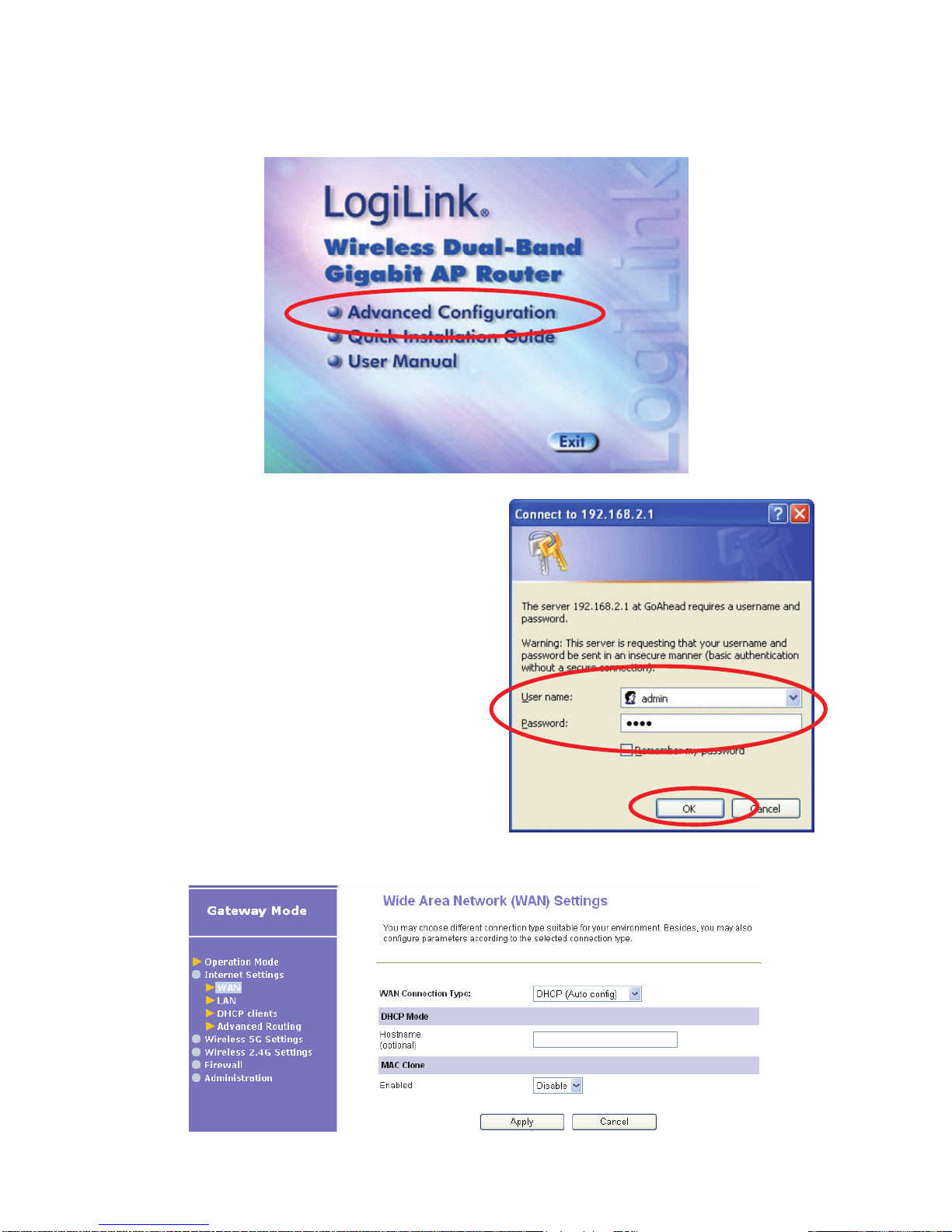
Please insert the supplied CD into your CD-ROM drive.
The CD should auto-start, displaying the window shown in 3.
below. If your CD does not start automatically, go to Windows
Explorer, Select your CD drive and double click autorun.exe.
- 9 -
To configure the device, please click on “Advanced
Configuration” button.
Please enter the User Name:
admin and Password: 1234 and
then click on OK button.
From the Internet Settings menu, click on WAN.
Inhaltsverzeichnis


