
Lynx Ionic Series Bedienungsanleitung

USER MANUAL
Lynx Pro Audio S.L.
Ionic series
IONIC-50
IONIC-12S
V.21.04

Manufacturer
CE CERTIFICACTION, EUROPEAN PRODUCT
IONIC-50
LYNX Pro Audio S.L.
Calle 1 - Pol. Ind. Picassent
E-46220 Picassent (Valencia)
This user guide is property of Lynx Pro Audio S.L. Any reproduction of this manual, by any means is strictly
prohibited. Copyright 2020. All rights reserved.
IONIC-12S

Ionic Series User Manual
Lynx Pro Audio S.L 3www.lynxproaudio.com
INTRODUCTION
This manual describes the recommended installation procedure for the Ionic-50 in combination with the
subwoofers Ionic-12S.
The Ionic series is Lynx Pro Audio’s answer to light, portable and permanent column speakers. The Ionic
series comprise two full-range modular columns (Ionic-100 and Ionic-50), one small coaxial cabinet (Ionic-
5CX) and two subwoofers (Ionic-18S and Ionic-12S).
The columns are very low prole, versatile, aesthetically pleasing and are designed for reverberant
installations where intelligible, clear voice reproduction is paramount and where a low prole, discreet
column is required. They are very easy to install and can be done so either horizontally or vertically.
The full range columns can be powered from the active subwoofers and also offer various preset
congurations from the integrated DSP.
Please note that a wide range of mounting accessories is available.
CONTENTS
• SAFETY PRECAUTIONS 4
• SYSTEM OVERVIEW
IONIC-50 5
IONIC-12S 6
BACK PANEL 7
• CONNECTORS AND CONNECTIONS 8
ACOUSTIC CENTRE 9
CONNECTION EXAMPLE PRESET 1 10
CONNECTION EXAMPLE PRESET 2 11
CONNECTION EXAMPLE PRESET 3 12
• CONFIGURING THE DIGITAL SIGNAL PROCESSOR 13
• ONLINE CONTROL SYSTEM 15
• RAINBOW 3D ACOUSTIC SIMULATION SOFTWARE 16
• WALL INSTALLATION 17
• HARDWARE AND ACCESSORIES 18
• CERTIFICATIONS AND GUARANTEE 19

Ionic Series User Manual
Lynx Pro Audio S.L 4www.lynxproaudio.com
Before starting to use this device, please read this instruction manual carefully.
Keep these instructions in the place where the equipment will be used and with easy access to them.
• Electrical appliance
The exclamation mark within a triangle identies the presence of electricity. Use the system carefully without wet
hands or feet. Avoid installing the speaker in wet or excesivelly humid places. Do not place material that contains
liquid on or near the unit. Avoid dripping or splashing water or any liquid over the unit. Regularly check the condition
of the cables and make sure these are not being walked on or pinched. Connect the speaker to bipolar, earthed
mains. The mains plug must be connected to the appropriate protection (fuse or breaker). Connection to any other
type of mains could result in an electrical shock and violate local electrical codes.
CAUTION: DO NOT CONNECT OR DISCONNECT THE AC POWER CONNECTORS UNDER LOAD.
•Heavy equipment
Apply back protection when using the system. Avoid loading and unloading at heights.
•Electrical shock risk
The diagonal mark within a triangle identies the presence of dangerous voltage.
Do not open or handle the interior of the box. These parts are not to be adjusted by the user. For maintenance and/
or repair please go to an authorized service centre.In order to reduce the risk of electric shock, disconnect from
AC before plug in or unplugging Audio signal cables. Reconnect to AC only if all signal connections are made and
secured. Never manipulate the ground type plug provided.
The AC mains plugs should always remain accessible for operation.
Unplug the loudspeaker during storms or when it’s being used for a long time.
•Hearing damage risk
These systems can reproduce large quantities of sound pressure which can damage hearing. Take precautions if
you are going to be near them for extended amounts of time and do not get too close.
•Hanging / Flying
Do not hang the cabinets from the handles or from any other part other than the designated hanging point. When
ying this system please observe the technical and “Rainbow” software data carefully. Never exceed the maximum
safe working loads or ignore the instructions included within this manual. Use Only ying accessories provided by
Lynx Pro Audio S.L. Rigging must be always carried out by professionals.
•Delicate Material
Please ensure no foreign object or water enters the speaker. Only clean the unit with dry cloths. Do not use solvents.
•Overheating / Fire risk
To reduce the risk of the speaker over heating, avoid direct contact with sunlight. Avoid placing the unit close to heat
inducing objects such as radiators. Do not cover the equipment in use and do not block any ventilation openings.
Do not put naked ame, such as lighted candles, close or on top of the unit.
•Electromagnetic and interferente emissions
Avoid placing objects which through electromagnetic waves can damage the unit, such as mobile phones, lap tops,
magnetic strip cards etc.
This system complies with normatives EN 55103-1 (1)
EN 55103-2 (2)
(1) This device may not cause harmful interferences.
(2) This device may receive interference including interferences that may cause undesired working.
•IMPORTANT NOTE
This Equipment must be used in accordance with these instructions and by trained professional personnel only.
This equipment should not be used in places with extreme tropical climates. Don’t expose this apparatus to extreme
humidity and or temperature values.

Ionic Series User Manual
Lynx Pro Audio S.L 5www.lynxproaudio.com
SYSTEM OVERVIEW
• Technical Data:
Components: 6 x 3” speaker with 0.75” voice coil
Frequency range: 150 Hz – 20 KHz (-10dB)
Frequency response: 180 Hz – 18 KHz (± 3dB)
Sensivity 97 dB (1W@1m)
Max SPL / Peak: 119 dB - 125 dB peak
Coverage: 15º ± 5º V x 100º H
Power: 150 W (300 W program, 600 W peak)
Nominal impedance: 32 Ω
Connectors: 2 x Neutrik Speakon NL4MP
Finish: Epoxy paint / bespoke pattern
Material: 1.5 mm stainless steel
Dimensions: 502 x 89 x 117 mm (H x W x D)
Weight: 4.4 Kg (9.7 lbs)
•Ionic-50
The Ionic-50 is an ultra-compact passive column speaker. Consists of 6 x 3” (0.75” voice coil) neodymium
transducers. 15º +/- 5º vertical coverage. 119dB SPL.
• Ionic-50 measurements • Ionic-50 column back panel
Input Speakon +1/-1
Loop thru
Installation kit
xing points
Installation kit
xing points
Input Speakon +1/-1
Loop thru

Ionic Series User Manual
Lynx Pro Audio S.L 6www.lynxproaudio.com
• Ionic-12S
The Ionic-12S is a powered subwoofer enclosure. It uses 1 x 12” (3” voice coil) neodymium transducers
offering an ultra compact subwoofer enclosure with 127dB SPL. The power module (Class D with
switching power supply) includes a Digital Signal Processor which offers different presets to cover a
wide range of sound applications complementing the column speakers.
• Technical Data:
Components:
• LF: 1 x 12” speaker with 3” voice coil
Frequency range: 40 Hz – 250 Hz (-10dB)
Frequency response: 46 Hz – 250 Hz (± 3dB)
Max SPL / Peak: 127 dB
Coverage angle: Omnidirectional
Power amplier: 1400W Class D with switching power supply & PFC
LF amplier:1 x 700W
Speaker output amplier: 1 x 700 W @ 8 Ω
Processing: 48 KHz / 56 bit double precision DSP
Control: User control interface with LCD
Control connections: Ethernet (OCS) optional / USB (DSP programming)
AC Power: 85 – 270V. 50/60 Hz with PFC
AC Connectors: 16A Neutrik powerCon TRUE1 with looping output
Finish: Polyurea coating, high grade resistant paint
Material: 15 mm Premium birch plywood
Dimensions: 407 x 440 x 520 mm (H x W x D)
Weight: 23 kg (50.6 lbs)
• Ionic-12S measurements

Ionic Series User Manual
Lynx Pro Audio S.L 7www.lynxproaudio.com
BACK PANEL
TheIonic-50columnsarepoweredfromtheactivesubwoofersIonic-12S.Inthefollowingdrawingyoucansee
the back panel of the Ionic-12S, which includes the power amplications and the digital signal control board.
From the sub unit back panel you can also select various preset congurations using the LCD display and
digital control buttons. You can see how to congure the cabinet DSP options on page 13.
* Available when the user has requested the cabinets to be supplied with the Ethernet Module kit.
USB connection
LCD display &
digital control
Signal Input
Signal Output
Output power
speakon +1/-1 Main input Main link
* Ethernet
OPTIONAL

Ionic Series User Manual
Lynx Pro Audio S.L 8www.lynxproaudio.com
CONNECTORS AND CONNECTIONS
XLR AEREAL CONNECTORS
OUTPUTS
1.- EARTH
2.- LIVE (+)
3.- LIVE (-)
INPUTS
1.- EARTH
2.- LIVE (+)
3.- LIVE (-)
XLR SOCKET CONNECTORS
SOCKET POWERCON TRUE1
CAUTION: Do not connect
or disconnect the AC Power
connectors under load.
NAC3FX-W
NAC3MX-W
Ionic Series User Manual
Lynx Pro Audio S.L 9www.lynxproaudio.com
• ACOUSTIC CENTRE
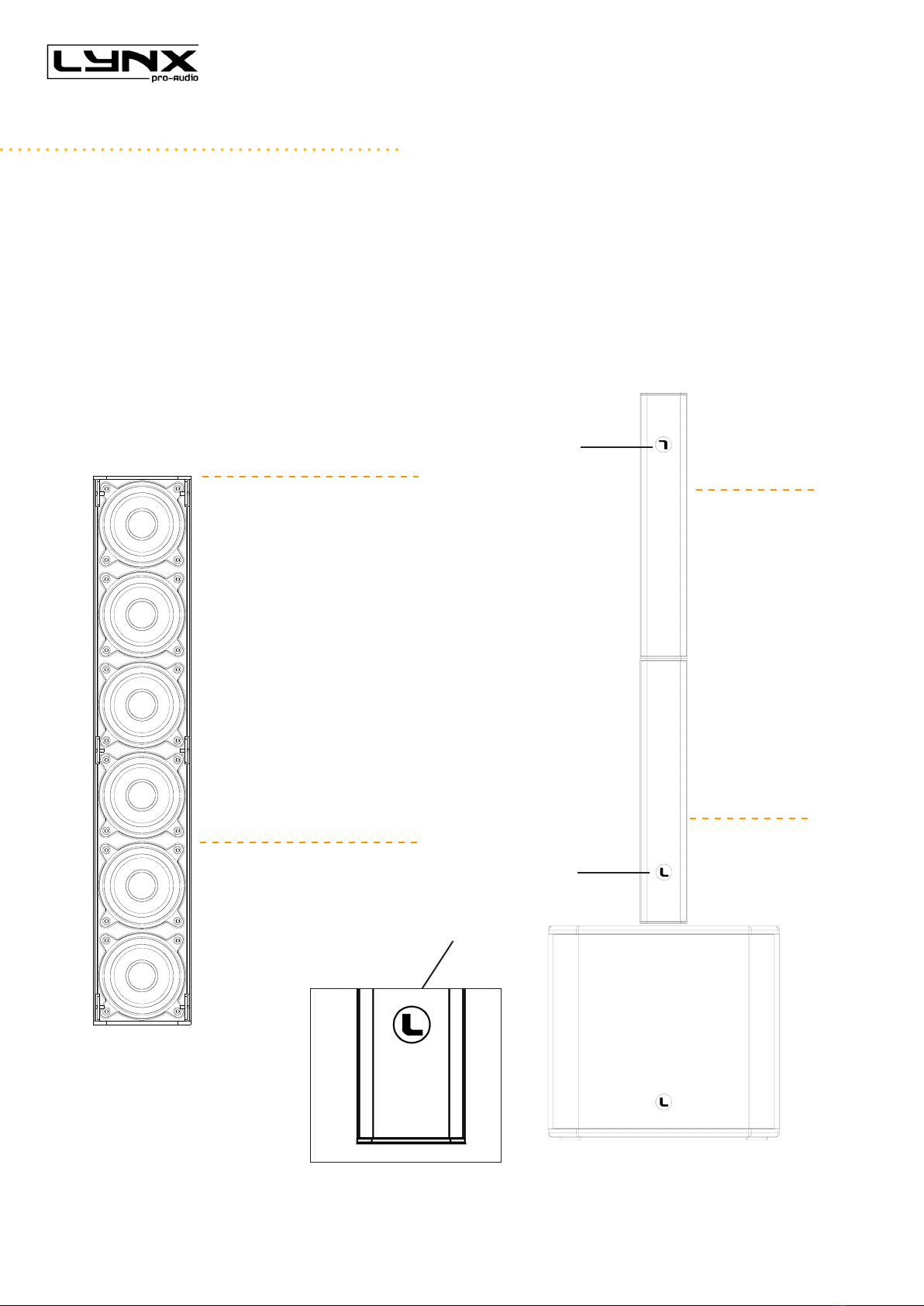
When mounting an ionic column is essential to understand that the height of the unit above the oor level is
extremely critical. The correct operational height is the height of the ionic’s “acoustic centre”. The acoustic
centre of the Ionic-50 is located between the four speakers of the top.
When two Ionic-50 columns have to be used to form one column then the upper column must be placed
upside down, so its acoustic centre is in touch with the acoustic centre of the above cabinet. Note that the
Lynx round logo indicates which way is up, so you can see when a column is upside down, when you see that
the round logo of the cabinet is at the top of the column, and the L is inverted.
CONNECTORS AND CONNECTIONS
These four speakers are the full
range section of the column.
This is the acoustic centre of the
system.
ACOUSTIC CENTRE
Column placed upside
down,theroundlogois
atthetopofthecabinet
and the L is inverted
Column in its normal
position, the round
logowiththeLisatthe
bottom of the cabinet

Ionic Series User Manual
Lynx Pro Audio S.L 10www.lynxproaudio.com
• CONNECTION EXAMPLE (mono channel): Ionic-50 + one Ionic-12S PRESET 1
CONNECTORS AND CONNECTIONS
ACOUSTIC CENTRE
Speakon
+1/-1
Connect to
power output
Speakon
+1/-1
Connect to
power input
Andere Handbücher für Ionic Series
3
Dieses Handbuch passt für folgende Modelle
4
Inhaltsverzeichnis
Andere Lynx Subwoofer Handbücher


