
Martin Jerry US-STD-TC01 Bedienungsanleitung

1
User Manual
3Way Smart Dimmer Switch
Contents
Part 1: General................................................................................. 2
1.1. Specification ........................................................ 2
1.2. Main Features ..................................................... 2
Part 2: Installation and Wire Connection.......................................... 3
Part 3: Connect the WiFi Dimmer Switch to Wi-Fi ............................ 5
Part 3: Connect the Dimmer Switch to Alexa.................................. 15
Part 4: Connect the Dimmer Switch to Google Home..................... 18

2
Part 1: General
1.1. Specification
Item
Description
Product Name
3Way Smart Dimmer Switch
Model
US-STD-TC01
Color
White
Voltage
100V-240VAC
Frequency
50-60Hz
Wattage
150W (LED)
1.2. Main Features
Works with Alexa & Google Assistant for voice control
ONLY compatible with 2.4G Wi-Fi, DO NOT use it under 5GHz
FREE iOS and Android App is available to control it anywhere
Set schedule and timing to automatically turn on/off
Manually turn on/off the switch by the Main Button
Dimmer : Dimmable LED, CFL, halogen & incandescent Bulbs
Restart
Button
Power Button
Dimmer Indicator
Dim Pad
Wi-Fi Button
Wi-Fi Indicator

3
Part 2: Installation and Wire Connection
Notice:
1. As the switch needs power for itself, three lines must
be connected (Live Line, Load Line and Neutral Line);
2. Please use the wire nuts to make the copper
conductors fully concealed;
3. If you really cannot find out a Neutral Line in your
Power line Socket, STOP installing the switch and
consult with a professional electrician or contact our
service team.

4
Step 1: Turn off power at the circuit breaker that controls the
light switch. Use voltage tester to confirm no voltage
is present.
Step 2: Remove existing faceplate and light switch, then
identify Live/Load, Neutral and Ground lines.
Step 3: Connect the Smart Switch wiring with the provided wire
connectors as follows:
Black wire on switch (Live Line) Live Line
White wire on switch (Neutral Line) Neutral line
Green wire on switch (Ground Line) Ground line
If use it as a Single Pole:
Red wire on switch (Load Line) Load line to light bulbs
Capped the Brown wire
If use it for 3-way:
Red & Brown wire on switch Travelers to slave switch
Please wrap electrical tape around the wire nuts to make
sure the copper conductor is fully concealed.

5
Part 3: Connect the 3Way Smart Dimmer Switch to Wi-Fi
Step 1: Download the App
Scan the QR code or search “Smart Life” in the App Store or
Google Play

6
Step 2: Register a New Account
Password must contain
6-20 letters and numbers
Register with phone number
or email address

7
Step 3: Turn on the power at the circuit breaker. Press the
Wi-Fi Button and then the Wi-Fi Indicator light flashes quickly in
Red.
Flash Quickly in Red: Paring Mode (EZ mode)
Constant Green Dimmer Indicator & Wi-Fi Indicator: Power
ON, Wi-Fi Connected
Constant Red Wi-Fi Indicator: Lost Wi-Fi Connection
Dimmer Indicator OFF: Power OFF
Step 4: Tap + to Add a device
in your App (Smartphone
should connect to 2.4GHz
Wi-Fi).
Step 5: Select “Dimmer
Switch”

8
Step 6: Select 2.4 GHz Wi-Fi
network and enter your
password. (Your phone
should have connected to the
same Wi-Fi first)
Step 7: Select Confirm and
tap Next.
9
Step 8: It will be added in
around 20 seconds.
-----If it fails,
try to reconnect and contact
the seller for help.
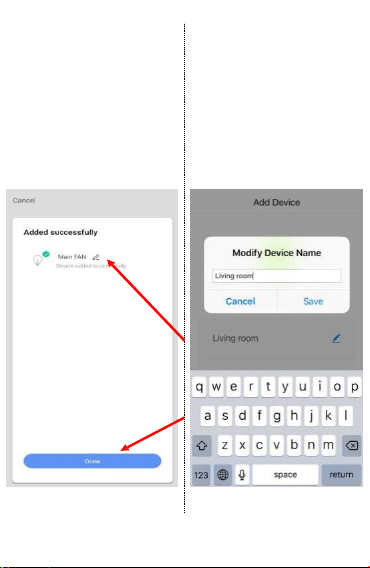
After the device is added,
Input a proper name and click
“Done”.
Simple Names will be easier
to be identified by Echo or
Google Home.

10
Step 9: The switch is
connected and you can
control it by this App. If you
need voice control, please
refer to Part 3 for Alexa, Part
4 for Google Assistant.
Congratulations! Now you
can turn on/off the smart
dimmer switch via App on
your smartphone.
If the above pairing method
(EZ mode) fails several
times,
Please try AP mode as
follows:
Inhaltsverzeichnis
Andere Martin Jerry Schalten Handbücher


