MESIDA TECH A16 Bedienungsanleitung

A16 User Manual

Please read the instruction manual before use, in order to properly installed and rapid
use!
1. Application method
1. Before use, please test equipment model is correct, accessories are complete.
2. In shutdown state insert support GSM network SIM card (GSM 850,900,1800,1900MHZ)and
open the caller id function and monthly flow (not less than 30 m/month traffic package).
3. Power off: press on the power button for 3 seconds or more then powered on.
4. Shutdown: When mobile phone APP display equipment online, through the app setting
remote shutdown function to turn it off.
When mobile phone APP display equipment offline, please take out the Sim card and long
press power button for power off.
5. Charge: insert the USB charging line, connected to the output of 5v - 1a standard mobile
phone adapter, from no power to full about 2-3 hours.
6. Heart rate measurement: Long press heart rate measurement button, watch will be
into the heart rate measurement function, users follow the guidance, please do not shake
your arms when waiting for the result, after the heart rate meausrement, press any button
can exit from the heart rate measurement. Users could also use the heart rate timing measu
rement function through mobile APP (Timing measurment will shorten the battery standby ti
me).
7. Other functions: Real time tracking, SOS emergency call and many other functions
that need through APP on the mobile phone. Please refer to the instruction on the user man
ual about the client software, download the APP and setup accordingly before use.
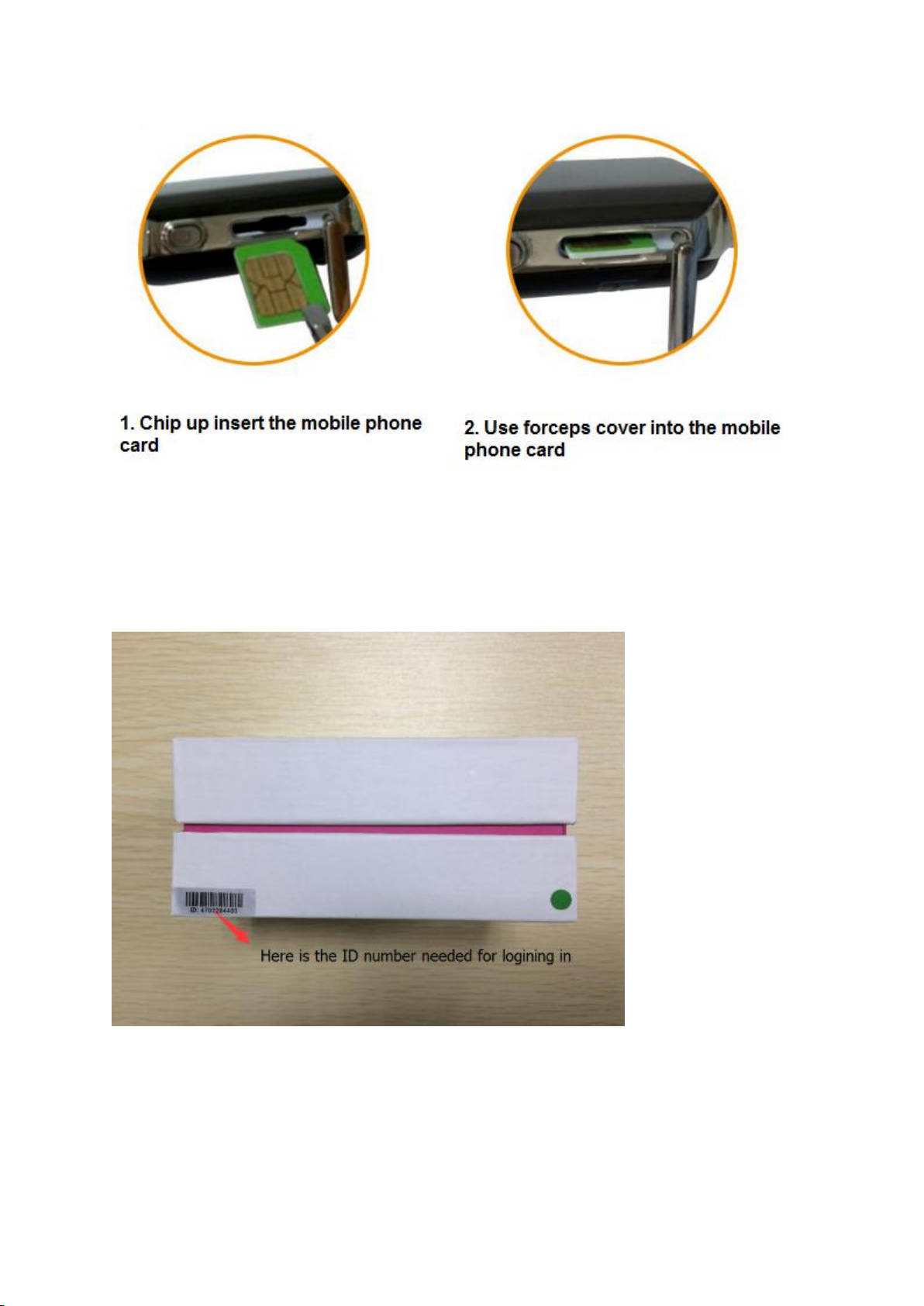
8. SIM card installation method

9. Record the ID number of the device
Around the outside of the box, you will find ID number(ten number). Please remember or record it
down. Remember they will be used in the process of logining in.

2. Product function
1. Real time tracking
2. Historical route
3. Geo-fence
4. SOS emergency call , two way talk, voice monitoring
5. Real time and timing heart rate measurement
6. Do not disturb mode
7. Clock alarm
8. Pill alarm
9. Find watch
10. Remote shutdown
11. Various App setting and function
3. Equipment parameters

Positioning: GPS satellite positioning+Beidou positioning+AGPS auxiliary positioning+WIFI
positioning+LBS base station positioning
Positioning accuracy: GPS+Beidou location 5-15m WIFI location 15-100m Base station
location-100-1000m
Device size:46X36X16mm Whole machine weight:40G
Battery capacity:500mAh Standby time:5 days
Platform monitoring:support android, apple mobile phone system, computer network clients, etc
Universal: four frequency support GSM network, languages and time zone setting, built in global
network parameters

4. Function declaration
4.1 SOS emergency call
If you have set up the family number, long press power/ SOS button, watch will dial the family
number, if the first number answer, will not dial the second number. If not answer, will dial the
second number, circle dial twice, will not call until answer.
4.2 Working mode setting
There are three kinds of working mode. User through setting in the phone APP software function to
set the working mode.
1. Rapid positioning (1 minute) : equipment at 1 minute intervals update location information,
rapid positioning model the locator use battery faster.
2. Standard positioning (10 minutes) : equipment according to the time of 10 minutes interval
update location information.
3. Save electricity positioning (an hour): equipment in one hour time interval update location
information, the power-saving mode use battery is slowly
4.3 Historical route query
This product can keep 3 months of route information. If two anchor point position is very close,
this product will be in the route filter position very close point.
4.4 Geo-fence
Users in the cell phone APP choose Geo-fence function, on the map can set Geo-fence round, if
the device away from fences, mobile phone APP client-side will display the alarm information. Alarm
information time is related to the positioning interval time setting, The smaller positioning time
interval can get timely alarm information.

4.5 Voice monitoring
Select voice monitoring function in setting up and fill in your mobile phone number, wait for a
while and after confirmation equipment will be sent a calling to your number, you can listen to the
voice around locator after answering. After set up the white list, the inside of white list number will
send a calling to device, press the heart rate button answer, can listen to the voice around locator.
4.6 Do not disturb mode
Don’t disturb mode, mainly is to prevent the locator sound disturb which one carrying the watch.
Can set up four groups timing, within the time interval, unable to call the locator.
4.7 SMS monitor number and language time zone setting
After Set message monitoring number, SMS monitoring number can give device issued message
commands (specific message instructions please contact retailers). SMS alarm monitoring number
can receive device sent text messages and other notification message. Time zone is set up for
foreign language users design features, user does not need to set up in China.
4.8 Heart rate timing measurement
Open the time need to set the timing measurement interval, unit: minutes. After setting the
watch will according the time interval measurement of heart rate, user can click the heart icon to
open the heart rate chart view the heart rate data. Timing measure heart rate requires power will
affect watches using time,the user can choose close timing measurement to save electricity.
4.9 Find watch
Instructions issued for looking watch, watch under network connection normal status will
make noise, easy to find watch.This positioning watch have many other functions, through use of
mobile phone APP, user can easy use.

5、Buttons instruction
Turned off condition by pressing the power button / SOS button positioning watch will turn on in
case of power sufficient . Positioning watch online status can’t manually shut down, watch without
SIM card can press power key/SOS key to turn it off manually.
Positioning watch card when normal, if you have set up the family number, long press power
key/SOS button, the watch will call family number, the first number after dialing if you have
answered will not continue to dial the second number, if you do not answer will dial the second
number, circular dial twice, after connect terminate the call.
6、Software client-side
6.1 Scan the QR code download software APP “AIBEILE” to cell phone client-side.
APP for Android system APP for IOS system
6.2 For PC:http://en.i365gps.com/
6.3 For Android,
You can download the app from "google play" by searching "AIBEILE"
For Iphone,
You can download the app from "app store" by searching "AIBEILE"
Note: the installation process prompts whether to trust this program, or whether to
allow access to mobile phone location, please choose trust or allow.

6.3 Open APP client-side, choose device login in, equipment number please type device ID number
on box(ten number),default passwords as 123456, Finally click login to the main menu. (advice for
the first time after landing please amend and remember the passwords)
Landing interface Main menu

个人安全信息
请您正确安装使用本产品。为了保证产品使用的安全,请务必保证您的产品不被未经许可的人绑
定。公司承诺,依照全国人大常委《关于加强网络信息保护的决定》、《全国人大常委会关于维护互
联网安全的决定》及《互联网电子公告服务管理规定》等法律法规的规定,采取技术和管理措施保障
Inhaltsverzeichnis