Multitech REVEAL RBS305-ATH Bedienungsanleitung

Radio Bridge
LoRaWAN® Wireless Sensor
Air Temperature Humidity Sensor User Guide

LORAWAN WIRELESS AIR TEMPERATURE HUMIDITY SENSOR
2 Radio Bridge LoRaWAN®Wireless Sensor Air Temperature Humidity Sensor User Guide
LoRaWAN Wireless Air Temperature Humidity Sensor
Model: RBS305-ATH
Part Number: RB0013 Rev. 1.2
Trademarks and Copyright
Copyright
This publication may not be reproduced, in whole or in part, without the specific and express prior written permission signed by an executive officer of
Multi-Tech Systems, Inc. All rights reserved. Copyright © 2023 by Multi-Tech Systems, Inc.
Trademarks and Registered Trademarks
MultiTech, the MultiTech logo, DeviceHQ, and Conduit are registered trademarks of Multi-Tech Systems, Inc. All other products and technologies are the
trademarks or registered trademarks of their respective holders.
Disclaimers
Information in this document is subject to change without notice and does not represent a commitment on the part of Multi-Tech Systems, Inc.. Multi-Tech
Systems, Inc. provides this document “as is,” without warranty of any kind, expressed or implied, including, but not limited to, the implied warranties of
fitness or merchantability for a particular purpose. Multi-Tech Systems, Inc. may make improvements and/or changes in this manual or in the product(s)
and/or the software described in this manual at any time.
Legal Notices
See the Legal Notices section of the website for up-to-date information on MultiTech warranty, returns policy, privacy statement, terms of sale, and terms
of service.
Customer Support
Sales Support
+1 (763) 785-3500 +1 (763) 717-5863
Website
https://www.multitech.com
Knowledge Base
For immediate access to support information and resolutions for MultiTech products, visit https://www.multitech.com/kb.go.
Support Portal
To create an account and submit a support case directly to our technical support team, visit: https://support.multitech.com.
World Headquarters
Multi-Tech Systems, Inc.
2205 Woodale Drive, Mounds View, MN 55112
USA

CONTENTS
Radio Bridge LoRaWAN®Wireless Sensor Air Temperature Humidity Sensor User Guide 3
Contents
Chapter 1 – Quick Start............................................................................................................................................ 5
Overview ....................................................................................................................................................................... 5
Part Numbers ................................................................................................................................................................ 5
Documentation ............................................................................................................................................................. 5
Chapter 2 – Preparing Sensor................................................................................................................................... 6
Preparing the Sensor..................................................................................................................................................... 6
Quick Start..................................................................................................................................................................... 6
Mounting the Sensor .................................................................................................................................................... 6
Chapter 3 – Hardware Specifications and Information ............................................................................................. 8
Absolute Maximum Ratings .......................................................................................................................................... 8
Battery Life.................................................................................................................................................................... 8
Replacing the Battery.................................................................................................................................................... 8
Mechanical Drawings .................................................................................................................................................. 10
Air Temperature and Humidity 305 Sensor .............................................................................................................. 10
Chapter 4 – Common Messages ............................................................................................................................. 11
Common Messages ..................................................................................................................................................... 11
Message Protocol........................................................................................................................................................ 11
Factory Reset (0xEC) ................................................................................................................................................... 11
Uplink Messages ......................................................................................................................................................... 11
Reset Message 0x00.................................................................................................................................................. 12
Supervisory Message 0x01........................................................................................................................................ 13
Tamper Message 0x02 .............................................................................................................................................. 13
Link Quality Message 0xfb ........................................................................................................................................ 14
Downlink Messages..................................................................................................................................................... 14
General Configuration............................................................................................................................................... 14
Device Info Request .................................................................................................................................................. 17
Link Quality Configuration (0xEE) ............................................................................................................................. 17
ADR Advanced Configuration.................................................................................................................................... 18
Advanced Configuration............................................................................................................................................ 18
Downlink ACK.............................................................................................................................................................. 19
Chapter 5 – Sensor-Specific Messages.................................................................................................................... 20
Uplink Messages ......................................................................................................................................................... 20
Downlink Messages..................................................................................................................................................... 22
Periodic Reports........................................................................................................................................................ 23
Chapter 6 – Safety ................................................................................................................................................. 24

Lithium Battery Safety ................................................................................................................................................ 24
User Responsibility...................................................................................................................................................... 24

CONTENTS
4 Radio Bridge LoRaWAN®Wireless Sensor Air Temperature Humidity Sensor User Guide
Chapter 7 – Regulatory Information....................................................................................................................... 25
Federal Communications Commission (FCC) .............................................................................................................. 25
Harmonized Commodity Description (HS Code)......................................................................................................... 25
Export Control Classification Number (ECCN)............................................................................................................. 25

QUICK START
Radio Bridge LoRaWAN®Wireless Sensor Air Temperature Humidity Sensor User Guide 5
Chapter 1 – Quick Start
Overview
The Reveal™ wireless air temperature humidity sensor uses air flow to measure temperature and humidity levels.
If the temperature and/or humidity rises above or falls below the configured thresholds, an alert is sent over the
wireless network.
Part Numbers
Part Number Rating Wireless Region
RBS305-ATH-US Indoor LoRaWAN North America
RBS306-ATH-US Outdoor/Industrial LoRaWAN North America
Documentation
The following documentation is available at https://www.multitech.com/products/sensors.
Document Description Part Number
User Guide This document provides overview, safety and regulatory
information, design considerations, schematics, and general
hardware information.
RB00013
Connection Guide This document provides instructions and information on how
to connect LoRaWAN sensors on gateways and networks.
RB00001

PREPARING SENSOR
6 Radio Bridge LoRaWAN®Wireless Sensor Air Temperature Humidity Sensor User Guide
Chapter 2 – Preparing Sensor
Preparing the Sensor
Sensors ship with batteries installed. There is a plastic tab over the battery, which needs to be removed. If the tab
does not pull out easily, you may need remove the battery to remove the tab. If the battery does no come out
easily, you might need to remove the mounting bracket.
Quick Start
Use your sensor through either the console or a third-party network. To use the console, use the following steps.
To use a third-party network, refer to the Connecting LoRaWAN Sensors on Gateways and Networks (RB00001) ,
which is available through the sensor page at https://www.multitech.com/products/sensors
1. Create a console account at: https://console.radiobridge.com/
2. Click on Devices on the left.
3. Click Add Device.
4. Select the network you want to use.
5. Make sure Console Only Device is NOT selected.
6. Specify if you want to Register Through Radio Bridge or use an existing account with the network.
7. Enter the Device Name,Device ID, and Device Key.
Note: For easy Device ID and Key entry, scan the QR code on the yellow key card included with your
device. Then copy and paste data into the console. With the QR code, the first line is the Device ID and
the rest is the key.
8. Select the model from the Device Type drop down. Model is on the device label.
9. Set the Join EUI to 7894E80000000000 and click Continue.
10. Review the summary and click Confirmation.
The console shows complete when the device is successfully added.
Mounting the Sensor
To mount the sensor:
1. Turn the mounting bracket counter-clockwise to remove it from the sensor.
2. Secure the bracket with the enclosed screws.

PREPARING SENSOR
Radio Bridge LoRaWAN®Wireless Sensor Air Temperature Humidity Sensor User Guide 7
3. Put the sensor on the mounting bracket and turn clockwise.

HARDWARE SPECIFICATIONS AND INFORMATION
8 Radio Bridge LoRaWAN®Wireless Sensor Air Temperature Humidity Sensor User Guide
Chapter 3 – Hardware Specifications and Information
Absolute Maximum Ratings
Parameter Rating
Operating ambient temperature (indoor version) -30°C to +70°C
Operating ambient temperature (outdoor version) -40°C to +70°C
Storage ambient temperature -40°C to +90°C
Battery Life
The sensor uses a lithium non-rechargeable battery, capable of an estimated 200,000+ messages.
Note: Refer to the Sensor Battery Estimator.xlsx spreadsheet on the on the sensor's product page for specific
battery life estimates:
https://www.multitech.com/products/sensors
Battery life depends on the number of transmissions per day. Power required for a message transmission is greater
than the “sleep current” for high power radio technologies (e.g, LoRaWAN).
Different battery types deplete over time with different voltage profiles; a lithium battery maintains high voltage
for the life of the battery with a rapid drop near the end of life, and an alkaline battery has gradual reduction in
voltage over time. Sensors ship with a lithium battery, which is the recommended replacement type.
Recommended battery: Panasonic CR123/A
Battery life estimates in the online spreadsheet assume room temperature, meaning temperatures near the
maximum and minimum ratings negatively impact battery life. Battery voltage lowers in cold temperatures, and
internal circuitry needs a minimum voltage to operate properly.
Note: Battery life will be reduced in cold environments leading to possible device shut down.
The battery voltage and a low battery indicator are reported by supervisory messages. Refer to the section on
Message Protocol for details.
Replacing the Battery
Replacement battery type is listed in the Battery Life topic. To replace the battery:
1. Use a pen or similar object to press the button on the opposite side of the case.

HARDWARE SPECIFICATIONS AND INFORMATION
Radio Bridge LoRaWAN®Wireless Sensor Air Temperature Humidity Sensor User Guide 9
2. Remove the battery.
3. Insert the new battery as shown.
4. Close the case.

HARDWARE SPECIFICATIONS AND INFORMATION
10 Radio Bridge LoRaWAN®Wireless Sensor Air Temperature Humidity Sensor User Guide
Mechanical Drawings
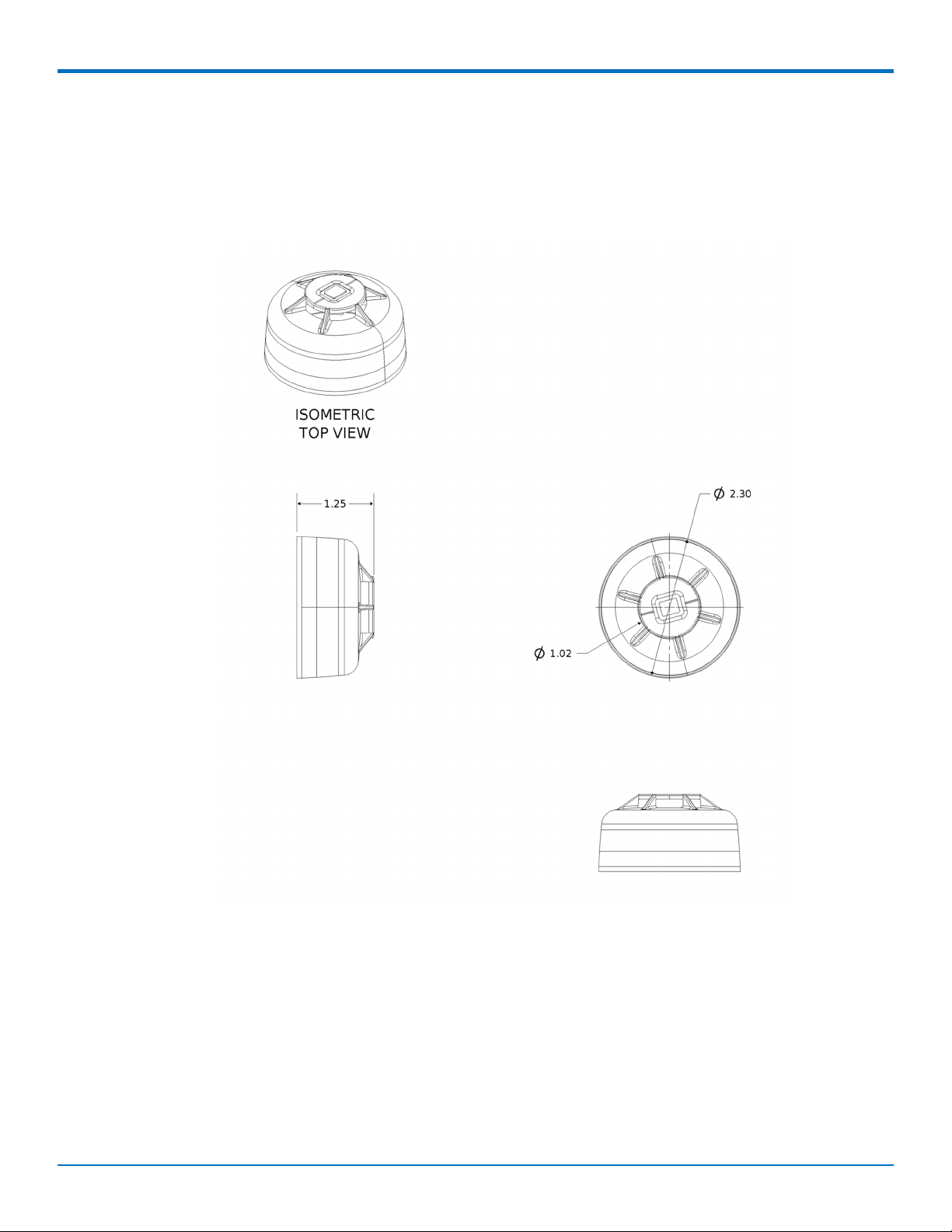
The mechanical drawings provided in this section are for the main body of the sensor. All dimensions use inches
unless specified.
Air Temperature and Humidity 305 Sensor
Andere Handbücher für REVEAL RBS305-ATH
1
Inhaltsverzeichnis
Beliebte Temperaturregler Handbücher anderer Marken

Swegon
Swegon LUNAd MB Bedienungsanleitung

Lucky Reptile
Lucky Reptile Thermo Control II Bedienungsanleitung

SENSORMETRIX
SENSORMETRIX Argon 100 Bedienungsanleitung

Fuji Electric
Fuji Electric PXE4 Bedienungsanleitung

Yuyao gongyi
Yuyao gongyi XMT-808 series Bedienungsanleitung

Selec
Selec TC544C Bedienungsanleitung