Murata LBAC0ZZ1SU Bedienungsanleitung

Preliminary Specification Number :
P.1/22
Confidential
LBAC0ZZ1SU
User Manual
Applicable Product Name:
LBAC0ZZ1SU
Feb/17/2018

Preliminary Specification Number :
P.2/22
Confidential
Table of contents
1. Product Summary ................................................................................................................ 4
2. Product Specification ........................................................................................................... 4
3. Physical peripherals............................................................................................................. 5
4. Product Features and Functions ........................................................................................10
5. Graphic user interface for configuration ............................................................................12
6. Size of Appearance..............................................................................................................14
7. Part Name and Function ....................................................................................................16
8. Power Supply ......................................................................................................................17
9. Product Label ......................................................................................................................18
10. Operating Condition ........................................................................................................19

11. Software License..............................................................................................................19

Preliminary Specification Number :
P.3/22
Confidential
Revision History
Date
Version
Change History
2018/2/9
1.0.0
Initial version

Preliminary Specification Number :
P.4/22
Confidential
1. Product Summary
LBAC0ZZ1SU are the multiple RF protocol gateway. This product can be enable to receive data from
multiple sensor units and transfer those data to customer’s system by suitable interfaces and
protocols.
2. Product Specification
This specification is applied to LBAC0ZZ1SU gateway solution.
Product name
LBAC0ZZ1SU
CPU
ARM Coretex-A8 32bit RISC processor
ROM
4Gbit NAND
RAM
2Gbit DDR3
Power supply
USB cable :BJA91003
WLAN
IEEE 802.11 b/g/n compliant
Frequency: 2412MHz to 2462MHz
Specific low power radio
ARIB STD-T108 compliant
Frequency on LBAC0ZZ1SU: 902.5MHz –927.5MHz
Ethernet
2 Ports : IEEE 802.3 10/100 Base-T compliant
LED indicator
5 LED windows
Button
2 Buttons
System clock
RTC with coin cell battery
Product size
W:170mm x L:109mm x T:26.5mm typ (*1)
Product weight
250g typ (*1)
Environmental assessment
ROHS directive 2011/65/EU compliant
UV rating
N/A
IP rating
IP20
Working environment
0 - 60℃, 0 - 90%RH (without condensation)
Storage environment
0 - 60℃, 0 - 90%RH (without condensation)
Max duty cycle
7.5%
(*1) External antenna and AC adopter are not included

Preliminary Specification Number :
P.5/22
Confidential
3. Physical peripherals
Product physical peripherals are shown as below.
3.1 Button
The button is short and designed for reset purpose and long and designed for user configuration.
No.
Time
Actions
1
1 second
Software reset
2
10 seconds
Factory reset
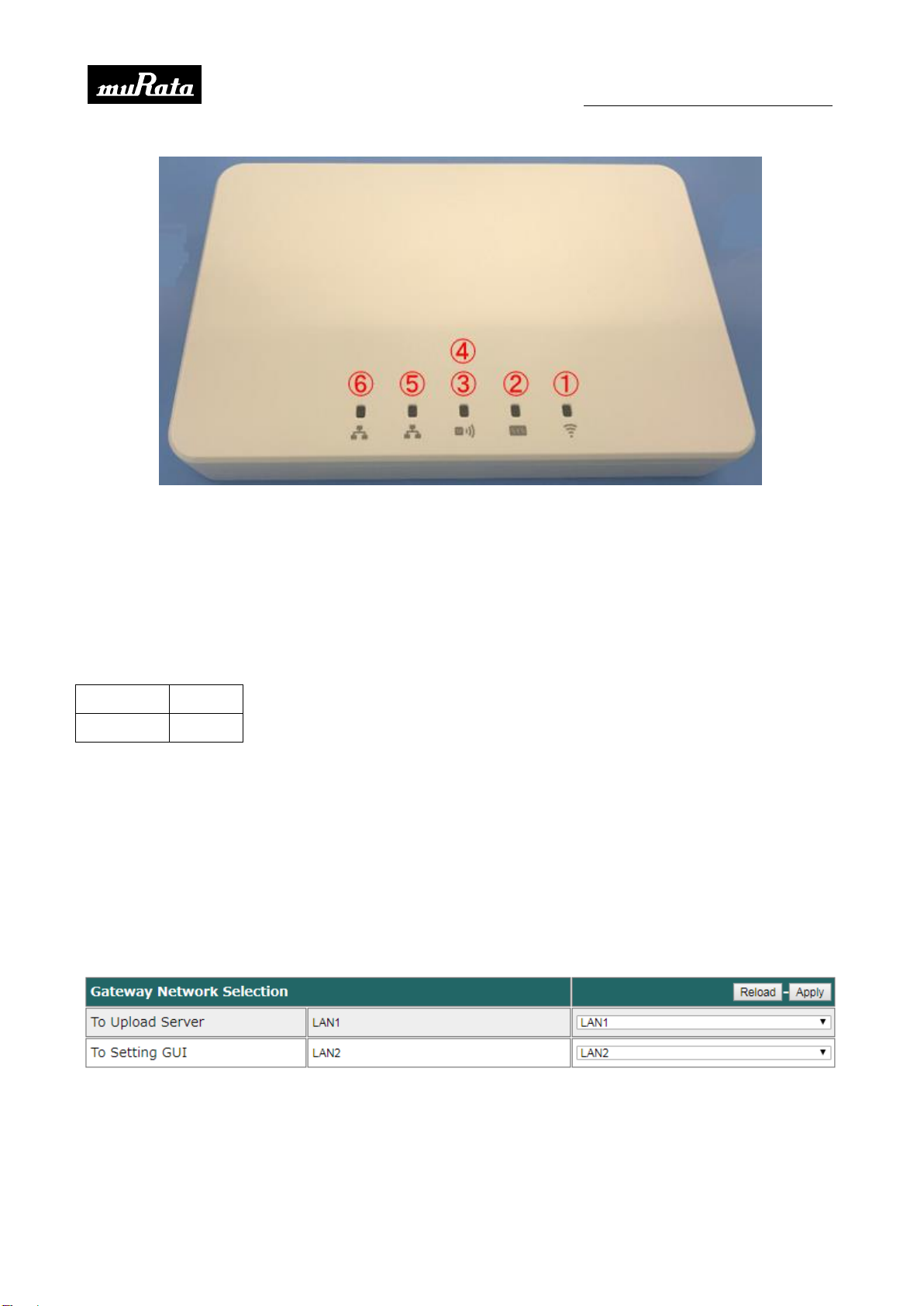
3.2 LED indicators
There are 5 LEDs show the status of this gateway.
LED
LED Window
Color
1
WLAN ON
Green
2
System enable
Green
3/4
Blink Red LED when SubGHz packet is received
Red / Green
5
N/A
Green
6
Writing data to micro SD card
Green
All LED light up when power on the product.

Preliminary Specification Number :
P.6/22
Confidential
3.3 USB
One USB interface is used for data storage and connection to other peripherals.
3.4 micro SD card slot
Micro SD card slot is used for log data storage by FAT format, and firmware update. Please do NOT
remove the card while the LED6 is ON. Below type of memory cards are supported.
Class 10
16GB
Class 10
32GB
The card and slot might be damaged physically in case insert the card incorrectly.
The data might be disappeared, in case shut down gateway when saving sensor data.
3.5 Ethernet
Ethernet port with RJ45 connector is used for Ethernet connection. It complies with IEEE802.3
10/100 Base-T. One port will be exclusively disabled by the status of WLAN station mode.
GUI image for Ethernet only:
GUI image for Ethernet and WLAN AP mode:

Preliminary Specification Number :
P.7/22
Confidential
GUI image for Ethernet and WLAN station mode:
Initial setting: LAN1
Item
Initial setting
IP address
DHCP
Subnet mask
Default gateway
DNS1
DNS2
GUI image for LAN1:
Initial setting: LAN2
Item
Initial setting
IP address
192.168.1.100
Subnet mask
255.255.255.240
Default gateway
192.168.1.1

Preliminary Specification Number :
P.8/22
Confidential
GUI image for LAN2:
3.6 WLAN
AP mode and station mode are exclusively supported. The setting can be changed by configuration
display.
Initial setting: AP mode
Item
Initial setting
Selectable setting
Connection Mode
Enable
Enable or Disable
IP address
192.168.2.100
Any
Subnet mask
255.255.255.254
Any
SSID (*1)
WSNGW_XXXXXX (*1)
Any
Channel (*1)
Auto
Channel 1 -11 or Auto
Broadcast
Enable
Enable or Disable
Security
Disable
Enable or Disable
Key
defaultkey
Any
(*1) The part of “XXXXXX” is lower 6 digits of WLAN MAC address
GUI image for AP mode:

Preliminary Specification Number :
P.9/22
Confidential
Initial setting: Station mode
Item
Initial setting
Selectable setting
Connection Mode
Enable/Static
Enable/Static or Disable
IP address
192.168.100.100
Any
Subnet mask
255.255.255.240
Any
Default Gateway
192.168.100.101
Any
Channel (*1)
Auto
Channel 1 -11 or Auto
Security
Disable
Enable (WPA2-PSK AES) or Disable
Key length
Any
GUI image for Station mode:
3.7 SubGHz
This radio is used for sensor data transmission between gateway and sensor units.
Network protocol
868MHz or 920MHz proprietary
Max connection with sensor unit
20 units (*1)
Expected connection distance
200m (Best effort: Indoor and No obstruction) (*2)
Data rate
100kbps
(*1) This performance cannot be guaranteed by installation conditions and network configurations.
(*2) There is a possibility to see the different value depending on the surrounding environmental
condition, building structure, material and barriers.
Initial setting for data upload by UDP:
Item
Initial setting
Selectable setting
Server Upload
Disable
Enable or Disable

Preliminary Specification Number :
P.10/22
Confidential
Server Address
Not Configured
Any
Destination Port
Not configured
Any
GUI image:
4. Product Features and Functions
Product basic features are shown as below.
4.1 Network Protocols
UDP and HTTP/HTTPS are supported for data transmission between gateway and customer’s
server.
4-1-1. UDP
The sensor data via SubGHz can be transferred by UDP. Payload format is provided by another
document.
4-1-2. HTTP/HTTPS
The sensor data via SubGHz and EnOcean can be transferred by HTTP/HTTPS. Data structure is
provided by another document.
4.2 Network configuration
Network configuration running on web server is changeable by graphic user interface on web
browser.
Item
Parameter
IP address for LBAC0ZZ1SU
192.168.1.100/index.html
Initial user name
admin
Initial password (*1)
admin
Supported web browser
Google Chrome version 63
Microsoft Internet Explorer version 11
Inhaltsverzeichnis
Andere Murata Tor Handbücher
Beliebte Tor Handbücher anderer Marken

LST
LST M500RFE-AS Bedienungsanleitung

Kinnex
Kinnex Media Gateway Bedienungsanleitung

2N Telekomunikace
2N Telekomunikace 2N StarGate Bedienungsanleitung

Mitsubishi Heavy Industries
Mitsubishi Heavy Industries Superlink SC-WBGW256 Bedienungsanleitung

ZyXEL Communications
ZyXEL Communications ZYWALL2 ET 2WE Bedienungsanleitung

Telsey
Telsey CPVA 500 - SIP Bedienungsanleitung