NatComm DP4 Bedienungsanleitung

DP4
DOOR PHONE
For Technical Assistance
Please Phone: (07) 5596 5128

Page 2 National Communications
TABLE OF CONTENTS
Description Page 3
DoorPhoneDimensions Page 4
DescriptionContinued Page 5
DoorPhoneRange Page 6
DoorPhonePerformance Page 7
CameraPower Page 8
CameraWiring Page 9
MountingtheDoorPhone Page 10
OperationSummary Page 11
Balance PotAdjustment Pages 12-13
WiringDiagrams Pages 14-15
WiringConnection Pages 16-17
SurfaceMounting Kits Page 18
DoorPhoneCovers Page 19
Specificationsand WarrantyInformation Pages 20

National Communications Page 3
DESCRIPTION
Our Model DP4 Flush Mount Door Phones are specifically designed for
connection to a Natcomm Door Station Controller (Models DS1-DS6).
DP4 incorporates a Low Light, High Resolution CCD Colour Camera, fitted
in a sealed plastic enclosure. The Camera Circuit uses a High Resolution
SONY sensor, which is designed to operate to at low light levels, where
moon light will provide good images.
Resolution: 380 lines
S/N Ratio: 46dB
Image Sensor: 1/4" CCD
Light Sensitivity: 2 Lux
A/V Connectors: BNC
The Camera is powered by the 4 wire connection to the Door Phone and
separate power is not required unless the DP4 is to be located more than
70m away.
If DP4 will be located more than 70m from the Door Phone controller, please
adviseNatcomm or yourDealer and aseparate 12V regulatedPower adaptor
will be provided at no charge. (see page 8).
DP4 has a BNC Video Output, suitable for direct connection to coaxial
cable. Optional CAT5 Video Baluns are available at extra cost, should you
wish to forward the video by 2 wires of a CAT5 cable. See page 9.
The Camera Lens provides a viewing angle of 92 degrees, and is fitted
behind a sealed 12mm transparent window.
DP4 has a polymer coated 316 Marine Grade Stainless Steel fascia plate
and can be mounted either horizontally or vertically.
Please order your unit set up for Vertical or Horizontal orientation, so the
Camera and the BELL of the Touch Sensitive switch are orientated
appropriately. Fitting this unit in the alternative orientation will cause the
Video image to be 90 degrees out.
There are 2 Models of DP4 :
DP4-V - Vertical Orientation
DP4-H - Horizontal Orientation

Page 4 National Communications
MODEL DP4 DOOR PHONE

National Communications Page 5
DESCRIPTION
continued
Our DP4 Door Phones can operate at distances of up to 300 meters
from the Controller, providing high quality cabling such as CAT5 is used.
Note - When located more than 70m from the Door Phone controller,
the Camera will need to use a separate power source by using the
supplied 12V regulated Power adaptor. This additional Power Adaptor
wil be supplied separately on request at no additional charge.
AllDP4unitsaredesignedtobehighlyWEATHERRESISTANTandthey
haveproventobereliableoverlongperiodsoftime,providingtheyarenot
exposed to direct rain. The Speaker is made of a plastic mylar material
and great effort has been taken to maximise weather proofing all
electroniccomponents.
Note - DP4 Door Phones are not WATER PROOF.
Whenever your Door Phone is likely to be exposed to RAIN, an optional
DOOR PHONE COVER or a SURFACE MOUNTING KIT with Rain
Deflector should be used. They will ensure that rain water cannot
gradually permeate through to the electronics of the Door Phone which
can cause unreliable operation and premature failure of this device.
See Pages 18-19.
Up to two of our Door Phones can be connected to the one DOOR
STATION (CONTROLLER). This allows for a Door Phone to be located
at two different locations. In this situation, the Door Phone devices are
connected in parallel (see wiring connection).
Our DP4’s are designed for wall or pole mounting at a height of
approximately 1.5 meters (5 feet). Visitors should stand within 0.5
meters (20 inches) of the Door Phone for best results.
OurDP4units incorporate a ‘touch sensitive’switch,in order to further
improveit’slongtermreliability.Thisswitchisactivatedbyabrieftouch.

Page 6 National Communications
DOOR PHONE RANGE
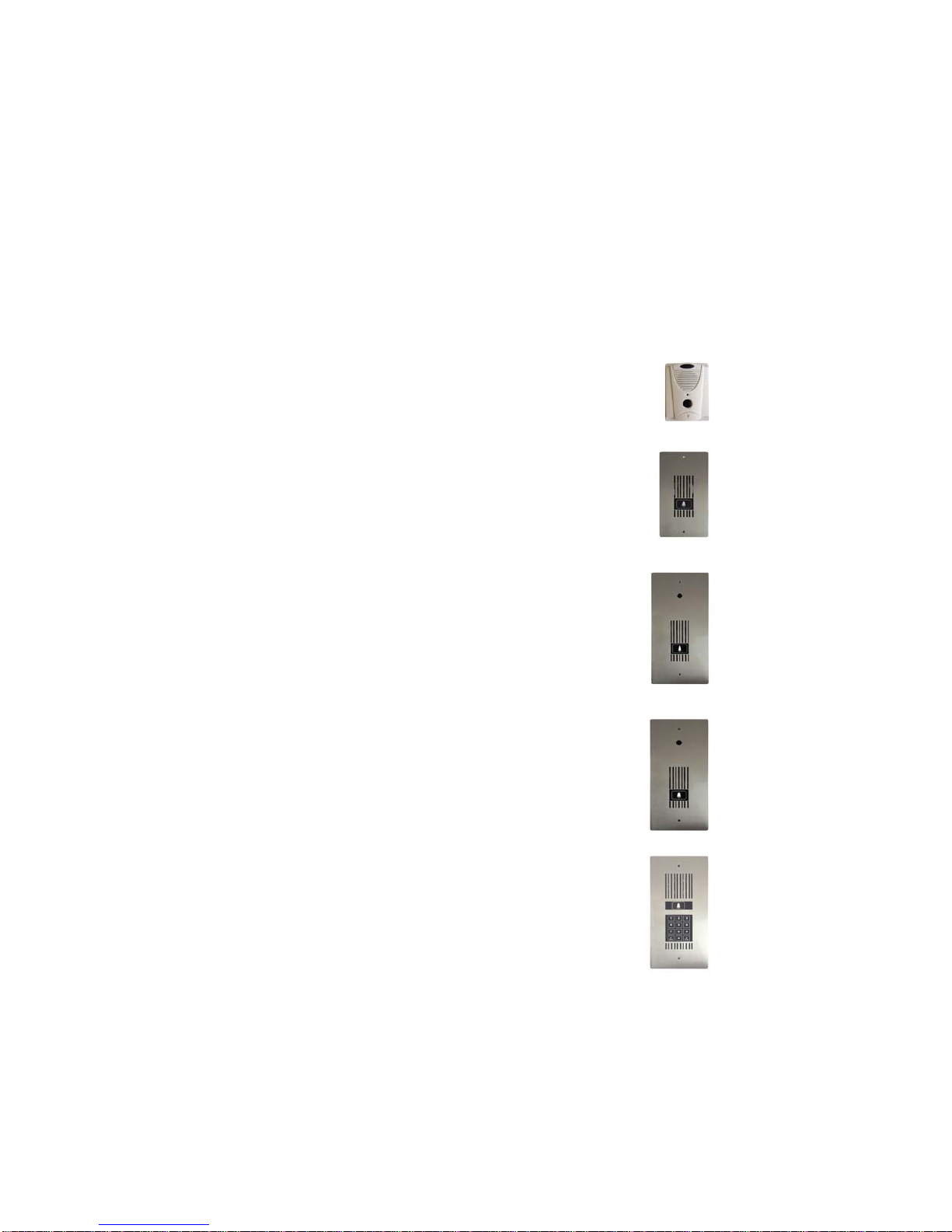
A choice of Five Door Phones are provided for use with our range of Door
Station Controller units :
Model DP1 - SURFACE MOUNT
Moulded plastic unit, designed for easy mounting direct
onto your wall surface. Vertical orientation only.
(100mm Wide, 133mm High, 32mm Depth).
Model DP2 - FLUSH MOUNT Compact Size
Marine Grade Stainless Steel face plate.
Touch Switch operation. Night illumination.
Available in Vertical or Horizontal orientation.
Optional Surface Mounting Kit is available.
(107mm Wide, 204mm High, 30mm Depth).
Model DP3 - FLUSH MOUNT Standard Size
Marine Grade Stainless Steel face plate.
Touch Switch operation. Night illumination.
Available in Vertical or Horizontal orientation.
Has a 12 mm hole and threaded mounting studs
to allow for a Digital Camera to be fitted.
Optional Surface Mounting Kit is available.
(130mm Wide, 264mm High, 30mm Depth).
Model DP4 - FLUSH MOUNT Standard Size
Fitted with a high resolution, low light Digital
Colour Camera.
Marine Grade Stainless Steel face plate.
Touch Switch operation. Night illumination.
Available in Vertical or Horizontal orientation.
Optional Surface Mounting Kit is available.
(130mm Wide, 264mm High, 37mm Depth).
Model DP5 - FLUSH MOUNT Standard Size
Fitted with an intelligent Pedestrian Access Keypad.
Touch switch operation with 99 User Codes
Marine Grade Stainless Steel face plate.
Blue and White LED Night illumination.
Available in Vertical or Horizontal orientation.
Optional Surface Mounting Kit is available.
(130mm Wide, 264mm High, 30mm Depth).

National Communications Page 7
DOOR PHONE PERFORMANCE
This product is IDEAL for RESIDENTIAL USE or COMMERCIAL USE,
whereROADNOISE is NOT HIGH.
It is not designed for INDUSTRIAL USE where ambient noise will be
constantly high.
The volume of the audio communication on the internal phones should
be comfortably audible (a similar level to a telephone call) providing :
•The person at the Door Phone is talking directly towards the Door
Phone and at a distance of no more than 1 to 2 feet away (max 500-600
mm).
•TheDoorPhoneismountedataheightofabout1.5meters(5feet).You
canmountat a lower level toallowfor very young children, butvolumewill
suffer.
•No plates or other material are placed over the front face of the Door
phone.OurDoorPhoneCoveraccessory,ora properlydesignedRainHood
willnotaffectperformance.
The volume of the audio communication at the Door Phone should be
comfortably audible, providing :
•There is not excessive road noise or other noise near the Door Phone.
This will affect the automatic gain circuit used in this device.
•ThathighqualityADSLFILTERINGisfittedaheadoftheDSCONTROL-
LER where ADSL is used on the same line. If you do not do so, volume in
bothdirectionswillbeaffected.Refer to your Door Station Controller User
Guidefor detailedinformation on the use of ADSL with this product.

Page 8 National Communications
CAMERA POWER
The Integrated Camera is powered direct from the Door Phone, which
receives it’s power via the 4 wire connection from the DS Controller.
However, the power consumption of the Camera is approximately
150 mA and this cannot be supported over distances greater than 70
meters.
When operating the Camera at distances greater than 70m from the
Door Phone controller, you will need to use a separate 12VDC regulated
Power adaptor to separately power the Camera. This additional Power
Adaptor wil be supplied separately on request at no additional charge.
INSTRUCTIONS FOR USE OF THE
SEPARATE CAMERA POWER SUPPLY
1. Remove the Power Cable connecting to the Camera assembly power
socket. Seal the removed cable and plug with waterproof insulating tape
to prevent future shorting.
2. Connect the Power Plug of the supplied 12V DC Regulated Power
Supply to the power socket of the Camera assembly. Connect the
supplied 12V DC Regulated Power Supply to a 240V Power Source.
Camera Assembly
Power Cable
Video Cable
Note - You must use the supplied
12VDC Regulated Power Adaptor
or the Camera may be damaged.

National Communications Page 9
CAMERA WIRING
DP4 provides a BNC output for Video, which can be connected to
standard TV’s, dedicated Video display units or both.
If IP Video is required, the DP4 video output should be connected to an
Analogue to Video IPConverter, such as the AXIS 241S.
You can use either Coaxial cable or CAT5 cable to connect video to
your Video display units.
As only 4 wires of an 8 wire CAT5 cable are required for the Door Phone,
4 wires are unused, unless One or Two Door locks are used in
conjunction with the Door Phone.
If only One Door Lock is used, then 2 wires are still available for Video.
If Two Door Locks are used, there will be no spare wires and a separate
CAT5 cable or a Coaxial cable will be needed for Video.
If you plan to use 2 wires of a CAT5 cable, then you will need to use a
pair of CAT5 Video Baluns to transfer the video signal. One Balun will
connect to the BNC output from the DP4 and the other will connect to
your Video display device.Asingle pair of CAT5 cable is used between
the Baluns.
Good Quality Baluns, such as those provided by Natcomm (see below)
will allow for good quality video over 100’s of meters of CAT5 cable.
CAT5 Video Baluns

Page 10 National Communications
MOUNTING THE DOOR PHONE
The DOOR PHONE should be mounted at the average face
height of 1.5 meter (5 feet) for optimum performance.
The main body of the DP4 unit is designed to be
recessed into a wall surface. It can be fitted
horizontally or vertically.
To assist installation, a Galvanised Iron ‘Wall Mount box’ (WMB) is
supplied which should be fitted within the wall cavity is supplied.
A recess area of : 255 mm, 93mm
and 40mm (D) should be prepared
for insertion of the Wall Mount Box.
Alternatively, a brick can be
removed. WMB is the same height
and width of a standard brick.
The Wall Mount Box should then be securely fixed within the recessed
cavity using nails, dyna bolts or silicone.
DP4 is then screwed onto the WMB by using 2 supplied stainless
steel screws.
SURFACE MOUNTING KITS
Optional Stainless Steel Surface Mounting Kits are available for all Natcomm
DoorPhones, so that yourDoor Phone canbe mounted ONTO awall surface,
rather than into it.
See page 18 for further detail.
Andere Handbücher für DP4
1
Dieses Handbuch passt für folgende Modelle
3
Inhaltsverzeichnis
Andere NatComm Gegensprechanlage Handbücher

NatComm
NatComm DP4 Bedienungsanleitung

NatComm
NatComm DP2 Bedienungsanleitung

NatComm
NatComm DS6 Bedienungsanleitung

NatComm
NatComm DP5 Bedienungsanleitung

NatComm
NatComm DP5 Bedienungsanleitung

NatComm
NatComm DP1 Bedienungsanleitung

NatComm
NatComm DS3 Bedienungsanleitung

NatComm
NatComm DP2 Bedienungsanleitung

NatComm
NatComm DP2 Bedienungsanleitung

NatComm
NatComm DS1 Bedienungsanleitung