
Ningbo RD610 Bedienungsanleitung
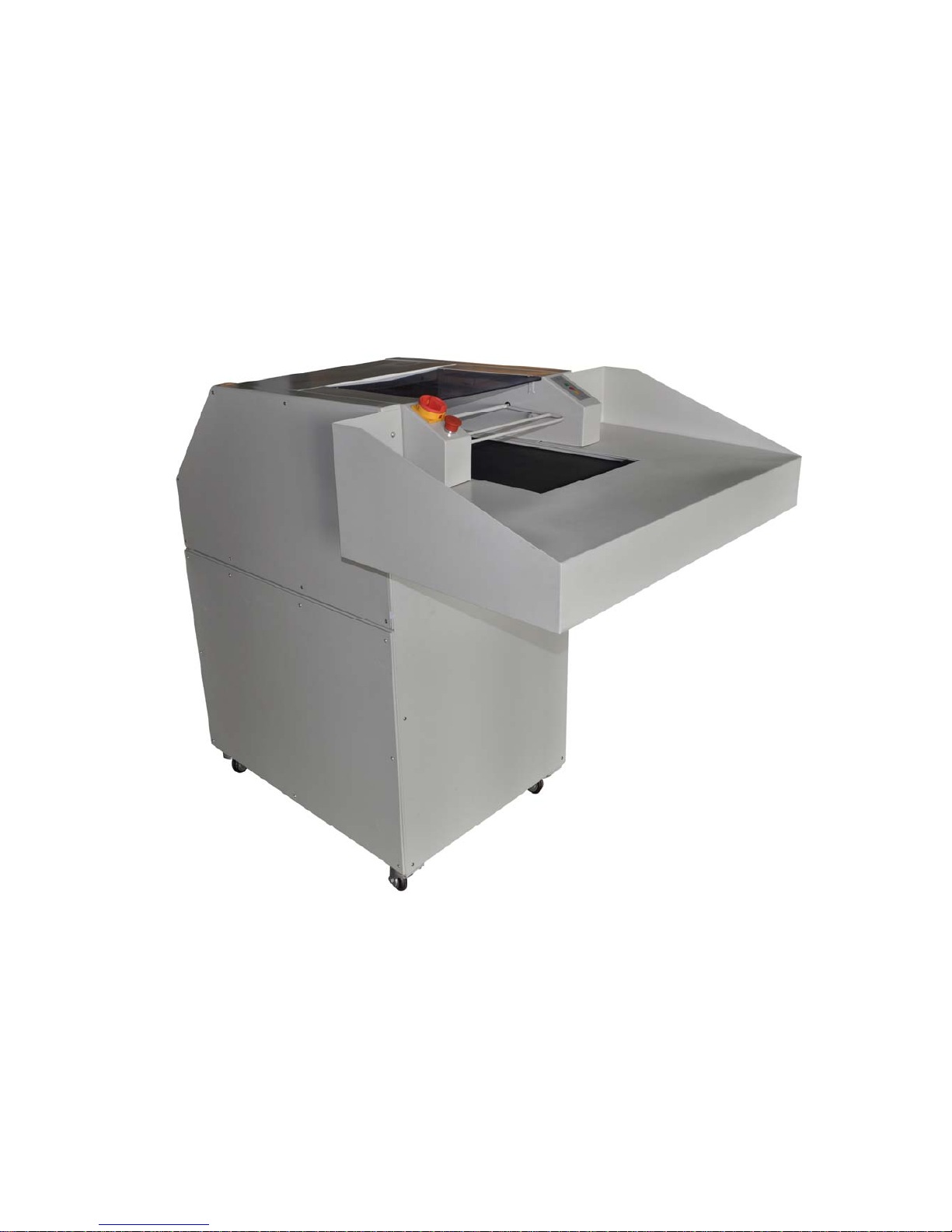
RD610/RD620
Paper Shredder Operation Manual
Ningbo R.D.C Office Equipment Co.,Ltd

Preface
The operation manual will guide you how to operate and maintain paper shredder, and also
include security guides. The paper shredder could keep in a good performance and work condition
which is closely related to right operation and maintenance. So please read the manual and
security guides carefully and take it with you .If you operate as the manual, it can be in working
order to avoid accident.
R .D. C company focus on improving the quality of products. Our company have the right of
modification and improvement for performance and specification ,but it doesn’t mean we are
under obligation to modify the machine which have been sold out .to improve the quality of paper
shredder ,it is necessary to improve the technology, but our company keep the right!
Copyright of this manual belongs to R.D.C company. The manual show the information about
installation, operation, maintenance for the machine. The information about technology
specification and drawing are not allowed to copy, spread, use in unfair competition and retransfer
to the third parties.
Notice: If you have any question after reading the manual, please contact with the local distributor.
1

Catalog
Preface——————————————————————————————1
Paper shredder nameplate ———————————————————------4
1.Security
—————————————————————————-----5
1.1 Points for attention on safety———————————————————--5
1.1.1 Security symbols——————————————————————------5
1.1.2 Attention symbols——————————————————————-----5
1.2 Safe operation guides—————————————————————-----5
1.3 Operation as manual——————————————————————---7
1.4 Inspecting security device——————————————————--------7
1.4.1 Inspecting process —————————————————————-------8
2. Technology parameter———————————————————----10
2.1 Assembly summary—————————————————————-----10
2.2 Specification and feature—————————————————-----------11
2.3 Shred data—————————————————————————----11
2.4 Motor————————————————————————————-12
2.5 Power supply specification and fuse protection———————---------------12
2.6 Size————————————————————————————---12
2.6.1 Machine Size————————————————————————---12
2.6.2 Paper feed table——————————————————————------12
2.7 Space demand————————————————————————---13
2.8 Noise index————————————————————————------13
2.9 Machine size(drawing)———————————————————----13
3.Installation————————————————————————------14
3.1 Space demand—————————————————————————-14
3.2 Power supply connection————————————————————---14
3.3 Transfer paper shredder to installation location———————----------------14
3.3.1Installation of paper feed table——————————————---------------14
3.4 Installation of paper shredder ————————————————---------15
4.Start ————————————————————————————--15
4.1 Control and display——————————————————————----15
4.1.1 Main supply switch—————————————————————-------15
4.1.2 Emergency stop switch————————————————————------15
2

4.1.3 Control panel———————————————————————------16
4.2 Paper delivery ————————————————————-------17
4.3 Deliver paper too much—motor overload————————————------17
4.4 Shut down——————————————————————————-18
4.5 Replace shred bag——————————————————————----18
5.Inspection and maintenance——————————————————--19
5.1 Maintenance of delivery belt—————————————————--------19
5.1.1 Inspecting the tightness of delivery belt——————————----------------19
5.1.2 Inspecting the abrasion of delivery belt———————————--------------20
5.1.3 Cleaning the delivery belt—————————————————------------20
5.2 Inspecting the tightness of chain belt—————-----------------------------------20
5.3 Lubricating paper shredder——————————————————-------21
5.3.1 Paper shredder system————————————————————-------21
5.3.2 Drive———————————————————————————------21
6.Replacing parts—————————————————————--------22
6.1 After-service department address———————————————---------22
6.2 Maintenance—————————————————————————---22
7.Circuit diagram———————————————————————--23
3

RONGDA
Paper shredder
Model:RD610/RD620
serial No:
Motor:
voltage:
current:
结构:
If you couldn’t offer the serial No, you will not get the right of claim and guarantee for all repairs
The serial No is showed on nameplate as indicated above
Once you receive the goods, please mark the serial and related data on right place immediately
4

1. Security
1.1 Points for attention on safety
1.1.1 Security symbol
The symbol means dangerous, it may cause serious harm to health and
even life if ignoring it .Please pay attention to it and inform of other
users.
1.1.2 Attention symbol
You should pay much attention to the symbols .make sure to operate the machine
as manual guide to avoid damaging the machine and other devices.
1.2 Safe operation guides
Please notice below security operation ways:
The machine have passed the security certificate, but it will cause following harm by
incorrect operation
zUser’s health and life
zMachine and other precious devices
zUsing effort of paper shredder
The machine utilize the national advanced technology to guarantee the security,
but it will cause the dangerous by incorrect operation and the operation which is
not apply to our machine design
zThe curled materials are not apply to be shredded by the machine
zLong hair, clothes, belt, Scarves must be far from the paper feeding Portal
--- It is not allowed to operate it for the people under 16 years old
--- The operation worker who is engaged in the assembly, disassembly, reinstallation
5

and maintenance (including inspection, maintenance and repair) must read and
understand the manual totally, especially the contents involve “security”
--- The person who is engaged in operation, maintenance, repairing for the machine
should be trained and guided and know potential danger of the machine.
--- The procedure of installation, disassembly, reassembly, operation and maintenance
should clearly know the responsibility of each other to avoid potential danger.
--- Make sure to cut the power before installation, disassembly, reassembly, operation,
maintenance. These operations should be done when power off
--- Before using the machine, avoid driving the machine by touching switch
unconsciously. Please turn the main switch to “off” to lock the power.
--- After repairing and before using, please inspecting all protection devices
----When operating machine, all operations which will threaten to your security will
be forbidden
---If the situation which will threaten to your security happened, please report
principal. It is not allowed to start the machine before solving the danger
---Make sure the machine could work normally before starting to use
--- Make sure to keep machine in a clear and safe place
---All the modifications that will decrease security index are forbidden. Forbid
removing or rejecting security devices
--- When the machine leave unused, please continuously do the maintenance work.
--- Forbid opening the door or cover of the machine when the machine is working,
please notice the symbol
--- Please inspect the security system after installing and repairing the machine.
---When using the paper shredder, please pay attention to the local safety regulation
--- Don’t put the machine on the stand or salience surface object which will affect
security index
--- Keep all connection wire well
--- Inspecting the wear parts of the mechanism every half year
--- Inspecting the electron parts by qualified electrician every half year.
6

1.3 Operate as manual
The paper shredder is apply to shred paper, cardboard, CD, and card. But it is not
apply to shred loose-leaf book, paper clip and staple.
The operator will take on after effect by incorrectly using the machine.
Manufacturer will be derelict of duty
Operating as manual and working conform to factory’s instruction of installation,
disassembly, reassembly, operation. The person who is engaged in operation,
maintenance, repairing for the machine should be trained and guided and know
potential danger from the machine
Take attention to related security rules and other occupational disease preventing rule
1.4 Inspecting security devices
Please inspect the security devices as below:
zWhen Change the function of machine ,it should be inspected
zWhen the machine continuous work, it should be inspected at least once a
week .
zInspect after maintenance and repair
Please make security inspecting as following aspects:
zSpecific environment
zSpecific position
zAttached security devices
zSpecific function
Once the error happened when the machine is working, Please stop the machine
and eliminate the error
Don’t modify and remove the protection devices. When the danger happened,
please don’t cut down the protection devices.
To be on the safe side, it is not allowed to modify the machine
Caution symbol
Error security devices may cause serious accident, so when the security devices
have problem, should stop using the machine immediately. Forbid putting you hands
7
into paper feed system, otherwise it will be grievously hurt.
Please start shredding after all the security devices is checked normally
Please inspect as all the following points. Eliminate the error first before using the machine
1.4.1 Inspection List
Please inspecting all the following points before using the machine
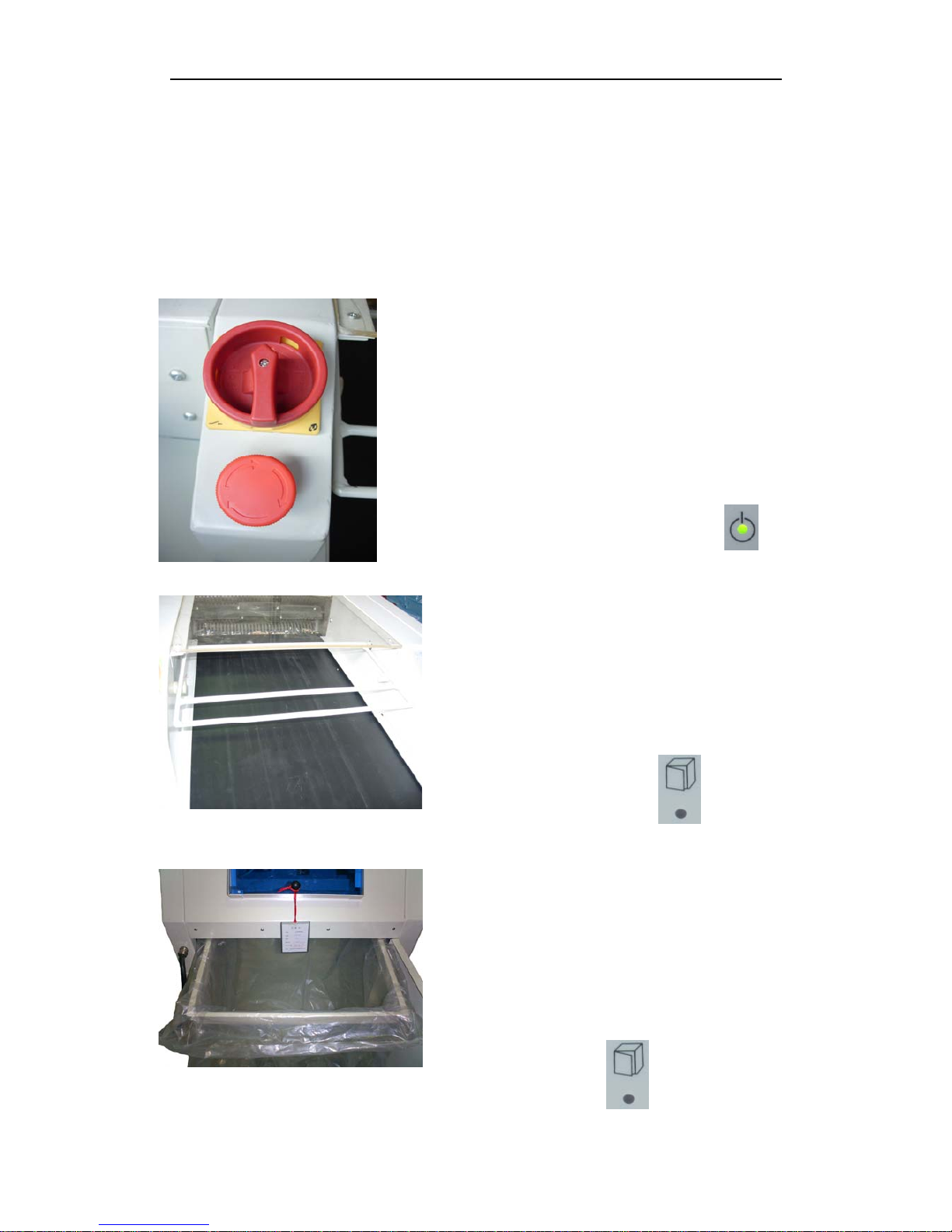
1. Inspecting “emergency stop” switch on paper
feeding table
When you press down “emergency stop” switch,
please shut down the machine immediately, then the
“on” light will be off.
When the “emergency stop” switch is locked.
Please don’t start the machine. The “on” light will be
on after release the “emergency stop” switch.
2. Inspecting the top cover of delivery belt.
When the top cover open, machine stop
immediately. ”security top cover open” light is
on. When the top cover open, please don’t start
the machine. ”security top cover open “light is
off after closing the top cover.
3. Inspecting the security switch of shred box
The machine will stop immediately, when you
take out the shred box. ”security top cover open”
light is on. Please do not start the machine, when
you are taking out the shred box. The “security
top cover open” light will be off after you
reinsert the shred box.
8
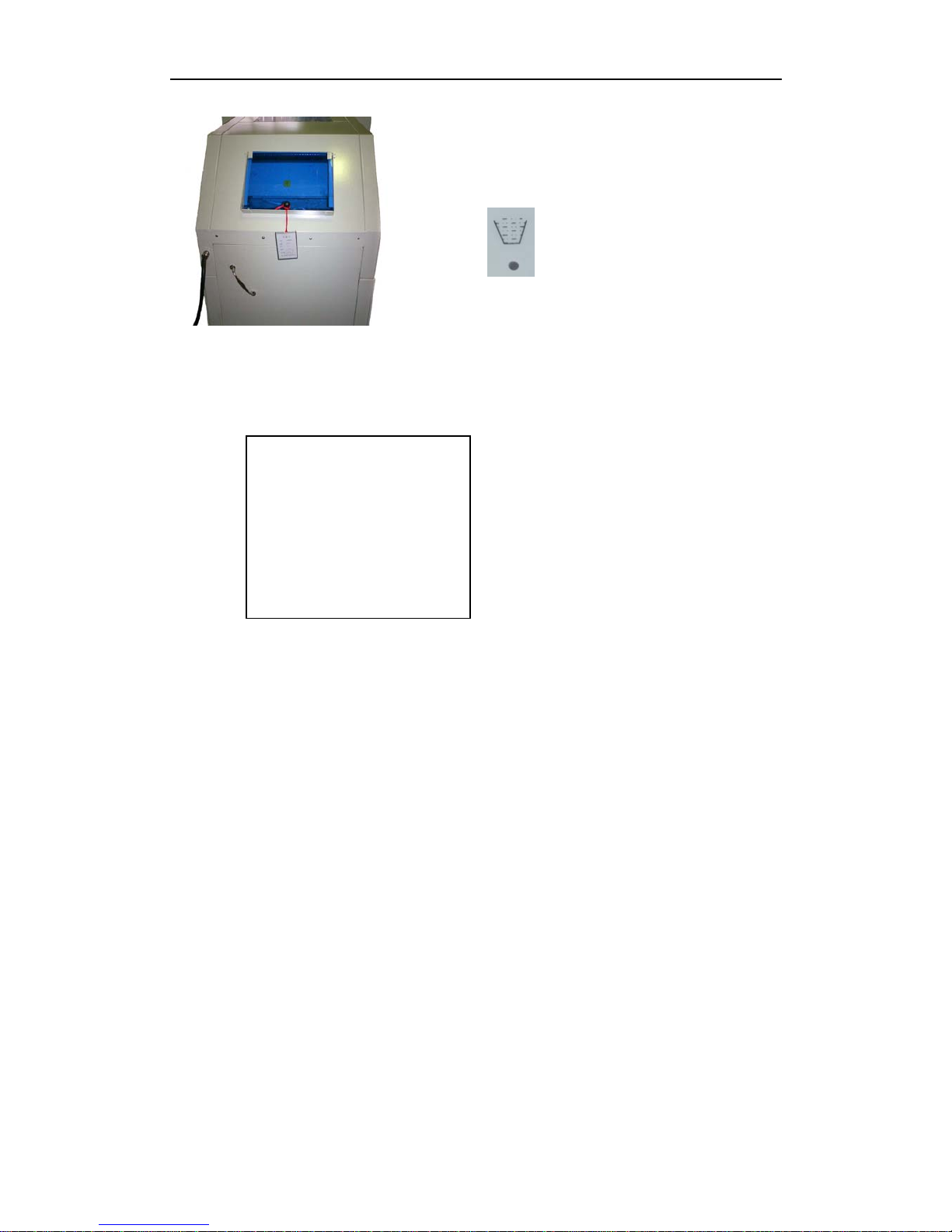
4. Inspecting security switch of checking door
When open the checking door, the machine stop
immediately. ”shred box full” light is on, close it, the
light is off.
5. Install all security cover and tighten them.
record:
Date:________________
note:_________________
9
Dieses Handbuch passt für folgende Modelle
1
Inhaltsverzeichnis
Andere Ningbo Aktenvernichter Handbücher


Beliebte Aktenvernichter Handbücher anderer Marken

Swingline
Swingline STACK-AND-SHRED200X&200XL 60X Bedienungsanleitung

GBC
GBC ShredMaster CC055 Bedienungsanleitung

UNITED OFFICE
UNITED OFFICE UAV 190 A1 Bedienungsanleitung

UNITED OFFICE
UNITED OFFICE UAV 190 A1 Bedienungsanleitung

Rexel
Rexel Optimum AutoFeed+ 45X Bedienungsanleitung

Martin Yale
Martin Yale 227284S1 Bedienungsanleitung


