
Nokia SU-7 Bedienungsanleitung

User’s Guide for
Nokia Image Frame SU-7
9311006
Issue 1
!"

DECLARATION OF CONFORMITY
We, NOKIA CORPORATION, declare under our sole responsibility that the product
SU-7 is in conformity with the provisions of the following Council Directive:
1999/5/EC.
A copy of the Declaration of Conformity can be found at
http://www.nokia.com/phones/declaration_of_conformity/.
Copyright © 2004 Nokia. All rights reserved.
Reproduction, transfer, distribution or storage of part or all of the contents in this
document in any form without the prior written permission of Nokia is
prohibited.
Nokia and Nokia Connecting People are trademarks or registered trademarks of
Nokia Corporation. Other product and company names mentioned herein may be
trademarks or tradenames of their respective owners.
Nokia operates a policy of continuous development. Nokia reserves the right to
make changes and improvements to any of the products described in this
document without prior notice.
Under no circumstances shall Nokia be responsible for any loss of data or income
or any special, incidental, consequential or indirect damages howsoever caused.
The contents of this document are provided "as is". Except as required by
applicable law, no warranties of any kind, either express or implied, including, but
not limited to, the implied warranties of merchantability and fitness for a
particular purpose, are made in relation to the accuracy, reliability or contents of
this document. Nokia reserves the right to revise this document or withdraw it at
any time without prior notice
The availability of particular products may vary by region. Please check with the
Nokia dealer nearest to you.
9311006/Issue 1
!"
3
English
Contents
FOR YOUR SAFETY ................... 4
Introduction ............................. 6
Power supply................................... 6
Technical data................................. 6
Image format .................................. 7
1. Overview............................... 8
2. Getting started .................. 11
Setting up the Nokia Image
Frame............................................... 11
Switching the power on
and off ............................................ 12
Keying in the PIN code............... 13
Configuring the MMS
settings ........................................... 13
OTA message ..................................... 14
SMS messages................................... 14
3. Using the Nokia
Image Frame ........................... 16
Viewing the images .................... 16
Editing the images ...................... 16
Switching the screensaver
on and off...................................... 17
Modifying the display
brightness...................................... 18
Sending an image from the
Nokia Image Frame..................... 18
Receiving images with the
Nokia Image Frame..................... 18
Receiving images over MMS
with the Nokia Image Frame.... 20
Care and maintenance ...........22
Important Safety Information 23
!"
FOR YOUR SAFETY
4
FOR YOUR SAFETY
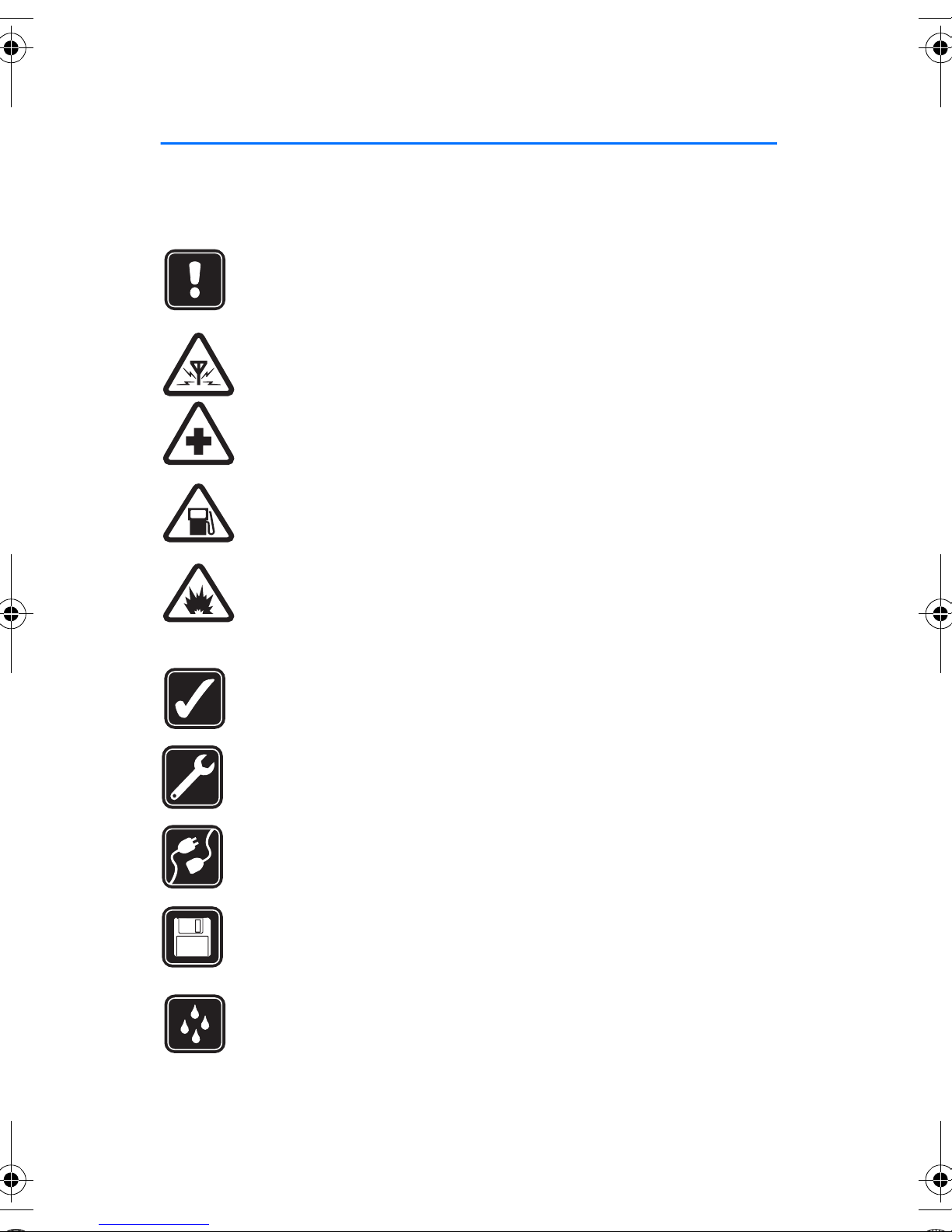
Read these simple guidelines. Breaking the rules may be dangerous or illegal.
Further detailed information is given in this manual.
Do not connect the Nokia Image Frame to the mobile network when
wireless phone use is prohibited or when it may cause interference or
danger.
INTERFERENCE
All devices may get interference, which could affect performance.
SWITCH OFF IN HOSPITALS
Follow any regulations or rules. Do not connect the Nokia Image
Frame to the mobile network near medical equipment.
SWITCH OFF WHEN REFUELLING
Do not connect the Nokia Image Frame to the mobile network at a
refuelling point. Don't use near fuel or chemicals.
SWITCH OFF NEAR BLASTING
Do not connect the Nokia Image Frame to the mobile network where
blasting is in progress. Observe restrictions, and follow any
regulations or rules.
USE SENSIBLY
Use only in the normal position. Don't touch the antenna
unnecessarily.
QUALIFIED SERVICE
Only qualified personnel may install or repair the Nokia Image Frame
equipment.
CONNECTING TO OTHER DEVICES
When connecting to any other device, read its user's guide for
detailed safety instructions. Do not connect incompatible products.
BACKUP COPIES
Remember to make backup copies of all important data.
WATER-RESISTANCE
Your Nokia Image Frame is not water-resistant. Keep it dry.
# !"

FOR YOUR SAFETY
5
English
IMPORTANT:
Only use chargers in dry conditions. Never supply power to the device
with a charger when the device or charger or their parts are damp or
wet. If the device has been exposed to salt water, wipe it immediately
with a cloth dampened with fresh water to avoid corrosion. The device
must then be carefully wiped dry.
Do not point the IR (infrared) beam at anyone's eye or allow it to
interfere with other IR devices. This device is a Class 1 Laser product.
■Network Services
The Nokia Image Frame described in this guide is approved for use on the EGSM
900 and GSM1800 network.
A number of features included in this guide are called Network Services. These
are special services that you arrange through your wireless service provider.
Before you can take advantage of any of these Network Services, you must
subscribe to them through your service provider and obtain instructions for their
use from your service provider.
Note: Some networks may not support all language-dependent
characters and/or services.
!"

Introduction
6
Introduction
The Nokia Image Frame SU-7 is an enhancement product, which enables
you to view the digital images taken or received by your IrDA-enabled
Nokia phone or other compatible devices. You can connect the Nokia
Image Frame to the devices using its infrared (IR) port. If you insert a
SIM card to the Nokia Image Frame, you can also receive new images as
MMS messages.
You can place the Nokia Image Frame on a table and view the images
either one-by-one or as a slide show. The Nokia Image Frame comes
supplied with three pre-loaded images, and you can conveniently add
new images from a compatible device and delete old images.
Read this user’s guide carefully before using the Nokia Image Frame.
■Power supply
Check the model number of any charger used to supply power before use
with this device. The Nokia Image Frame is intended for use with the
ACW-5A charger.
Warning! Use only chargers approved by the manufacturer for
use with this particular enhancement. The use of any other
types will invalidate any approval or warranty applying to the
enhancement, and may be dangerous.
For availability of approved chargers, please check with your dealer.
When you disconnect the power cord of any enhancement, grasp and
pull the plug, not the cord.
■Technical data
• Weight: 570 g
• Width (max) / height (max) / depth (max):
170 mm / 129 mm / 123.0 mm
• Display: 5.1" transmissive backlit STN color LCD 320 x 240 horizontal
orientation, 4096 colors. The image resolution in these materials
may appear different.
$ !"
Introduction
7
English
• Operating temperature: 0 oC to 40 oC
• Compatibility: The Nokia Image Frame SU-7 is compatible with
phones and other devices that support image sending over infrared
(IrDA). Note that if image sending cannot be activated from the
phone (IrDA Send feature), the Nokia Image Frame can pull the
images from the compatible Nokia phone when the phone’s IR
connection has been activated. The Nokia Image Frame can also
receive images over MMS from most MMS-enabled phones.
• IrDA standards: IrOBEX 1.3 receive/send, IrTranP receive
• Supported image format: JPEG and GIF (not animated GIF)
• Supported image size: max 1024 x 768, up to 200 kB. Due to
different techniques of image processing, even up to 1 MB.
■Image format
The Nokia Image Frame converts all the received images to JPEG format
with the 320 x 240 pixel resolution. If the resolution of the received
image differs from this resolution, the Nokia Image Frame scales the
image so that it fits optimally on the display.
When you send images from the Nokia Image Frame, they are sent with
the JPEG format, since the Nokia Image Frame does not store the
original formats of the received images. You should therefore remember
to make backup copies of your original images.
!"

Overview
8
1. Overview
The Nokia Image Frame has the following parts:
1. Display
2. Infrared (IR) port
3. Control keys
4. Table support
5. Charger connector
6. Back cover
You can use the Nokia Image Frame through the control keys on top of
the device. The control keys are:
1. Power on/off key
2. Show/Brightness key
3. Rotation key
% !"

Overview
9
English
4. Three-position switch:
• Slide show mode
• Image view mode
• Edit mode
5. Up key
6. Down key
7. Mark key
8. IrDA key
There are three ways to press the keys. These are as follows:
•Press briefly - press a key for less than one second
•Press - press a key for at least one second
•Press and hold - press and hold down the key for at least three
seconds
Indicators on the display
This indicator shows that the image has been marked for
viewing.
The memory in the Nokia Image Frame is full, 50 images are
stored in the Nokia Image Frame. If the memory becomes full
in the middle of image transfer, the rest of the images are
discarded.
The Nokia Image Frame is rotating the image 90oclockwise.
The Nokia Image Frame is switching to the next image.
The Nokia Image Frame is switching to the previous image.
Confirms that the image has been successfully deleted.
& !"

Overview
10
This indicator blinks when the Nokia Image Frame attempts to
establish the IrDA connection. When the connection is
established and the Nokia Image Frame is sending or receiving
an image, the indicator is displayed continuously.
Confirms that the images have been successfully received or
sent (the receiving device has confirmed the images as
received).
The image is not supported by the Nokia Image Frame. It is, for
example, too large or not in the compatible format.
An error occurred during the image transfer.
This indicator blinks when the Nokia Image Frame is
downloading an incoming MMS message. When the message
has been stored to the Nokia Image Frame, the indicator is
displayed continuously until you check the message and either
accept it or delete it.
The network connection has been established. When the
connection has not been established, there is a /mark across
the icon.
GPRS service is available. When the service is not available,
there is a /mark across the icon.
This indicator shows how many images have been
marked for viewing and how many images in total have
been stored. The maximum number of stored images is
50.
The progress bar is shown while the Nokia Image Frame
processes the received images.
!"
Inhaltsverzeichnis
Andere Nokia Digitaler Bilderrahmen Handbücher


Beliebte Digitaler Bilderrahmen Handbücher anderer Marken


Philips
Philips SPF1327 Bedienungsanleitung

Philips
Philips SPF7010/10 Bedienungsanleitung

Digital Spectrum
Digital Spectrum MemoryVue MV-1500 Bedienungsanleitung

ViewSonic
ViewSonic VFM1042-52 Bedienungsanleitung

YURAKU
YURAKU YUR.PHOTO 7B4C Bedienungsanleitung

Denver
Denver PFF-710WHITE MK2 Bedienungsanleitung

Pandigital
Pandigital PAN8000DWPCF1 Bedienungsanleitung

Rekam
Rekam Deja View HD-850 Bedienungsanleitung

Majestic
Majestic DF 918HD MP3 Bedienungsanleitung

ViewSonic
ViewSonic DPF8-CAM Bedienungsanleitung

Philips
Philips SPF2527 Bedienungsanleitung

Digital Foci
Digital Foci Image Moments IMT-063 Bedienungsanleitung