
oliser MS Soho Bedienungsanleitung

MS SOHO BLACK & COLOR
INKJET FILLING MACHINE
Mesrutiyet caddesi. Hatay Sokak. 17/B
06640. Kızılay / Ankara
Turkey
Tel : +90 312 417 72 75
Fax : +90 312 425 72 81
Web : www.oliser.com.tr
Email : [email protected]

>>WARNING<<
Suggestions when using Oliser’s Inkjet Filling Machines
Oliser suggests using water when operating the machine for the rst time
A pencil eraser can be used to clean the circuits on a cartridge
!
!
Maintenance :
Insert all Exhaust Lines into your specic catch receptable
Note : Empty your catch buckets once they become 1/3 full. This
will optimize the air ow in your equipment and allow the System to per-
form correctly.
Note : Use separate catch buckets for waste and reusable liquids.
Flush your equipment with warm distilled water daily.
Simply use an empty cartridge to draw the distilled water through
your equipment in place of ink.
This will keep any sediment from clogging the interior of the equip-
ment.
Cleaning of VAC generator :
Take out the VAC generators connectors, put the VAC generator
warm distilled water or cleaning solutions around ve minutes, then apply
compressed air through connectors one by one 3-5 seconds. Reconnect the
connectors to the VAC generator and test the vacumm level before install
into the machine.
Maintenance procedure must be done regularly every
week.
OLISER is NOT responsible for the problems which is
caused by un-maintenance...
To Order Call: +90 312 417 72 75 / oliser@oliser.com.tr
!
!

Specications:
1- Fills all black cartridges.
2- Advanced Menu system helps; effective cartridge lling.
3- Portable and easy to operate.
4- 110/220 V Switching power supply.
You can select the lling cartridge model by left and right ar-
rows.
HP ( 15/45, 26-33, 27-A, 56, 29/14 )
Lexmark ( 70/76, 13400, 3620, 0620, 0050, 0032, 0042, 0016 )
Canon ( 02/X3, BC10, BC20, BC01 )
Xerox ( 3855,0140,x310, c4, olivetti, 7879,7881 )
Manual ( By selecting manual, Dye and Pigment choices appear, and you can
make adjustable ink lling )
By pressing and holding enter button setting menu appears and you can de-
crease or increase the lling amount. Under settings also Evac menu is avail-
able. Press enter to evacuate the cartridges with vacuum system.
Only entry-level machine for common-black inkjet cartridge relling
It Fills, Evacuates and primes the abovementioned cartridges
Filling and pressurizing operation is microcomputer controlled
All cartridge models mentioned are stored in smart memory logic; with pre-de-
termined pressure, ink ml quantity and sequence processing
Caters to sponge and bladder-based
cartridges.
Also boasts manual override feature for user-dened operation: For cartridges
not featured here, yet desired by user for lling.
No compressed air required
Works on 110/220V (switching PSU)
Very easy to use, You do not need to have special training: Simply insert the
empty cartridge to the lling station; select cartridge type and push the Start /
Stop button. You can cancel the lling operation at any time.
Machine will ll the cartridge and perform auto-pressurizing / balancing.
Thereafter immediately take the cartridge for print testing
This machine is designed for use franchises, corner shops and the like.
No optional extras: machine is shipped with all parts and auxiliary extras.
12 month warranty
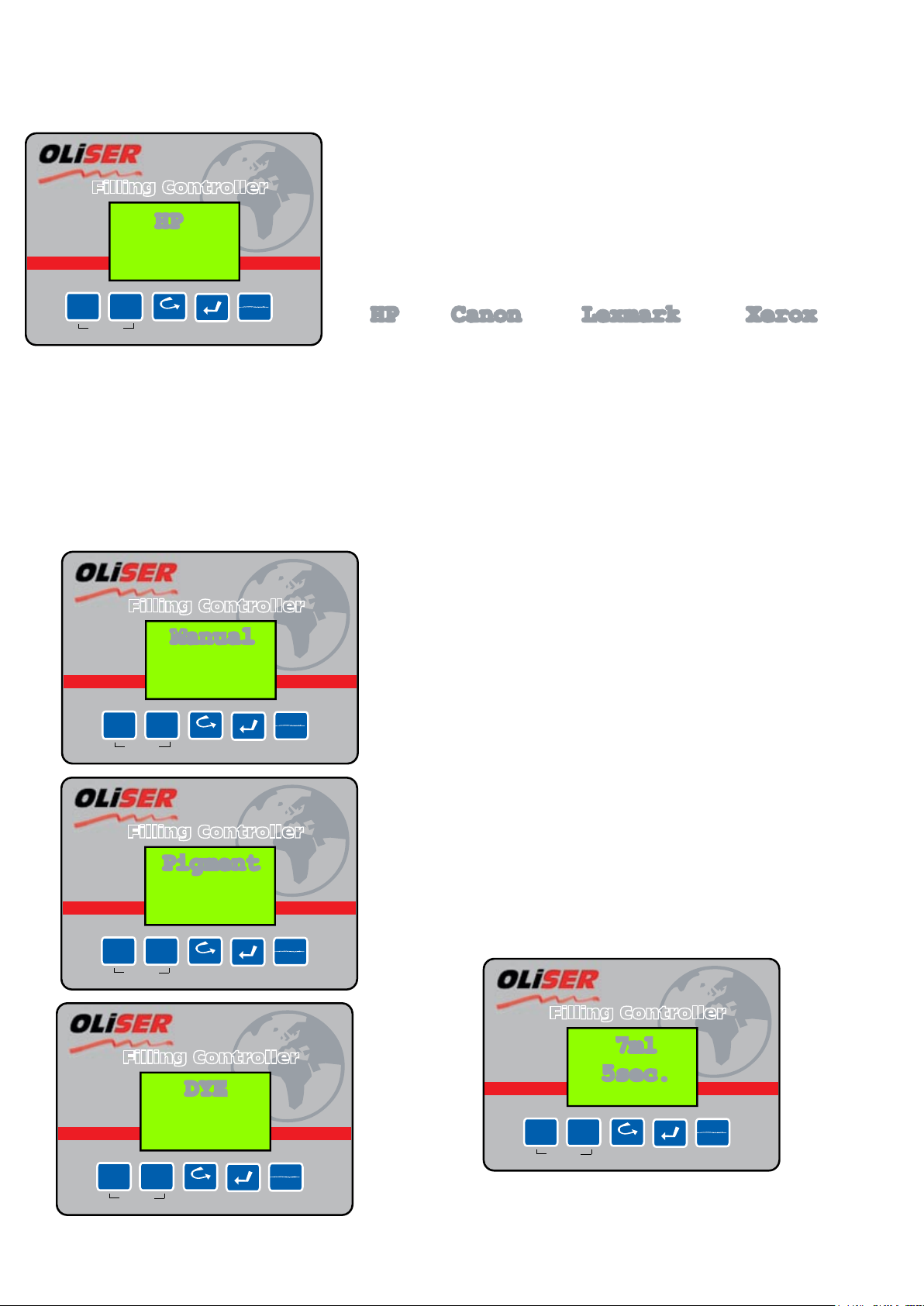
BLACK FILLING CONTROL PANEL
You can select 4 different lling models by pressing
left and right buttons. In order to see the contents
of menu press enter.
Under HP menu;
15/45, 26-33, 27-A, 56, 29/14 car-
tridges appears. Press READ button
to view prime/balance details.
Then start lling by pressing START
Under Lexmark menu;
70/76, 13400, 3620, 0620, 0050,
0032, 0042, 0016 cartridges ap-
pears. Press READ button to view
prime/balance details. Then start
lling by pressing START
Under CANON menu;
02/X3, BC10, BC20, BC01 cartridges
appears. Press READ button to view
prime/balance details. Then start lling
by pressing START
Under Xerox menu;
3855,0140,x310, c4, olivetti, 7879,7881 car-
tridges appears. Press READ button to view
prime/balance details. Then start lling by
pressing START
Under MANUAL menu;
PIGMENT and DYE choices ap-
pear.
Press READ button to view
prime/balance details. Then
start lling by pressing START
www.oliser.com.tr
---1
++5
Adjust
Shift
Read Enter Filling
Start
Stop
Filling Controller
HP
HP Canon Lexmark Xerox
www.oliser.com.tr
---1
++5
Adjust
Shift
Read Enter Filling
Start
Stop
Filling Controller
Manual
t
www.oliser.com.tr
---1
++5
Adjust
Shift
Read Enter Filling
Start
Stop
Filling Controller
Pigment
t
www.oliser.com.tr
---1
++5
Adjust
Shift
Read Enter Filling
Start
Stop
Filling Controller
DYE
t
www.oliser.com.tr
---1
++5
Adjust
Shift
Read Enter Filling
Start
Stop
Filling Controller
7ml
5sec.
Press –1 and +5 buttons to adjust
lling amount.

COLOR FILLING CONTROL PANEL
You can select 4 different lling models by pressing left and
right buttons. In order to see the contents of menu press
enter.
Under HP menu;
C25A, 28A, 41A, 49A, 57A, 78D,
23D, 25A cartridges appears.
Press READ button to view
prime/balance details. Then
start lling by pressing START
Under Lexmark menu;
13619, 0120, 0060, 0026,
1980 cartridges appears.
Press READ button to view
prime/balance details. Then
start lling by pressing START
Under CANON menu;
BC05, cartridges appears.
Press READ button to view
prime/balance details. Then
start lling by pressing
START
Under Xerox menu;
7880, 0141, C4 cartridges appears. Press READ
button to view prime/balance details. Then
start lling by pressing START
Under MANUAL menu;
MANUAL1 and MANUAL2 choices appear.
Press READ button to view prime/balance details.
Then start lling by pressing START
Press and hold ENTER button to
adjust lling settings.
Press left and right buttons to ad-
just lling amount.
www.oliser.com.tr
---1
++5
Adjust
Shift
Read Enter Filling
Start
Stop
Filling Controller
HP
HP Canon Lexmark Xerox
www.oliser.com.tr
---1
++5
Adjust
Shift
Read Enter Filling
Start
Stop
Filling Controller
Manual
www.oliser.com.tr
---1
++5
Adjust
Shift
Read Enter Filling
Start
Stop
Filling Controller
Manual 1
COLOR
www.oliser.com.tr
---1
++5
Adjust
Shift
Read Enter Filling
Start
Stop
Filling Controller
Manual 2
COLOR t
www.oliser.com.tr
---1
++5
Adjust
Shift
Read Enter Filling
Start
Stop
Filling Controller
7ml
5sec.

26/29/14 EVACUATION
Empty the cartridge if necessary (we rec-
ommend all old ink is evacuated).
To undertake this step, you will rst need
to connect the evacuation pipe-peripheral
in the correct and allotted slot into the
suitable cradle (xture).
Place the cradle xture on the machine
base platform in its correct “park” posi-
tion - as shown above.
Push the evacuation button to activate the
function of emptying the old ink from the
cartridge.
Note: Empty weight of 26/29/14 cartridges
is 20 Grams.
To Order Call: +90 312 417 72 75 / oliser@oliser.com.tr
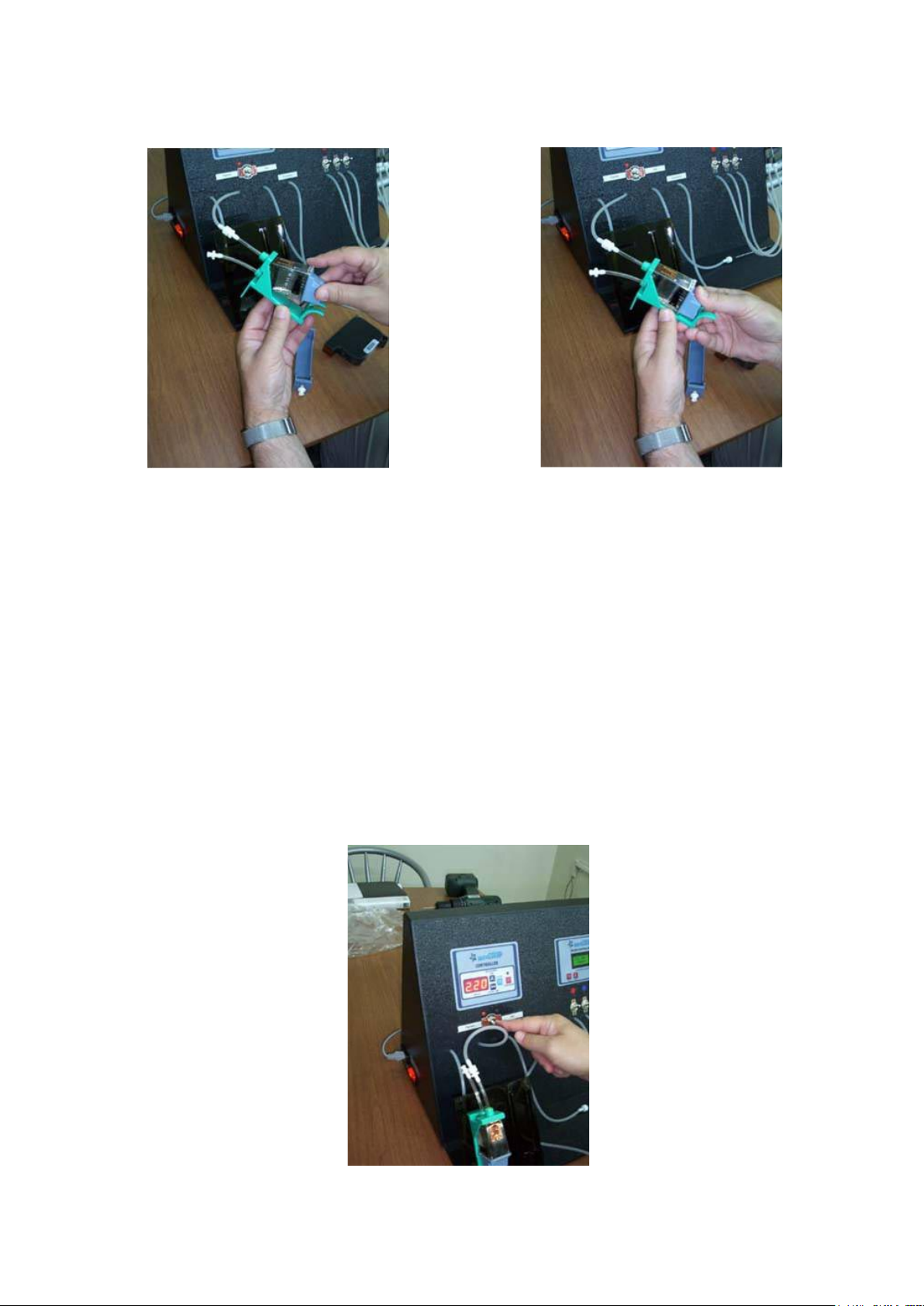
HP small-prole cartridges, such as 51626A, 51629A, C6614 use different inks.
Older HP51626A cartridges use dye-based ink, whereas 51629A and C6614 units require pig-
mented inks (although both inks will work in either type of model).
Connect the lling connector to the cartridge holder and ip the select switch to DYE or PIGMENT
depending on the cartridge and/or your own selection.
You can ll cartridges through both methods, namely: - MAZE HOLE or PRINT HEAD.
Pressurizing (also known as Equalizing or balancing) is automatic, as the machine has built-in
intelligence to undertake and perform this function for you.
Set the lling time to 2.40 and pressurizing to 9-seconds.
Push the lling start button to commence operations.
*** Cartridge is ready to test print ***
14/26/29 FILLING
To Order Call: +90 312 417 72 75 / oliser@oliser.com.tr

15/45 EVACUATION
Please clean the cartridge print head using
the steam generator.
This operation opens clogged nozzles
where dried ink cements itself in the jets.
This is a very important function that
needs performing before lling or evacua-
tion procedures are undertaken.
Connect the evacuation connector to the
45/15 cradle.
Place the cradle xture on the ma-
chine base platform in its correct
“park” position - as shown above.
Push the evacuation button to activate the function of
emptying the old ink from the cartridge.
Note: Empty weight of 15/45 cartridges is 66 Grams.
To Order Call: +90 312 417 72 75 / oliser@oliser.com.tr

15/45 FILLING
After you have evacuated and weighed the
cartridge, connect the pigment ink line (pipe)
to the relevant inlet connector on the cradle
holder.
Now place the cartridge cradle back in its park position.
Set the lling time to 2.40 and pressurizing to 9-seconds.
After push to the lling start button.
When “Cartridge Clogged” message occured on LCD displays, please remove the
cartridge. Don’t attemt to rell the cartridge. Fill the 26/29/14 series cartridges
through the maze hole instead of printhead.
Note: Full weight of cartridge will be around 106-108 Grams.
*** Cartridge is ready to test print ***
To Order Call: +90 312 417 72 75 / oliser@oliser.com.tr
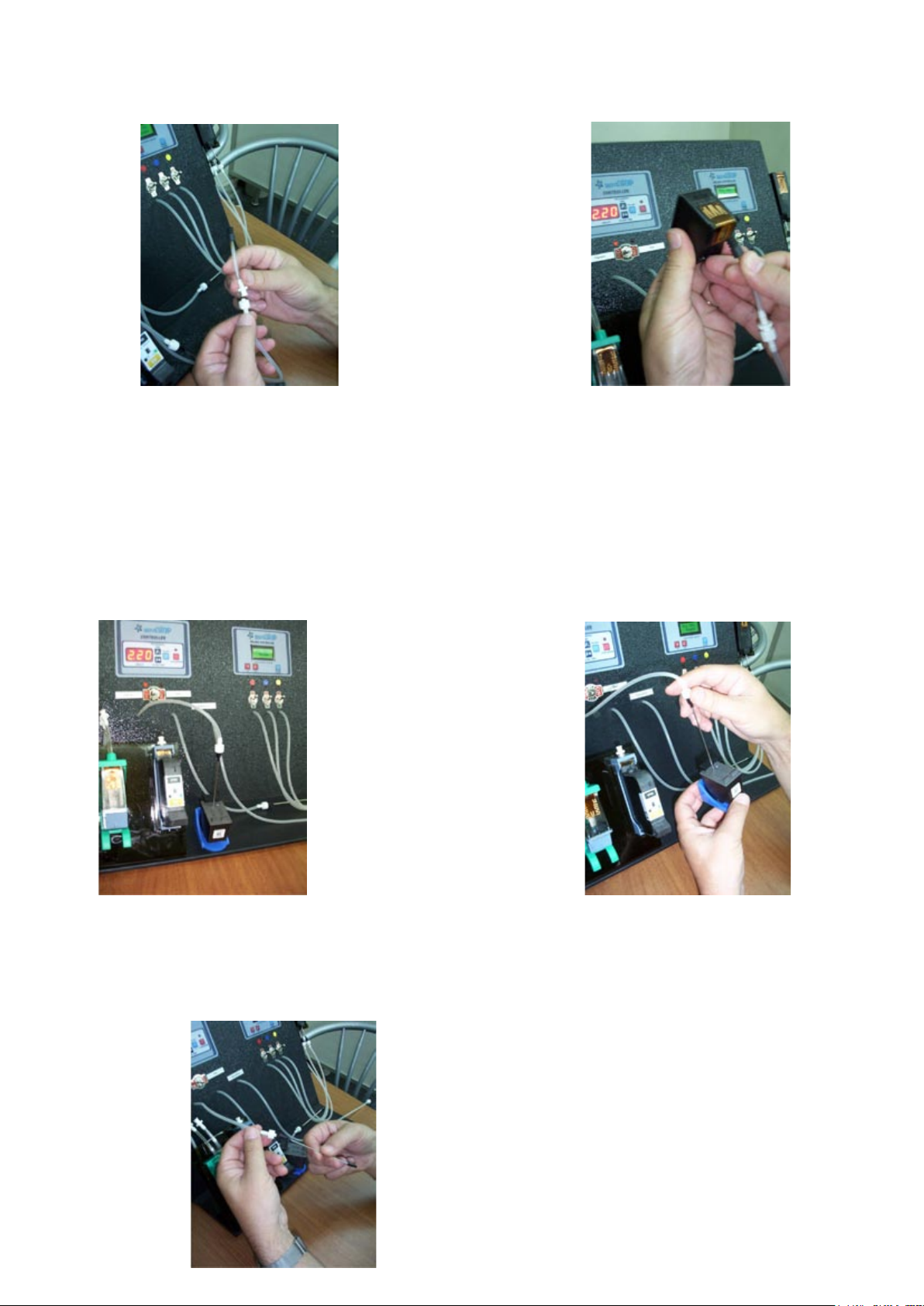
27/56 FILLING
Connect the supplied needle to the pigment lling
connector, by screw-in action
Peel off the OEM sticker; revealing 3 ll hole
positions. Place the cartridge into the allocat-
ed cradle holder and insert the needle into
front hole (forward: towards the cartridge
electronics side).
Caution: - Make sure you insert the needle diagonally and NOT
straight down (otherwise you will puncture the bubble-breaker
diaphragm)
Set the lling time to 0.55 for #27 and 1.05 for
#56 cartridges.
Important Note: - Pressurizing time 0 (See Point
16 for priming functions)
PRIMING:
After lling is completed:
connect the vacuum (suction cap) to the evacuation
connector. Remove the cartridge from the cradle.
Place the suction boot (cap) onto the cartridge nozzle plate.
Push the evacuation button and suck for between 3-5 sec-
onds, as shown above.
** Cartridge is ready to test print **
Inhaltsverzeichnis
Andere oliser Druckerzubehör Handbücher


