Panduit Smartzone UPS INTELLIGENT NMC Bedienungsanleitung

User Manual
UPS Network Management Card
Version 1.1

INTELLIGENT NMC USER MANUAL
2
Table of Contents
Section 1 –System Overview .........................................................................................8
NMC Controller............................................................................................................8
Connecting the NMC via Ethernet Port........................................................................8
Connecting the NMC to a Computer Serial Port..........................................................9
Section 2 –Web Graphical User Interface (GUI) ..........................................................11
Internet Protocol (IP) Addressing...............................................................................11
Web Connection........................................................................................................11
Introduction to the Web GUI ......................................................................................14
Introduction to the Dashboard ...................................................................................16
Network Settings........................................................................................................19
System Management Information..............................................................................23
Setting Time and Date on the NMC...........................................................................26
Control & Manage......................................................................................................28
Panduit’s Smart Load Shedding.............................................................................38
Email Setup ...............................................................................................................45
Event Log ..................................................................................................................48
Data Log....................................................................................................................49
Web Interface Access................................................................................................50
Setting Up the System for RADIUS Authentication....................................................52
Configuring the system with LDAP Server Settings...................................................53
Section 3 –Simple Network Management Protocol (SNMP).........................................57
SNMP Management Configuration............................................................................57
Configuring Users for SNMP V1/V2c.........................................................................59
Configuring Users for SNMP v3.................................................................................60
Configuring SNMP Traps...........................................................................................63
Section 4 –Network Management Controller................................................................67

INTELLIGENT NMC USER MANUAL
3
Status LED ................................................................................................................67
Network LED .............................................................................................................67
Section 5 –SmartZone G5 Accessories........................................................................68
Hardware Overview...................................................................................................68
Configuring Temperature Scale.................................................................................69
Configuring Environmental Sensors ..........................................................................70
Configuring Security Sensors....................................................................................71
Deleting Sensors .......................................................................................................73
Section 6 –Security ......................................................................................................74
Non-volatile Storage..................................................................................................74
Authentication Data ...................................................................................................74
Network Transport Security.......................................................................................75
External Authorization Mechanisms...........................................................................76
Secure Boot Protection..............................................................................................77
Firmware Update Protection......................................................................................77
Other Features ..........................................................................................................77
Secure deployment....................................................................................................77
Warranty and Regulatory Information............................................................................80
Warranty Information.................................................................................................80
Regulatory Information ..............................................................................................80
Panduit Support and Other Resources..........................................................................81
Accessing Panduit Support........................................................................................81
Acronyms and Abbreviations.........................................................................................82
Appendix A: Firmware Update Procedure.....................................................................98
Appendix B: System Reset or Password Recovery.......................................................99
Appendix C: Direct connect to the UPS via Ethernet without Bonjour.........................100
Appendix D: Command Line Interface.........................................................................106
Appendix E: RADIUS Server Configuration.................................................................109
Appendix F: POSIX Time Zone Information................................................................111

INTELLIGENT NMC USER MANUAL
4

INTELLIGENT NMC USER MANUAL
5
Table of Figures
Figure 1: Ethernet Port for Network Connection..............................................................8
Figure 2: Serial In Port ....................................................................................................9
Figure 3: Network information from CLI.........................................................................10
Figure 4: Refused Connection Example........................................................................11
Figure 5: Certificate Warning.........................................................................................12
Figure 6: Login Page.....................................................................................................12
Figure 7: Changing Your Password ..............................................................................13
Figure 8: After Login......................................................................................................13
Figure 9: Landing Page/Dashboard ..............................................................................14
Figure 10: Power Summary Page .................................................................................16
Figure 11: UPS Monitoring Page...................................................................................17
Figure 12: Environmental Monitoring Page...................................................................18
Figure 13: Security Monitoring Page.............................................................................18
Figure 14: IP Configuration ...........................................................................................19
Figure 15: DNS Configuration.......................................................................................20
Figure 16: Web Access Configuration...........................................................................20
Figure 17: SSH Configuration .......................................................................................21
Figure 18: Syslog Configuration....................................................................................21
Figure 19: Network Time Protocol.................................................................................22
Figure 20: Date/Time Configuration ..............................................................................22
Figure 21: Time Zone Configuration..............................................................................23
Figure 22: System Management ...................................................................................23
Figure 23: System Information Configuration................................................................24
Figure 24: Rack Location Configuration........................................................................25
Figure 25: Power Panel & Core Location......................................................................26
Figure 26: Setting the Date and Time............................................................................26
Figure 27: NTP Configuration........................................................................................27
Figure 28: Daylight Saving Time Zone Configuration....................................................28
Figure 29: Control & Manage........................................................................................29
Figure 30: Audible Alarm Configuration.........................................................................29
Figure 31: Enter Bypass Example.................................................................................30
Figure 32: Exit Bypass Example ...................................................................................31
Figure 33: UPS Manual Test Configuration...................................................................31
Figure 34: Start Test Example.......................................................................................32
Figure 35: Start Test Confirmation ................................................................................32
Figure 36: Cancel Test Example...................................................................................33

INTELLIGENT NMC USER MANUAL
6
Figure 37: Cancel Test Confirmation.............................................................................33
Figure 38: Battery Test Configuration............................................................................34
Figure 39: UPS Mode Example.....................................................................................34
Figure 40: Edit Outlet Group .........................................................................................35
Figure 41: Outlet Group Control....................................................................................36
Figure 42: Edit Outlets...................................................................................................37
Figure 43: One Delay Time...........................................................................................38
Figure 44: Shutdown Group Configuration....................................................................40
Figure 45: Smart Load Configuration ............................................................................42
Figure 46: Shutdown Schedule Configuration...............................................................44
Figure 47: Email Setup..................................................................................................45
Figure 48: SMTP Account Settings...............................................................................46
Figure 49: Email Recipient............................................................................................48
Figure 50: Event log......................................................................................................48
Figure 51: Event log Actions menu ...............................................................................49
Figure 52: Data Log.......................................................................................................49
Figure 53: Data Log Configuration................................................................................50
Figure 54: Data Log Configuration Panel......................................................................50
Figure 55: User Accounts..............................................................................................53
Figure 56: RADIUS Configuration.................................................................................53
Figure 57: LDAP Configuration .....................................................................................55
Figure 58: Enable Role Privileges.................................................................................56
Figure 59: SNMP Management.....................................................................................57
Figure 60: SNMP General.............................................................................................58
Figure 61: SNMP Port...................................................................................................58
Figure 62: Setup SNMP Port and Trap Port..................................................................59
Figure 63: Define SNMP V1/V2c User ..........................................................................59
Figure 64: Edit V1/2c Manager......................................................................................60
Figure 65: SNMP v3 Manager.......................................................................................61
Figure 66: SNMP V3 Edit..............................................................................................62
Figure 67: SNMPv2c Trap Receiver Configuration Information.....................................64
Figure 68: SNMPv3 Trap Server configuration Information...........................................65
Figure 69: Sensor Port..................................................................................................69
Figure 70: User Accounts..............................................................................................70
Figure 71: Temperature Units Setting ...........................................................................70
Figure 72: Environmental Sensor Threshold Configuration View..................................71
Figure 73: Temperature Sensor Edit dialog..................................................................71
Figure 74: Security Sensor Alarm Configuration view...................................................72


INTELLIGENT NMC USER MANUAL
7
Figure 75: Dry Contact Sensor Edit dialog...................................................................73
Figure 76: SSL Certificate Load Screen.......................................................................78
Figure 77: Upload Firmware..........................................................................................98
Figure 78: Control Panel .............................................................................................100
Figure 79: Network Status and Tasks .........................................................................101
Figure 80: Change Adapter Settings...........................................................................102
Figure 81: Properties...................................................................................................102
Figure 82: Ethernet Properties....................................................................................103
Figure 83: Internet Protocol Version 4.........................................................................104
Figure 84: Reading from CLI.......................................................................................107
Figure 85: Writing from CLI .........................................................................................108

INTELLIGENT NMC USER MANUAL
8
Section 1 –System Overview
NMC Controller
All Panduit Intelligent NMCs feature a Hot Swappable NMC Controller. This centralized
piece of intelligent hardware receives an IP address, contains a Graphical Web
Interface and is addressable over the network.
Connecting the NMC via Ethernet Port
Connecting the NMC to a LAN provides communication through an Internet or Intranet
connection enabling monitoring and control over the intelligent power distribution unit.
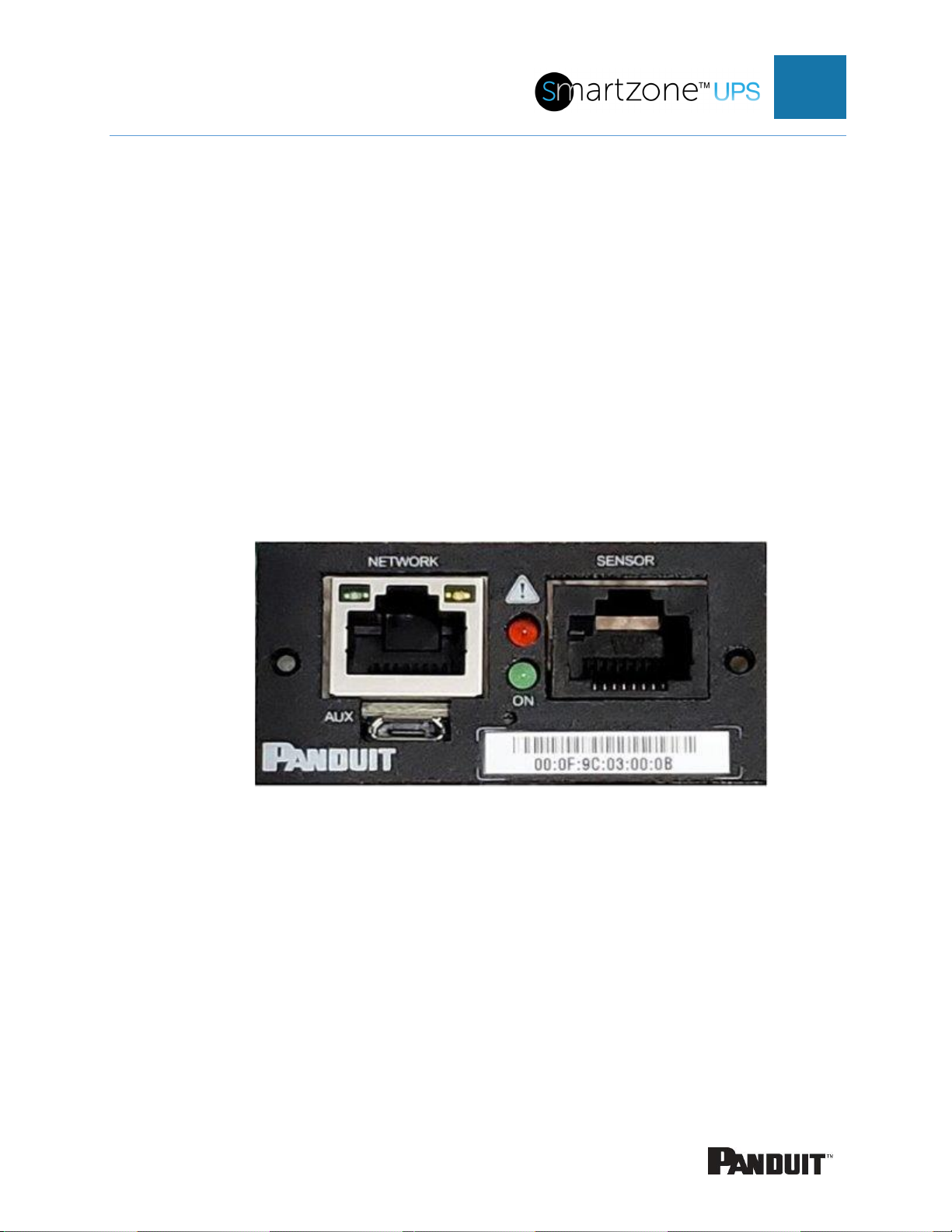
1. Connect an Ethernet cable to the Network port on the NMC (see Figure 1).
2. Connect the other end of the cable to the Network port on the router (or another
LAN device).
Figure 1: Ethernet Port for Network Connection
From the factory the NMC defaults to DHCP and HTTPSconnection. If you are
connected to a network with a DHCP server, the NMC automatically receives an IP
address. If there is no DHCP server, the NMC will assign an IP (Auto IP). The Auto IP
address will be a link-local IP address, and it can be obtained using the instructions in
Appendix C: Direct connect to the UPS via Ethernet without Bonjour. The NMC supports
mDNS to discover the DHCP IP or the Auto IP. The mDNS address format is “panduit-
ups-nmc-<macaddress>.local”. For example, the mDNS address for Figure 1
corresponds to “panduit-ups-nmc-000F9C03000B.local” The address is a unique
address based on the NMC MAC address.

INTELLIGENT NMC USER MANUAL
9
Connecting the NMC to a Computer Serial Port
If unable to connect to a network, you can retrieve the network setting using the serial
interface.
To discover the network setting, perform the following steps:
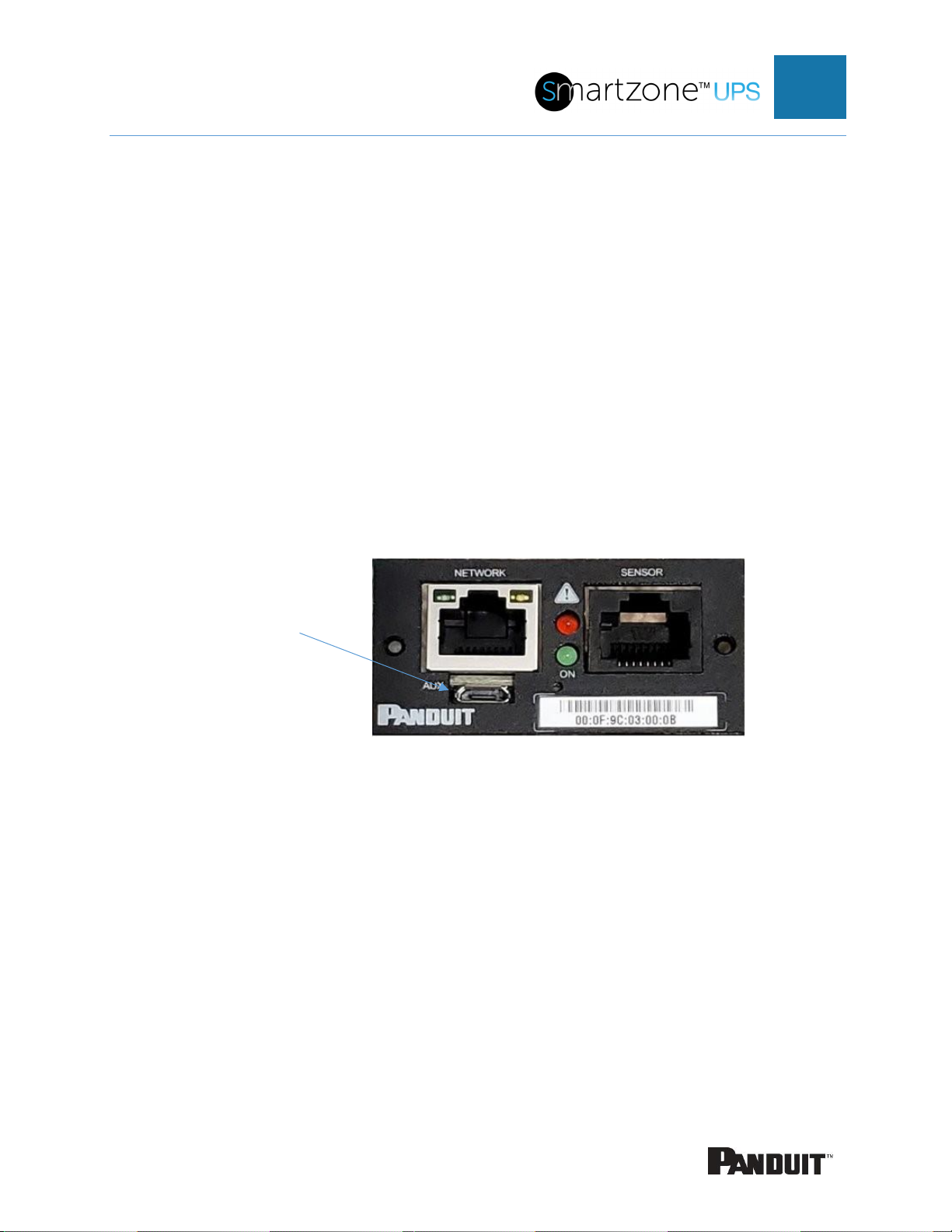
1. Connect PC to the NMC USB port. See Figure 2: Serial In Port.
2. Using a Terminal emulator program, send read CLI command
•Refer to Appendix D: Command Line Interface for CLI configuration and
password change
3. Enter “read status.netStatus.*”
Figure 2: Serial In Port
Serial In

INTELLIGENT NMC USER MANUAL
10
Figure 3: Network information from CLI
Inhaltsverzeichnis
Andere Panduit Controller Handbücher