
Planet LS100 Series Bedienungsanleitung

LoRaWAN Sensors
LS100/LS200 Series
User’s Manual

Table of Contents
1. Product Introduction ............................................................................. 5
1.1 Package Contents .......................................................................... 6
1.2 Overview ...................................................................................... 6
1.3 Features ....................................................................................... 8
1.4 ProductSpecications .................................................................. 10
2. Hardware Introduction ........................................................................ 16
2.1 Physical Descriptions .................................................................... 16
2.2 Hardware Installation ................................................................... 20
2.2.1 Battery Installation.............................................................. 20
2.2.2 Magnetic Mounting or Wall Mounting..................................... 21
2.3.2 Precautions......................................................................... 24
3. Preparation ........................................................................................ 28
3.1 Requirements .............................................................................. 28
3.2 LoRaWAN Gateway Setup ............................................................. 28
3.2.1 LoRa Frequency Setting....................................................... 28
3.2.2 LoRaWAN Setting................................................................ 29
3.2.3 Setting Up of LoRa Connection via ABP Decryption ................ 30
4. Customer Support .............................................................................. 32

3
Copyright
Copyright (C) 2023 PLANET Technology Corp. All rights reserved.
The products and programs described in this User’s Manual are licensed
products of PLANET Technology, This User’s Manual contains proprietary
information protected by copyright, and this User’s Manual and all
accompanying hardware, software, and documentation are copyrighted.
No part of this User’s Manual may be copied, photocopied, reproduced,
translated, or reduced to any electronic medium or machine-readable form
by any means, electronic or mechanical including photocopying, recording,
or information storage and retrieval systems, for any purpose other than the
purchaser's personal use, and without the prior express written permission of
PLANET Technology.
Disclaimer
PLANET Technology does not warrant that the hardware will work properly in
all environments and applications, and makes no warranty and representation,
either implied or expressed, with respect to the quality, performance,
merchantability,ortnessforaparticularpurpose.
PLANET has made every eort to ensure that this User’s Manual is accurate;
PLANET disclaims liability for any inaccuracies or omissions that may have
occurred. Information in this User’s Manual is subject to change without
notice and does not represent a commitment on the part of PLANET. PLANET
assumes no responsibility for any inaccuracies that may be contained in this
User’s Manual. PLANET makes no commitment to update or keep current
the information in this User’s Manual, and reserves the right to make
improvements and/or changes to this User’s Manual at any time without
notice.
If you nd information in this manual that is incorrect, misleading, or
incomplete, we would appreciate your comments and suggestions.
FCC Compliance Statement
This Equipment has been tested and found to comply with the limits for
a Class A digital device, pursuant to Part 15 of the FCC rules. These limits
are designed to provide reasonable protection against harmful interference in
a residential installation. This equipment can radiate radio frequency energy
and, if not installed and used in accordance with the instructions, may cause
harmful interference to radio communications.

4
However, there is no guarantee that interference will not occur in a particular
installation. If this equipment does cause harmful interference to radio or
television reception, which can be determined by turning the equipment o
and on, the user is encouraged to try to correct the interference by one or
more of the following measures:
– Reorient or relocate the receiving antenna.
– Increase the separation between the equipment and receiver.
– Connect the equipment into an outlet on a circuit dierent from that to
which the receiver is connected.
– Consult the dealer or an experienced radio/TV technician for help.
CE mark Warning
This equipment is compliant with Class A of CISPR 32. In a residential
environment this equipment may cause radio interference.
WEEE
To avoid the potential eects on the environment and human health
as a result of the presence of hazardous substances in electrical and
electronic equipment, end users of electrical and electronic
equipment should understand the meaning of the crossed-out
wheeled bin symbol. Do not dispose of WEEE as unsorted municipal waste and
have to collect such WEEE separately.
Trademarks
The PLANET logo is a trademark of PLANET Technology. This documentation
may refer to numerous hardware and software products by their trade names.
In most, if not all cases, these designations are claimed as trademarks or
registered trademarks by their respective companies.
Revision
User’s Manual of PLANET LoRaWAN Sensors
Model: LS100 series (LS100-WL, LS100-PIR, and LS100-DW) and LS200
series (LS200-TH, LS200-PT, LS200-TC, LS200-RF, LS200-LG, and LS200-CM3)
Rev.: 1.0 (December 2023)
Part No. EM-LS100 Series_ LS200 Series v1.0

5
1. Product Introduction
Thank you for purchasing PLANET LoRaWAN Sensor, LS series. The descriptions
of these models are as follows:
EU868
LS100-WL-EU868 IP65 LoRaWAN Water Leak Sensor (EU868 Sub 1G)
LS100-PIR-EU868 IP30 LoRaWAN Indoor Occupancy Sensor (Occupancy/
Light/Temperature -20~55 degrees C, EU868 Sub 1G)
LS100-DW-EU868 IP30 LoRaWAN Door and Window Sensor (EU868 Sub
1G)
LS200-TH-EU868 IP65 LoRaWAN Indoor Temperature and Humidity
Sensor (-20~55 degrees C, EU868 Sub 1G)
LS200-PT-EU868 IP65 LoRaWAN Product Temperature Sensor (PT1000
Needle Probe -70~200 degrees C, EU868 Sub 1G)
LS200-TC-EU868 IP65 LoRaWAN Machine Temperature Sensor
(Thermocouple -40~125 degrees C, EU868 Sub 1G)
LS200-RF-EU868 IP65 LoRaWAN Refrigerator Temperature and Humidity
Sensor (-40~55 degrees C, EU868 Sub 1G)
LS200-LG-EU868 IP65 LoRaWAN Light Level Sensor (EU868 Sub 1G)
LS200-CM3-EU868 IP53 LoRaWAN 3-phase Current Meter (3 x 75A
Clamp-On CT, EU868 Sub 1G)
US915
LS100-WL-US915 IP65 LoRaWAN Water Leak Sensor (US915 Sub 1G)
LS100-PIR-US915 IP30 LoRaWAN Indoor Occupancy Sensor (Occupancy/
Light/Temperature -20~55 degrees C, US915 Sub 1G)
LS100-DW-US915 IP30 LoRaWAN Door and Window Sensor (US915 Sub
1G)
LS200-TH-US915 IP65 LoRaWAN Indoor Temperature and Humidity
Sensor (-20~55 degrees C, US915 Sub 1G)
LS200-PT-US915 IP65 LoRaWAN Product Temperature Sensor (PT1000
Needle Probe -70~200 degrees C, US915 Sub 1G)
LS200-TC-US915 IP65 LoRaWAN Machine Temperature Sensor
(Thermocouple -40~125 degrees C, US915 Sub 1G)

6
LS200-RF-US915 IP65 LoRaWAN Refrigerator Temperature and Humidity
Sensor (-40~55 degrees C, US915 Sub 1G)
LS200-LG-US915 IP65 LoRaWAN Light Level Sensor (US915 Sub 1G)
LS200-CM3-US915 IP53 LoRaWAN 3-phase Current Meter (3 x 75A
Clamp-On CT, US915 Sub 1G)
“LoRaWAN Sensor” mentioned in the manual refers to the above models.
1.1 Package Contents
The package should contain the following:
Model Package Contents
LS100-WL LoRaWAN Water Leak Sensor x 1
LS100-PIR LoRaWAN Indoor Occupancy Sensor x 1
LS100-DW LoRaWAN Door and Window Sensor x 1
LS200-TH LoRaWAN Indoor Temperature and Humidity Sensor x 1
LS200-PT LoRaWAN Product Temperature Sensor x 1
LS200-TC LoRaWAN Machine Temperature Sensor x 1
LS200-RF LoRaWAN Refrigerator Temperature and Humidity Sensor x 1
LS200-LG LoRaWAN Light Level Sensor x 1
LS200-CM3 LoRaWAN 3-phase Current Meter x 1
If any of the above items are missing, please contact your
dealer immediately.
1.2 Overview
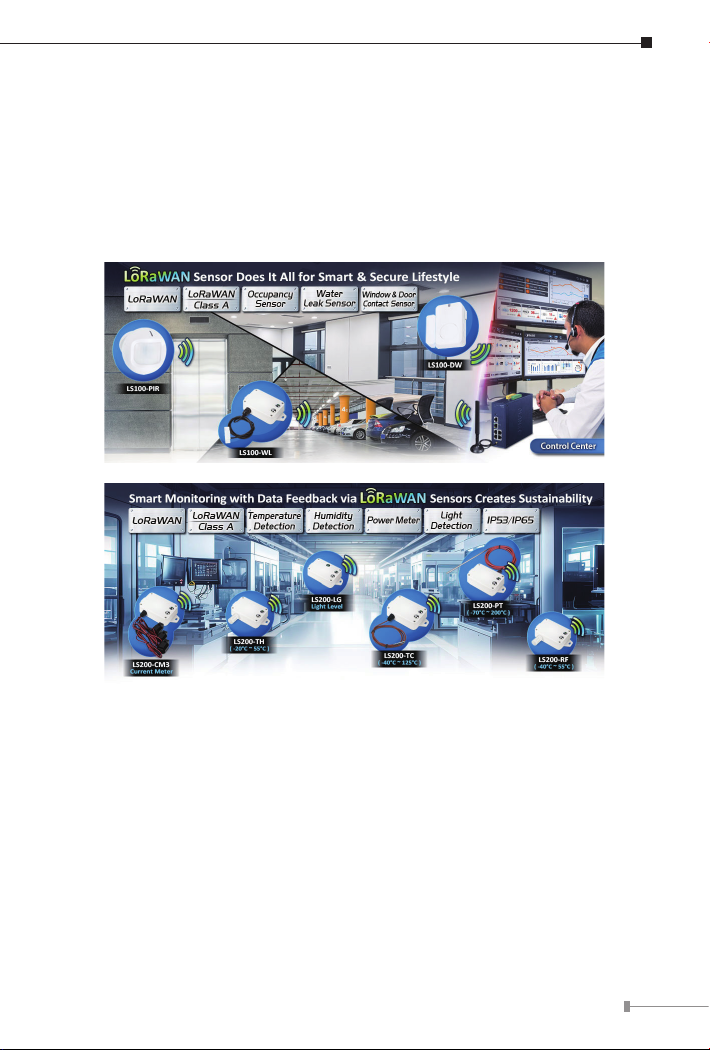
Build a Smart IoT Environment with Fabulous LoRaWAN Sensors
PLANET LS100 and LS 200 LoRaWAN sensors are intended for environmental
monitoring and data collection. Data such as temperature, humidity,
illumination, and ingress/egress all impact the status of a facility or a device,
In some areas, installing a surge suppression device may
also help to protect the GSD-1022UP from being damaged by
unregulated surge or current to the GSD-1022UP or the power
adapter.
7
whether it is a motor, a refrigeration unit, or even the networking gear itself.
Sensors in the LS series mostly have IP65 and IP67 ratings, allowing them
to be deployed in outdoor and industrial indoor environments. The number
of sensors deployed depends on network requirements. The sensor(s) cam
monitor a wide variety of conditions, including humidity, leak detection, room
temperature, machine temperature, product temperature, ingress and egress,
lighting, occupancy and asset location. These battery-operated sensors with no
wiring required are easy to install in any place.
LoRa and LoRaWAN Wireless Technology
LoRa is a low-power, wide area network (LPWAN) RF modulation technology.
It standardizes LPWANs and enables extremely long-range data links. With
a range of up to three miles (ve kilometers) in urban areas and over 10
miles (15 kilometers) in rural areas (line of sight), LoRa is ideal for creating
networks that require long-range or deep in-building communication. A
key feature is its ultra-low power requirements, enabling the deployment
of battery-operated devices that can last up to several years. Using the
open LoRaWAN protocol in a star topology, it’s suitable for applications with
numerous low-power devices collecting small amounts of data. The LS series is
ideal for LoRa-enabled devices in the IoT system.
LoRaWAN-based Controller with Rich Industrial Interfaces

8
PLANET LoRaWAN Sensor is fully compatible with standard LoRaWAN gateways
like PLANET LCG-300 series, supporting the LoRaWAN class A. It is ideal for
large-scale IoT applications, including building automation, smart metering,
HVAC systems, agriculture, and more. The sensor facilitates the seamless
integrationofmultiplesensors, makingitaperfectchoiceforretrottinglegacy
assets into IoT-enabled systems.
zLS100-WL
IP65 LoRaWAN Water Leak Sensor
zLS100-PIR
IP30 LoRaWAN Indoor Occupancy Sensor
zLS100-DW
IP30 LoRaWAN Door and Window Sensor
zLS200-TH
IP65 LoRaWAN Indoor Temperature and Humidity Sensor
zLS200-PT
IP65 LoRaWAN Product Temperature Sensor
zLS200-TC
IP65 LoRaWAN Machine Temperature Sensor
zLS200-RF
IP65 LoRaWAN Refrigerator Temperature and Humidity Sensor
zLS200-LG
IP65 LoRaWAN Light Level Sensor
zLS200-CM3
IP53 LoRaWAN 3-phase Current Meter
1.3 Features
Key Features
zLS100-WL
Water Leak Sensor
IP65 rating
LoRaWAN™ Class A compatible
zLS100-PIR

9
Indoor Occupancy Sensor (Occupancy/Light/Temperature)
IP30 rating
LoRaWAN™ Class A compatible
zLS100-DW
Door and Window contact Sensor
IP30 rating
LoRaWAN™ Class A compatible
zLS200-TH
Indoor Temperature and Humidity Sensor (-20~55 degrees C)
IP65 rating
LoRaWAN™ Class A compatible
zLS200-PT
Product Temperature Sensor with PT1000 Needle Probe (-70~200 degrees C)
IP65 rating
LoRaWAN™ Class A compatible
zLS200-TC
Machine Temperature Sensor with Thermocouple (-40~125 degrees C)
IP65 rating
LoRaWAN™ Class A compatible
zLS200-RF
Refrigerator Temperature and Humidity Sensor (-40~55 degrees C)
IP65 rating
LoRaWAN™ Class A compatible
zLS200-LG
Light Level Sensor
IP65 rating
LoRaWAN™ Class A compatible
zLS200-CM3
3-phase Current Meter with Clamp-On CT
Measure 75A current maximum
IP53 rating
LoRaWAN™ Class A compatible

10
1.4 ProductSpecications
LS100 series
Product LS100-WL LS100-PIR LS100-DW
Wireless Transmission
Technology LoRaWAN
Frequency EU868: 863–870 MHz
US915: 902–928 MHz
TX Power
US915 20dbm
AS923 16dbm (optional)
AU915 20dbm (optional)
EU868 16dbm
KR920 14dbm (optional)
IN865 20dbm (optional)
Rx Sensitivity
-136dBm
(LoRa, Spreading Factor = 12, Bitrate = 293bps)
-121dBm
(FSK, Frequency Deviation = 5kHz, Bitrate = 1.2kbps)
Work Mode OTAA/ABP Class A
Data Interfaces
Power Supply
2x 3.6V ER14505 AA battery in
parallel
(Battery not included)
2x 3.0V CR2450
button battery
(Battery not
included)
Operating Voltage DC 3.1V~3.65V DC 3.1V~3.65V DC 2.4V~3V
Battery Life Time
5 years
(25°C, 15-minute reports,
TxPower=20dBm, SF10)
3 years
(25°C, 15-minute
reports,
TxPower=20dBm,
SF10)
Standby Current 22uA 110uA 12uA
Wake-up Current
(Typical value) 7.12mA 9.78mA 120mA/11mA
Low Battery
Threshold 3.2V 3.2V 2.4V
Dieses Handbuch passt für folgende Modelle
7
Inhaltsverzeichnis


