
Platin Gate Technology Stereo Hub Bedienungsanleitung

Stereo Hub Manual

02
TABLE OF CONTENT
1. Introduction . . . . . . . . . . . . . . . 03
2. Stereo Hub Overview . . . . . . . . . . . . 04
2.1 Included in the box 04
2.2 Stereo Hub Layout 05
2.3 Remote Layout 06
2.3 Wi-Fi LED indications 07
3. How to set up . . . . . . . . . . . . . . 08
3.1 Setting up the Stereo Hub 08
3.2 Pairing the remote 08
3.3 Connecting the Hub to home network 09
3.4 Pairing speakers using WiSA 10
4. How to use . . . . . . . . . . . . . . . . 11
4.1 Using the remote 11
4.2 Channel setup using remote 12
4.3 Audio Playback 14
4.4 Automatic Standby 18
5. Trouble shooting . . . . . . . . . . . . . 19
5.1 Drop-outs in only one speaker 19
5.2 Power cycling 20
5.3 Factory reset 20
6. Safety & Warnings . . . . . . . . . . . . . 21
6.1 Important Safety Instructions 21
6.2 Warning 22
6.3 Legal information 22

03
Introduction
Thank you for buying the Stereo Hub. We hope you will enjoy it!
Features:
• Audio streaming
Stream wireless audio from a wide variety of services.
• DSP functions for manual and Room EQ
Adjust your speakers using multiple audio lters or use our
automatic Room EQ so your speakers sound just right.
• Hi-resolution playback
Play digital content with a high sample rate of up to 192kHz
from streaming, optical COAX or USB inputs.
• APP based interface with system trimming options.
Personalize your settings to get the best listening experience
out of your space and speakers.
1. Introduction

Stereo Hub Overview
04
2. Stereo Hub Overview
2.1 Included in the box
1x Stereo Hub
1x Remote
1x Antenna
1x Power adapter (with EU/US/UK
plug)
2x AAA Batteries
1x Allen key
05
Stereo Hub Overview
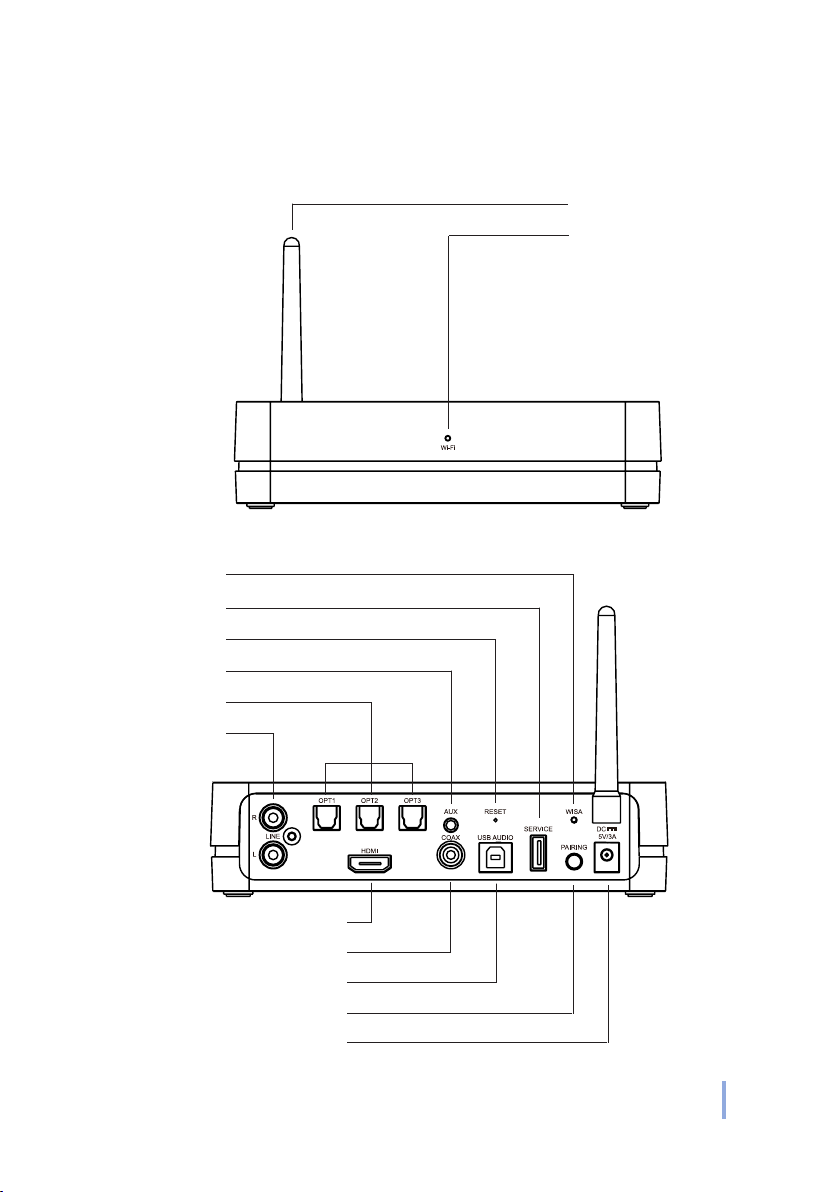
2.2 Stereo Hub Layout
Wi- LED
LINE
Optical
AUX
Reset
Service port
WiSA LED
HDMI
COAX
USB Audio
Antenna
Pairing button
FRONT
REAR
Power input

Stereo Hub Overview
06
2.3 Remote Layout
PREV
OK
Navigation arrows
Volume indicator
Mute
Input indicator
Power ON/OFF
Pause/Play
NEXT

07
Stereo Hub Overview
2.3 Wi-Fi LED indications
Solid white: Connected to network
White (slow blinking): Booting
White (rapid blinking): Wi-Fi conguration mode
Solid green: Spotify streaming
White (Irregular blinking): Updating software

How to set up
08
3.1 Setting up the Stereo Hub
1. Connect antenna to the back
• Screw the included Wi-Fi ante-
na on to the back plate of the
Stereo Hub.
3. How to set up
2. Connect power supply
• Plug the included power adapt-
er into the Stereo Hub.
3.2 Pairing the remote
Pair the remote before proceeding to the next step. Make sure
your Hub is on before starting.
1. Insert batteries
• Unscrew the bottom plate of
the remote using the included
Allen key.
• Insert batteries into your re-
mote.
• Make sure batteries has the
correct direction, as indicated
on the inside of the remote.

09
How to set up
2. Press and hold pair
• Press and hold the ‘Pair’ button
on the Stereo Hub for 3 seconds
until the WiSA LED on the REAR
of the Stereo Hub starts blinking
rapidly.
3. Press any button on remote
• Press any button on the remote,
if pairing is successful, the
‘WiSA LED’ on the rear of the
hub will stop blinking.
• When pressing any button on
the remote, the ‘WiSA LED’
should blink once.
3 SEC
3.3 Connecting the Hub to home network
1. Download the “Google Home” App
Scan the QR code below to get direct access to the app from the
Apple Store or the Google Play store.
IOS Android

How to set up
10
2. Power on the Stereo Hub
The Stereo Hub is ready for the next step when the ‘Wi-Fi LED’
starts ashing rapidly, meaning it has entered ‘Wi-Fi Congura-
tion’ mode.
3. Open the Google Home app and follow the instructions
You will be guided through each step in the app.
4. Wait for LED to turn solid white
After nishing the setup in the Google Home app, the ‘Wi-Fi LED’
should turn solid white, signifying that the Hub is connected to
the Wi-Fi and ready to stream.
3.4 Pairing speakers using WiSA
The Stereo Hub can easily be paired with any WiSA certied
speakers.
1. Prepare speakers
• Make sure all speakers are cor-
rectly positioned, powered ON
and their pairing or associate
mode is activated.
2. Press pair
• To pair the speakers with the
Stereo Hub, press the pairing
button on REAR once and await
slow blinking in WiSA LED while
connecting.
Inhaltsverzeichnis


