ProScan PRCD838BT Bedienungsanleitung

2
CAUTION:THIS DIGITAL VIDEO DISC PLAYER EMPLOYS A
LASER SYSTEM.
TO PREVENT DIRECT EXPOSURE TO LASER
BEAM, DO NOT TRY TO OPEN THE ENCLOSURE.
VISIBLE LASER RADIATION MAY BE PRESENT
WHEN THE ENCLOSURE IS OPENED. DO NOT
STARE INTO BEAM.
WARNING:TO REDUCE THE RISK OF FIRE OR ELECTRIC
SHOCK, DO NOT EXPOSE THIS PRODUCT TO
RAIN OR MOISTURE.
WARNING:TO REDUCE THE RISK OF FIRE OR ELECTRIC
SHOCK, AND ANNOYING INTERFERENCE, USE
THE RECOMMENDED ACCESSORIES ONLY.
The lightning flash with arrowhead symbol
within an equilateral triangle is intended to
alert the user to the presence of uninsulated
dangerous voltage within the product`s
enclosure that may be of sufficient magnitude
to constitute a risk of electric shock to persons.
The exclamation point within an equilateral
triangle is intended to alert the user to the
presence of important operating and
maintenance(servicing) instructions in the
literature accompanying the appliance.
FCC NOTICE:This equipment has been tested and found to
comply with the limits for a Class B digital device,
pursuant to part 15 of the FCC Rules. These limits
are designed to provide reasonable protection
against harmful interference in a residential
installation. This equipment generates, uses and
can radiate radio frequency energy and, if not
Installed and used in accordance with the
instructions, may cause harmful interference to
radio communications.
However, there is no guarantee that interference
will not occur in a particular installation. If this
equipment does cause harmful interference to
radio or television reception, which can be
determined by turning the equipment off and on,
the user is encouraged to try to correct the
interference by one or more of the following
measures:
Reorient or relocate the receiving antenna.
Increase the separation between the equipment
and receiver.
Connect the equipment into an outlet on a
circuit different from that to which the receiver is
connected.
Consult the dealer or an experienced radio/TV
technician for help.
FCC WARNING:To assure continued compliance, follow the
attached installation instructions and use only
shielded cables when connecting to other devices.
Modifications not authorized by the manufacturer
may void user`s authority to operate this device.
IMPORTANT SAFETY INSTRUCTIONS
INDUSTRY CANADA CONFORMITY
CAN ICES-3(B)/NMB-3(B)
CAUTION: TO REDUCE THE RISK OF ELECTRIC SHOCK,
DO NOT REMOVE COVER (OR BACK). NO USER-
SERVICEABLE PARTS INSIDE. REFER SERVICING
TO QUALIFIED SERVICE PERSONNEL.
RISK OF ELECTRIC SHOCK
DO NOT OPEN FCC Radiation Exposure Statement:This equipment complies with FCC radiation
exposure limits set forth for an uncontrolled
environment. This equipment should be installed
and operated with minimum distance 20cm
between the radiator & your body.
Cet équipement est conforme aux limites
d'exposition aux radiations de la FCC établies
pour unenvironnement non maîtrisé. Cet
équipement doit être installé et utilisé avec une
distance minimale de 20 cm entre le radiateur et
votre corps.
This device complies with Industry Canada licence-
exempt RSS standard(s). Operation is subject to
the following two conditions:
(1) this device may not cause interference, and
(2) this device must accept any interference,
including interference that may cause undesired
operation of the device.
Le présent appareil est conforme aux CNR
d'Industrie Canada applicables aux appareils radio
exempts de licence. L'exploitation est autorisée aux
deux conditions suivantes :
(1) l'appareil nedoit pas produire de brouillage, et
(2) l'utilisateur de l'appareil doit accepter tout
brouillage radioélectrique subi, même si le
brouillage est susceptible d'en compromettre le
fonctionnement.
WARNING: The mains plug is used as
disconnected device. The disconnect device shall
remain readily operable. The equipment is Class II
or double insulated electrical appliance.
It has been designed in such a way that it
does not require a safety connection to
electrical earth.

Before using the unit, be sure to read all operating instructions carefully. Please note that these are general
precautions and may not pertain to your unit.
For example, this unit may not have the capability to be connected to an outdoor antenna.
1)Read these instructions.
All the safety and operating instructions should be read before the product is operated.
2)Keep these instructions.
The safety and operating instructions should be retained for future reference.
3)Heed all warnings.
All warnings on the product and in the operating instructions should be adhered to.
4)Follow all instructions.
All operating and use instructions should be followed.
5)Do not use this apparatus near water.
Do not use this product near water and moisture, for example: near a bathtub, washbowl, kitchen sink or
laundry tub; in a wet basement; or near a swimming pool.
6)Clean only with dry cloth.
Unplug this product from the wall outlet before cleaning. Do not use liquid cleaners or aerosol cleaners. Use
a dry cloth for cleaning.
7)Do not block any ventilation openings. Install in accordance with the manufacturer's instructions.
Slots and openings in the cabinet and in the back or bottom are provided for ventilation, to ensure reliable
operation of the product and to protect it from overheating. These openings must not be blocked or
covered. The openings should never be blocked by placing the product on a bed, sofa, rug or other similar
surface. This product should never be placed near or over a radiator or heat source. This product should
not be placed in a built-in installation such as a bookcase or rack unless proper ventilation is provided or the
manufacturer's instructions have been adhered to.
8)Do not install near any heat sources such as radiators, heat registers, stoves, or other apparatus (including amplifiers) that produce heat.
9)Do not defeat the safety purpose of the polarized or grounding-type plug. A polarized plug has two
blades with one wider than the other. A grounding type plug has two blades and a third grounding
prong. The wide blade or the third prong are provided for your safety. If the provided plug does notfit into your outlet, consult an electrician for replacement of the obsolete outlet.
10)Protect the power cord from being walked on or pinched particularly at plugs, convenience receptacles, and the point where they exit from the apparatus.
11)Only use attachments/accessories specified by the manufacturer.
12)Use only with the cart, stand, tripod, bracket, or table specified by the manufacturer, or sold with theapparatus. When a cart is used, use caution when moving the cart/apparatus combination to avoid
injury from tip-over.
An appliance and cart combination should be moved with care. Quick stop, excessive
force and uneven surfaces may cause the appliance and cart combination to overturn.
13)Unplug this apparatus during lightning storms or when unused for long periods of time.
To protect your product from a lightning storm, or when it is left unattended and unused for long periods of
time, unplug it from the wall outlet and disconnect the antenna or cable system. This will prevent damage to
the product due to lightning and power-line surges.
14)Refer all servicing to qualified service personnel. Servicing is required when the apparatus has beendamaged in any way, such as power-supply cord or plug is damaged, liquid has been spilled or
objects have fallen into the apparatus, the apparatus has been exposed to rain or moisture does not
operate normally, or has been dropped.
15)Power sourceThis product should be operated only from the type of power source indicated on the marking label. If you
are not sure of the type of power supply to your home, consult your appliance dealer or local power
company. For products intended to operate from battery power, or other source, refer to the operation
instructions.
16)Power linesAn outside antenna system should not be located in the vicinity of overhead power lines or other electric
light or power circuits, or where it can fall into such power lines or circuits. When installing an outside
antenna system, extreme care should be taken to keep from touching such power lines or circuits as contact
with them might be fatal.
IMPORTANT SAFETY INSTRUCTIONS
3

17)OverloadingDo not overload wall outlets and extension cords as this can result in a risk of fire or electric shock.
18)Object and liquid entryNever push objects of any kind into the product through openings as they may touch dangerous voltage
points or short out parts that could result in fire or electric shock. Never spill or spray any type of liquid on the
product.
19)Outdoor antenna groundingIf an outside antenna is connected to the product, be sure the antenna system is grounded so as to Provide
some protection against voltage surges and built up static charges. Section 810 of the National Electric
Code ANSI/NFPA 70 provides information with respect to proper grounding of the mast and supporting
structure, grounding of the lead-in wire to an antenna discharge product, size of grounding conductors,
location of antenna-discharge product, connection to grounding electrodes and requirements for the
grounding electrodes.
20)ServiceDo not attempt to service this product yourself as opening or removing covers may expose you to dangerous
voltage or other hazards. Refer all servicing to qualified service personnel.
21)Replacement partsWhen replacement parts are required, be sure the service technician uses replacement parts specified by
the manufacturer or those that have the same characteristics as the original parts. Unauthorized
substitutions may result in fire or electric shock or other hazards.
22)Safety checkUpon completion of any service or repairs to this product, ask the service technician to perform safety checks
to determine that the product is in proper operating condition.
23)24)Damage requiring serviceUnplug this product from the wall outlet and refer service to qualified service personnel under the following
conditions.
a) When the power-supply cord or plug is damaged.
b) If liquid has been spilled or objects have fallen into the product.
c) If the product has been exposed to rain or water.
d) If the product does not operate normally by following the operating instructions. Adjust only those
controls that are covered by the operating instructions, as an adjustment of other controls may result in
damage and will require extensive work by a qualified technician to restore the product to its normal
operation.
e) If the product has been dropped or the cabinet has been damaged.
f) When the product exhibits a distinct change in performance-this indicates a need for service.
Note to CATV system installerThis reminder is provided to call the CATV system installer's attention to Article 820-40 of the NEC that
provides guidelines for proper grounding and, in particular, specifies that the cable ground shall be connected
to the grounding system of the building, as close to the point of cable entry as practical.
NOTE: Refer all servicing to qualified service personnel. Servicing is required when the unit has been damaged in any way such as the following: the power-supply cord or plug has been damaged, liquid has been spilled into unit, the unit has been exposed to rain or moisture, the unit has been dropped or the unit does not operate normally.
IMPORTANT SAFETY INSTRUCTIONS
4

Turntable
Screw fixing the turntable for transportation
Lever
Tone arm holder
Tone arm
Speed selector
F
E
D
C
B
A
A
C
D
B
E
Location of Controls
Turntable
Before use, completely loosen the screw by turning it clockwise.
When transport the unit again, turn the screw counterclockwise to secure the turntable.
Before use, take out the stylus
guard ( white plastic cover ) by
pull it out.
5
F

Location of Controls
X
Y
W
V
U
T
S
Q
P
R
O
L
M
K
N
J
I
H
Side View
Front View
Function selector
Radio dial scale
Power ON/OFF-Volume knob
Tuning knob
AUX IN jack
LED display for CD
Cassette
Eject button
Speakers
OPEN/CLOSE button
STOP button
PLAY/PAUSE button
REPEAT button
Disc tray
PROGRAM button
B.SKIP and F.SKIP
(Backward and Forward skip) buttons
AM/FM BAND Switch
PHONE jack
6

Location of Controls
Back View
Open/close the turntable cover
1. Lift the cover.
2. Push the arms to backward to release the lock.
3. Close the cover.
2.Pull the arms to front to lock it as the figure on left.
LINE OUT jacks
FM antenna
1.Lift the turntable cover.
7
FM ANT ENNADC 9V 1 .3A
DC jack

M
I
N
O
N
.
O
F
F
MAX
VOLUME
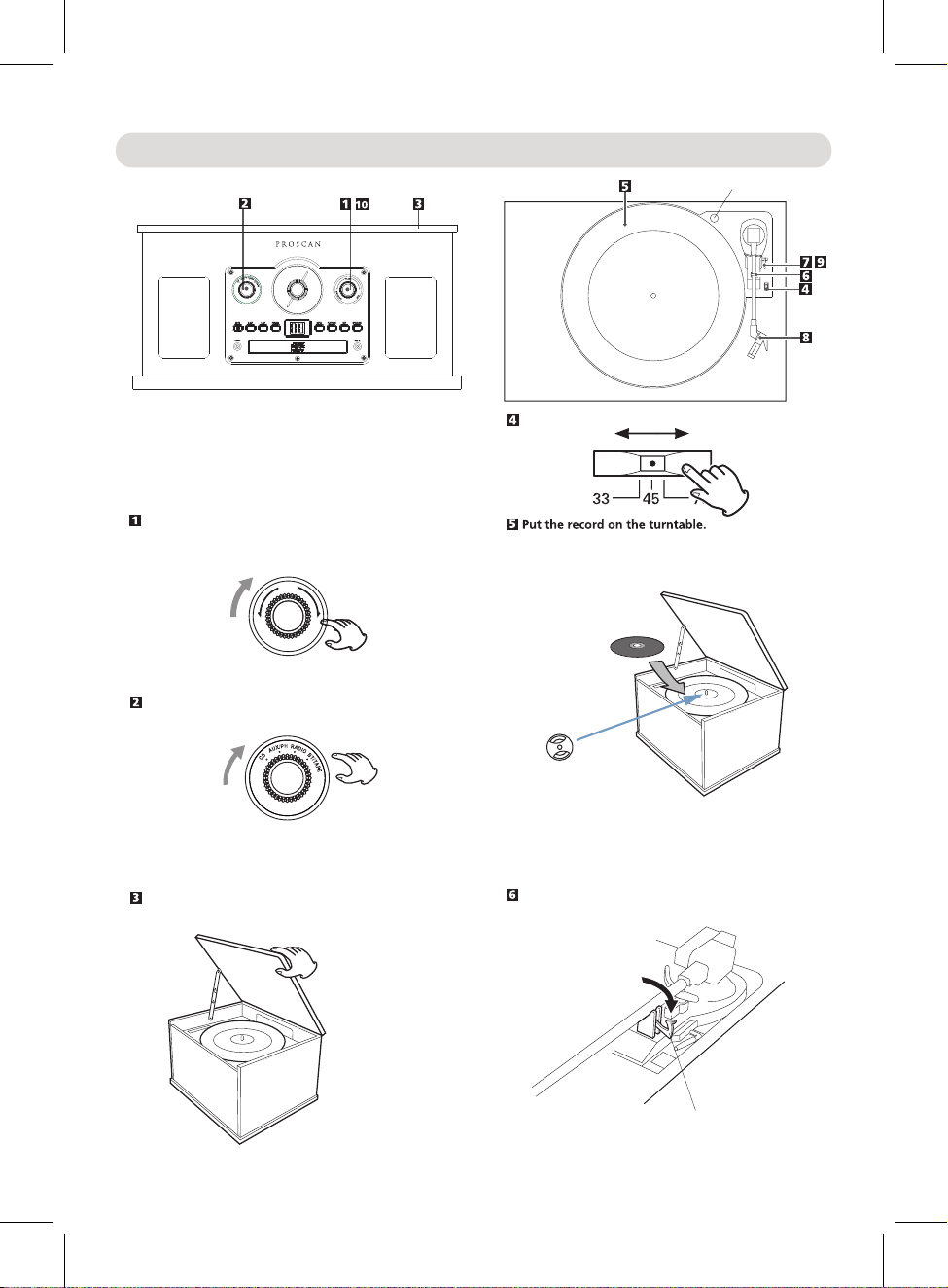
Listening to a Record
Turn the Power ON/OFF-VOLUME knob clockwise until a sound
click was heard to turn on the unit.
Turn the Function selector to the AUX/PH position.
Open the cover.
If plays the small size 45 rpm record, insert the supplied
adaptor to the center spindle before placing the record.
clip
Unlock the clip to release the tone arm as the figure below.
Transportation screw
""
Select the speed.
45 RPM adaptor
Step 1
Step 2
8
Note: This adaptor is for 45 RPM only, for the 33-3/1 and
78 RPM do not need to put this adaptor.
Before use, completely loosen the transportation screw
by turning it clockwise.
Take out the stylus guard (white plastic cover).

Move the tone arm to the top of the record. The turntable will start to turn.
M
I
N
O
N
.
O
F
F
MAX
VOLUME
7
8
9
10
lever
Listening to a Record
Raise the lever to lift the tone arm.
the volume.
11 When finished listening, replace the
tone arm to the rest and lock it as
""
Place the tone arm to the desired point on
the record by turn the lever down as the
figure below.
9
Turn the Power ON/OFF-VOLUME
knob to adjust
previous procedures. Turn the Power
ON/OFF-VOLUME knob counterclockwise
until a click sound was heard to power
off the unit.
cue lever
tone arm
Note:
During playing, DO NOT insert the AUX cable,
or it will stop playing and switch to AUX mode
automatically.

3
Place a disc on the tray with the printed label face up.
4
Press the OPEN/CLOSE button to close the tray.
5
6
1
2
7
M
I
N
O
N
.
O
F
F
MAX
VOLUME
M
I
N
O
N
.
O
F
F
MAX
VOLUME
Listening to a CD
CD Playback:
Turn the POWER ON/OFF-VOLUME knob clockwise
until a click sound was heard to turn on the unit.
Turn the Function selector to the CD position. on the LED display and play will start automatically.
Turn the POWER ON/OFF-Volume knob to adjust volume level.
~ Press the B.SKIP or F.SKIP button repeatedly to skip the tracks.
~ To stop, press the STOP button.
During playback:
8When finished listening
" "
Press the OPEN/CLOSE button to open the disc tray.
A few seconds later, the total number of tracks will appear
sound was heard to power off the unit.
~ Press the PLAY/PAUSE button to pause, press again to resume
normal playback.
~ Press and hold the B.SKIP or F.SKIP button to fast searching the
desired section.
Never place more than one disc on the tray.
The disc must be placed on the center of the disc tray. If the
disc is not correctly loaded, it may not be possible to open the
tray again once it has closed.
10
Turn the Power ON/OFF - VOLUME knob counterclockwise unit a
"click"
3
5
4
68
Inhaltsverzeichnis