PUSR USR-M300 Bedienungsanleitung

USR-M300 Start Guide
pusr.com
1
- 2 -
Content
1. Introduction ...............................................................................................................................................- 4 -
1.1. Overview...........................................................................................................................................- 4 -
1.2. Features............................................................................................................................................- 4 -
2. Get Started.................................................................................................................................................- 5 -
2.1. Hardware connection........................................................................................................................- 5 -
2.2. Login Gateway ..................................................................................................................................- 5 -
2.3. Brief introduction of the webpage .....................................................................................................- 6 -
3. Overview Information.................................................................................................................................- 7 -
4. Network .....................................................................................................................................................- 7 -
4.1. Network switching.............................................................................................................................- 7 -
4.2. Cellular .............................................................................................................................................- 8 -
4.3. Ethernet Port.....................................................................................................................................- 8 -
4.4. WAN Interface...................................................................................................................................- 9 -
4.5. LAN Interface ....................................................................................................................................- 9 -
4.6. Routing...........................................................................................................................................- 10 -
5. Edge Computing ......................................................................................................................................- 10 -
5.1. Edge Mode...................................................................................................................................... - 10 -
5.2. Preset Extension IO..........................................................................................................................- 11 -
5.3. IO Module .......................................................................................................................................- 12 -
5.3.1. DI Interface ............................................................................................................................- 12 -
5.3.2. Status of IO modules ..............................................................................................................- 14 -
5.4. Data Point.......................................................................................................................................- 14 -
5.5. Protocol .......................................................................................................................................... - 17 -
5.6. Edge Gateway.................................................................................................................................- 20 -
5.6.1. Serial Port .............................................................................................................................. - 20 -
5.6.2. Communication......................................................................................................................- 21 -
5.6.3. Data Query/Control................................................................................................................ - 21 -
5.6.4. Data Reporting.......................................................................................................................- 24 -
5.6.5. Linkage Control...................................................................................................................... - 26 -
6. System Management................................................................................................................................- 30 -

6.1. System Time....................................................................................................................................- 30 -

USR-M300 Start Guide
pusr.com
1
- 3 -
6.2. Log .................................................................................................................................................- 31 -
6.3. System............................................................................................................................................ - 31 -
6.3.1. Configuration Management....................................................................................................- 31 -
6.3.2. Firmware Upgrade.................................................................................................................- 32 -
6.3.3. User Management..................................................................................................................- 33 -
6.3.4. Reboot...................................................................................................................................- 33 -
6.4. PUSR Cloud Service .........................................................................................................................- 33 -
6.5. Location..........................................................................................................................................- 33 -
7. Contact Us................................................................................................................................................- 33 -
8. Disclaimer................................................................................................................................................- 33 -

USR-M300 Start Guide
pusr.com
1
- 4 -
1. Introduction
1.1. Overview
USR-M300 is a high-performance and scalable edge IOT gateway. This device integrates edge collection,
data calculation, data reading and writing, active reporting, linkage control, IO collection and control and other
functions. The collection protocol includes standard Modbus protocol and a variety of common PLC protocols, as
well as industry-specific protocols. At the same time, the product also has routing and VPN as well as graphical
programming functions to ensure data transmission security. Using graphical programming, users can develop
independently to achieve the required functions.
USR-M300 is embedded in Linux kernel, with a main frequency of up to 1.2Ghz. It can access the Internet via
Ethernet port, ADSL and LTE cat4 cellular network to achieve easy network deployment.
It is widely used in various industrial intelligent solutions such as industrial robot, smart factories, smart
agriculture, smart water management system etc.
1.2. Features
•Dual-core professor with ultra-high performance, the main frequency is up to 1.2Ghz, providing high-
performance processing resources for edge computing.
•Supports Python development, for developing user custom applications.
•Supports graphical programming to facilitate user development.
•LTE 4G and Ethernet network serve as backups for each other to ensure stable network transmission
without downtime.
•Integrated 1*WAN/LAN and 1*LAN Ethernet port, VPN and firewall protection to ensure safe data
transmission.
•Integrated 2 serial ports: 1*RS232/485, 1*RS485, which can transform traditional serial devices into IOT
devices.
•Comes with IO interface: 2*DI, 2*DO, 2*AI, flexible expandable IO module is supported.
•Powerful edge gateway function: supports edge collection, edge computing, group reporting, and
supports real-time collection of up to 2000 points.
•Supports major industrial protocols including Modbus TCP/RTU, PLC protocols and OPC UA Server.
•Support 2 socket channels, each channel supports TCP(SS)/UDP, MQTT(S) protocols.
•Cloud support: MQTT via AWS IOT, Alibaba Cloud, and PUSR Cloud.

USR-M300 Start Guide
pusr.com
1
- 5 -
2. Get Started
2.1. Hardware connection
Preparation:
Power adapter 12V/1A * 1
Network cable * 1
The hardware connection diagram is like the following:
2.2. Login Gateway
Power on the USR-M300, connect PC to M300 via LAN port, users can login the gateway via Chrome or the

USR-M300 Start Guide
pusr.com
1
- 6 -
other browser. The default network parameters are shown in the following table:
Table 1. Default network parameters
Parameter
Default value
LAN IP
192.168.1.1
Username
admin
Password
admin
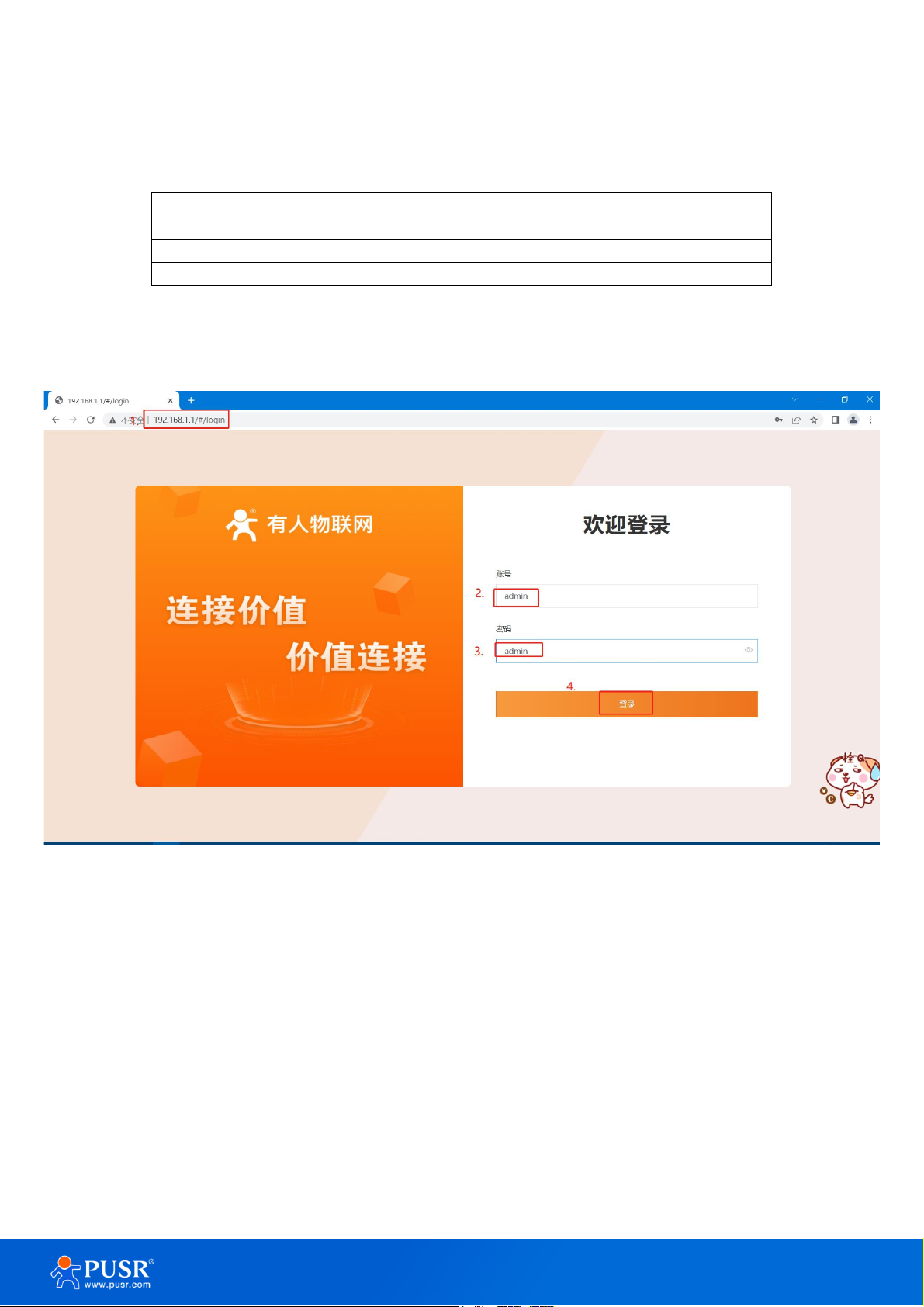
Open the browser, enter 192.168.1.1 in the URL blank, and press Enter, it will navigate to the following webpage.
After entering the login password, clicking login, the web page will show configuration page of USR-M300.
Figure 1. Login webpage
2.3. Brief introduction of the webpage
There are several tabs on the top of the webpage, users can set parameters of USR-M300 on the tab pages.
➢Overview:On this page, users can quickly learn about the running status of the gateway, like system
information, device status, cellular information and etc.
➢Network: In this interface, there are many categories related to network connection. Users can set
parameters such as WAN port, LAN port and cellular network.
➢Edge Computing: With this functionality, the M300 gateway serves as host and actively sends the
polling acquisition command to periodically obtain the point data of the serial and Ethernet devices

USR-M300 Start Guide
pusr.com
1
- 7 -
and the data collected by the I/O interface.
➢System Management: In this webpage, users can check the log information, and set the system time
and so on.
➢Python Application: With this functionality, users can deploy Python applications.
3. Overview Information
In this page, it includes system information, device status, cellular information, flow usage monitoring and
performance of processor chipset.
Figure 2. Status webpage
4. Network
4.1. Network switching
On this page, users can select the Internet connectivity priority, and can also set the information of PING
detection.

USR-M300 Start Guide
pusr.com
1
- 8 -
4.2. Cellular
On this page, users can check the cellular information like the signal strength, IP address and so on. The APN
information can be set in this page also.
4.3. Ethernet Port
On this page, users can change the work mode of Ethernet Port1. This port is WAN mode by default. And it
can be changed to LAN mode. Then the users can get 2 Ethernet ports.

USR-M300 Start Guide
pusr.com
1
- 9 -
4.4. WAN Interface
User can set the parameters of WAN port like network mode, DNS mode and MTU.
4.5. LAN Interface
Users can set the basic information of LAN port like IP address, netmask and DHCP service. When the M300
enables the DHCP service, it can assign IP address to the terminal device connected to M300 via LAN port.

USR-M300 Start Guide
pusr.com
1
- 10 -
4.6. Routing
On this page, users can check the routing table and add needed static routing to USR-M300.
5. Edge Computing
5.1. Edge Mode
The edge mode is edge gateway by default. User can change the mode to Graphical Programming mode.
The Graphical Programming is based on Node RED, in this mode, user can develop the application about the
edge computing that they need.
Inhaltsverzeichnis
Andere PUSR Tor Handbücher
Beliebte Tor Handbücher anderer Marken

LST
LST M500RFE-AS Bedienungsanleitung

Kinnex
Kinnex Media Gateway Bedienungsanleitung

2N Telekomunikace
2N Telekomunikace 2N StarGate Bedienungsanleitung

Mitsubishi Heavy Industries
Mitsubishi Heavy Industries Superlink SC-WBGW256 Bedienungsanleitung

ZyXEL Communications
ZyXEL Communications ZYWALL2 ET 2WE Bedienungsanleitung

Telsey
Telsey CPVA 500 - SIP Bedienungsanleitung