
Quantum Rehab Q-Logic 2 Montageanleitung

Pride USA
Pride Mobility Products Corporation
182 Susquehanna Avenue
Exeter, PA 18643-2694
Pride Canada
Pride Mobility Products Company
380 Vansickle Road
St. Catharines, Ontario L2R 6P7
Pride UK
Pride Mobility Products Ltd.
32 Wedgwood Road
Bicester, Oxfordshire OX26 4UL
Pride Australia
Pride Mobility Products Australia Pty. Ltd.
20-24 Apollo Drive
Hallam, Victoria 3803
Pride Italy
Pride Mobility Products Italia S.r.l.
Via del Progresso, ang. Via del Lavoro
Loc. Prato della Corte
00065 Fiano Romano (RM)
Pride B.V.
Pride Mobility Products Europe B.V.
Castricummer Werf 26
1901 RW Castricum
The Netherlands
www.pridemobility.com
US_FC_GE_IT_SP_Q-Logic_2_Controller_BOI_Cover_RevA_Feb13_4499.pdf 1 2/20/2013 3:56:58 PM

1
2
12 13 14
8
10
11
9
8
7
6
5
3
4
1
2
12 13 14
8
10
11
9
8
7
6
5
3
4
IDENTIFICATION KEY CLE D’IDENTIFICATION LEGENDE
Copyright © 2013
Pride Mobility ProductsCorporation
INFMANU4499/Rev A/February 2013
CODICE DI IDENTIFICAZIONE CLAVE DE IDENTIFICACIÓN
US_FC_GE_IT_SP_Q-Logic_2_Controller_BOI_Cover_RevA_Feb13_4499.pdf 2 2/20/2013 3:56:59 PM

3
1
3
2
4 5
67 8
910 11
12 13 14
Regulador Pantalla LCD
Bloqueo de la funcion de condeccion
Palanca de selección de modo
y encendido/apagado
Palanca de mando Tomas mono
Botón de selección 1 Botón de menú Claxon
Botón de selección 2 Regulador de velocidad Puerto del cargador
Botón de luces
Botón del intermitente izqdo
Botón del intermitente dcho
Steureng LCD-Anzeige Antriebs-/Funktionssperre
An/ Aus Modus Wahlshalter Hebel
Joystick Mono-anschlüsse
Auswahltaste 1 Menütaste Hupetaste
Auswahltaste 2 Geschwindigkeitsjustierung Ladegerätanschluss
Beleuchtungstaste
Linke Richtungsanzeigertaste Rechte Richtungsanzeigertaste
Centralina Visore LCD
TInhibizione trazione/funzione
Tasto di selezione modalità On/Off
Joystick Mono Jacks
Tasto di Selezione 1 Tasto di Selezione Menu Clacson
Tasto di Selezione 2 Selettore di velocità Porta del Caricabatterie
Tasto di Selezione Menu Pulsante freccia sinistra Pulsante freccia destra
Contrôleur Écran LCD
Fonction d’inhibition de l’entraînement
Levier «On/Off» et «Mode Select»
Manette Réceptacles «Mono»
Bouton «SELECT 1» Bouton de «Menu» Klaxon
Bouton «SELECT 2»
Sélecteur réglage de la vitesse
Réceptacle du chargeur
Bouton des phares Bouton clignotant gauche Bouton clignotant droit
Controller LCD Screen Drive/Function Inhibit
On/Off Mode Select Lever Joystick Mono Jacks
Key 1 Select Button Menu Button Horn Button
Key 2 Select Button Speed Adjustment Charger Port
Light Button Left Turn Indicator Button Right Turn Indicator Button
CODICE DI IDENTIFICAZIONE CLAVE DE IDENTIFICACIÓN

4IDENTIFICATION KEY CLED’IDENTIFICATION LEGENDE
1
3
2
4 5
67
Control auxiliar Botón de Modo Piloto de Mode
Equipamientos opcionales
Indicador del Nivel de Bateria
Botón On/Off
Palanca de mando Tomas On/Off y Modo
Steuerung für Begleitperson
Modus Taste LED Modus
Stellantrieb Anzeig Vier LEDs
Batterieanzeiger An/ Aus Taste
Joystick On/Off und Mode Jacks
Comando Guida Accompagnatore
Tasto di selezione Modalità Modalità LED
Indicatori di Attuatori
Indicatore di stato della batterie
Tasto On/Off
Joystick On/Off e modalità Jacks
Contrôleur préposé Bouton de mode Voyants de «Mode»
Indicateurs d’actionneurs Jauge à batteries Cié de contact
Manette Jacks Marche/Arrêt et mode
Attendant Control Mode Button Mode LED
Actuator Indicators Battery Condition Meter On/Off Button
Joystick On/Off and Mode Jacks
1
2
3
4
5
6
7

5
CODICE DI IDENTIFICAZIONE CLAVE DE IDENTIFICACIÓN
1
3
2
4 5
6
4
5 6
2
1
3
Pantella mejorada Botón On/Off Pantalla LCD
Bloqueo de la funcion de condeccion
Puerto del cargador/programador
Conector d-sub 9 contactos
Tomas On/Off y Modo
Erweiterte Anzeige An/ Aus Taste LCD-Anzeige
Antriebs-/Funktionssperre
Lade-/Programmieranschluss
9-Pin D-Sub-Stecker
On/Off und Mode Jacks
Visore Tasto On/Off Visore LCD
TInhibizione trazione/funzione
Porta del Caricabatterie/Programmatore
Connettore 9 pin
On/Off e Modalità Jacks
Affichage amélioré Clé de contact Écran LCD
Fonction d’inhibition de l’entraînement
Port pour chargeur/Programmeur
9-pin D-sub Connecteur
Jacks Marche/Arrêt et mode
Enhanced Display On/Off Button LCD Screen
Drive/Function Inhibit Charger/Programmer Port 9-pin D-sub Connector
On/Off and Mode Jacks
6
WARNING! A Quantum Rehab Provider or a qualified
technician must perform the initial setup of this
product and must perform all of the instructions in this
manual.
The symbols below are used throughout this owner’s manual and on the
power chair to identify warnings and important information. It is very
important for you to read them and understand them completely.
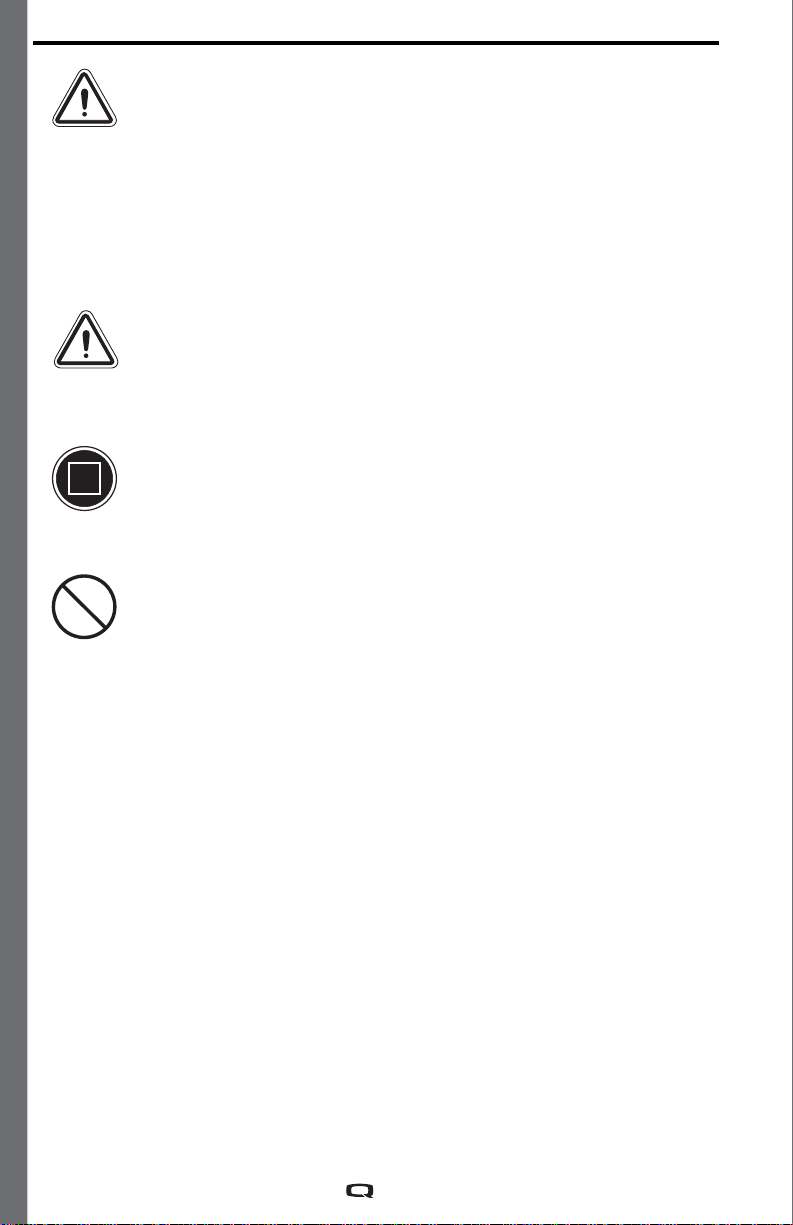
WARNING! Indicates a potentially hazardous condition/
situation. Failure to follow designated procedures can
cause either personal injury, component damage, or
malfunction. On the product, this icon is represented
as a black symbol on a yellow triangle with a black
border.
MANDATORY! These actions should be performed as
specified. Failure to perform mandatory actions can
cause personal injury and/or equipment damage. On
the product, this icon is represented as a white symbol
on a blue dot with a white border.
PROHIBITED! These actions are prohibited. These
actions should not be performed at any time or in any
circumstances. Performing a prohibited action can
cause personal injury and/or equipment damage. On
the product, this icon is represented as a black symbol
with a red circle and a red slash.
NOTE: These instructions are compiled from the latest specifications
and product information available at the time of publication. We
reserve the right to make changes as they become necessary. Any
changes to our products may cause slight variations between the
illustrations and explanations in this manual and the product you
have purchased. The latest/current version of this manual is available
on our website.
NOTE: This product is compliant with WEEE, RoHS, and REACH
directives and requirements.
SAFETY GUIDELINES

7
TABLE OF CONTENTS
LABEL INFORMATION ...................................................................8
Q-LOGIC 2 CONTROLLER..............................................................9
PRECAUTIONARY GUIDELINES ................................................9
OPERATING THE Q-LOGIC 2 CONTROLLER ........................10
On/Off and Mode Select Lever .......................................................10
Joystick Control ...............................................................................10
Lock/Unlock Procedure ..................................................................10
Speed Adjustment Knob .................................................................11
Keypad ...............................................................................................11
Horn Button ......................................................................................11
Menu Button .....................................................................................11
Key 1 and Key 2 Button ..................................................................11
Light Button ......................................................................................11
Left/Right Turn Indicator Button ..................................................11
LCD Screen .......................................................................................12
Drive Screen .....................................................................................12
Drive Profile Selection ....................................................................13
Actuator Adjustment (Seat Screen) .............................................13
Main Menu .........................................................................................14
Auxiliary (Aux) Menu .......................................................................19
Standby Select Menu ......................................................................19
Attendant Control/Stand-alone Joystick .....................................19
Enhanced Display ............................................................................19
SLEEP MODE ..................................................................................20
THERMAL ROLLBACK .................................................................20
BATTERY CONDITION METER .................................................20
Q-LOGIC 2 ERROR CODES .........................................................21
CARE AND MAINTENANCE ........................................................22
TEMPERATURE ..............................................................................22
WARRANTY .....................................................................................22

8
PRODUCT SAFETY SYMBOLS
The symbols below are used on the controller to identify warnings,
mandatory actions, and prohibited actions. It is very important for you
to read and understand them completely.
Read and follow the information in the owner’s manual.
Avoid exposure to rain, snow, ice, salt, or standing
water whenever possible. Maintain and store in a clean
and dry condition.
Disposal and recycling — Contact your Quantum Rehab
Provider for information on proper disposal and
recycling of your Pride product and its packaging.
LABEL INFORMATION

9
Q-LOGIC 2 CONTROLLER
The Q-Logic 2 Controller is a fully programmable, modular
electronic controller system that allows you to operate your power
chair. The Q-Logic 2 has several input devices available that operate
through a power module. The hand control will primarily be
discussed in this manual, along with references to the Enhanced
Display, Stand-alone Joystick, and Attendant Control. Additional
input devices are also available for the Q-Logic 2. Contact your
Quantum Rehab Provider for more information.
The controller has been pre-programmed to meet a typical user’s needs.
The program is adjusted using either a personal computer with software
provided by the controller manufacturer or with a hand-held programmer,
also provided by the controller manufacturer, by your Quantum Rehab
Provider or a trained service technician.
WARNING! The controller program can affect speed,
acceleration, deceleration, dynamic stability, and
braking. If it is programmed incorrectly or outside of
the safe limits as determined by your healthcare
professional, it can create a dangerous situation. Only
your Quantum Rehab Provider or a trained service
technician should program the controller.
NOTE: When a power chair is equipped with multiple input devices,
the device that powered up the chair will be in control.
PRECAUTIONARY GUIDELINES
Before operating the Q-Logic 2 Controller, please read the following.
These guidelines are provided for your benefit and will aid you in the safe
operation of the controller system.
Turn off the power to the controller before you are seated in your
power chair.
Follow all of the procedures and heed the warnings as explained in
your power chair owner’s manual.

10
OPERATING THE Q-LOGIC 2 CONTROLLER
The Q-Logic 2 hand control is used to operate your power chair and all
of its components.
On/Off and Mode Select Lever
The On/Off and Mode Select lever turns the system on and off and is also
used to select drive profiles.
WARNING! Unless faced with an emergency situation, do
not use the on/off lever to stop the chair. This will cause
the power chair to stop abruptly.
WARNING! Always turn the power off when you are
stationary to prevent unexpected movement.
Joystick
The joystick controls the driving speed and direction of the power chair.
When the joystick is at rest, it is in the neutral (center) position and the
chair is stationary. In order to drive the chair, the joystick must be taken out
of neutral. Moving the joystick in any direction will switch the chair from
neutral to drive, and the chair will move in the direction indicated by the
joystick position. The farther away from the neutral position the joystick
is, the faster the chair will move in that direction. To stop chair movement,
simply release the joystick or move it back to the neutral position. The
chair’s electromagnetic brakes will engage after the chair has come to a
controlled stop.
Lock/Unlock Procedure
The Q-Logic 2 Controller comes with a programmable lock/unlock option.
NOTE: The lock-out feature is not programmed at the factory. To have
this feature added, contact your Quantum Rehab Provider.
To lock the controller:
1.
Power the controller on.
2.
Push and hold the On/Off and Mode Select Lever in the on position
until the controller turns off. The controller is now locked.
To unlock the controller:
1.
Turn the controller on. The words “System Lock” will appear on the
display screen.
2.
Move the joystick to the full forward position until you hear a beep.
3.
Move the joystick to the full reverse position until you hear a beep.
4.
Release the joystick. The controller is now unlocked.
Inhaltsverzeichnis
Sprachen:


