RADEMACHER DuoFern Bedienungsanleitung

VBD 695-2-1 (02.21)
Item no. 3445 00 60
EN
DuoFern Manual Control
Instruction manual
Type: 9493-1

2
EN
i
Contents
1. This manual... ...........................................................................4
1.1 How to use this manual ....................................................................4
2. Hazard symbols .......................................................................4
2.1 Levels of danger and signal words ...............................................5
2.2 Symbols and depictions used.........................................................5
3. Safety instructions ..................................................................6
3.1 Intended use.........................................................................................6
3.2 Improper use ........................................................................................7
3.3 Glossary - definition ...........................................................................7
4. Included in delivery ................................................................8
5. General view ............................................................................9
6. Product description............................................................. 10
7. Technical specifications ...................................................... 11
8. Initial commissioning.......................................................... 12
9. Brief description of the home screen ............................... 14
10. Changing a device/groups ................................................. 15
11. Brief description of the main menu.................................. 15
12. Menu overview..................................................................... 16
13. Automatic mode................................................................... 17
14. Automation ........................................................................... 18
14.1 Time settings ..................................................................................... 19
14.2 ASTRO settings.................................................................................. 22
14.3 Setting the random function....................................................... 25
15. Settings (device settings) ................................................... 26
15.1 Name .................................................................................................... 27
15.2 Group(s)............................................................................................... 27
15.3 Automatic functions ....................................................................... 28
15.3.1 Automatic solar function................................................ 29
15.3.2 Wind automation .............................................................. 30
15.3.3 Rain automation................................................................ 31

3
EN
Contents
i
15.4 Ventilation position......................................................................... 32
15.5 Intermediate position..................................................................... 33
15.6 Motor run time.................................................................................. 34
15.7 Change of rotation direction / mode........................................ 34
15.8 Thresholds .......................................................................................... 35
15.9 End points........................................................................................... 36
15.10 Remote log-on/off........................................................................... 38
15.11 Factory settings ................................................................................ 38
15.12 Software version............................................................................... 38
16. Group settings ...................................................................... 39
16.1 Participants......................................................................................... 40
16.2 Sorting ................................................................................................. 40
16.3 Name .................................................................................................... 41
16.4 Jog mode ............................................................................................ 41
17. Radio (logging DuoFern devices on / off) ....................... 42
17.1 Logging on devices......................................................................... 43
17.2 Logging off devices......................................................................... 46
17.3 Clear-up ............................................................................................... 48
18. Setting the manual control ................................................ 49
18.1 Date & time......................................................................................... 50
18.2 Location & astro................................................................................ 50
18.3 Language ............................................................................................ 50
18.4 Button lock ......................................................................................... 51
18.5 Display.................................................................................................. 51
18.6 Reset ..................................................................................................... 52
18.7 Software version............................................................................... 52
19. Software update for the manual control......................... 53
20. Changing batteries ............................................................. 54
21. Simplified EU declaration of conformity ......................... 55
22. Warranty terms and conditions......................................... 56

4
EN
i
1. This manual...
describes how to use the DuoFern Manual Control.
1.1 How to use this manual
◆Before you begin, please read this manual through completely and
follow all the safety instructions.
◆Please also read the instruction manuals for the accessories (if avail-
able) as well as the manuals for the respective connected electrical
appliances.
◆This manual is part of the product. Please store it in an easily accessi-
ble place.
◆When passing the DuoFern Manual Control on to a third party, this
manual must be passed on as well.
◆Damage resulting from non-compliance with this manual
and the safety instructions will void the warranty. We assume
no liability for any resulting damage.
i
2. Hazard symbols
The following hazard symbols are used in this manual:
Danger area / dangerous situation
i

5
EN
i
2.1 Levels of danger and signal words
ATTENTION!
This hazard may lead to property damage.
2.2 Symbols and depictions used
i
i
Other useful
information
Please read the respective
manual
1. Procedures
2.
◆Itemisation
1) or a) Lists
Activated menu symbols and setting
parameters are shown on the display.

6
EN
3. Safety instructions
The use of defective equipment can lead to personal injury and
damage to property.
◆Never use defective or damaged devices.
◆Check the DuoFern Manual Control for damage.
◆Please contact our Customer Service if you find any damage, see
page 60.
Improper use leads to an increased risk of injury.
◆Instruct all relevant parties in how to use the DuoFern Manual
Control safely.
◆Children must not play with the device.
i
3.1 Intended use
Only use the DuoFern Manual Control to log on and control DuoFern
devices.
Operating conditions
◆The associated tubular motors must be fitted with mechanical or
electronic end position switches.
◆Only operate the DuoFern Manual Control in dry rooms.
◆The installation and operation of radio systems is only permitted
for systems and devices where a malfunction in the transmitter or
receiver would not cause a danger to persons or property or where
this risk is already covered by other safety equipment.
i
Radio systems that transmit on the same frequency
can cause interference.
i

7
EN
3.2 Improper use
Using the DuoFern Manual Control for any other purpose than previously
mentioned is not permissible.
Improper use can lead to serious injuries or property damage.
Never use the existing radio system (e.g. DuoFern radio system) and its
components for the remote control of devices and systems with increased
safety-relevant requirements or where there is an increased risk of ac-
cidents. Applications of this kind require additional safety equipment.
Observe the respective statutory regulations for the installation of such
systems.
3.3 Glossary - definition
2014/53/EU
◆European Radio Equipment Directive
DuoFern
◆RADEMACHER radio system used to control compatible
products.
HomePilot®
◆The HomePilot® is a central control unit for RADEMACHER radio
products.
i
i

8
EN
i
4. Included in delivery
Included in delivery
a) 1 x manual control
b) 3 x 1.5 V battery, type AAA (micro)
c) 1 x instruction manual (not illustrated)
After unpacking please check and compare...
... the contents of the package with those specified above.
a)
b)

9
EN
i
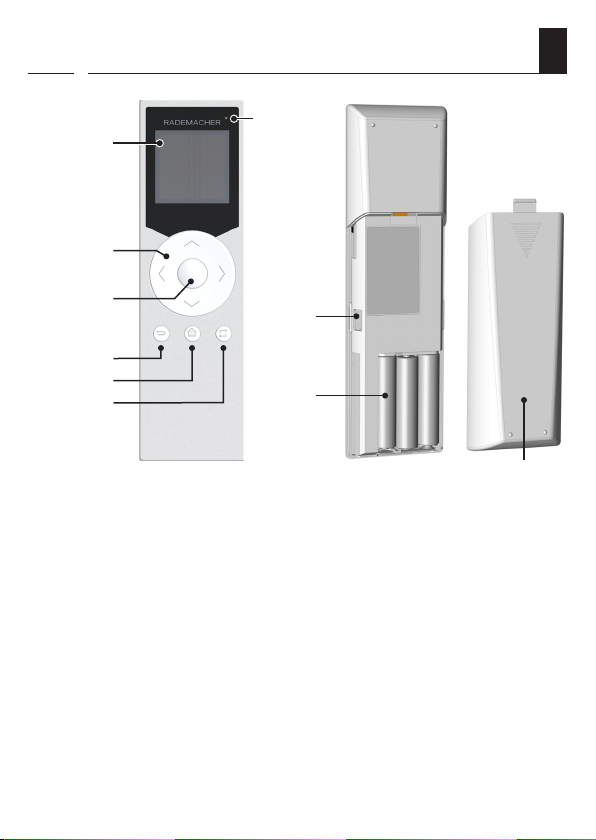
5. General view
1)
3)
4)
5)
6)
2)
7)
1) Display
2) Multidirectional toggle switch with control and navigation
buttons
3) OK / stop button
4) Back / cancel button
5) Menu / home screen button
6) Group / channel selection button
7) Status LED
8) USB port (micro USB)
9) Battery compartment
10) Battery cover
8)
9)
10)

10
EN
i
The DuoFern Manual Control serves as a central control for DuoFern
devices. It can be used, for example, to remotely control roller shutters,
Venetian blinds, slats, awnings or lighting conveniently by radio.
In addition, you can configure DuoFern devices and automate them in
groups with the DuoFern Manual Control.
6. Product description
Andere Handbücher für DuoFern
6
Dieses Handbuch passt für folgende Modelle
1
Inhaltsverzeichnis
Andere RADEMACHER Fernbedienung Handbücher
Beliebte Fernbedienung Handbücher anderer Marken

Panasonic
Panasonic EUR7622KB0 Bedienungsanleitung

Bang & Olufsen
Bang & Olufsen Beo4 Bedienungsanleitung

Sunwave Tech.
Sunwave Tech. RemoteComm SRC-7000 Bedienungsanleitung

Multiplex
Multiplex PROFI TX 9 Bedienungsanleitung

One Remote
One Remote RMB4 Bedienungsanleitung

FUTABA
FUTABA 9ZAP - PART2 Bedienungsanleitung