
Renault R-Link Bedienungsanleitung

R-Link

GB.1
ENG_UD27768_1
sommaire (XNX - MID - Renault)ENG_NW_1048-1_NX_Renault_0
Contents
Precautionsduringuse........................................................... GB.3
Generalinformation.............................................................. GB.4
Generaldescription ........................................................ GB.4
Introductiontothecontrols................................................... GB.5
SDcard:use,initialisation................................................... GB.13
Operatingprinciples........................................................ GB.15
Switchingon,off........................................................... GB.18
Addandmanagefavourites.................................................. GB.19
Usingvoicerecognition ..................................................... GB.20
Navigation.....................................................................GB.23
Enteringadestination ...................................................... GB.23
Volumeandvoice.......................................................... GB.28
Readingamap............................................................ GB.29
Guidance................................................................ GB.30
Preparingaroute.......................................................... GB.33
Trafficinformation.......................................................... GB.34
Displayingthemap......................................................... GB.37
Navigationservices ........................................................ GB.38
Z.E.Services............................................................. GB.40
Rechargingstation......................................................... GB.41
Range................................................................... GB.42
Adding,managingsavedaddresses ........................................... GB.43
Navigationsettings......................................................... GB.44

GB.2
ENG_UD27768_1
sommaire (XNX - MID - Renault)ENG_NW_1048-1_NX_Renault_0
Multimedia.....................................................................GB.47
Listeningtotheradio....................................................... GB.47
Media................................................................... GB.50
Photoreader ............................................................. GB.51
Videoplayback............................................................ GB.52
Multimediasettings ........................................................ GB.53
Phone ........................................................................GB.54
Pairing,unpairingatelephone................................................ GB.54
Connecting,disconnectingatelephone......................................... GB.55
Managingthetelephonedirectory............................................. GB.56
Making,receivingacall..................................................... GB.57
Calllog.................................................................. GB.59
Duringacall.............................................................. GB.60
Telephonesettings......................................................... GB.61
Vehicle........................................................................GB.62
Eco²driving .............................................................. GB.62
Parking distance control, reversing camera . . . . . . . . . . . . . . . . . . . . . . . . . . . . . . . . . . . . . . GB.63
Electricvehicle............................................................ GB.65
Well-being ............................................................... GB.67
On-boardcomputer,vehiclesettings........................................... GB.68
Services.......................................................................GB.69
IntroductiontotheServicesmenu............................................. GB.69
Downloading and installing applications . . . . . . . . . . . . . . . . . . . . . . . . . . . . . . . . . . . . . . . . GB.70
Servicessettings .......................................................... GB.74
system........................................................................GB.75
Settings ................................................................. GB.75
Operatingfaults.................................................................GB.79

SD card.................................................(up to the end of the DU)
precautions during use .........................(up to the end of the DU)
navigation system................................. (up to the end of the DU)
GB.3
ENG_UD27745_1
Précautions d’utilisation MID (XNX - MID - Renault)ENG_NW_1048-1_NX_Renault_0
Precautions during use
PRECAUTIONS DURING USE
The prior acceptance of the General Conditions of Sale is mandatory before using the system.
The description of the models given in this manual is based on the specifications at the time of writing. This manual covers all
existing functions for the models described. Whether or not they are fitted depends on the equipment model, options selected
and the country where it is sold. This manual may also contain information about functions to be introduced later in the year.
Precautions when operating the system
– Operate the controls and read the information on the screen only when road conditions allow.
– Set the volume to a reasonable level so that outside noise can be heard.
Precautions regarding navigation
– Use of the navigation system does not in any way replace the responsibility or vigilance of the driver when driving the vehi-
cle.
– Depending on the geographical area, the map on the SD card may not have the latest information on new roads. Be alert.
In all cases, Road Traffic Regulations and road signs always take precedence over the directions of the navigation system.
Precautions concerning the equipment
– Do not attempt to dismantle or modify the system, as there is a risk of damage to equipment and fire.
– Contact a representative of the manufacturer in the event of malfunction and for all operations involving disassembly.
– Do not insert foreign objects or a damaged or dirty SD card into the reader.
– Always clean your screen with a microfibre cloth.
– Use an SD card which is suitable for your navigation system.
It is essential to follow the precautions below when using the system, both in the interest of safety and to prevent material damage.
You must always comply with the laws of the country in which you are travelling.

soft button............................................. (up to the end of the DU)
GB.4
ENG_UD27746_1
Description générale MID (XNX - MID - Renault)ENG_NW_1048-1_NX_Renault_0
General information
General description
GENERAL DESCRIPTION
Menu screen
OGo to previous page.
PName of menu.
QGo to next page.
RName of function or of sub-menu.
SReturn to previous menu.
Welcome screen
AAudio information.
BSystem notifications.
COutside air quality / Eco Function.
DCall log / State of connected tele-
phone.
EOutside temperature.
FTime.
GTraffic information.
HInstructions for navigation and dis-
tance to next change of direction.
Drive to...
Home Saved loca-
tions
Address
Recent desti-
nations
Local
search
Charging
station
FM1
Energy flow
Menu
BNR - Dancefloor
Preset 3
A B O QD
R
C PE F
G
H
IJKLMN
IPop-up menu.
JNavigation map.
KCurrent vehicle position.
LFavourites.
MDriving Eco².
NMain menu.
Note: You can change the configura-
tion of the welcome screen. Please see
the information on “Welcome screen” in
the “System settings” section.
S
controls.................................................(up to the end of the DU)
buttons.................................................. (up to the end of the DU)
fascias and steering wheel controls......(up to the end of the DU)
GB.5
ENG_UD27747_1
Présentation des commandes MID (XNX - MID - Renault)ENG_NW_1048-1_NX_Renault_0
Introduction to the controls
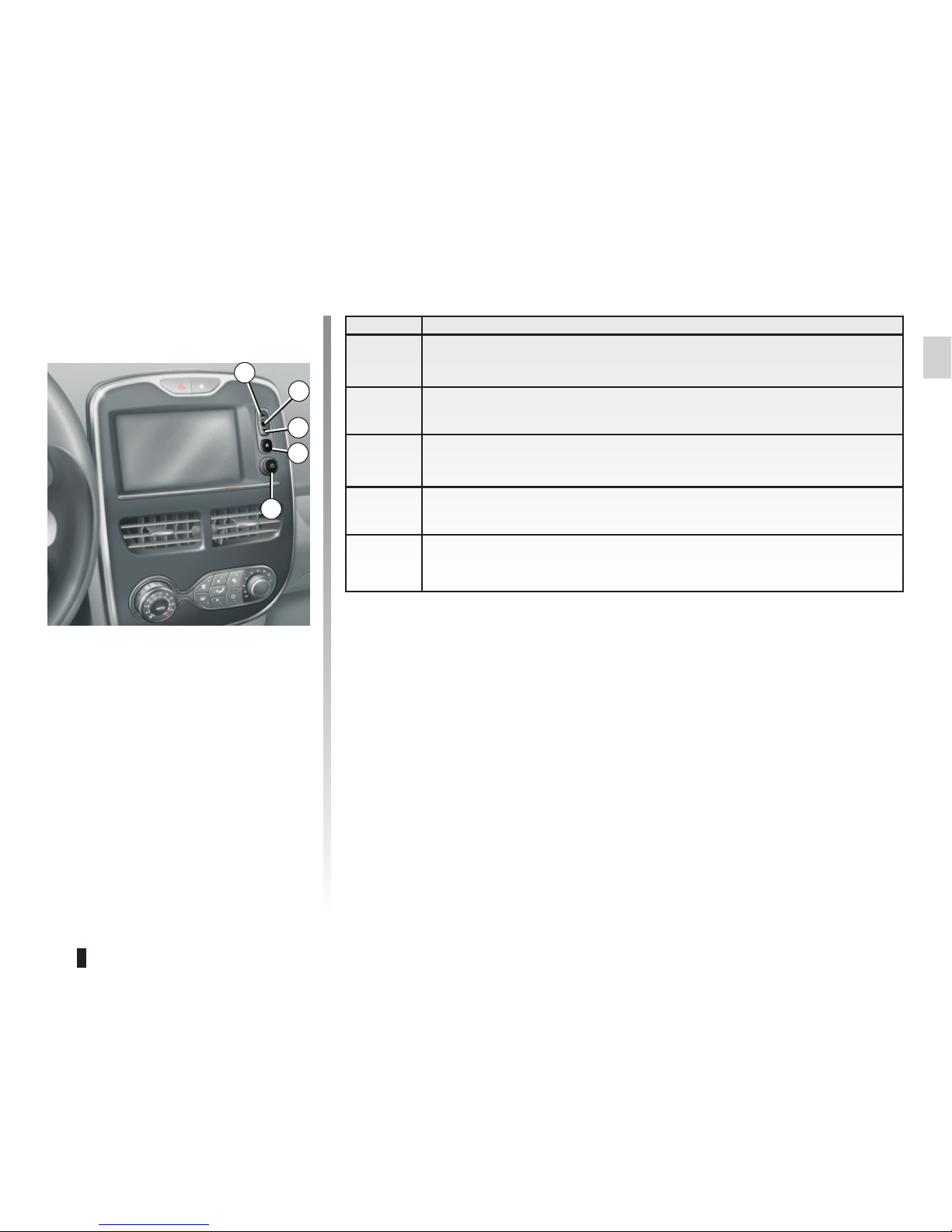
Function
1From a list: move upwards.
From the map: change scale (ZOOM mode).
2Confirmation button
3From a list: move down.
From the map: change scale (ZOOM mode).
4Display main menu
5Press: on/off
Rotate: adjust source volume while listening.
INTRODUCTION TO THE CONTROLS (1/8)
Screen controls
1
2
3
4
5

GB.6
ENG_UD27747_1
Présentation des commandes MID (XNX - MID - Renault)ENG_NW_1048-1_NX_Renault_0
Jaune Noir Noir texte
INTRODUCTION TO THE CONTROLS (2/8)
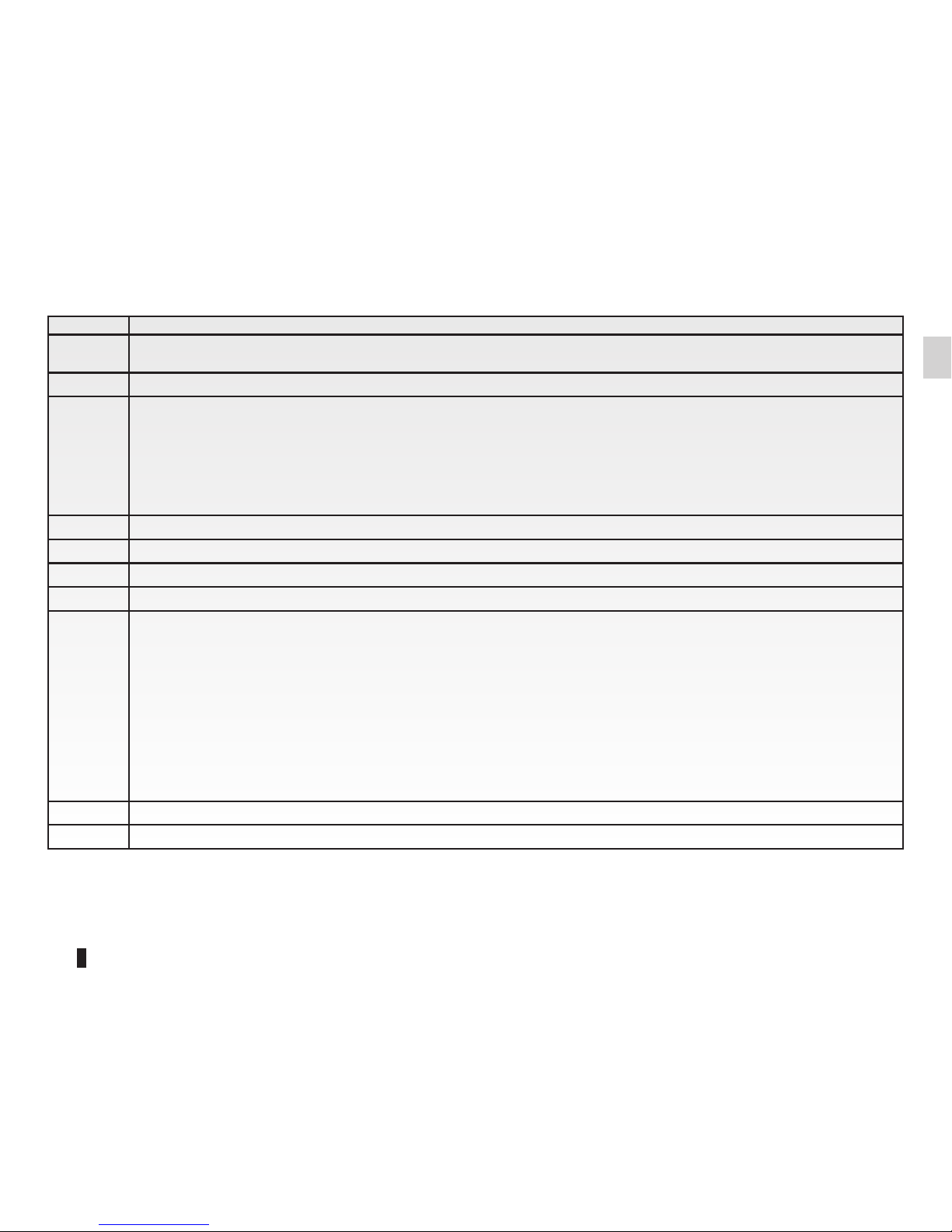
Multimedia screen
6 7 8 8 9 10
1114 1215 13
Jaune Noir Noir texte
GB.7
ENG_UD27747_1
Présentation des commandes MID (XNX - MID - Renault)ENG_NW_1048-1_NX_Renault_0
INTRODUCTION TO THE CONTROLS (3/8)
Function
6Short press: on/off
Rotate: adjust the volume of the source currently in use.
7Listen to the radio/change band.
8
Short press:
– change a CD track.
Long press:
– fast forward/rewind on a CD.
9Choose an external source.
10 Eject a CD.
11 Go to the main menu.
12 Open the pop-up menu.
13
Switching:
– moving around the card;
– up/down: move around the various areas of a menu (upper bar, central zone, lower bar);
– left/right: move around the various tabs of a menu.
Rotate:
– move around the various elements of a zone;
– modify the scale (ZOOM mode).
Press:
– confirm.
14 Go back to the previous menu.
15 Go to the welcome screen.
GB.8
ENG_UD27747_1
Présentation des commandes MID (XNX - MID - Renault)ENG_NW_1048-1_NX_Renault_0
Jaune Noir Noir texte
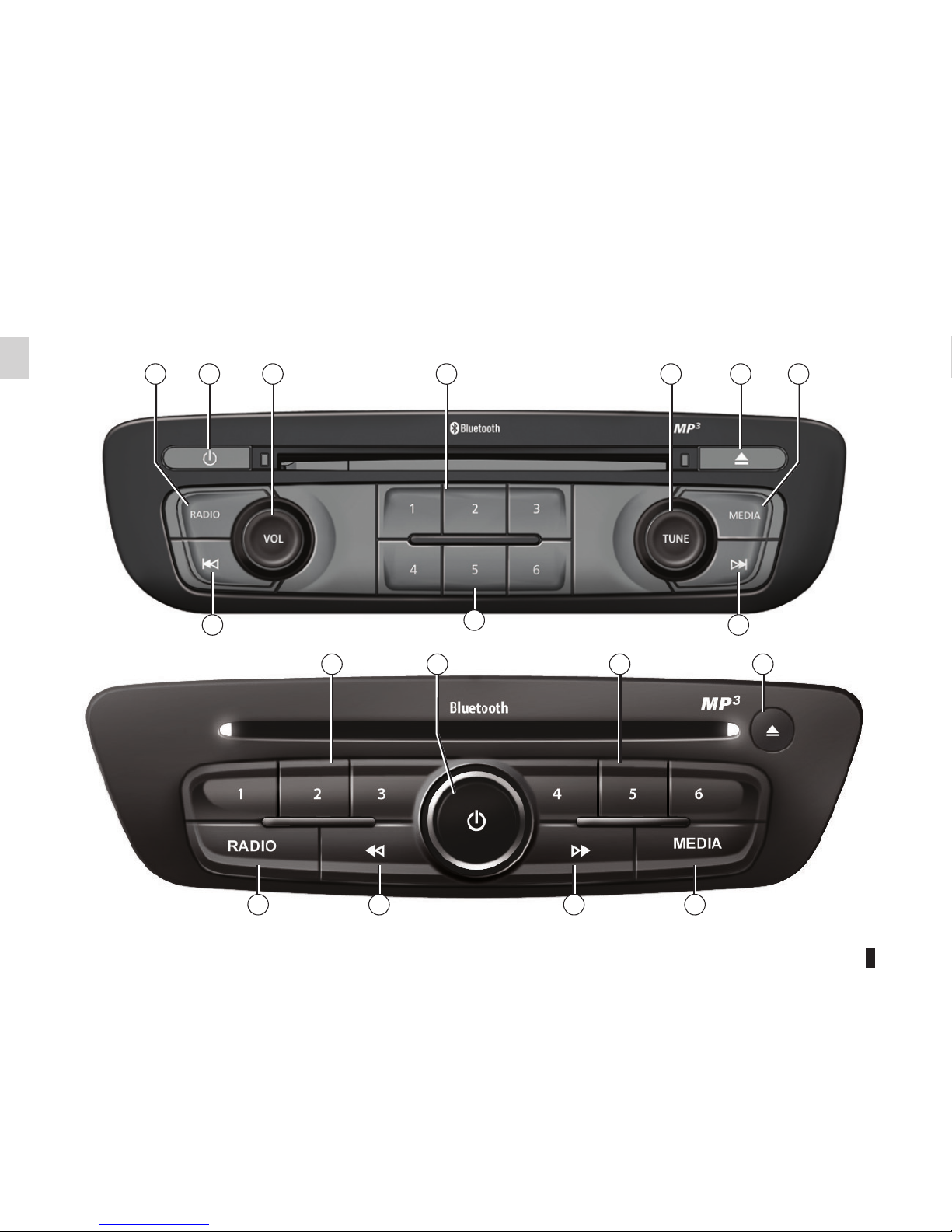
Radio front panel
For more functions, please refer to the description of the central control.
INTRODUCTION TO THE CONTROLS (4/8)
16 17 18 19 20 21
23
19
23
22
19 17 19 21
16 2323 22

Jaune Noir Noir texte
GB.9
ENG_UD27747_1
Présentation des commandes MID (XNX - MID - Renault)ENG_NW_1048-1_NX_Renault_0
INTRODUCTION TO THE CONTROLS (5/8)
Function
16 Listen to the radio.
17 On/off
18 Rotate: adjust the volume of the source currently in use.
19 Short press: recall a radio station.
Long press: store a radio station.
20 Rotate: search for radio stations, change a CD track.
21 Eject a CD.
22 Choose an external source.
23
Short press:
– move horizontally in the displays;
– move around the various zones of the screen;
– change a CD track or playlist.
Long press:
– fast forward/rewind a CD or an audio file.
Andere Handbücher für R-Link
4
Inhaltsverzeichnis
Andere Renault Autoradiosystem Handbücher


