
Rinnai BEPH10DTWF Bedienungsanleitung

Electric Panel Heater
Wi-Fi Operation & Manual
Models:
BEPH10DTWF
BEPH15DTWF
BEPH22DTWF
ON/OFF MODE
WIFI
DOWNUP

Rinnai 2 BEPH Electric Panel Heater Wi-Fi OM
This appliance must be installed in accordance with:
• Manufacturer’s Installation Instructions
• Current AS/NZS 3000
• Local Regulations and Municipal Building Codes
including local OH&S requirements
For continued safety of this appliance it must be installed
and maintained in accordance with the manufacturer’s
instructions.
Before proceeding with the operation or installation of your
new heater, please read this manual thoroughly and gain a
full understanding of the requirements, features and
operation of your new appliance.

Rinnai 3 BEPH Electric Panel Heater Wi-Fi OM
TABLE OF CONTENTS
Terms & Conditions 4
Wi-Fi Compatibility / Connectivity ����������������������������������������������������������������������������������������������������������������������� 5
Minimum Requirements ������������������������������������������������������������������������������������������������������������������������������������� 5
Wi-Fi Set Up 6
Operation 12
Device List Page ���������������������������������������������������������������������������������������������������������������������������������������������� 12
Operation Functions ����������������������������������������������������������������������������������������������������������������������������������������� 12
Device settings ������������������������������������������������������������������������������������������������������������������������������������������������� 13
App Settings 15
App settings ������������������������������������������������������������������������������������������������������������������������������������������������������ 15
Voice Control with Google Home or Amazon Alexa ����������������������������������������������������������������������������������������� 16
How to Connect to Amazon Alexa �������������������������������������������������������������������������������������������������������������� 16
How to Connect to Google home ��������������������������������������������������������������������������������������������������������������� 16
How to Control Amazon Alexa �������������������������������������������������������������������������������������������������������������������� 17
How to Control Google Home �������������������������������������������������������������������������������������������������������������������� 17
Contacts 20

1. DEFINITIONS
App means the Tuya Smart App you can download to your Device to operate your Rinnai BEPH Panel Heater.
Australian Consumer Law (‘ACL’) is Schedule 2 of the Competition and Consumer Act 2010.
Device means your smart phone/ tablet (Android 5.0+ or Apple 10.0+) through which you have downloaded the App.
Rinnai BEHP Panel Heater, comprising the following models:
Models BEPH10DTWF BEPH15DTWF BEPH22DTWF
Rinnai, we, our or us means Rinnai Australia Pty Ltd (ABN 74 005 138 769).
Wi-Fi Operations Manual means the Wi-Fi operations manual which details how to download and operate the App.
you or your means a customer who uses the Rinnai BEPH Panel Heater and App.
2. GENERAL
2.1 By downloading the App, you agree to be bound by these Terms & Conditions.
2.2 These Terms & Conditions should be read in conjunction with the Wi-Fi Operations Manual.
2.3 Rinnai may make updates to these Terms & Conditions from time to time. You should download and understand all
relevant updates to ensure you understand your obligations and Rinnai’s obligations under the Terms & Conditions.
2.4 Rinnai may make updates to the App from time to time. You should download and understand all relevant updates to
ensure you have access to the functions of your Rinnai BEPH Panel Heater and App.
3. THE AUSTRALIAN CONSUMER LAW (‘ACL’)
Our goods come with guarantees that cannot be excluded under the ACL. You are entitled to a replacement or refund for
a major failure and compensation for any other reasonably foreseeable loss or damage. You are also entitled to have the
goods repaired or replaced if the goods fail to be of acceptable quality and the failure does not amount to a major failure.
All the clauses under these Terms & Conditions apply subject to the ACL.
4. USE OF THE APP
4.1 You may download the App to your Device for your personal use only.
4.2 You are responsible for all costs incurred in accessing, downloading and using the App. This includes but is not limited to
fees charged by your internet service provider, smartphone or app data access charges and any other access charges
or device usage charges.
4.3 You must follow the instructions in the Wi-Fi Operations Manual to operate the Rinnai BEPH Panel Heater via the App.
4.4 You must not use the App for any prohibited or unlawful purpose.
4.5 The App is available as another means to control and monitor the Rinnai BEPH Panel Heater, but should not be used for
critical heating or cooling applications.
5. TERMINATION
5.1 You may terminate these Terms & Conditions by deleting and ceasing use of the App.
5.2 Rinnai may terminate these Terms & Conditions immediately through the App or by any other appropriate means if you
are in breach of the Terms & Conditions.
6. INTELLECTUAL PROPERTY
6.1 If you download the App, Rinnai grants you a limited, non-exclusive, non-transferable, and non-assignable royalty free
licence solely in order to access and use the App.
6.2 All intellectual property rights in the Rinnai BEPH Panel Heater and the App are owned by Rinnai or licensed to Rinnai by
third parties. You do not acquire any express or implied rights in any these intellectual property rights, other than those
granted in clause 6.1 and within the context of these Terms & Conditions.
6.3 You may not modify, copy, sell, reproduce, interfere with or distribute the App in any way.
7. DISCLAIMER
To the extent permitted by law:
7.1 Rinnai makes no warranties that the App will be error-free, secure or free from any virus, malicious code or other adverse
elements. Rinnai therefore excludes any liability which may arise as a result of you downloading, accessing or using
the App. Rinnai does not exclude or restrict liability to the extent provided for by the ACL under the Competition and
Consumer Act 2010.
7.2 Rinnai will not be liable for any indirect, incidental, special or consequential loss.
8. FORCE MAJEURE
Unless prohibited by law, Rinnai shall be released from its obligations in the event of national emergency, war, prohibitive
governmental regulation, or if any other cause beyond the control of the parties renders the App or Rinnai BEPH Panel
Heater inoperable.
Rinnai 4 BEPH Electric Panel Heater Wi-Fi OM
TERMS & CONDITIONS

Rinnai 5 BEPH Electric Panel Heater Wi-Fi OM
Wi-Fi COMPATIBILITY / CONNECTIVITY
Rinnai BEPH panel heater models are tted with built-in Wi-Fi connectivity. Using the Tuya Smart App (available
from Apple App Store or Google Play) it is then possible to use a smart phone to operate these appliances
remotely. Multiple compatible appliances can be added as required.
A Wi-Fi router (paired with the appliance via Tuya Smart App) is used to control the appliance(s).
IMPORTANT
The Appliance(s) MUST BE installed in a location that has Wi-Fi router coverage.
If the controlling mobile device is outside of the Wi-Fi router's coverage i.e. operating remotely,
then the Wi-Fi router will require an internet connection to communicate with the controlling
mobile device.
1
3
4
6
5
2
Within Wi-Fi router coverage
Outside Wi-Fi router coverage
E F
1. The Appliance
2. Smart phone (using Wi-Fi)
3. Wi-Fi router
4. Internet connection
5. Internet cloud
6. Smart phone (using internet cloud)
MINIMUM REQUIREMENTS
• Rinnai BEPH panel heater models
• Wi-Fi Router, 2.4G frequency range supporting 802.11b/g mode, with coverage of the Appliance(s) location
• For remote cloud based operation Wi-Fi router / modem with active internet connection
• Smart phone / Tablet (Android 5.0+ or Apple iOS 10.0+) with Tuya Smart App installed
INTRODUCTION
Rinnai 6 BEPH Electric Panel Heater Wi-Fi OM
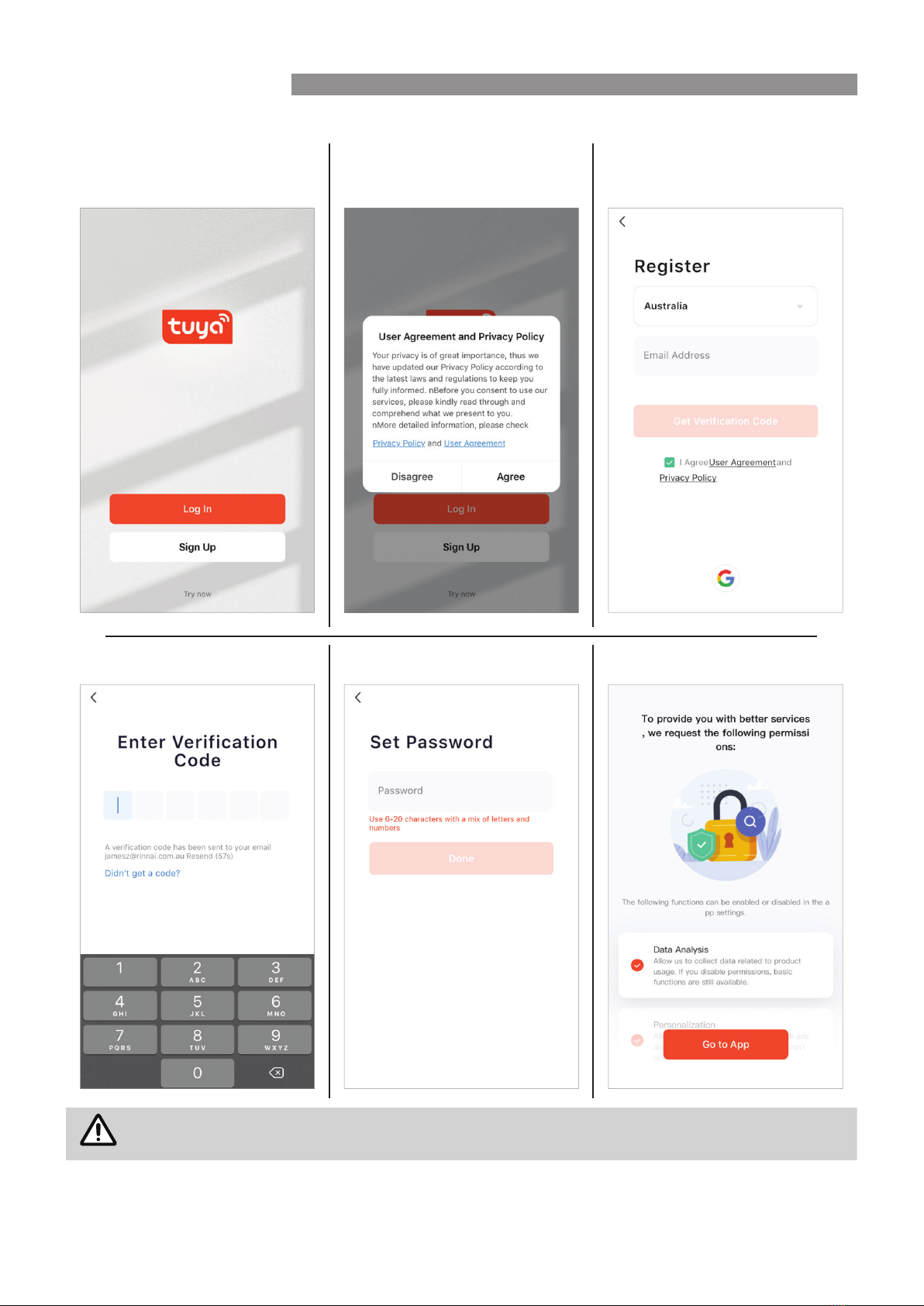
Pairing With Mobile device & Wi-Fi Network
1. Open App, and Sign up for rst
time users.
2. Read and con rm the User
Agreement and Privacy Policy
3. Register via email
Enter veri cation code Set password Allow permissions
NOTE
Password may require a number of characters including alphabet and numerals.
WI-FI SET UP

Rinnai 7 BEPH Electric Panel Heater Wi-Fi OM
Follow prompts on the screen. Follow prompts on the screen.
Follow prompts on the screen. Follow prompts on the screen.
WI-FI SET UP
Rinnai 8 BEPH Electric Panel Heater Wi-Fi OM
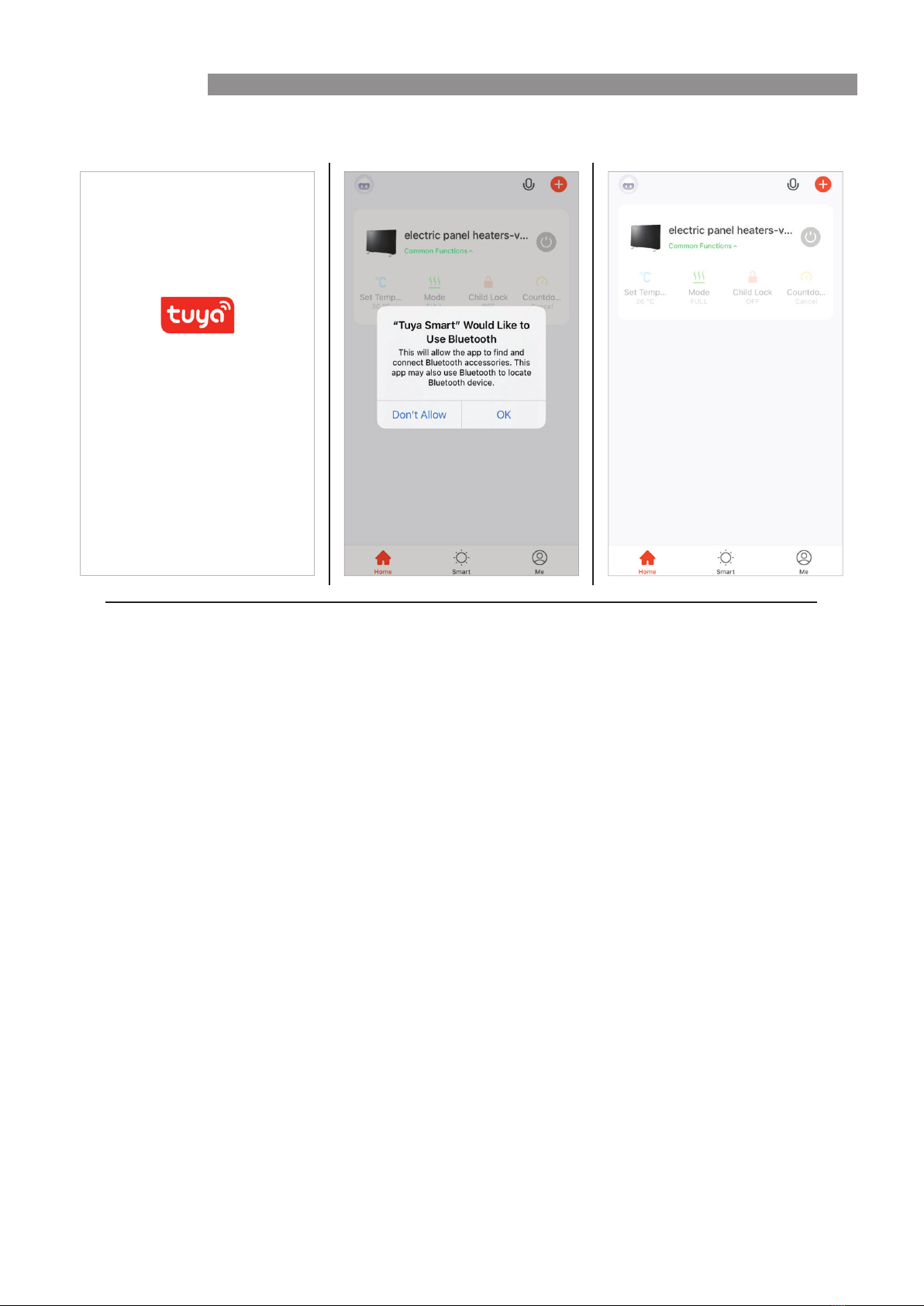
4. 'Welcome' page. If prompted, give the App permission.
WI-FI SET UP
Rinnai 9 BEPH Electric Panel Heater Wi-Fi OM
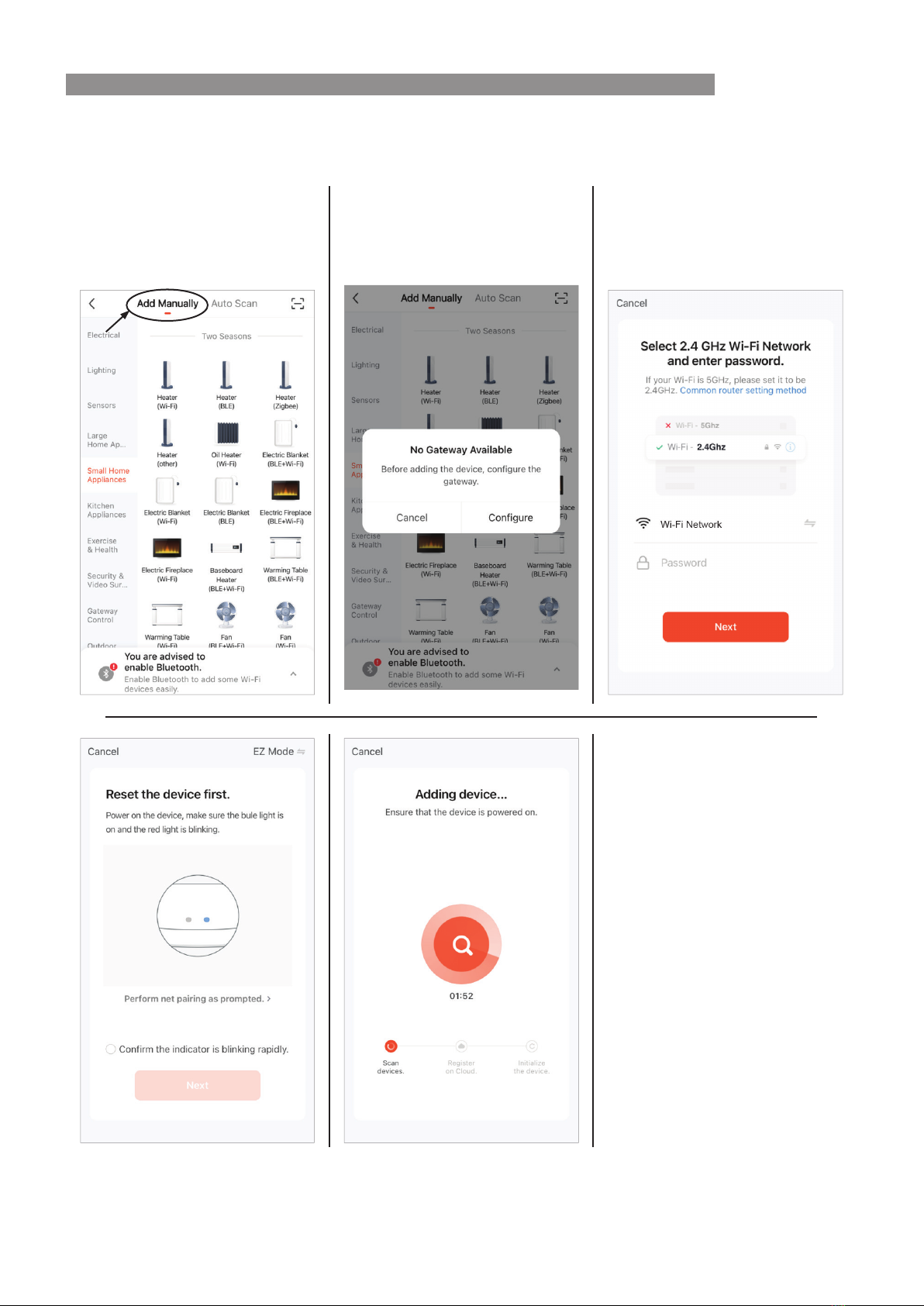
5. Add Device. Turn on the panel heater that is to be paired, then activate the Wi-Fi module by pressing and
holding the Wi-Fi button on the remote control more than 5 seconds, the appliance will respond with a beep
and Wi-Fi indicator fl ash to con rm Wi-Fi activation.
Select the + Add device button, on
the Device List page.
Add Manually or Auto Scan, follow
prompts on the screen.
Add Manually Follow prompts on the screen.
WI-FI SET UP

Rinnai 10 BEPH Electric Panel Heater Wi-Fi OM
Auto Scan (Allow the app to use Bluetooth)
NOTE
The confi guration process may take up to a minute or more depending upon signal strength. The
Device List page will be displayed with the new device listed when confi guration is complete.
To add additional device to the current mobile device press the + 'Add button' and follow the
screen prompts.
NOTE
Changing your internet provider/service may mean you need to add device again.
WI-FI SET UP
Andere Handbücher für BEPH10DTWF
1
Dieses Handbuch passt für folgende Modelle
2
Inhaltsverzeichnis
Andere Rinnai Elektrische Heizung Handbücher

Rinnai
Rinnai FS35BN/US Kurzanleitung

Rinnai
Rinnai DEPH-10DTW Bedienungsanleitung

Rinnai
Rinnai ES750 Bedienungsanleitung

Rinnai
Rinnai SUPER RAY NG Technisches Datenblatt

Rinnai
Rinnai PEPH-10PEW Bedienungsanleitung

Rinnai
Rinnai EPH10MW Bedienungsanleitung

Rinnai
Rinnai GEPH-10DTW Bedienungsanleitung

Rinnai
Rinnai JEPH-10DTW Bedienungsanleitung

Rinnai
Rinnai Super Ray WMA 16 Bedienungsanleitung

Rinnai
Rinnai BEPH10DTWF Bedienungsanleitung


