Repair, Parts Replacement and Calibration
After opening the meter, live parts may be exposed. There-
fore, the meter must be disconnected from the measuring
circuit prior to opening its case for repair, replacement of parts
of calibration. If repair or calibration cannot be avoided unless
the meter is open and live, this work must be performed by a
qualified person who understands the danger involved.
Faults and extraordinary Stress
When it must be assumed that the safe operation is no longer
possible, take the meter out of service and secure it against
accidential use.
It is assumed that Safe operation is no longer possible,
* when the meter shows oblivious sign of damage,
CAT Definition
I
II
III
IV
The instruments used for measurement in electrical systems, those not
directly connected to the mains system: e.g. telecommunication equipments,
battery operated devices or batteries etc
This category instruments cover the local level of circuits for fixed or non-
fixed power devices: e.g. Lighting equipments, appliances and 120 V/240V
equipment inside house, offices or laboratories...
This category instruments can withstand transients found on distribution
circuits, feeders, lighting systems in large buildings..
This category instruments are designed for testing on the primary supply
source, which includes 120V/240 V overhead or underground lines. Also
electricity meters, mains terminal etc
Measuring categories and their Meaning per IEC 61010-1
The measurement category and relevant maximum rated
voltage (e.g. 600V CAT II) which are shown on the
instrument casing apply to your measuring instrument.
RISHABH INSTRUMENTS 78
Note !
Electrical discharge and high frequency interference
can cause incorrect displays, and may block
the measuring sequence. To reset, switch the
meter off, and then back on. If this procedure is
unsuccessful, briefly disconnect the battery from
the contact terminals.
Attention !
Before opening, disconnect the meter from the
measuring circuit and observe chapter 16,
page 28!
* when the meter no longer functions correctly,
* after a prolonged storage under adverse conditions,
* due to severe stress due to transportation.
2 Initial Start-Up
Battery
Fit the meter with battery (batteries) provided along with the
meter
please see chapter 16.1, page 28, before initial start-up of
your instrument, or after a lengthy period of storage.
Switching the Meter ON
Turn the Function selector switch from the OFF position to the
desired measuring function.
All of the segments of LCD are activated briefly.
A drawing of the LCD can be found on page 2.
9
Automatic turn-OFF
15 minutes, if no keys or the selector switch have been
activated during this time.
Switching the Meter back ON
Activate the HOLD/ON key.
Switching the Meter OFF
Turn the selector switch to the OFF position.
3 Selecting Measuring Functions and Ranges
3.1 Measuring Function Selection
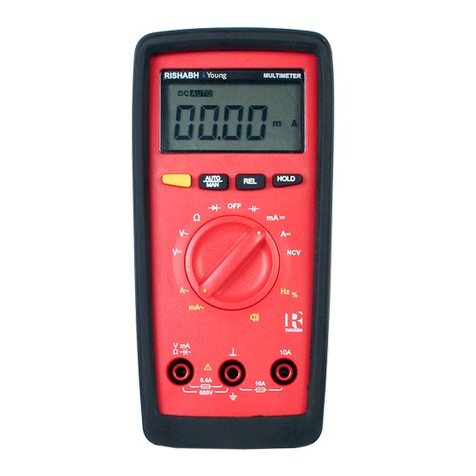
The desired measuring function is selected with the Function
selector switch (blue or yellow printing). In order to select the
function printed in yellow half circle, the yellow multifunction
key must also be pressed. If the multifunction key is pressed
again, the function printed in blue half circle is reactivated.
Your meter switches itself OFF automatically after
3.2 Automatic Measuring Range Selection
These multimeters features autoranging for all measuring
ranges except for the ranges 400 mV ~ and 10 A. Automatic
selection is functional as soon as the meter is switched ON.
According to the measured quantity applied, the meter auto-
matically selects the measuring range which gives the best
resolution.
3.3 Manual Measuring Range Selection
You can switch OFF autoranging, select and fix the ranges
manually according to the table given on page 10.
First select the desired measuring function with the
function selector switch and, if appropriate, the
multifunction key.
Briefly activate the AUTO/MAN key.
RISHABH INSTRUMENTS RISHABH INSTRUMENTS