
Rocket Fish RF-HV3 Bedienungsanleitung

Convertible Speaker Dock
RF-HV3
User Guide

2RF-HV3 Convertible Speaker Dock
Convertible Speaker Dock
Contents
Important safety instructions ..................................... 3
Features............................................................................... 4
Package contents .................................................. 4
Top .............................................................................. 4
Back ............................................................................ 5
Remote control....................................................... 6
Power LED indicator ............................................. 7
Setting up your dock...................................................... 8
Connecting power ................................................ 8
Installing remote control batteries ................. 9
Using your convertible speaker dock.....................10
Docking an iPod or iPhone ..............................10
Using landscape mode......................................12
Troubleshooting ............................................................14
Specifications..................................................................14
Compatibility (iPod & iPhone).........................14
Legal notices ...................................................................15
One-year limited warranty.........................................16

3
RF-HV3 Convertible Speaker Dock
Important safety instructions
Note to reviewers: The following is the standard Best Buy safety
instructions. Please review and let us know what items to delete. We
can add addition items if required.
1Read these instructions.
2Keep these instructions.
3Heed all warnings.
4Follow all instructions.
5Do not use this apparatus near water.
6Clean only with a dry cloth.
7Do not block any ventilation openings. Install in accordance with the
manufacturer's instructions.
8Do not install near any heat sources such as radiators, heat registers,
stoves, or other apparatus (including amplifiers) that produce heat.
9Do not defeat the safety purpose of the polarized or grounding-type
plug. A polarized plug has two blades with one wider than the other. A
grounding type plug has two blades and a third grounding prong. The
wide blade or the third prong are provided for your safety. If the
provided plug does not fit into your outlet, consult an electrician for
replacement of the obsolete outlet.
10 Protect the power cord from being walked on or pinched particularly at
plugs, convenience receptacles, and the point where they exit from the
apparatus.
11 Only use attachments/accessories specified by the manufacturer.
12 Use only with the cart, stand, tripod, bracket, or table
specified by the manufacturer, or sold with the apparatus.
When a cart is used, use caution when moving the
cart/apparatus combination to avoid injury from tip-over.
13 Unplug this apparatus during lightning storms or when
unused for long periods of time.
14 Refer all servicing to qualified service personnel. Servicing is required
when the apparatus has been damaged in any way, such as
power-supply cord or plug is damaged, liquid has been spilled or objects
have fallen into the apparatus, the apparatus has been exposed to rain or
moisture, does not operate normally, or has been dropped.
15 To reduce the risk of fire or electric shock, do not expose this device to
rain, moisture, dripping, or splashing, and no objects filled with liquids,
such as vases, shall be placed on it.

4RF-HV3 Convertible Speaker Dock
16 An apparatus with a three-prong, grounding-type plug is a Class I
apparatus, which needs to be grounded to prevent possible electric
shock. Make sure that you connect this Class I device to a
grounding-type, three-prong outlet.
17 The wall plug is the disconnecting device. The plug must remain readily
operable.
18 Batteries should not be exposed to excessive heat such as sunshine, fire,
or the like.
Caution: Danger of explosion if battery is incorrectly replaced. Replace only with the
same or equivalent type.
Features
• Certified iPod connector installed for iPods and iPhones
• Charges iPods and iPhones when docked
•Digitalvolumecontrol
• 3.5mm type line-in jack for use with other music players
Package contents
•Convertiblespeakerdock
• Seven dock adapters for iPods and iPhones
•ACadapter
•IRremotecontrol
• Quick Setup Guide
Top
#Component Description
1iPhonedock Insert your iPhone into this dock.
2(power button) Press to turn the speakers on or off.
3 – (volume down) Press to decrease the speaker volume.
4+ (volume up) Press to increase the speaker volume.

5
RF-HV3 Convertible Speaker Dock
Back
#Component Description
1 LINE IN jack
Plug an external audio device into this 3.5mm jack.
Note: If you have a device connected to this jack, it takes
priority over an iPod inserted into the iPod dock. To listen
to the iPod, unplug the device connected to the LINE IN
jack.
2DC IN jack Plug the AC adapter into this jack and into a power outlet.

6RF-HV3 Convertible Speaker Dock
Remote control
#Button Description
1 POWERONPress to turn the speakers on or off.
2 Press to navigate up in a docked iPod or iPhone menu.
3MENU Press to open or close a docked iPod or iPhone menu.
4Press to navigate down in a docked iPod or iPhone menu.
5 (repeat)
Press to repeat the current audio track. Press twice to repeat the
entire album or playlist. Press three times to turn off the repeat
option.
6(previous)
Press to skip to the previous file. Press and hold to search
backwards through an audio or video file on a docked iPod or
iPhone.
7VOLUME– Press to decrease the speaker volume.
8(mute) Press to turn off the speaker volume. Press again to turn on the
speaker volume.
9SELECT Press to make a selection on a docked iPod or iPhone.
10 (shuffle) Press to play files on a docked iPod in random order. Press again
to turn off the shuffle option.
11 (play/pause) Press to play or pause a file on a docked iPod or iPhone.
12 (next) Press to skip to the next file. Press and hold to search forwards
through an audio or video file on a docked iPod or iPhone.
13 VOLUME+ Press to increase speaker volume.

7
RF-HV3 Convertible Speaker Dock
Power LED indicator
Your speaker dock has a power LED indicator on the top.
LED state Description
Off Your dock is in standby mode.
Warning: When your dock is in standby mode,
power is still flowing into it. To disconnect all
power, unplug the AC adapter and remove the
batteries.
On Your dock is tuned on.
Blinking Speakers are muted.
LED indicator

8RF-HV3 Convertible Speaker Dock
Setting up your dock
Connecting power
You can use the AC adapter or batteries to power your dock.
To connect the AC adapter:
• Plug the AC adapter into the DC 5V jack on the back of your dock and
into a power outlet.
To install batteries:
1Remove the battery compartment cover on the bottom of your dock.

9
RF-HV3 Convertible Speaker Dock
2Insert four AAA batteries (not included) into the battery compartment.
Make sure that the + and – symbols on the batteries align with the +
and – symbols inside the battery compartment.
3Replace the battery compartment cover.
Note: When you operate your dock on battery power, it does not charge a docked iPod
or iPhone.
Installing remote control batteries
To install remote control batteries:
1Slide the battery compartment cover to open the battery compartment.
2Insert a CR2025 3V battery (provided) into the battery compartment
with the + side up.
3Slide the battery compartment cover back into place to close the battery
compartment.
10 RF-HV3 Convertible Speaker Dock
Using your convertible speaker dock
Docking an iPod or iPhone
To dock an iPhone or iPod:
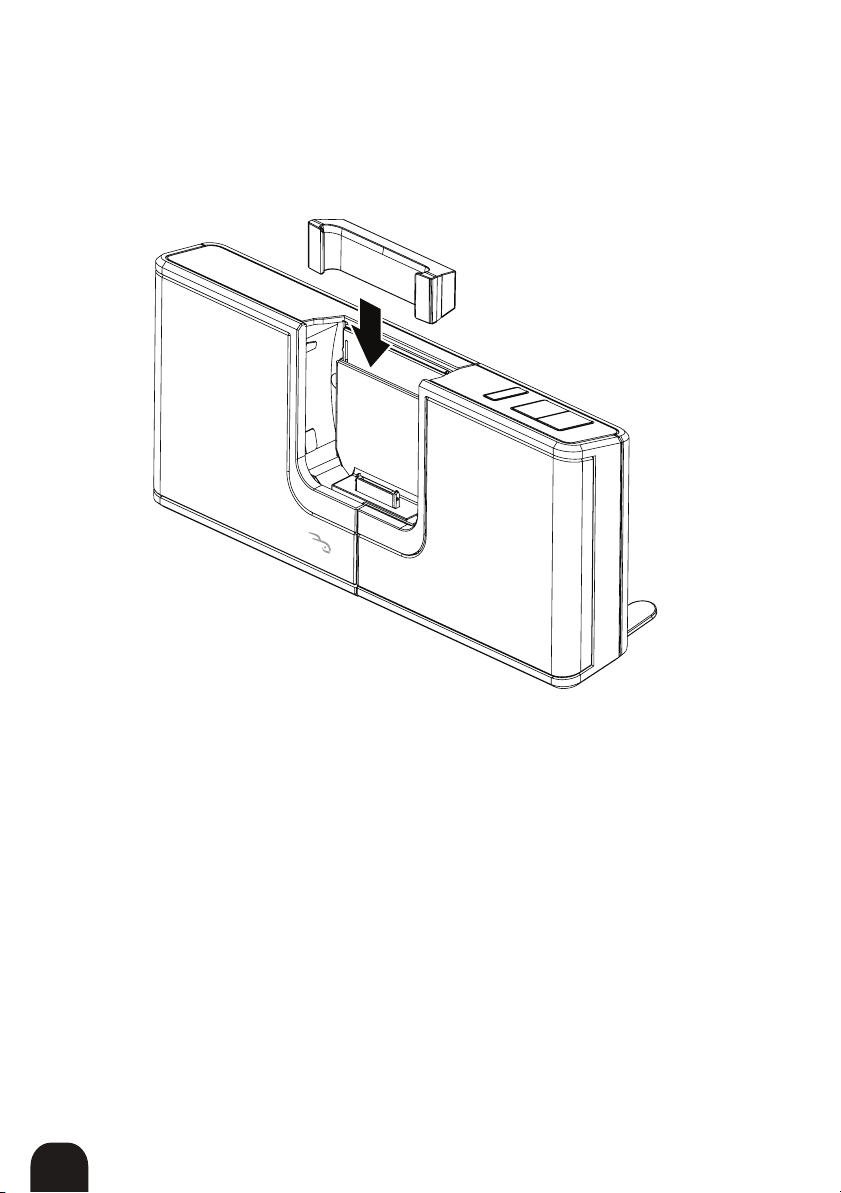
1Select and insert the correct adapter for your iPhone or iPod. Each
adapter is labled with the specific device it is used for.
Andere Handbücher für RF-HV3
1
Inhaltsverzeichnis
Andere Rocket Fish Dockingstation Handbücher


