
SAGEMCOM D77T-V Bedienungsanleitung

U
s
er
gu
i
de
E
N


ENGLISH
2
TABLE OF CONTENTS
4INFORMATION
4Preface
4 Safety information
5 Application information
5Environment
6 Setting up/range
7SET-UP
7 D77 box contents
8 Presenting the base unit
9 Presenting the handset
10 The Navigator
11 Rapid access to the answering machine messages
11 Screen
12 Base unit connection
13 Inserting batteries in the handset
14 Battery function duration
14 Longevity of the battery
14 Battery charging status
14 Switching the handset on and off
14 Out of range
15 BLOCK DIAGRAM
16 MAKING TELEPHONE CALLS
16 Making an external call
16 Answering a call
16 Making an internal call
16 CLI (Caller Line ID) function
17 Managing calls whilst communication is underway
17 Call management
18 Locking the handset keypad
18 Using in hands-free mode
19 Setting the volume
19 Secret mode
20 PHONEBOOK
20 Adding a phonebook entry
20 Viewing a phonebook entry
21 Editing a phonebook entry
21 Deleting a phonebook entry
21 Deleting the entire phonebook
22 DATE AND TIME
22 Set the time and date

3
TABLE OF CONTENTS
23 CUSTOMISATION
23 Setting the melody and handset volume for an external call
23 Customising the name of the handset
23 Activating/deactivating automatic pick-up
23 Activating/deactivating automatic Hang-up
24 Setting the menu language
24 Setting the base unit melody and volume
25 ADVANCED SETTINGS
25 Setting the flash time
25 Registering a new handset
26 Removing a handset
26 Changing your PIN code
27 Resetting the handset and the base unit default settings
28 CALL LOG
28 To display the list of calls made
28 Removing numbers from the list of calls
28 Storing a caller's details in the phonebook
29 ANSWERING MACHINE (D77V only)
29 Playing a message
30 Recording a memo
30 Selecting answer machine mode
32 Activating/deactivating the answering machine
32 TAM Settings
33 Remote control
37 TECHNICAL DATA
37 Condition on delivery
38 Features
39 WARRANTY
39 Terms and Conditions for United Kingdom & Ireland only

ENGLISH
4
INFORMATION
Preface
Dear customer, congratulations on buying your SAGEMCOM
DECT telephone and thank you for placing your confidence in
us. This device has been manufactured with the utmost care. If
you should have difficulties in operating it, we recommend that
you consult this user manual.
You can also find information on the following site:
http://www.sagemcom.com
To operate the device safely and easily, please read the following
sections carefully:
Safety information
- Do not install your DECT telephone in a damp environment,
such as a bathroom, washroom, kitchen etc, and not within
1.50 metres of a source of water or outside. This device is
designed for use in temperatures of between 5 °C and 45 °C.
- Only use the power unit supplied and connect it to the electricity
mains in accordance with the installation instructions in this user
manual and the details on the sticker regarding voltage,
electrical current and frequency. As a precaution if there is a
risk of danger, the power plug can be pulled out to disconnect
the 230 volt power supply. Therefore the sockets should be
near the device and easily accessible.
- This device is designed to be used for connecting to the public
telephone network. If problems should arise, contact your
nearest specialist dealer. Only use the telephone cable supplied.
- For safety reasons, never put the handset in the base station
without the battery inserted or without the lid on the battery
compartment as this could cause an electric shock.
- To avoid damaging your handset, only use certified
rechargeable battery NiMH 2.4 V 600 mAh, never use non
rechargeable battery. Insert the battery in the handset battery
compartment respecting polarity.
The used battery must be disposed of in line with the recycling
regulations in this user manual.
- Your DECT telephone has a range of approx. 50 metres
indoors and up to 300 metres outdoors. The range can be
affected by the proximity of metal objects, such as a television
and electrical devices.
- Certain medical equipment and highly-sensitive machines or
security systems may be affected by the transmission power of
the telephone. In these cases we recommend adhering to the
safety information.
- In regions greatly affected by electrical storms we recommend
that you protect your telephone circuit with a special fixture for
excess voltage.
INFORMATION
5
INFORMATION
- You cannot make calls with the device if there is a power cut.
Therefore keep another telephone at the ready in the event of
an emergency.
- TheCE label confirms that the product complies withthe 1999/
5/EC regulations of the European Union Parliament regarding
wireless systems and telecommunications for user protection
and for preventing electromagnetic interference. This ensures
the allocated communication network is used properly and
radio interference is avoided. The declaration of compliance
may be looked up on the
www.sagemcom.com
website, section
«S
Support
» or can be obtained from the following address:
SAGEMCOM SAS
250, route de l'Empereur - 92500 Rueil-Malmaison - France
Application information
This telephone is to be used for transmitting voice messages via
telephone networks. Any other use is not permitted and is
considered unfit for the intended use.
Environment
Environmental protection and sustainable development is an
important priority for SAGEMCOM. SAGEMCOM has a policy
of using environmentally-friendly systems and makes
environmental protection an essential part of the life-cycle of its
products – from the manufacturing, to the installation, operation
and disposal.
Packaging
The logo (green point) on the packaging means that a fee is paid
to an authorised national organisation to improve packaging
recycling and the recycling infrastructure. Follow the local sorting
regulations for this type of waste product in order to improve
recycling.
Batteries
If your product contains batteries, they must be disposed of at the
designated collection points.
The product
The crossed out dustbin displayed on the product signifies that it
belongs to the electrical and electronic equipment group. The
European regulations request you to carry out your own selective
recycling collection at:
• the sales outlet when you buy a similar new device.
• the collection points available in your area (recycling centres,
sorting points, etc).
ENGLISH
6
INFORMATION
This means you participate in the recycling and valorisation of
used electric and electronic goods which would otherwise have
a negative impact on the environment and health.
Setting up/range
Place the base station somewhere central and easily accessible
where you want to use it.
Depending on the ambient conditions, the range can be up to
approx. 300 metres outdoors. It has a range of up to 50 metres
indoors depending on the space and structure of the building.
The structure of the building can cause signal shadows to occur.
This can lead to short interruptions when speaking due to the
weak signal.
The connection breaks up temporarily when there is insufficient
field strength.
Place an anti-slip mat under the base station. The feet on the
device do not usually leave any undesirable marks behind. Due
to the variety of varnish and polish used on furniture, we cannot
completely rule out the possibility that marks from the feet of the
device are left on any surfaces.
SAGEMCOM does not accept any liability for this type of
damage.
Operating the base station or charger outside or in areas
exposed to frost is not permitted.
The recommended ambient temperature for operating the base
station is +5 °C – +45 °C, the recommended relative air
humidity is 20 % to 75 %.
The installation location must have a mains socket for 230 volts
for the base station or the charger.

7
SET-UP
D77 box contents
Place the box in front of you, open it and make sure it contains
the following items:
• one base,
• one handset,
• one battery compartment cover,
• one equipped power adapter,
• a rechargeable battery unit,
• one telephone line cord,
•thisuserguide.
In the case of purchasing a pack duo or trio, you will find in
addition for each additional handset:
• a handset charger,
• an additional battery flap,
• A rechargeable battery unit.
SET-UP
ENGLISH
8
SET-UP
Presenting the base unit
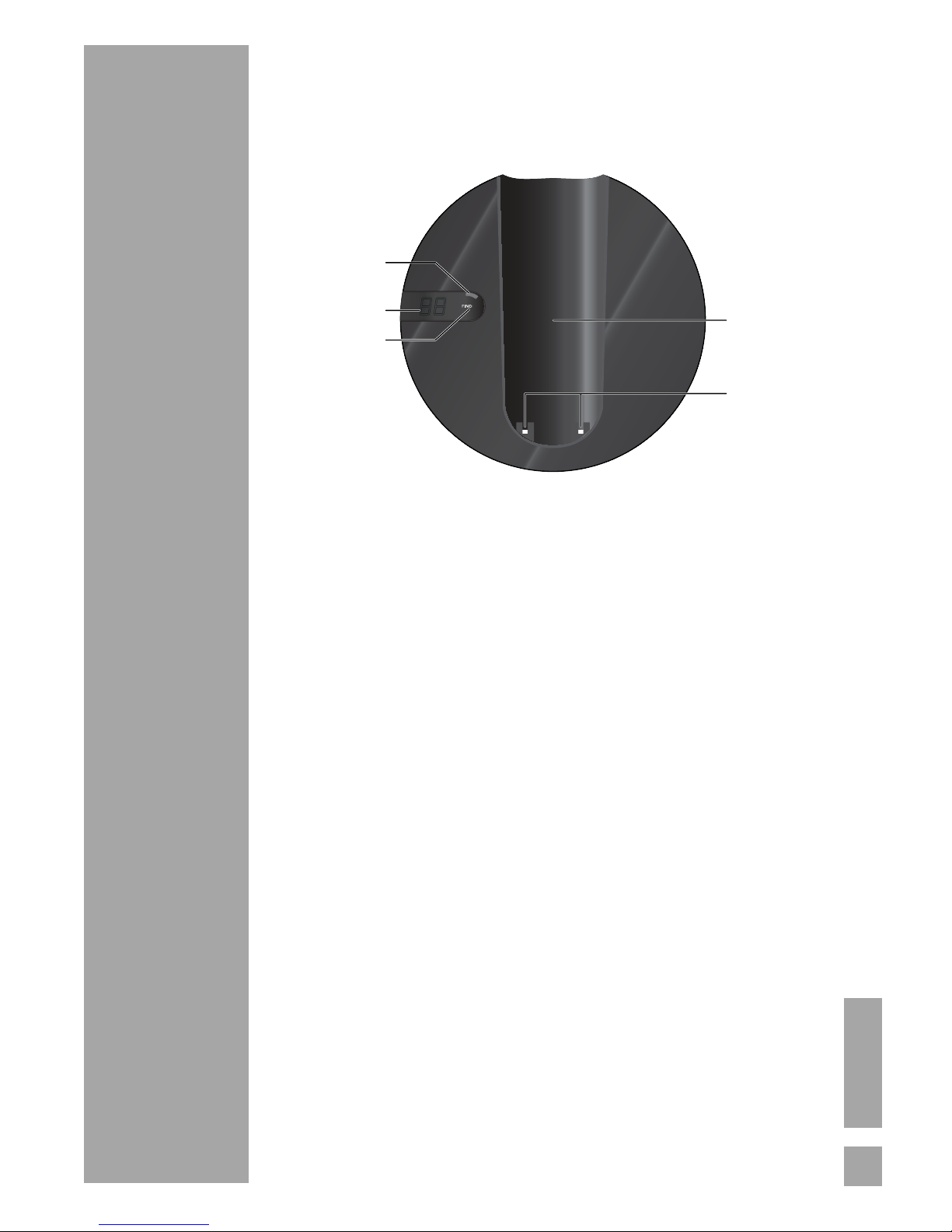
Your base is designed to fit into your family environment.
1. Flashing light on the base unit :
Red : handset charging
Green : line connection
Orange : line connection and the handset is charging.
Green + flashing slowly: base unit in paging mode.
Orange + flashing slowly: base unit in paging mode and
the handset is charging.
Green + flashing quickly: base unit in pairing mode.
Orange + flashing quickly: base unit in pairing mode and
the handset is charging.
Green + flashing slowly + flashing display :
Presence of new unread answering machine messages.
2. Display (model with answering machine only) :
Record mode (example o2 ):
- New messages : the display flashes indicating the
number of unread messages.
- No new messages : the display shows the number of
read messages.
Simple mode :Ao is displayed.
Deactivated : -- is displayed.
3. Base unit button :
Short press: searches for handsets (paging).
Long press: matching of handsets.
4. Location of the handset.
5. Base unit charging contacts.
1
2
34
5
9
SET-UP
Presenting the handset
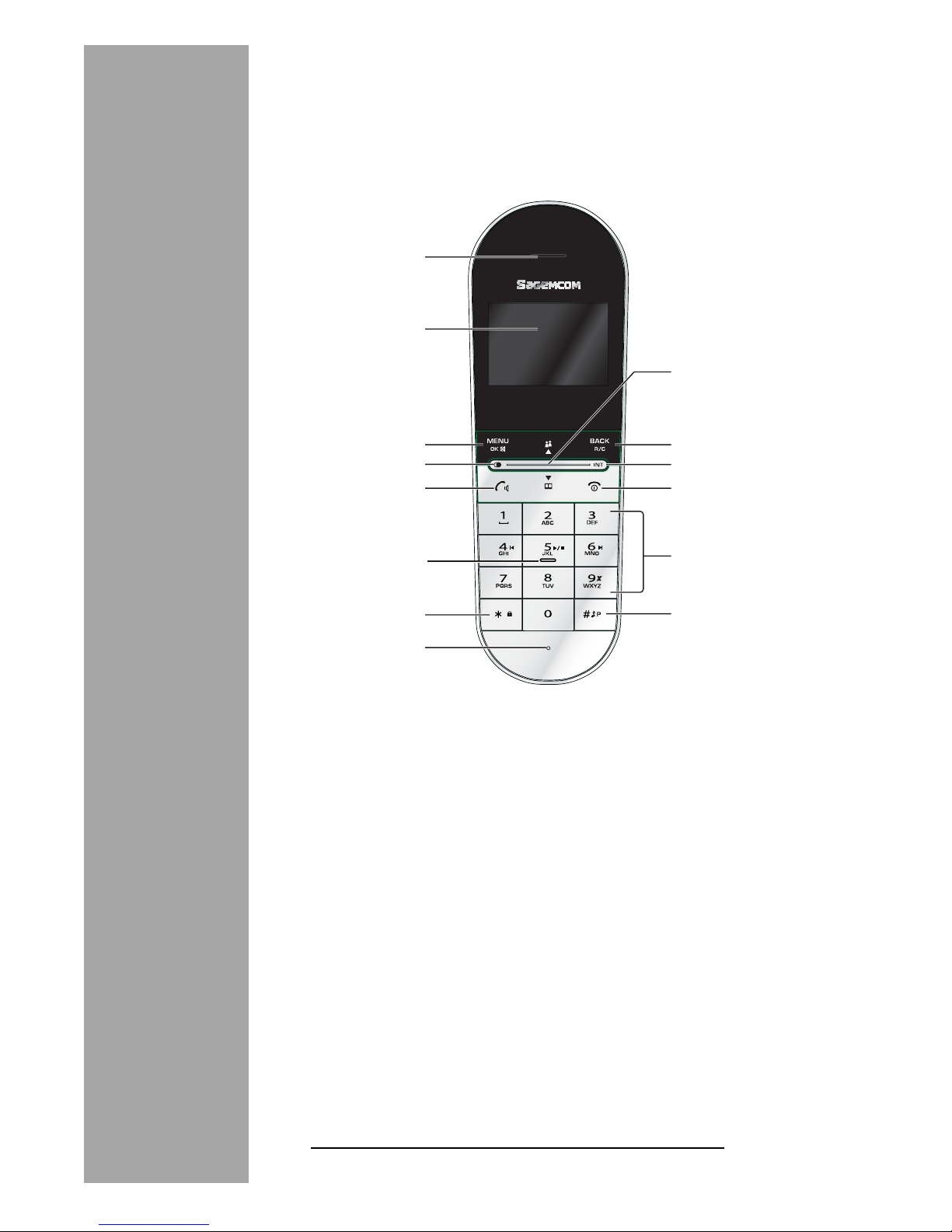
You will appreciate the design and quality of the handset during
conversations with your callers.
1. Speaker.
2. Display.
3. OK / Menu key / Secret mode key during communication
(Secret).
4. Access list of calls made.
5. Phone pick-up / Speaker key.
6. Rapid access to your messages on the answering
machine 1(“Rapid access to the answering machine
messages”, page 11).
7. Lock/Unlock keypad.
8. Microphone.
9. Browser (refer to the next paragraph).
10. Return key / Cancelling an entry / R key.
11. Intercommunication (between handsets).
12. Hang up / Handset on/off.
13. Alphanumeric keypad.
14. Inserting a pause (long press) / Stopping the handset ring.
1. Model with answering machine only
1
2
3
4
5
10
9
11
12
7
8
13
14
6
Inhaltsverzeichnis
Andere SAGEMCOM Schnurloses Telefon Handbücher

SAGEMCOM
SAGEMCOM D350 Bedienungsanleitung

SAGEMCOM
SAGEMCOM D680C Solo Bedienungsanleitung

SAGEMCOM
SAGEMCOM D380 Bedienungsanleitung

SAGEMCOM
SAGEMCOM SIXTY 2 Bedienungsanleitung

SAGEMCOM
SAGEMCOM D680C Solo Bedienungsanleitung

SAGEMCOM
SAGEMCOM D530 Bedienungsanleitung

SAGEMCOM
SAGEMCOM SIXTY Bedienungsanleitung

SAGEMCOM
SAGEMCOM D16V Bedienungsanleitung

SAGEMCOM
SAGEMCOM D380 Bedienungsanleitung

SAGEMCOM
SAGEMCOM Seen Bedienungsanleitung


