
SAMITECH Heat Wrap Smart Bedienungsanleitung

Versión 2. 2002
Smart Version
INSTRUCTIONS MANUAL
Portable and exible heat treatment solution
for wood ¡shape it as you ned!
Heat Wrap

Heat Wrap
Thank you for purchashing the SAMITECH Heat Wrap
Smart, the physical solution against xylophages in all stages
for any kind of wood. A modular set of six heating panels,
up to 2,4sqm of surface, that you can adapt to your needs:
beams, oors, walls, ceilings, furniture, the shape does not
matter.
Heat Wrap is based in SAMITECH far infrared intelligent
heating technology. The system allows you to control the
treatment temperature and duration and monitor conditions
at all times.
After the treatment you get a full PDF report that can be
shared by email with your costumer.
Please, read the instructions carefully before using this
device.
The operator must always respect the basic security
measures as detailed below.
Use this device only as described in the manual; Any other
use not recommended by the manufacturer may cause re,
electric shock, or injuries.
CONTENT
1. PRODUCT TECHNOLOGY DESCRIPTION
1.1. Far infrared heating technology
1.2 Components and accessories
2. OPERATION MODE
2.1 Assembly
2.2 ¡Shape it as you need!
2.3 Connections
2.4 Set Up
2.5 Touch-screen tablet
2.6 User Interface
3. SAFETY INSTRUCTIONS
4.REFERENCES FOR THE TREATMENT
DURATIONS
5. WARRANTY CERTIFICATES
2
2
3
4
4
5
6
7
8
9
13
18
20

Heat Wrap
1. PRODUCT TECHNOLOGY DESCRIPTION
1.1 Far infrared heating technology
Samitech’s Heat Wrap is the effective, practical, exible and portable solution to pest problems in
wood.
Heat Wrap technology is based on far infrared waves, emitted from heat panels. These waves
penetrate deeply into the wood surface or the surface of the object treated, directly attacking the
protein cells of the xylophages or insects that reside inside the wood, killing them by dehydration.
2
Heat Wrap from Samitech guarantees the effectiveness
in the elimination of the plague without damaging or
altering the state of the objects treated.
The objects to be treated with Heat Wrap can be of
any shape or size. The heat panels are made with a
material that uses textile nanotechnology, so they
can adapt to any shape, adhere to other panels and
cover different surface sizes without losing exibility,
resistance or treatment capacity.

Heat Wrap
1.2 Components and accessories
1. Heating panels
2. Smart Control Unit
3. Power Cord
4. Tablet (with user interface)
5. Data cables
6. Power cables
7. Temperature probes
Heat Wrap Smart consists of a set of six exible panels that allow the operator the possibility of adapting
them to any wood surface. The set is completed with the Smart Control Unit, that provides heat to each
panel and receives information from them, and the treatment is managed and controlled by the touch-
screen tablet.
3
1
5
2
6
3
7
4

Heat Wrap
2.1 Assembly
1. Each Heating Panel has a Velcro tape all around it, on the
upper side is the female Velcro, on the lower side is the male
Velcro. The panels can be united with this mechanism, it is
suitable for at surfaces, and it is even possible to wrap the
object to be treated with a single panel, uniting its male and
female Velcro straps.
2. Each Heating Panel has a total of 14 eyelets all around;
with the use of a stapler, the panels can be adhered to other
wooden surfaces, whether they are at or in any other shape.
The staples used in this procedure are so small that do not
cause any damage to the treated surface.
2. OPERATION MODE
This epigraph contains all the details required to set up the SAMITECH Heat Wrap Smart and get it ready
to carry out the treatment.
Before plugging in any part of the system, you must make sure you perform a full check of the cables for
any cuts or damages. If you nd any, then do not proceed with the treatment and inform us immediately.
4

Heat Wrap
2.2 ¡SHAPE IT AS YOU NEED IT!
No matter the shape or size of the surface or the object you want to treat with Heat Wrap Smart. Using one
or all of the panels, you can adapt the set to the surface in question. Using the Velcro tapes or the straps,
the operator can wrap or cover any surface.
5
To cover a big surface, the operator can place the
heating panels on top of it uniting them using the
Velcro tapes.
Wrap a beam or a column with a heating panel,
using the Velcro tapes.
The dust-guard (wood or carpet) of any wall can be
covered thanks to the exibility of the panels.

Heat Wrap
2.3 Connections
1. Once the surface or the object
to be treated is completely
covered up by the heating panels,
place the Control Box Unit close
to it and plug it to a power supply.
Make sure the cables reach to
cover the distance between the
object and the Smart Control
Unit and the socket.
Connect the data and power
cables to the Smart Control
Unit, each pair of cables must be
plugged in its number row.
2. If it is the rst time you connect the cables, you may have to shake
them into the connector to adjust the small parts.
6

Heat Wrap
7
2.4 Set Up
Smart Control Unit: Connect the Smart control Unit to the energy socket and switch the device on. The
green LED light will turn ON.
When the treatment starts the red the LED lights will light up indicating the connections status of the
Heating Panels.
Warning Light: If any connection problem is detected, the ‘Warning’ light ashes will show the row number
with an issue.
NUMBER OF FLASHES
WARNING
LIGHT ROW NUMBER
1
1
2
2
3
3
4
4
5
5
6
6
7
A
Heat Wrap
8
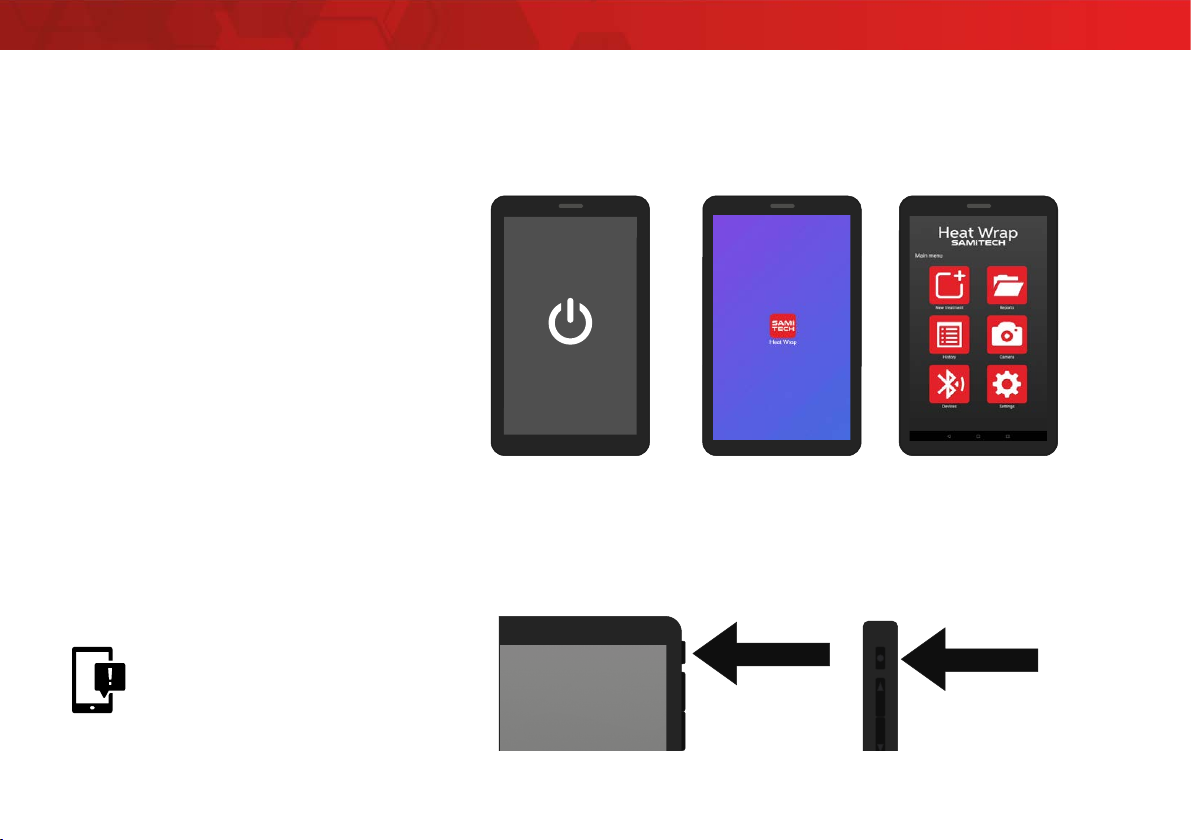
1. Turn on the Touch-screen Tablet
and tap the SAMITECH icon.
2. Manage and control all the
conditions and treatment
settings. Save the report les and
treatments pictures.
2.5 Touch-screen tablet
If the product you have purchased does not include an Android device or if you want to use another device,
you can download the application from the Google Play service.
As for many other personal and industrial devices power saving is a must for extending battery life in our
electronic equipment.
Keeping the tablet screen on during the whole treatment duration will drain the tablet battery too fast.
The solution is so simple as keeping the screen off most of the time and turning it on only when it is really
needed. The treatment control will continue running in the background.
In order to avoid the high
battery consumption of the
tablet, it’s very important
to turn OFF the screen, and
turn it ON for treatment update
details.

Heat Wrap
2.6 User interface
The application is simple and intuitive, it allows the operator to take pictures of the objects that will be
treated to guarantee their status before and after the treatment.
9
Img. 1
- New Treatment: Initiate a new treatment.
- Reports: File containing reports generated by the application.
- History: History of the treatments carried out by this device.
- Camera: Access to the camera.
- Devices: List of devices paired with this tablet.
- Settings: Application settings.
Img. 2
Form to fulll with basic treatment, client and operator data; these data
will appear exactly as they are typed in the nal report.
Img.3
Security warnings previous to the start of the treatment, the client must
read this information and accept the conditions.
Img. 4
The Heat Wrap operator checks and accepts the elements to be treated.
Similarly, he makes observations on the conditions of the state of the objects
previous to the start of the treatment.
By signing the form, the operator ofcially acknowledges that security
conditions are in order for the start of the treatment. At any time of the
treatment, the operator can take pictures of the objects being treated, or
abort the treatment.
1
3
2
4
Inhaltsverzeichnis


