Savant PAV-SMS2001 Kurzanleitung

Copyright © 2019 Savant Systems, LLC 45 Perseverance Way, Hyannis, MA 02601
- 1 - Savant.com | 508.683.2500
Savant® IP Audio Music Server
Deployment Guide
Document Number: 009-1602-02
Document Date: December 2019
Document Supports: da Vinci 8.8 or higher
This document will guide the installer through the process of installing, configuring, and adding Savant IP Audio Music Server to a RacePoint Blueprint™
configuration.
–IP Audio Music Server [PAV-SMS2001-XX]

Savant IP Audio Music Server Deployment Guide Copyright © 2019 Savant Systems, LLC
009-1602-02 | 191218 2 of 17
Contents
To access links to the topics within this document, click the corresponding entry in the table below.
1. Before You Begin............................................................................................................4
2. Deployment Steps..........................................................................................................4
3. Wiring and Connections ..............................................................................................5
3.1. Audio Connection..................................................................................................5
3.2. Network Connection ............................................................................................5
3.3. AC Power Connection..........................................................................................5
4. Installation.........................................................................................................................5
5. Blueprint Configuration................................................................................................6
5.1. Basic Blueprint Layout ........................................................................................6
5.2. Adding a Savant Music Server to a Configuration....................................7
6. Expansion ..........................................................................................................................8
6.1. AVB Blueprint Layout ..........................................................................................8
6.2. Adding an AVB/TSN Switch..............................................................................9
7. Web User Interface (Web UI) ..................................................................................10
7.1. Accessing the Web UI........................................................................................10
7.2. Status Tab................................................................................................................ 11
7.3. Network Tab ........................................................................................................... 11
7.4. Inputs & Outputs Tab ......................................................................................... 12
8. Savant Music................................................................................................................... 12
9. System Monitor ............................................................................................................. 13
9.1. AVB Info .................................................................................................................. 13
9.2. Savant Music Trim................................................................................................ 13
Appendix A: Network Requirements ............................................................................... 14
Device Network Connections....................................................................................... 14
AVB Requirements ........................................................................................................... 14
Managing IP Addresses .................................................................................................. 14
Network Changes ............................................................................................................. 14
Appendix B: Setting Static IP Address............................................................................ 15
Appendix C: DNS (Add, Remove, Query)....................................................................... 16

Savant IP Audio Music Server Deployment Guide Copyright © 2019 Savant Systems, LLC
009-1602-02 | 191218 3 of 17
Important Safety Information - Read First
Before installing, configuring, or operating any equipment, Savant recommends
that each dealer, integrator, installer, etc. access and read all relevant technical
documentation. Savant technical documentation can be located by visiting
Savant.com. Vendor documentation is supplied with the equipment.
Read and understand all safety instructions, cautions, and warnings in this
document and the labels on the equipment.
Safety Statements
All safety instructions below should be read, understood, and applied under all
relevant circumstances when working with this equipment.
1. Read these instructions.
2. Keep these instructions.
3. Heed all warnings.
4. Follow all instructions.
5. Do not use this apparatus near water.
6. Clean only with dry cloth.
7. Do not block any ventilation openings. Install in accordance with the
manufacturer's instructions.
8. Do not install near any heat sources such as radiators, heat registers,
stoves, or other apparatus (including amplifiers) that produce heat.
9. Do not defeat the safety purpose of any polarized or grounding-type
plug. A polarized plug has two blades with one wider than the other. A
grounding type plug has two blades and a third grounding prong. The
wide blade or the third prong is provided for your safety. If any provided
plug does not fit into your outlet, consult an electrician for replacement
of the obsolete outlet.
10. Protect any power cord from being walked on or pinched; particularly at
plugs, convenience receptacles, and the point where they exit from the
apparatus.
11. Use only attachments/accessories specified by the manufacturer,
following all relevant safety precautions for any such attachments/
accessories.
12. Disconnect any outlet powered apparatus from its power source during
lightning storms or when unused for long periods of time.
13. Refer all servicing to qualified service personnel. Servicing is required
when the apparatus has been damaged in any way, such as a damaged
power supply cord or plug, liquid being spilled or objects having fallen
into the apparatus, the apparatus being exposed to rain or moisture,
apparatus having been dropped, or other failure to operate normally.
14. To completely disconnect equipment from AC mains power,
disconnect the power supply cord plug from the AC receptacle.
15. For applicable equipment, use the included power cord with the
grounding prong intact to insure proper grounding of the device.
16. For any hardwired or fixed in-wall apparatus, carefully follow all wiring
diagrams and instructions. All electrical wiring and servicing should be
performed by a properly licensed electrician.
Safety Classifications In this Document
NOTE:Provides special information for installing,
configuring, and operating the equipment.
IMPORTANT!
Provides special information that is critical to
installing, configuring, and operating the equipment.
CAUTION!
Provides special information for avoiding situations
that may cause damage to equipment.
WARNING!
Provides special information for avoiding situations
that may cause physical danger to the installer, end
user, etc.
Electric Shock Prevention
ELECTRIC
SHOCK!
The source power poses an electric shock hazard
that has the potential to cause serious injury to
installers and end users.
ELECTRICAL
DISCONNECT:
The source power outlet and power supply input
power sockets should be easily accessible, to
disconnect power in the event of an electrical hazard
or malfunction.
Weight Injury Prevention
WEIGHT INJURY!
Installing some Savant equipment requires two
installers to ensure safe handling during installation.
Failure to use two installers may result in injury.

Savant IP Audio Music Server Deployment Guide Copyright © 2019 Savant Systems, LLC
009-1602-02 | 191218 4 of 17
1. Before You Begin
Read this document in its entirety before starting deployment of the product, and ensure that the following required items are available:
Savant IP Audio Music Server.........................................................................................................................................................................................................
Unique ID (UID) of the Savant IP Audio Music Server ..........................................................................................................................................................
(located on the back of the device)
Savant Host (Smart or Pro) licensed and running da Vinci software..............................................................................................................................
da Vinci version 8.8 or higher
Savant Development Environment (SDE/MacBook).............................................................................................................................................................
Ethernet network meeting Savants requirements..................................................................................................................................................................
See Appendix A: Network requirements
Supported Release
Device Minimum Supported Release
PAV-SMS2001 da Vinci 8.8
Feature Minimum Supported Release
Savant Music Trim
(System Monitor) da Vinci 9.2
2. Deployment Steps
To successfully deploy a Savant IP Audio Music Server, follow the steps listed below. This page can be used as a checklist to track progress as items are
completed.
Review product specifications and connection details........................................................................................................................................................
See the device’s Quick Reference Guide on the Savant Customer Community.
Install the Savant IP Audio devices ..............................................................................................................................................................................................
See Installation
Install Savant qualified AVB/TSN Network Switch (Optional) ..........................................................................................................................................
See Adding an AVB/TSN Switch
Add the Savant IP Audio devices into a RacePoint Blueprint® configuration..............................................................................................................
See Adding a Savant Music Server to a Configuration

Savant IP Audio Music Server Deployment Guide Copyright © 2019 Savant Systems, LLC
009-1602-02 | 191218 5 of 17
3. Wiring and Connections
3.1. Audio Connection
The Savant IP Audio Music Server has two audio output connections. This device provides one stream of Savant Music, both connections transmit the
same audio.
HELPFUL INFO:
The digital outputs on this product are fixed. If the connected device does not support 96kHz/24-bit digital audio, an external audio processor
will be required.
3.2. Network Connection
The Savant IP Audio Music Server uses a standard RJ-45 port complying with IEEE 802.3 Ethernet standards. This port also supports Audio Video
Bridging (AVB) or Time Sensitive Networking (TSN) over Ethernet (AVB/TSN, IEEE 802.1). Up to 45 IP Audio devices can be connected using AVB/
TSN compliant switching. For more information on this, see the Expansion section.
3.3. AC Power Connection
SURGE PROTECTION!
Use a surge-protected circuit for all components and power supplies requiring 100/240V (AC 50/60 Hz) source power.
ELECTRICAL DISCONNECT!
The source power outlet and power supply input power sockets should be easily accessible, to disconnect power in the event of an electrical
hazard or malfunction.
4. Installation
The Savant IP Audio Music Server (PAV-SMS2001) can be placed on any solid flat surface such as a table or shelf, or can be installed in any 1U NEMA rack
shelf.

Savant IP Audio Music Server Deployment Guide Copyright © 2019 Savant Systems, LLC
009-1602-02 | 191218 6 of 17
5. Blueprint Configuration
5.1. Basic Blueprint Layout
The image below shows a simplified example of a basic RacePoint Blueprint layout for the Savant IP Audio Music Server:
Winespring Inn Host
Inputs
Assigned Outputs
Outputs
Assigned Data
Data
Firewire (Firewire (IEEE1394 6-pin))
Ethernet (Ethernet)
Headphone port (Analog/Optical Minijack)
AVB SMS
Assigned Outputs
Audio Output 1
Data
AVB_A Ethernet Port (AVB (A))
Digital Audio Out 1 (Digital Opt...
Digital Audio Out 1
Digital Audio Out 1 (Digital Coaxial)
SIPA50SM
Assigned Inputs
Audio Input 3
Assigned Outputs
Audio Output 1
Digital Audio In 1 (Digital Optical)
Stereo Out 1 (Stereo Speakers)
Living Room Speakers
Assigned Inputs
SpeakerInput
2.1 StandardWire (Stereo Spea...

Savant IP Audio Music Server Deployment Guide Copyright © 2019 Savant Systems, LLC
009-1602-02 | 191218 7 of 17
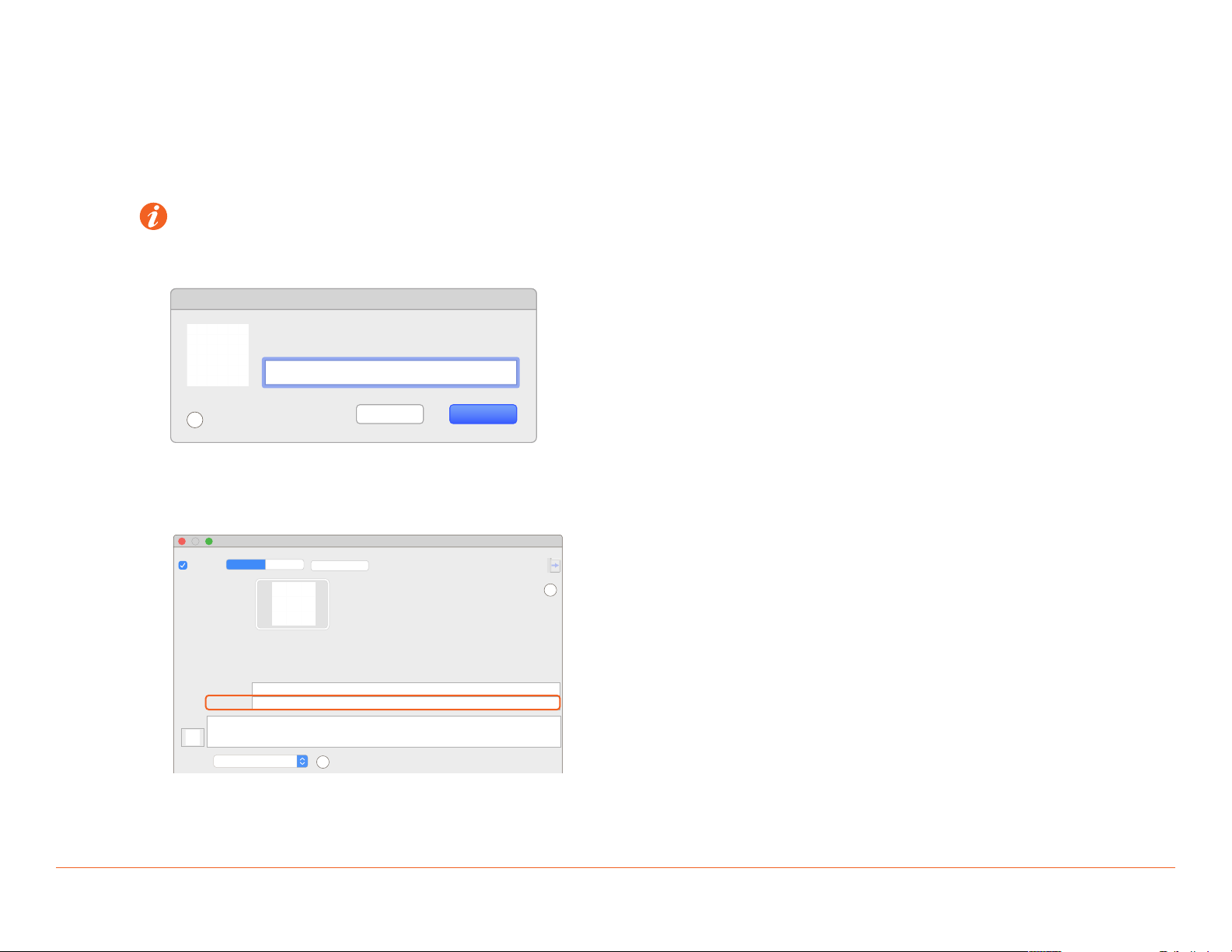
5.2. Adding a Savant Music Server to a Configuration
To add a Savant IP Audio Music Server to a RacePoint Blueprint configuration, follow the steps outlined below. The basic process is the same for all
IP Audio devices.
Within the open Blueprint configuration for the site:
1. Click Show Library.
2. Search for PAV-SMS.
3. Select the PAV-SMS2001 and drag into a Shared Equipment zone.
HELPFUL INFO:
Savant recommends placing all A/V source components in a Shared Equipment zone. The signal path of any source devices placed within a
User zone cannot output to any other zone.
4. Name the Device.
?
Enter a unique name for the component
Cancel Create
AVB SMS
5. Place PAV-SMS2001 in the layout window.
6. Select the PAV-SMS2001.
7. Open Inspector.
8. Enter the Savant UID in the corresponding field as shown below. The device UID can be found printed on a sticker on the physical device.
Inspecting “AVB SMS”
Outputs
?
?
Screens
Device Hide Details
S 1.17
Edit
Class:
Manufacturer:
Model:
Device Name:
Savant UID:
Notes:
Show:
Savant Medis Server
Savant
PAV-SMS2001
AVB SMS
NOTE: For single unit deployments, there is no need to represent the Ethernet/data connection within Blueprint. This connection is implied, and
should only be added for multi-unit deployments utilizing an AVB switch.
Savant IP Audio products support modular expansion with up to 45 devices in a single system. Each device must be added to the system in the
same way shown here for the first. See the Expansion section of this document for further information.

Savant IP Audio Music Server Deployment Guide Copyright © 2019 Savant Systems, LLC
009-1602-02 | 191218 8 of 17
6. Expansion
Up to 45 Savant IP Audio devices can be connected using any compatible AVB/TSN certified switch. The example below shows a simplified Blueprint
layout using multiple IP Audio devices connected via AVB switch.
6.1. AVB Blueprint Layout
Winespring Inn Host
Inputs
Assigned Outputs
Outputs
Assigned Data
Data
Firewire (Firewire (IEEE1394 6-pin))
Ethernet (Ethernet)
Headphone port (Analog/Optical Minijack)
AVB SMS
Assigned Outputs
Audio Output 1
Data
AVB_A Ethernet Port (AVB (A))
Digital Audio Out 1 (Digital Opt...
Digital Audio Out 1
Digital Audio Out 1 (Digital Coaxial)
SIPA50SM
Assigned Outputs
Audio Output 1
Stereo Out 1 (Stereo Speakers)
Audio Output 2
Stereo Out 2 (Stereo Speakers)
Audio Output 3
Stereo Out 3 (Stereo Speakers)
Audio Output 4
Stereo Out 4 (Stereo Speakers)
Data
AVB_A Ethernet Port (AVB (A))
AVB Switch
Assigned Data
Port 1
AVB_B Ethernet Port (AVB...
Port 2
Port 3
AVB_B Ethernet Port (AVB (B))
Port 4
AVB_B Ethernet Port (AVB (B))
Port 5
AVB_B Ethernet Port (AVB (B))
Living Room Speakers
Assigned Inputs
SpeakerInput
2.1 StandardWire (Stereo Spea...
Kitchen Speakers
Assigned Inputs
SpeakerInput
2.1 StandardWire (Stereo Spea...
Dining Room Speakers
Assigned Inputs
SpeakerInput
2.1 StandardWire (Stereo Spea...
Master Bedroom Speakers
Assigned Inputs
SpeakerInput
2.1 StandardWire (Stereo Spea...

Savant IP Audio Music Server Deployment Guide Copyright © 2019 Savant Systems, LLC
009-1602-02 | 191218 9 of 17
6.2. Adding an AVB/TSN Switch
An AVB/TSN switch is only needed if more than one IP Audio device is being used.
1. From Blueprint Click Show Library
2. Search for AVB.
?
Components
All Control Types
All Components
All Manufacturers
AVB
4
Components TL Rating Comment
Extreme Networks
X440-G2-12P (ESP-AVB12POE4SFP, Ext...
Extreme Networks
X440-G2-12T (ESP-AVB12E4SFP, Extre...
Extreme Networks
X440-G2-24P (ESP-AVB24POE4SFP, Ext...
Extreme Networks
X440-G2-24T (ESP-AVB24E4SFP, Extre...
Generic
AVB NetworkSwitch
MOTU
AVB Switch
3. Drag into a Shared Equipment zone.
4. Name the Device.
5. Place the AVB switch in the layout window and make AVB connections.
AVB SMS
Assigned Outputs
Audio Output 1
Data
AVB_A Ethernet Port (AVB (A))
Digital Audio Out 1 (Digital Opt...
Digital Audio Out 1
Digital Audio Out 1 (Digital Coaxial)
AVB Switch
Assigned Data
Port 1
AVB_B Ethernet Port (AVB...
All Savant IP Audio devices in a multi-source AVB deployment of this type must be connected to the AVB switch via their Data/Ethernet ports as
shown above.

Savant IP Audio Music Server Deployment Guide Copyright © 2019 Savant Systems, LLC
009-1602-02 | 191218 10 of 17
7. Web User Interface (Web UI)
Savant IP Audio devices have an available Web UI, which includes options for control and real-time management of audio connections, as well as a number
of device settings. This can be especially useful for troubleshooting potential issues in the field.
7.1. Accessing the Web UI
In order to access the Web UI, the IP Address of the IP Audio device is needed. This can be obtained from System Monitor, rpmEmbScanner, or any
network scanning software.
1. On the SDE, open a Web Browser and enter the address of the device in the address bar:
Syntax: http://[IP Address of Device]
10.0.100.50
Favorites
iCloudSavantGoogleApple
2. Once opened, login credentials will be required:
Default User Name: RPM
Default Password: RPM
Log in to 10.0.100.50:80
Your password will be sent unencrypted.
User Name
Password
Remember this password
Cancel Log In
Andere Handbücher für PAV-SMS2001
2
Inhaltsverzeichnis
Andere Savant Server Handbücher
Beliebte Server Handbücher anderer Marken

iRobo
iRobo IPC2U Bedienungsanleitung

Nortel
Nortel 1000 Con?guration guide Bedienungsanleitung

Asus
Asus AP7500 Bedienungs- und Wartungshandbuch

Avid Technology
Avid Technology AirSpeed 5000 Bedienungsanleitung

HP
HP Integrity rx2600 Installationsanleitung

Milestone
Milestone Husky IVO 350T Bedienungsanleitung