
Schilling SP100+ Bedienungsanleitung

Gesamt-Bedienungsanleitung
Entire Instruction Manual
SP100+
Deutsch
English
k:\bedienungsanltg\signiertechnik\ba-erstellung\sp100+\sp100+_gesamt-bedienungsanleitung_de_gb.doc

C
E
R
T
I
F
I
C
A
T
I
O
N
D
I
N
I
S
O
9
0
0
1
Schilling Marking Systems GmbH
Föhrenstr. 47 DE - 78532 Tuttlingen ++49 (0)7461 9472-0 ++49 (0)7461 9472-20 info@schilling-marking.de
www.schilling-marking.de
Gesamt-Bedienungsanleitung SP100+
Entire Instruction Manual SP100+
0 / 11
Diese Gesamt-Bedienungsanleitung wurde nach bestem Wissen von uns erstellt. Sollten Sie
trotzdem Fehler oder Unklarheiten feststellen, bitten wir Sie, uns dies mitzuteilen. Des
Weiteren sind wir für Hinweise und Anregungen dankbar. Bitte wenden Sie sich an:
This entire instruction manual has been generated to the best of our knowledge. However, in
case you should find any incorrect or unclear passages, please inform us accordingly. We will
be grateful for any hints and suggestions. Please contact:
Schilling Marking Systems GmbH
In Grubenäcker 1
D-78532 Tuttlingen
Tel: Tel.:07461–9472–0
Fax: 07461-9472–28
http://www.schilling-marking.de
e-mail: [email protected]
Der Inhalt und die Dokumentation ist Eigentum der Firma Schilling Marking Systems GmbH.
Sie darf weder als Fotokopie, Tonaufnahme, Video, Druck oder Mikrofilm in irgendeiner Form
ohne Genehmigung der Unternehmensleitung verbreitet oder vervielfältigt werden. Dies gilt
insbesondere auch für die Verbreitung der Daten in elektronischer Form oder als Datenträger.
Für Schäden, die dem Unternehmen durch Missachtung entstehen, behält sich dieses alle
Rechte vor.
The content of this document is owned by Schilling Marking Systems GmbH. It must not be
distributed or duplicated as photocopy, sound recording, video, print or microfilm in any form
without the approval of the management. This applies in particular to the distribution of the
data in electronic form or on a data carrier. The company reserves all rights to compensation
for damage to the company caused by failure to comply.
Tuttlingen, 27.03.2014
Revision / revision
Datum
date Version
version Kapitel
chapter Grund
reason Verantwortlich
responsible
27.03.2014 1.0 Alles / all Neuerstellung / new
edition J. Schnell

C
E
R
T
I
F
I
C
A
T
I
O
N
D
I
N
I
S
O
9
0
0
1
Schilling Marking Systems GmbH
Föhrenstr. 47 DE - 78532 Tuttlingen ++49 (0)7461 9472-0 ++49 (0)7461 9472-20 info@schilling-marking.de
www.schilling-marking.de
Gesamt-Bedienungsanleitung SP100+
Entire Instruction Manual SP100+
1 / 11
Inhalt:
1.0ANLEITUNG ZUM EINLEGEN DES KLISCHEEBANDES ......................................1
HOW TO INSERT THE STAMP TAPE ROLL CORRECTLY...................................3
2.0ANLEITUNG FÜR DIE INSTALLATION DER BARTENDER SOFTWARE.............5
MANUAL FOR THE INSTALLATION OF THE BARTENDER SOFTWARE ...........5
3.0ANLEITUNG FÜR DIE INSTALLATION DES WINDOWS 7 DRUCKERTREIBER .8
MANUAL FOR THE INSTALLATION OF THE WINDOWS-7 PRINTDRIVER.........8
4.0ANLEITUNG FÜR DIE PAPIERRÜCKZUGUNTERDRÜCKUNG..........................10
INSTRUCTIONS ON HOW TO AVOID THE STAMP TAPE FROM.......................10
REVERSE-FEEDING .............................................................................................10
5.0ANLAGEN / APPENDICES....................................................................................11
-SP100+ Prospekt.............................................................................................................................. 11
-SP100+ brochure ............................................................................................................................. 11
-SP100+ Benutzerhandbuch ............................................................................................................ 11
-SP100+ user‘s manual..................................................................................................................... 11

C
E
R
T
I
F
I
C
A
T
I
O
N
D
I
N
I
S
O
9
0
0
1
Schilling Marking Systems GmbH
Föhrenstr. 47 DE - 78532 Tuttlingen ++49 (0)7461 9472-0 ++49 (0)7461 9472-20 info@schilling-marking.de
www.schilling-marking.de
Gesamt-Bedienungsanleitung SP100+
Entire Instruction Manual SP100+
1 / 11
1.0 Anleitung zum Einlegen
des Klischeebandes
1. Das Klischeeband besteht aus zwei
verschiedenen Bändern:
- das obere Band (glänzende Seite)
Klischeeband
- das untere Band (Papier)
Trägerband
Die glänzende Seite muss nach oben zeigen!
1.
2. Führen Sie das gesamte Band auf dem
Boden des SP100+, unter der weißen Rolle
und zwischen den beiden grünen
Abstandshaltern nach Vorne. Bitte die
Abstandshalter auf die Breite der Folie
einstellen.

C
E
R
T
I
F
I
C
A
T
I
O
N
D
I
N
I
S
O
9
0
0
1
Schilling Marking Systems GmbH
Föhrenstr. 47 DE - 78532 Tuttlingen ++49 (0)7461 9472-0 ++49 (0)7461 9472-20 info@schilling-marking.de
www.schilling-marking.de
Gesamt-Bedienungsanleitung SP100+
Entire Instruction Manual SP100+
2 / 11
3. Führen Sie das gesamte Band über die
Gummiwalze in den Schlitz vor dem
Messer ein.
4. Ziehen sie nun das gesamte Band
durch den Messerschlitz. Positionieren
Sie die beiden grauen Führungen so
dass das Material störungsfrei
durchlaufen kann.
Jetzt schließen Sie den Drucker
vorsichtig mit beiden Händen. Mit einem
leisen Klick rastet er ein. Jetzt können
Sie einfach ihre Schablonen drucken.

C
E
R
T
I
F
I
C
A
T
I
O
N
D
I
N
I
S
O
9
0
0
1
Schilling Marking Systems GmbH
Föhrenstr. 47 DE - 78532 Tuttlingen ++49 (0)7461 9472-0 ++49 (0)7461 9472-20 info@schilling-marking.de
www.schilling-marking.de
Gesamt-Bedienungsanleitung SP100+
Entire Instruction Manual SP100+
3 / 11
How to insert the stamp
tape roll correctly
1. The stamp tape roll consists of two different
types of tapes:
- The upper tape (shiny side)
is the Stamp Tape
- The lower tape (paper)
is a support during the
transportation
When you insert the roll the shiny side has be
on top!
2. Feed the complete tape (both parts) along
the bottom of the printer, underneath the white
rod and between the two green braces. Please
adjust the braces in accordance to the width of
the tape.

C
E
R
T
I
F
I
C
A
T
I
O
N
D
I
N
I
S
O
9
0
0
1
Schilling Marking Systems GmbH
Föhrenstr. 47 DE - 78532 Tuttlingen ++49 (0)7461 9472-0 ++49 (0)7461 9472-20 info@schilling-marking.de
www.schilling-marking.de
Gesamt-Bedienungsanleitung SP100+
Entire Instruction Manual SP100+
4 / 11
3. Direct the tape (both parts) over the rubber
roller and through the slot in front of the cutting
knife.
4. Pull the tape through the slot. Make sure that
the two grey rails are adjusted correctly to ensure
an undisturbed flow.
Close the printer carefully with both hands. Now
you can easily print your stencils.

C
E
R
T
I
F
I
C
A
T
I
O
N
D
I
N
I
S
O
9
0
0
1
Schilling Marking Systems GmbH
Föhrenstr. 47 DE - 78532 Tuttlingen ++49 (0)7461 9472-0 ++49 (0)7461 9472-20 info@schilling-marking.de
www.schilling-marking.de
Gesamt-Bedienungsanleitung SP100+
Entire Instruction Manual SP100+
5 / 11
2.0 Anleitung für die Installation der BarTender Software
Manual for the installation of the BarTender Software
WICHTIG
Sollten sie keine Installationsrechte auf ihrem PC haben, müssen sie die Software von ihrem Administrator
installieren lassen.
Folgend sie den Bildern zur Installation.
IMPORTANT
If you do not have installation rights on your PC, you will have to have the installation of this software done by
your administrator.
Follow the instruction on the pictures for installation.
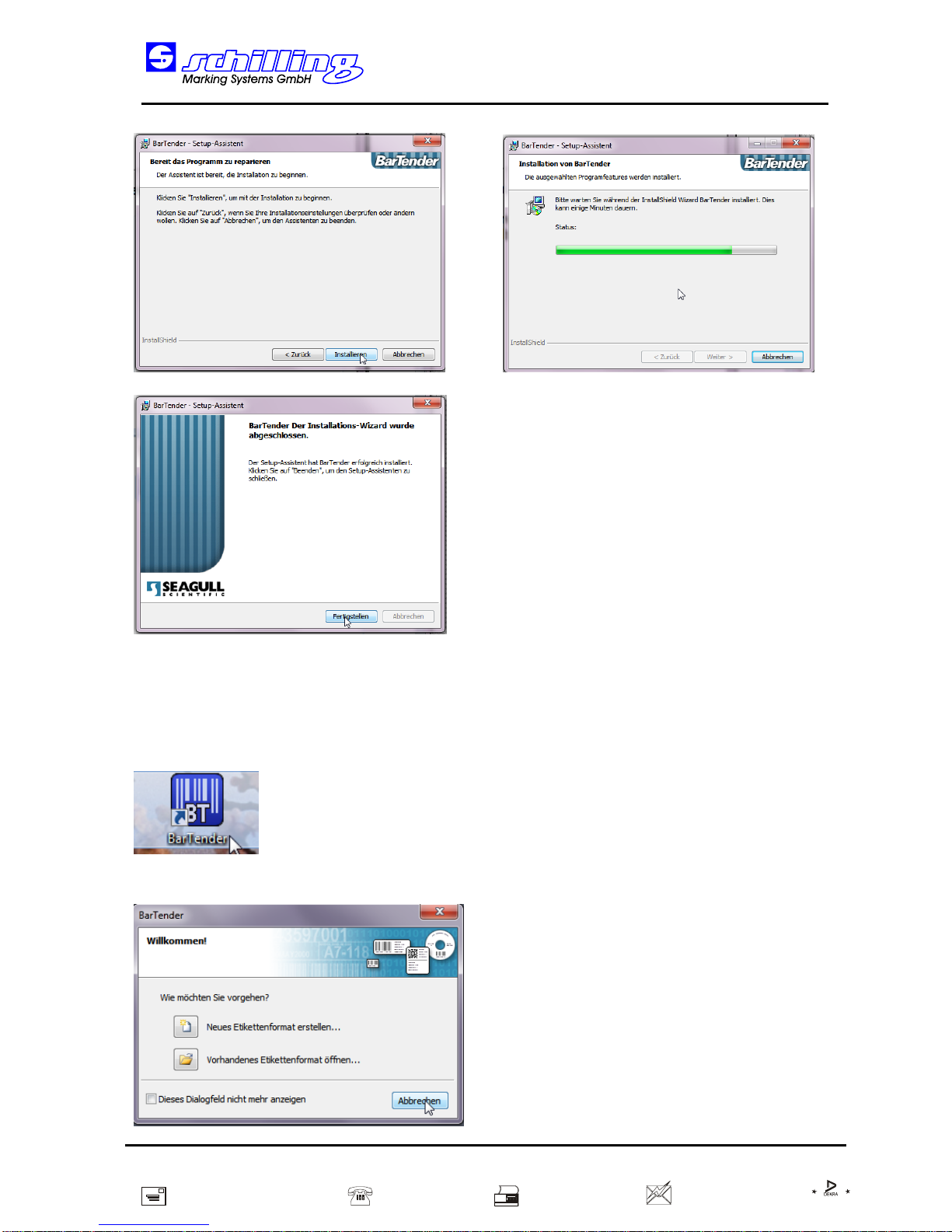
C
E
R
T
I
F
I
C
A
T
I
O
N
D
I
N
I
S
O
9
0
0
1
Schilling Marking Systems GmbH
Föhrenstr. 47 DE - 78532 Tuttlingen ++49 (0)7461 9472-0 ++49 (0)7461 9472-20 info@schilling-marking.de
www.schilling-marking.de
Gesamt-Bedienungsanleitung SP100+
Entire Instruction Manual SP100+
6 / 11
Starten der Software:
Starting the Software:

C
E
R
T
I
F
I
C
A
T
I
O
N
D
I
N
I
S
O
9
0
0
1
Schilling Marking Systems GmbH
Föhrenstr. 47 DE - 78532 Tuttlingen ++49 (0)7461 9472-0 ++49 (0)7461 9472-20 info@schilling-marking.de
www.schilling-marking.de
Gesamt-Bedienungsanleitung SP100+
Entire Instruction Manual SP100+
7 / 11
Änderung der Sprache:
Change the language:
Inhaltsverzeichnis


