
Shield Tech Security STS-408 Bedienungsanleitung


Components list
Before installation please check if the whole set including the
components as follow:
User Manual

Brief
Dear customer:
Congratulations on purchasing your new FOCUS security
system an thank you for the confidence you have shown in us.
You have chosen a high-quality product that has been produced,
tested and packed w the greatest care.
Please familiarize yourself with these instructions before
attempting to in stall the FOCUS security system because
prolonged reliable and trouble-free operation will only been
sure if it is fitted properly. We hope your new FOCUS security
system will bring you lasting pleasure.
User Manual

Chapter I Introduction
1.1 Features
Voice prompt and report: all operation, alarm message, and record
have voice instruction, very convenient for operation.
LCD Screen Indication: operation process, working status and alarm
process can be showed.
16 Wireless Zones: auto register of every zones, and can also register
through the keyboard.
8 wired Zones: compatible with various
kinds of detectors.
Zones Programmable: The device is pre-set with alerts types and
delay time code. Users can modify the zones type and alerts delay
time by keypad according to their requirement.
Wireless Accessories Register: all wireless accessories, including
detectors, door contacts, remote controllers etc can be registered
into control panel automatically or through keyboard. User can
delete them one by one or delete them all one time.
Ten Seconds Alarm information Record.
6 Alarm Telephone Numbers: 2 for CMS and 4 for common telephones.
If the control panel does not connect with CMS, the total 6 numbers
can be set for common telephones.
Record of clock and alarms: built-in automatic calendar and clock
can help to make record or view 45 alerts and arming/disarming
affairs and their time.
Alerts/alarm process mode: alarm process can be operated by common
phone and the voice record independently; self recognition and
compatibility for alarm centre and common phone alert.
Compatible with other CMS: ADEMCO contact ID alarm protocol.
Operations of arming/ disarming to alarm centre can be selected.
Alarm Message Display: when alarming, the alarm zones, alarming
types and other information will be displayed on the LCD. If the
control panel is connected to an alarm center station, the panel can
send detailed alarm information to the center station.
User Manual

Siren on/off Selectable When Alarming: user can set the siren
broadcast or not for different alarms.
Anti-Tamper Alarm: when the wires connected the wired detectors
and control panels are cut off, the control panel alarms. When the
telephone line connected to the control panel is cut off, the siren
starts to broadcast.
Long Distance Control: user can conduct arm, disarm, listen-in,
electronic switch control and do other functions by calling.
CMS Timely Test Setting: 4 times auto arm and disarm function, can
arm and disarm on time. And users can also set a auto alarm time, the
control panel can timely report to the CMS to check its status.
Wireless Zones supervising : tamper alarm, low power alarm and
status self-check.
System Password and User Password protection: there are two types
of password, system password and user password. The system
password is mainly for system manager to do the system setting. User
password is mainly for user to do arm, disarm, long distance and other
operation. Both the system password and user password can be
changed.
User Manual

1.3
Caution
Hint
Voice prompt
sos
LCD disypaly
1Keypad for operation
[#] OR
LCD
Arm Away
Arm Home
Requiry/
Control
appliance
Panic
/Bypass
Built-in Siren
MIC
StatusLED
Record LED Power LED Signal LED
Keypad
Convoy
User Manual
Chapter 2 Installation and Connection
2.1 Opening the Box
Open the package to check the contents as per the list. If the accessories
are not integrated, please contact the distributor.
2.2Installation of control panel
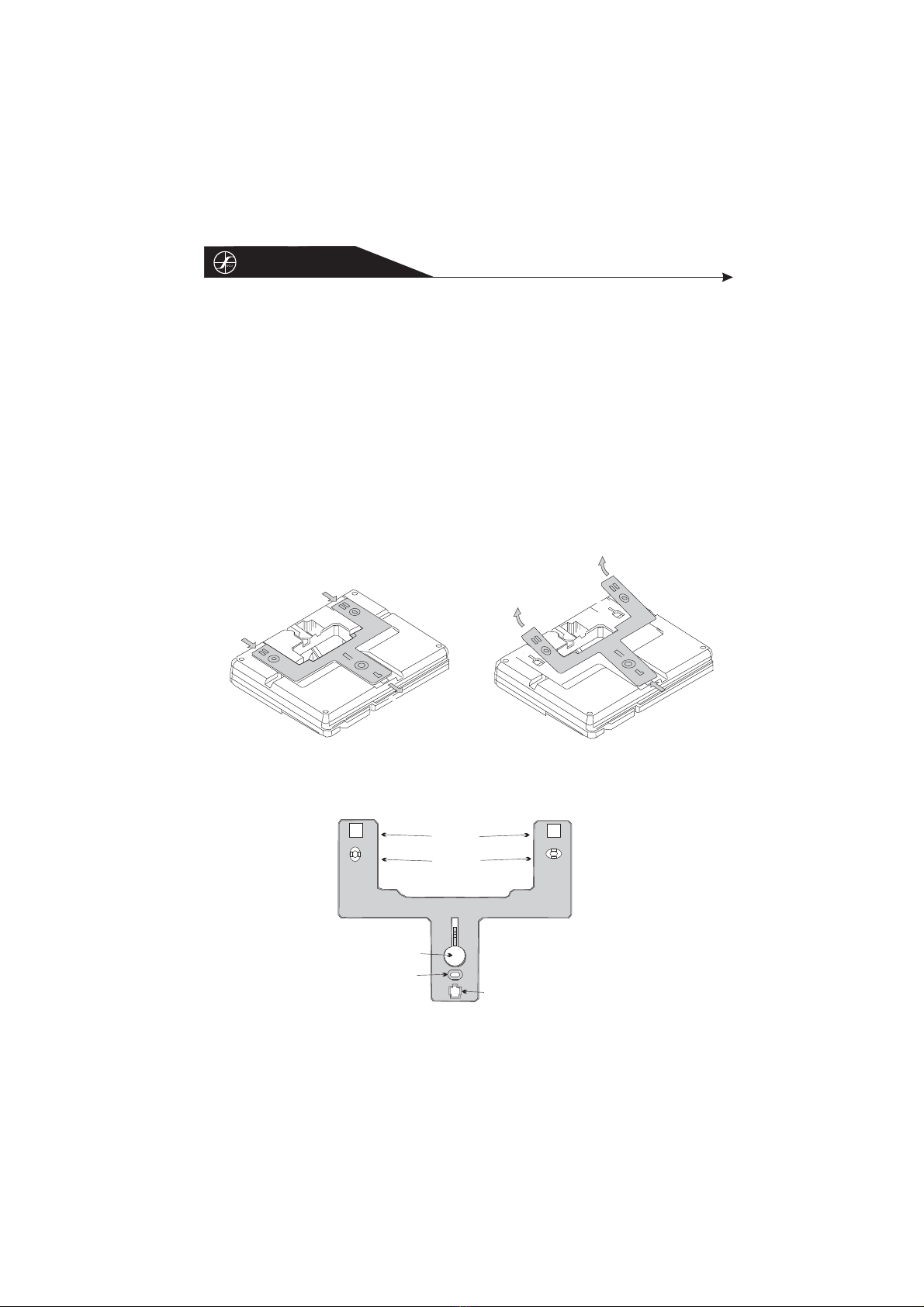
An obvious feature of the alarm is that it can be installed without open
it. User just need to connect several wires on the back of the panel.
1.Debus the bracket on the back of the panel.
2.Make a hole on the wall according to the hole distance on the bottom
cover.
Push the bracket along the arrow pointed
Remove the bracket
Bracket
Mounting hole
Pivot
Mounting hole
Mounting knockout
User Manual

1.
2.
There should be no large metal goods
around the control
Make sure the distance between the
control panels and detectors is valid.
And it is better to put the control
panel in a covert place.
2.3 Wiring Diagram
As the picture
Z1/Z5
GND
Z2/Z6
Z3/Z7
GND
GND
Vaux
GND
GND
Z4/Z8
BELL
GND
Higher zone
Lower zone
51K
30K
Higher zone
Lower zone
51K
30K
Metal
User Manual

2.4 Installation of Wired Detector
The wired zone is given 12 V from the main panel. The connections are
given to eight zones based on the diagram with end of line resistance.
For NC detector resistance is connected in parallel and for NO detector,
resistance is connected in series. Matching the resistor in lower zone is
30 K Ohm, while that in higher zone is 51K Ohm.
Caution: Control panel can supply 12V to detector. It can't exceed its
current more than 100mA. If it exceeds, another 12V back up power
is necessary for detector operation.
User Manual

Chapter III Simple Setting and Operation
This chapter gives an example to show the simple operation. User can
follow it and to simple test.
3.1Operation Preparation
3.1.1 Connect the telephone line and power correctly.
3.1.2 Wireless Siren Register: When the power is on, input 1111 to
disarm the control panel. If the red light on the control panel is still
on, input 1111 again. Then press the "save" key on the siren, hold on
and press the “alarm”. If the siren starts to whistling, the register is
successful. And lose the "save" key. The distance of the siren and the
control panel can be about 50m.
3.1.3 Alarm Telephone Number Setting: press * for 3 seconds,
999921alarmtelephone number #
3.1.4 Record Alarm Location: press * for 3 seconds, 9999 2 7
face the speaker and speak the location press #.10 seconds later, the
panel will replay the recorded voice. If user does not satisfy it, user
can record again.
3.1.5 Register Remote Controller: press * for 3 seconds, 9999 6
1 1, and then press any key on the remote controller, if 2 beeps
comes out from the panel, the register is successful.
3.1.6 Register Wireless Detector: press * for 3 seconds, 9999 6
3 1 then let the detector emit signal, if 2 beeps comes from the
panel, the register is successful.
Above are the simple operation processes. Chapter IV gives shows
more detailed operation processes.
Note: the user password we mention is the defaults 1111, if user
changes the password, please use the new password.
User Manual
Beliebte Sicherheitssystem Handbücher anderer Marken


EDM
EDM Solution 6+6 Wireless-AE Bedienungsanleitung

Highway Safety Group
Highway Safety Group EA401 Bedienungsanleitung

Siren
Siren LED GSM Bedienungsanleitung

Detection Systems
Detection Systems 7090i Montageanleitung

Se-Kure Controls
Se-Kure Controls MicroMini SK-4841 Bedienungsanleitung

Siemens
Siemens FDM273 Bedienungsanleitung