SiFive HiFive Unleashed Bedienungsanleitung

SiFive HiFive Unleashed Getting Started Guide
v1p2
© SiFive, Inc.

SiFive HiFive Unleashed Getting Started
Guide
Proprietary Notice
Copyright © 2018, SiFive Inc. All rights reserved.
Information in this document is provided “as is,” with all faults.
SiFive expressly disclaims all warranties, representations, and conditions of any kind, whether
express or implied, including, but not limited to, the implied warranties or conditions of mer-
chantability, fitness for a particular purpose and non-infringement.
SiFive does not assume any liability rising out of the application or use of any product or circuit,
and specifically disclaims any and all liability, including without limitation indirect, incidental, spe-
cial, exemplary, or consequential damages.
SiFive reserves the right to make changes without further notice to any products herein.
Release Information
Version Date Changes
v1p2 February 18, 2020 • Updated software development flow
v1p1 April 06, 2018
• Updated introduction
• Added component diagrams
• Added links to schematics and design files
• Added software development flow
v1p0 March 09, 2018 • Initial Release

Contents
1 Introduction .............................................................................................................. 3
1.1 HiFive Unleashed Components ....................................................................................3
1.2 HiFive Unleashed Schematics......................................................................................3
2Required Hardware ...............................................................................................4
3 Optional Hardware ................................................................................................5
4 Board Setup.............................................................................................................. 6
5 Boot and Run ......................................................................................................... 11
5.1 Connecting with ssh .................................................................................................. 11
5.2 Connecting with USB console ....................................................................................11
5.3 Knobs on the HiFive Unleashed .................................................................................12
5.4 HiFive Unleashed Boot..............................................................................................12
6 Firmware Update.................................................................................................. 14
7 Software Development Flow ..........................................................................15
7.1 Supported Platforms .................................................................................................15
7.2 Software Development with the Freedom Unleashed SDK............................................15
7.2.1 Install Prerequisite Packages ............................................................................15
7.2.2 Clone the freedom-u-sdk Repository ..................................................................16
7.2.3 Build the System ..............................................................................................16
7.2.4 Copy the System to an SD Card ........................................................................16
8 Connector Pinout.................................................................................................19
8.1 FMC Connector ........................................................................................................ 19
8.2 Low Speed I/O Expansion Connectors........................................................................23
8.3 MicroUSB Connector.................................................................................................24
1

Chapter 1
Introduction
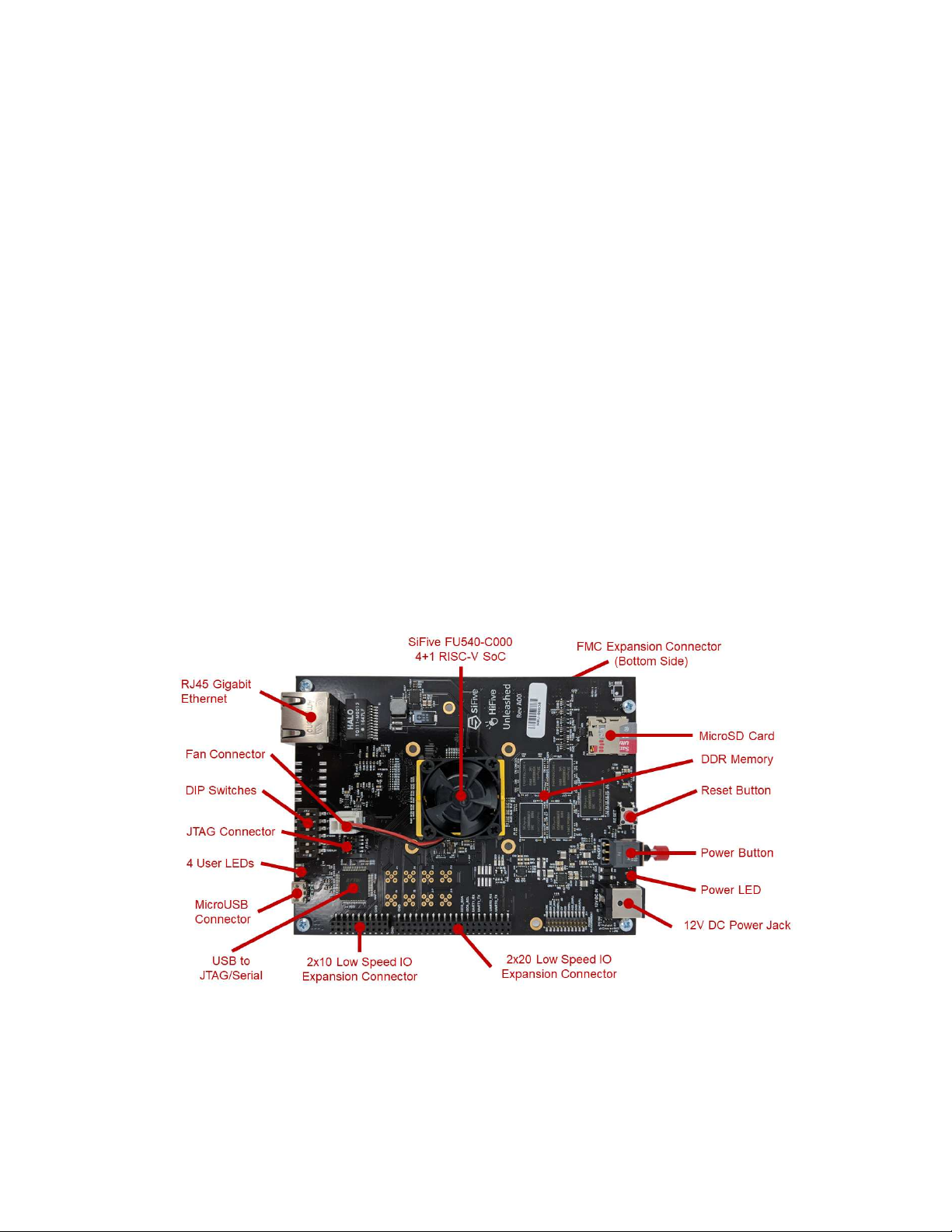
HiFive Unleashed is a Linux development platform for SiFive’s Freedom U540 SoC, the world’s
first 4+1 64-bit multi-core Linux-capable RISC-V SoC. The HiFive Unleashed has 8GB DDR4,
32MB QuadSPI Flash, a Gigabit Ethernet port, and a MicroSD card slot for more external stor-
age. Additionally, the HiFive Unleashed supports adding new features, such as PCI Express
(PCIe), through the FMC connector and low-speed I/O expansion connectors.
1.1 HiFive Unleashed Components
1.2 HiFive Unleashed Schematics
Schematics and design files for HiFive Unleashed are available at:
https://www.sifive.com/products/hifive-unleashed
3

Chapter 2
Required Hardware
Using the HiFive Unleashed Development Kit requires the following hardware:
HiFive Unleashed Development Kit
SiFive’s HiFive Unleashed development kit is based around SiFive’s FU540-C000 SoC. It can
be purchased from Crowd Supply:
http://www.crowdsupply.com/sifive/hifive-unleashed
USB A to Micro-B Cable
Any standard USB Type A Male to Micro-B Male cable can be used to interface with the HiFive
Unleashed.
http://store.digilentinc.com/usb-a-to-micro-b-cable
12V DC Power Wall Adapter
The HiFive Unleashed Development Kit requires an external 12V, 2A power supply. When not
powering directly from the FMC expansion module, a 12V DC Wall Adapter with a 5.5 outer
diameter, 2.5 mm center-positive barrel plug, must be plugged into DC power jack on the HiFive
Unleashed. If powering directly from the FMC expansion module, then unplug the 12V DC
power wall adapter from the development kit. Power should not be supplied from 2 different
external sources.
4

Chapter 3
Optional Hardware
Ethernet Cable
HiFive Unleashed Development Kit has an RJ45 Ethernet port that enables the FU540-C000 to
connect to an 10/100/1000 Base-T network.
FMC Expansion Carrier Card
Additional functionality can be added to the HiFive Unleashed Development Kit through the
FMC connector. The FMC expansion carrier card typically has an FPGA to enable third-party
developers to add new logic to the development kit.
The HiFive Unleashed Development Kit can be directly powered from the FMC expansion car-
rier card. When powering from the FMC expansion carrier card, do not plug in the 12V DC
adapter into the HiFive Unleashed.
5

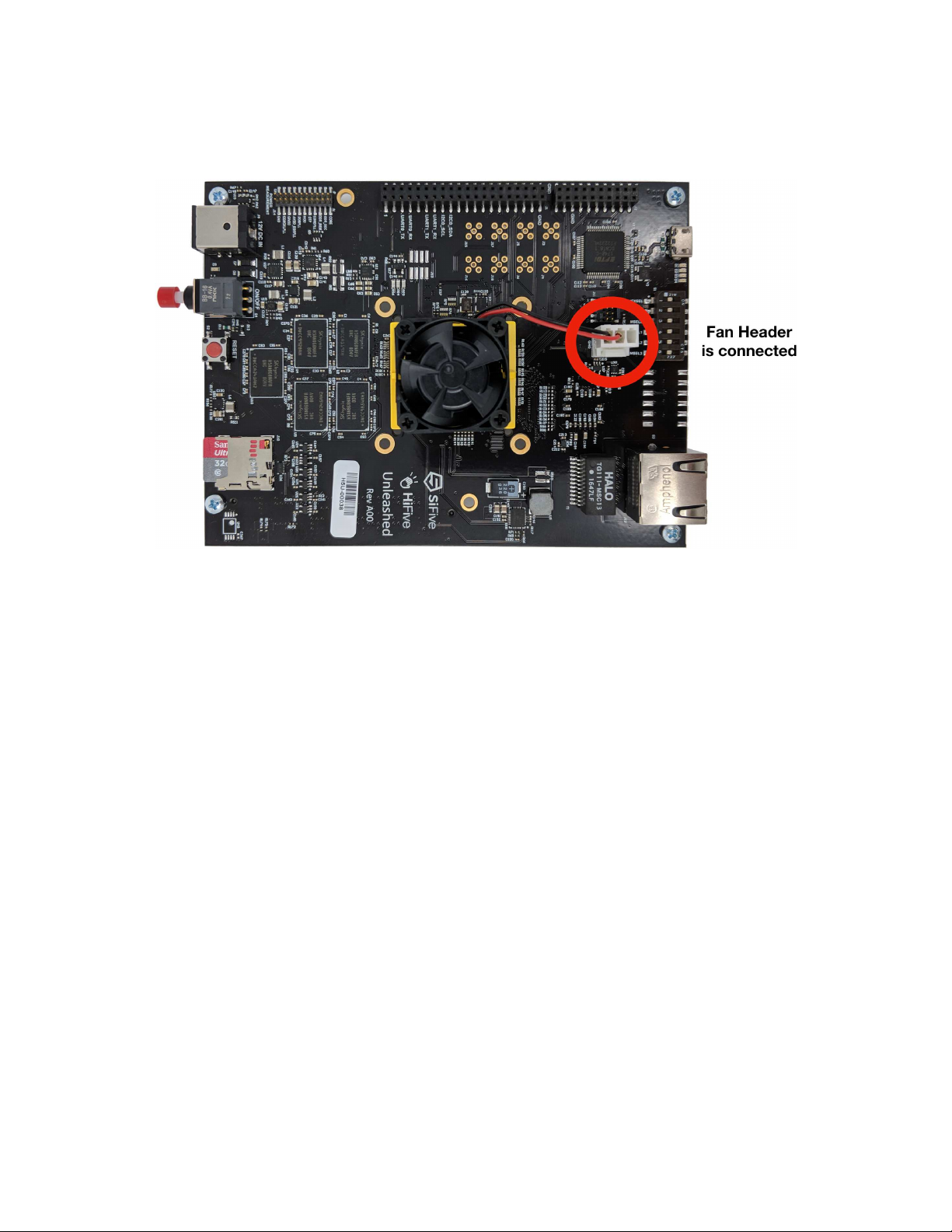
• Ensure the fan is plugged in.
• Set all pins in the DIP-switch block to the LEFT. The ON position=0; therefore, this sets
MSEL to mode 1111. See the boot modes table in next section for more information on
MSEL.
7

8
Inhaltsverzeichnis
Andere SiFive Hauptplatine Handbücher
Beliebte Hauptplatine Handbücher anderer Marken

Telit Wireless Solutions
Telit Wireless Solutions SL869-3DR Bedienungsanleitung

Gigabyte
Gigabyte GA-9IVDT Bedienungsanleitung

Texas Instruments
Texas Instruments ADS8372EVM Bedienungsanleitung

Commell
Commell MS-C73 Bedienungsanleitung

IBT Technologies
IBT Technologies MB860 Bedienungsanleitung

Nvidia
Nvidia TEGRA DG-04927-001_V01 Bedienungsanleitung