Signolux V Bedienungsanleitung

EN User manual
FR Mode d’emploi
Pagette vibrante portable version V
Vibrating pager Version V
Page 10
Page 2
CA-Signo-Pager_Vibra_only2019.indd 1 03.12.2019 07:47:04

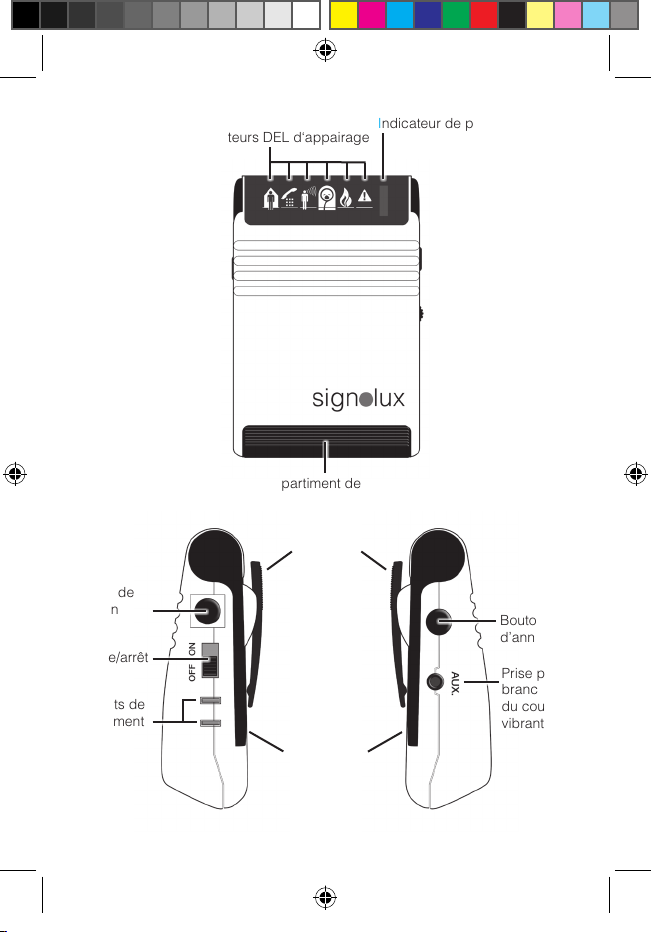
Battery status indicator
Battery compartment
Pairing-LEDs
Folding stand
Belt clip
Socket for
vibrating
pillow and
modules
Delete
button
On/off
switch
Function
button
Charging
contacts
English 2
CA-Signo-Pager_Vibra_only2019.indd 2 03.12.2019 07:47:05

Congratulations on purchasing
your
«
sign•lux pager
»
.
We hope it will give you many
years of reassuring operation.
You have purchased a modern
and reliable system.
Please read these operating
instructions carefully. They tell
you how to set up the system
correctly and explain all the sys-
tem’s features.
Package contents
Please check if all of the follo-
wing components are included:
-
«
sign•lux
-
pager
»
- carrying cord
- 2 pcs 1,5 V size AAA batteries
- manual
- warranty card
If any parts are missing, please
immediately contact your dealer
or the manufacturer directly.
Function
The portable
«
sign•lux
-
pager
»
is a receiver for the signals of
the various
«
sign•lux
»
trans-
mitters and indicates these as
vibration impulses only.
Signals and controls
Pairing-LEDs:
The 6 pairing-LEDs help to pro-
gramming transmitters with the
«
sign•lux pager
»
Battery status indicator:
The receiver informs about
the state of the batteries of the
receiver as well as the batteries
of the transmitters:
- A sufficient battery level of the
receiver is indicated by the red
control lamp flashing every 5 to
6 seconds.
- A low battery level of the recei-
ver is indicated by the red con-
trol lamp flashing in short se-
quence (once per second).
Please replace (or where appli-
cable, recharge) the receiver
batteries as soon as possible.
- A low battery level of a trans-
mitter is indicated by the red
control lamp shining together
with the symbol of the accor-
ding transmitter when it‘s sig-
nal is triggered.
Please replace (or where appli-
cable, recharge) the batteries
of the according transmitter as
soon as possible.
English 3
CA-Signo-Pager_Vibra_only2019.indd 3 03.12.2019 07:47:05

Function button:
When you feel the
«
sign•lux
-
pa-
ger
»
vibrating, you can stop the
vibration by pressing the functi-
on button on the receiver.
Furthermore, you can press
the function button to call up
the most recent signal again
(the function works for up to 3
minutes after receiving the sig-
nal).The function button is also
used to program the receiver
(see section 3 „Programming
signals“).
Belt clip:
You can use the belt clip to
attach the
«
sign•lux
-
pager
»
to
your clothing.
On/off switch:
Use this switch to turn the pager
on and off.
Delete button:
This button serves to remove
transmitters assigned to an
indicator symbol (see section
4 „Deleting transmitters from
receivermemory“).
Setting up the system
1. Inserting the battery
There is a battery compartment on
the underside of the «
sign•lux-pa-
ger
».
Open it by sliding the co-
ver of the battery compartment
away from the receiver using
both your thumbs.
Insert two 1.5 V AAA batteries
and close the receiver again.
2. Switching the unit on
Set the on/off switch to «on». The
«
sign•lux-pager
»
is now ready
to operate. After the unit has
been switched on, the battery
status LED lights up for about a
second.
3. Programming signals and
assignment to the symbols
A transmitter (e.g. doorbell push-
button) can be assigned to each
symbol. This assignment can
be adapted by programming.
Up to 6 transmitters can be as-
signed to each symbol. Please
keep in mind that a transmitter
can only be assigned if it is not
yet known in the memory of the
«
sign•lux-pager
»
. If required,
English 4
CA-Signo-Pager_Vibra_only2019.indd 4 03.12.2019 07:47:05

you might first have to delete
the transmitter from the memory
(see section 4.)
a)
b)
c)
4. Deleting transmitters from
receivermemory
If you wish to remove the transmit-
ters assigned to a symbol from the
receiver memory:
a)
b)
Please note that this will dele-
te all transmitters assigned to
the according symbol.
Meaning of the symbols
Checking the last signal, dele-
ting the current signal
Shortly pressing the functiony but-
ton, the last registered signal can
be displayed again.
You can also “delete” a signal that
was just activated by pressing this
button.
Keep the function button
pressed for some time. The
symbols begin to light up in
sequence. Let go of the fun-
ction button as soon as the
desired symbol is lit. (e. g.
doorbell symbol)
Trigger the signal of the
transmitter you want to as-
sign to the lit up symbol. (e.g.
operate the doorbell button).
Wait for about 20 seconds
and test the function.
Keep the function button
pressed for some time. The
symbols begin to light up in
sequence. Let go of the fun-
ction button as soon as the
desired symbol is lit.
English 5
Now press the function but-
ton and the delete button at
the same time. All symbols
will briefly light up.
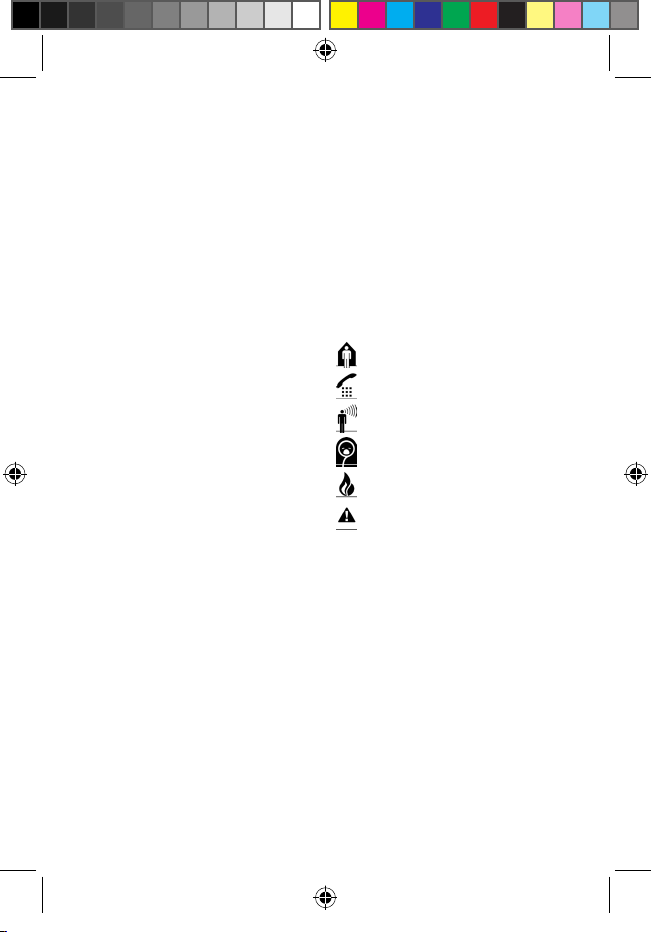
doorbell (green)
telephone (orange)
person call (yellow)
babycry (white)
fire alarm (red)
alarm (red)
CA-Signo-Pager_Vibra_only2019.indd 5 03.12.2019 07:47:05

Signal distinction
The various transmitter sources
can be recognized by the diffe-
rent vibration patterns which are
unique to each symbol:
Doorbell: Doorbell symbol
(LED) is lit up in green
Telephone: Telephone symbol
(LED) is lit up in orange
Person call: Person call symbol
(LED) is lit up in yellow
Babycry: Babycry symbol
(LED) is lit up in white
Fire alarm: Fire symbol (LED) is
lit up in red
Alarm: Alarm symbol (LED) is
lit up in red
Special accessories
The following modules (not in-
cluded) can be plugged into
to the AUX output connector:
- Vibrating pillow
- Flash module MF-1
- Acustic module MA-1
Transmission range
The signal range of the
«
sign•lux»
transmitters can be up to 200
metres under ideal conditions.
The following conditions may
result in a reduced range:
-buildings or vegetation.
-Interference from TVs, compu-
ter monitors and mobile phones.
Under certain circumstances,
this may prevent the receiver
from functioning at all.
-Positioning of the transmitter at
an unfavourable distance from
surfaces which reflect radio
waves, for example floors and
walls. This may lead to the si-
English 6
CA-Signo-Pager_Vibra_only2019.indd 6 03.12.2019 07:47:05

gnal wave being weakened or
even cancelled out by the re-
flected wave.
-Metallic objects reduce the range
due to the shielding effect of the
metal.
-Particularly in towns and cities,
there may be many other sources
of radio waves which can dis-
rupt the original signal.
-Having units operating at similar
frequencies located close to
one another may also result in
mutual interference.
Maintenance and care
All
«
sign•lux» devices do not
require any maintenance. If the
unit does become dirty, simply
wipe it clean with a soft, damp
cloth.
Never use spirits, thinners or
other organic solvents. Do not
expose the devices to full sun-
light for long periods.
In addition, they must be pro-
tected against excessive heat,
moisture and severe mechani-
cal shocks.
Note:
This product is not protected
against splash water. Do not
place any containers filled with
water, such as flower vases, or
anything with an open flame,
such as a lit candle, above or
near the product.
Please make sure that the batte-
ries are not exposed to excessi-
ve heat, such as sunlight, fire or
anything similar.
Warranty
The
«
sign•lux
-
pager
»
is a very
reliable product. Should a mal-
function occur despite the unit
having been set up and ope-
rated correctly, please contact
your dealer or the manufacturer
directly.
This warranty covers the repair
of the product and returning it to
you free of charge. It is essenti-
al that you send in the product
in its original packaging, so do
not throw the packaging away.
The warranty does not apply to
damage caused by incorrect
handling or attempts to repair
the unit by unauthorised per-
sons (destruction of the seal on
the unit).
Repairs will only be carried out
under warranty if the comple-
ted warranty card is returned
accompanied by a copy of the
dealer’s invoice/till receipt.
Always specify the product
serial number in any event.
English 7
CA-Signo-Pager_Vibra_only2019.indd 7 03.12.2019 07:47:05

Disposal
of used electric and electronic units (applicable in the
countries of the European Union and other European countries
with a separate collection system).
The symbol on the product or the packaging indicates that this pro-
duct is not to be handled as ordinary household waste but has to be
returned to a collecting point for the recycling of electric and elec-
tronic units. You protect the environment and health of your fellow
men by the correct disposal of this products.
Environment and health are endangered by a faulty disposal. Ma-
terial recycling helps to reduce the consumption of raw material.
You will receive further information on the recycling of this product
from your local community, your communal disposal company or
your local dealer.
This device complies to the following IC standards:
47 CFR Part 15; 2013
RSS-210 ISSUE 8
English 8
CA-Signo-Pager_Vibra_only2019.indd 8 03.12.2019 07:47:05

Technical data
Power supply: 2 pcs 1.5 V AAA battery or 1.2 V rechargeable
battery
Battery endurance: approx. 800 h with 1.5 V alkaline battery
approx. 400 h with 1.5 V zinc carbon battery
approx. 300 h with 1.2 V rechargeable battery
Frequency: 418 MHz or 915 MHz
Vibration: Eccentric motor, different vibration sequences
to differentiate between signals
Height: 85 mm
Width: 60 mm
Depth: 28 mm
Weight: approx. 88 g
Operating range: 0° C – 40° C
Technical specifications subject to change without prior notice.
English 9
CA-Signo-Pager_Vibra_only2019.indd 9 03.12.2019 07:47:05

Indicateur de piles faibles
Compartiment de piles
Indicateurs DEL d‘appairage
Pied
escamotable
Clip de
ceinture
Prise pour
branchement
du coussin
vibrant ou
modules
Bouton
d’annulation
Bouton
marche/arrêt
Touche de
fonction
Contacts de
chargement
Français 10
CA-Signo-Pager_Vibra_only2019.indd 10 03.12.2019 07:47:06
Inhaltsverzeichnis
Sprachen:
Beliebte Pager Handbücher anderer Marken

Motorola
Motorola Talkabout T900 Bedienungsanleitung

Motorola
Motorola Advisor Graphix CP1250 Bedienungsanleitung

Radio Shack
Radio Shack 17-7040 Bedienungsanleitung

PageOne
PageOne Advisor Graphix Bedienungsanleitung

Syscall
Syscall Nttworks GP-210RT Bedienungsanleitung

unication
unication G4 Bedienungsanleitung