
Siyata SD7 Bedienungsanleitung

Siyata SD7
Rugged, simple, and Highly
Functional MCPTT Device
User Guide

2
Thank you for purchasing the SD7 device.
The SD7 is designed to supply enterprise connectivity and
enjoys the advantages of today’s smart devices and 4G LTE
networks for your daily work usage.

3
Please read through this guide and safety instructions to
assure a safe and pleasant use of the device.
For more information, please visit our website at
www.siyatamobile.com

4
1 For your
safety
NOTE: To
decrease
the risk of
injury,
please read
the
following
important safety information before using
this
device. The
manufacturer
will
not be held
r
esponsible
for any
damage
resulting from
non-standard
use
or
usage
contrary to
instructions
appearing
in this
manual.
Warning signs!
Make sure you turn
off
your phone in
accordance
with
any
warning signs
or instructions.
Turn
off
your device and
follow
allsigns and instructions in
potentially explosive
areas.
Potentially explosive areas
include
fueling areas such as gas stations, areas with high content of
chemicals, grains, dust or metal dust in the air and any
other
area where it is
customary
to be advised to turn
off
cellular
devices.

5
Disclaimers
• Siyata Mobile will not be responsible for any issues related to
the device improper usage.
• Siyata Mobile is not responsible for any third-party
accessories that were not supplied with the product, and /or
any damage caused to the product by any third- party
accessories.
• SD7 does not include cellular or data connectivity. These
should be purchased separately from your local mobile
provider and depend on network plans in your region. Any use
of the device is subject to the purchase of such plans and may
be limited depended on the services provided by your cellular
operator.
• Siyata Mobile is not responsible for any third-party
applications and cannot guarantee that any such application
will work on the device.
• The use of third party software applications installed on the
device is subject to the acceptance of the terms and
conditions of the specific software application and is limited in
accordance with the applicable vendor terms.
• Certain trademarks used in connection with the product are
registered trademarks of their respective owners.

6
2 Your SD7
2.1 Kit
content
Your
purchased
SD7 device includes the following
original
items:
• Device
• Battery
• Micro USB Type C cable
• Ac adapter
• User Manual
NOTE: We have made every effort to ensure
that
the product
arrives
complete
and in working order.
If
you discover any
problems with this
product, please contact
the point of sale
immediately
.

7
2.2 Keys and
connectors
2.4 Display
indicators
Current signal
Bluetooth on
No SIM card found
BT Connected
3G Connected
Flight Mode
4G connected
No Connectivity
Channel
Knob
USB
Type-C
PTT
Volume
SOS
Power
M6
Accessories
port
8
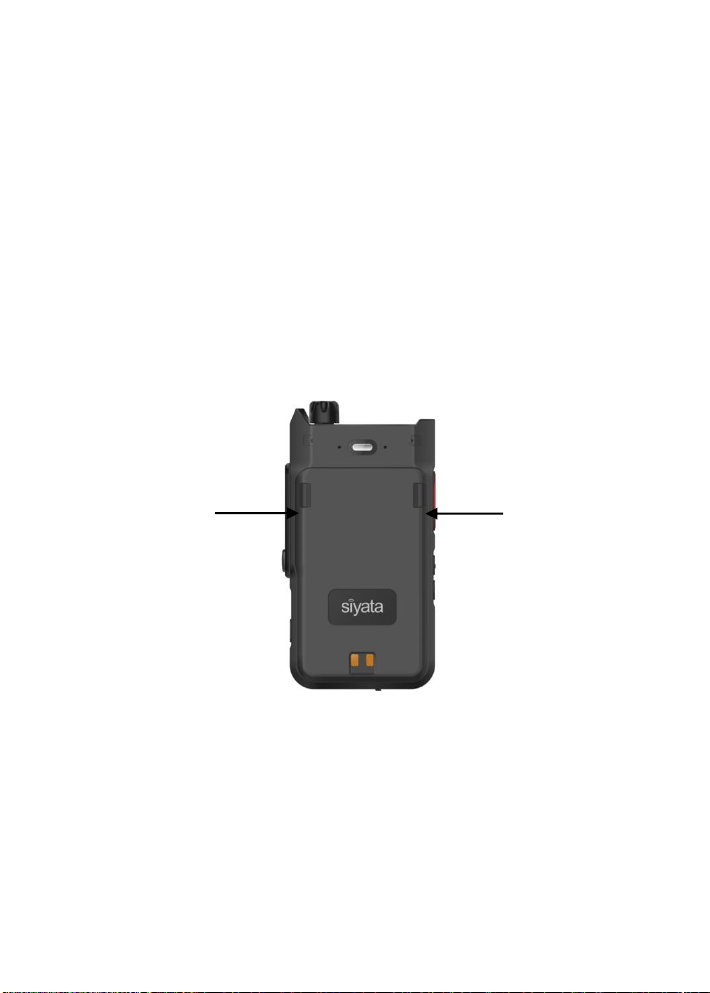
2.5 Battery replacement
To replace the battery, press both release buttons at once,
The battery will pop out and then can be replaced.

9
FCC statement
This device complies with Part 15 of the FCC rules. Operation is
subject to the following two conditions:
1) this device may not cause harmful interference, and
2) this device must accept any interference received, including
interference that may cause undesired operation.
Note: This equipment has been tested and found to comply with
the limits for a Class B digital device, pursuant to part 15 of the
FCC Rules. These limits are designed to provide reasonable
protection against harmful interference in a residential
installation. This equipment generates uses and can radiate radio
frequency energy and, if not installed and used in accordance with
the instructions, may cause harmful interference to radio
communications. However, there is no guarantee that
interference will not occur in particular installation. If this
equipment does cause harmful interference to radio or television
reception, which can be determined by turning the equipment off
and on, the user is encouraged to try to correct the interference
by one or more of the following measures:
--Reorient or relocate the receiving antenna.
--Increase the separation between the equipment and receiver.
--Connect the equipment into an outlet on a circuit different from
that to which the receiver is connected.

10
--Consult the dealer or an experienced radio/TV technician for
help.
Changes or modifications not expressly approved by the party
responsible for compliance could void the user’s authority to
operate the equipment.
FCC Radiation Exposure Statement
This device complies with FCC RF radiation exposure limits set
forth for an uncontrolled environment. This transmitter must not
be co-located or operating in conjunction with any other antenna
or transmitter.
FCC RF Exposure Information and Statement
The SAR limit of USA (FCC) is 1.6 W/kg averaged over one gram of
tissue. Device types: Tablet PC (FCC ID: 2AOCX- SD7 has also been
tested against this SAR limit.This device was tested for typical
body-worn operations with the back of the Siyata SD7 kept 0cm
from the body. Tomaintain compliance with FCC RF
exposurerequirements, use accessoriesthatmaintain a 0cm
separation distance between theuser's body and the backof the
Tablet PC. The use of belt clips, holsters and similaraccessories
should not contain metallic components in its assembly. The use
ofaccessories that do not satisfy these requirements may not
comply with FCC RF exposure requirements, and should be
avoided.
Inhaltsverzeichnis


