
Slate R1260U Technisches Dokument

TECHNICAL INFORMATION MANUAL
Revision 2.2 - 20 December 2016
R1260U
RFID UHF Desktop Reader

Scope of Manual
The goal of this manual is to provide the basic information to work with the SLATE R1260U UHF Desktop Reader.
Change Document Record
Date
Revision
Changes
Pages
11 Apr
2011
01
First release
-
28 Jul 2016 02
Modified
D
river installation
paragraph
7
Added
SLATE
GETTING STARTED
chapter
7
-
10
Renamed
Slate
R1260U
Functional Description
chapter into Slate R1260U External Interfaces
Description
12
Moved
Firmware Upgrade
paragraph into the
Slate
R1260U Reader Upgrade chapter 13
14/12/2016 2.1
Draft release for FCC Class II Permissive change
Application
20
/12/2016
2.
2
Draft release for FCC C
ertification
Application
-
Reference Document
[RD1] EPCglobal: EPC Radio-Frequency Identity Protocols Class-1 Generation-2 UHF RFID Protocol for
Communications at 860 MHz – 960 MHz, Version 1.1.0 (December 17, 2005).
CAEN RFID srl
Via Vetraia, 11 55049 Viareggio (LU) - ITALY
Tel. +39.0584.388.398 Fax +39.0584.388.959
www.caenrfid.com
© CAEN RFID srl – 2016
Disclaimer
No part of this manual may be reproduced in any form or by any means, electronic, mechanical, recording, or
otherwise, without the prior written permission of CAEN RFID.
The information contained herein has been carefully checked and is believed to be accurate; however, no responsibility
is assumed for inaccuracies. CAEN RFID reserves the right to modify its products specifications without giving any
notice; for up to date information please visit www.caenrfid.com.
Disposal of the product
Do not dispose the product in municipal or household waste. Please check your local regulations for
disposal/recycle of electronic products.

3
Index…
Scope of Manual ...........................................................................................................................................................................2
Change Document Record ............................................................................................................................................................2
Reference Document ....................................................................................................................................................................2
Index… ........................................................................................................................................................................................... 3
List of Figures ................................................................................................................................................................................. 3
List of Tables .................................................................................................................................................................................. 3
1 INTRODUCTION ................................................................................................................................................................... 4
Product Description ......................................................................................................................................................................4
Accessories ...................................................................................................................................................................................5
Installation Notice ........................................................................................................................................................................5
Ordering Options ..........................................................................................................................................................................6
2 SLATE GETTING STARTED ..................................................................................................................................................... 7
Introduction ..................................................................................................................................................................................7
Serial Port Emulator .....................................................................................................................................................................7
Driver installation ............................................................................................................................................................7
Connecting the Slate R1260U Reader .........................................................................................................................................10
Connecting the Slate using the EasyController ..............................................................................................................10
3 SLATE EXTERNAL INTERFACES DESCRIPTION ...................................................................................................................... 12
External Connection ...................................................................................................................................................................12
Front Panel Leds .........................................................................................................................................................................12
4 SLATE READER UPGRADE .................................................................................................................................................. 13
Firmware Upgrade ......................................................................................................................................................................13
5 SLATE TECHNICAL SPECIFICATIONS .................................................................................................................................... 14
Technical Specifications Table ....................................................................................................................................................14
Reader – Tag Link Profiles ...........................................................................................................................................................15
Radiation Patterns ......................................................................................................................................................................16
6 SLATE REGULATORY COMPLIANCE .................................................................................................................................... 17
FCC Compliance ..........................................................................................................................................................................17
List of Figures
Fig. 1.1: Slate R1260U UHF Desktop Reader ............................................................................................................................................4
Fig. 1.2: Slate R1260U Technical drawings: top view ...............................................................................................................................5
Fig. 1.3: Slate R1260U Wall mounting .....................................................................................................................................................6
Fig. 3.1: Slate R1260U Front Panel LEDs ................................................................................................................................................12
Fig. 5.1: Slate R1260U Radiation pattern H plane ..................................................................................................................................16
Fig. 5.2: Slate R1260U Radiation pattern V plane ..................................................................................................................................16
List of Tables
Tab. 3.1: Slate R1260U Front Panel LEDs ...............................................................................................................................................12
Tab. 5.1: Slate R1260U Technical Specifications ....................................................................................................................................14
Tab. 5.2: Slate R1260U Reader to tag link profiles ................................................................................................................................15

INTRODUCTION - Slate Technical Information Manual 4
1 INTRODUCTION
Product Description
The Slate (Model R1260U), the new desktop reader of the easy2read© Family, is an UHF multiregional RFID reader with
integrated antenna for short to medium range applications.
The Slate Reader is powered and controlled directly by an USB cable, thus allowing to read EPC Class 1 Gen 2 UHF RFID
tags in an easy desktop environment.
Thanks to its low profile (15 mm) and its size (approximately an A4 page), the Slate reader is the perfect choice for
various applications such as point-of-sales, document tracking, RFID programming stations, access control and so on. It
can be used as a building block for smart shelves and smart displays.
Fig. 1.1: Slate R1260U UHF Desktop Reader
INTRODUCTION - Slate Technical Information Manual 5
Accessories
Check for the supplied accessories below:
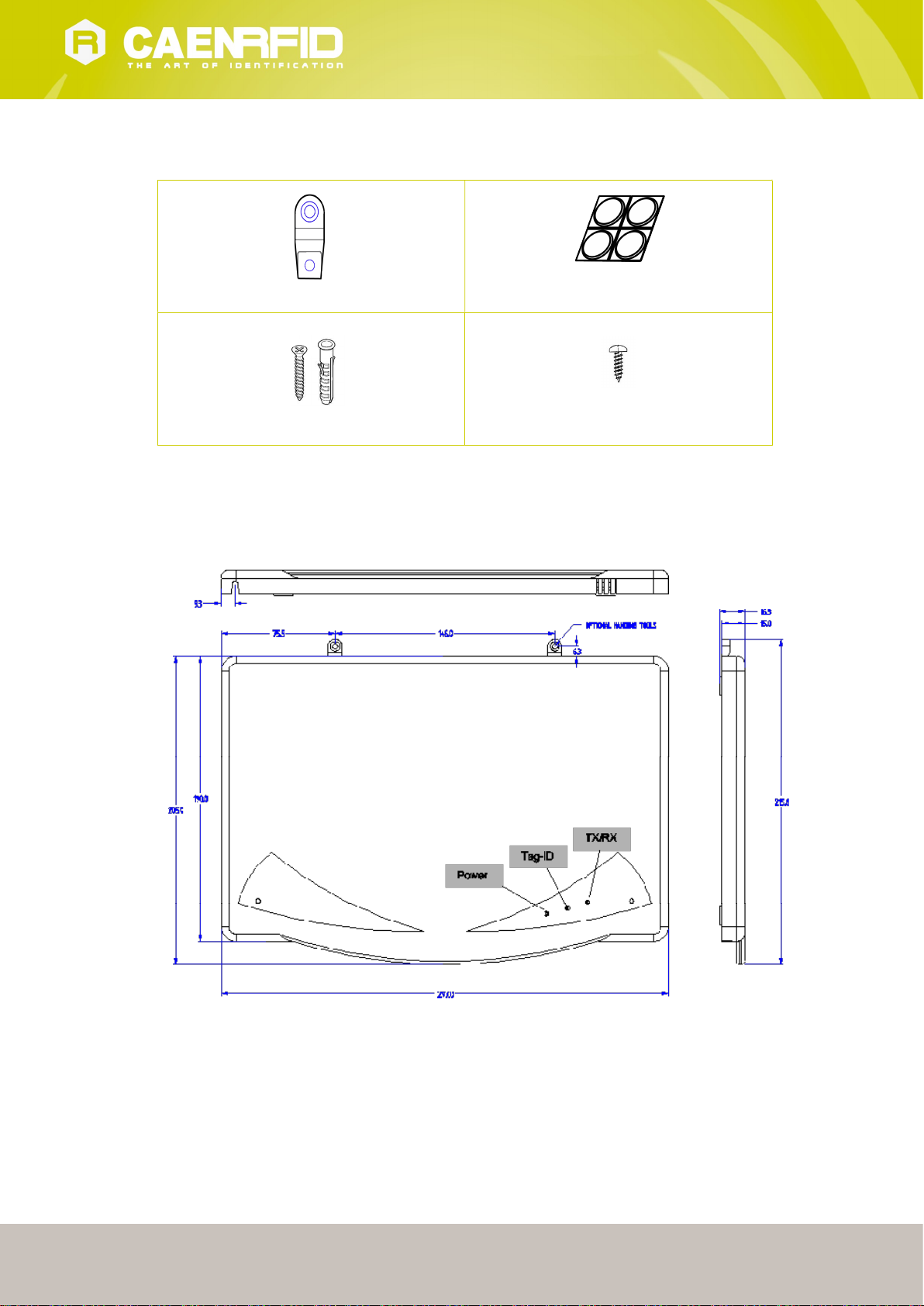
No.2 wall hooks
No. 4 rubber feet
No.2 rawlplugs (ø 4 mm) +screws
No. 2 small screws (ø 3 mm)
Installation Notice
The Slate R1260U can be easily placed on a table for desktop applications or it is possible to hang it on the wall.
Fig. 1.2: Slate R1260U Technical drawings: top view

INTRODUCTION - Slate Technical Information Manual 6
Horizontal Installation:
The Slate can be easily placed on a table for desktop applications affixing the 4 rubber feet to the bottom of the Slate
R1260U to prevent it from sliding.
Vertical Installation:
The Slate can be hanged on the wall (see Fig. 1.3: Slate R1260U Wall mounting).
First of all, use the two small screws (ø 3 mm) to fix the 2 hooks on the Slate.
Then, to hang the Slate on the wall, fix the hooks to the wall using the 2 rawlplugs (ø 4 mm) + screws at a distance of
146 mm each other.
If you want to hang the Slate on a wood panelling, fix the hooks to the wall just using the 2 screws.
Fig. 1.3: Slate R1260U Wall mounting
Ordering Options
Code Description
Reader WR1260UYAAAA R1260U - RFID UHF Desktop Reader (FCC part 15)

SLATE GETTING STARTED - Slate Technical Information Manual 7
2 SLATE GETTING STARTED
Introduction
This quickstart guide will help you to get started with your Slate R1260U reader.
For more detailed information on reader configuration, connections and setup options please refer to the next
chapters.
To begin, you need first to download and install the .NET framework 2.0 (only required if .NET is not already installed
on your PC).
Serial Port Emulator
The SLATE R1260U can be connected to a PC via USB connection. The RFID reader emulates a serial port. In the next
paragraph the procedure to install the required driver is presented.
Driver installation
The Slate reader is based on a FTDI chip. To connect it to the PC you need to install the VCP (Virtual Com Port) drivers
for your operating system. You can download VCP drivers for Windows based systems from the CAEN RFID Web Site at
Slate R1260I page or from http://www.ftdichip.com/Drivers/VCP.htm for different operating systems (or for the most
updated version).
The procedure to install the USB driver is presented below:
1. Verify that the USB cable is correctly plugged into the PC.
2. If the USB to Serial driver is not installed on the PC the following pop-up window is displayed.

SLATE GETTING STARTED - Slate Technical Information Manual 8
3. Select No, not this time and click on next.
4. Select Install from a list or specific location and click on next.
5. Select Include this location in the search and browse the folder where you have downloaded the VCP drivers
then click on next.

SLATE GETTING STARTED - Slate Technical Information Manual 9
6. When the installation is successfully terminated, press on Finish.
7. Now the driver installation procedure is completed.
SLATE GETTING STARTED - Slate Technical Information Manual 10
Connecting the Slate R1260U Reader
You can connect to the Slate R1260U Reader using the EasyController software via USB connection.
Connecting the Slate using the EasyController
1. Download from the CAEN RFID web site the latest version of the EasyController software and install it.
2. Follow the procedure described in Driver installation paragraph pag. 7.
3. Connect the Slate to your pc using the USB connection.
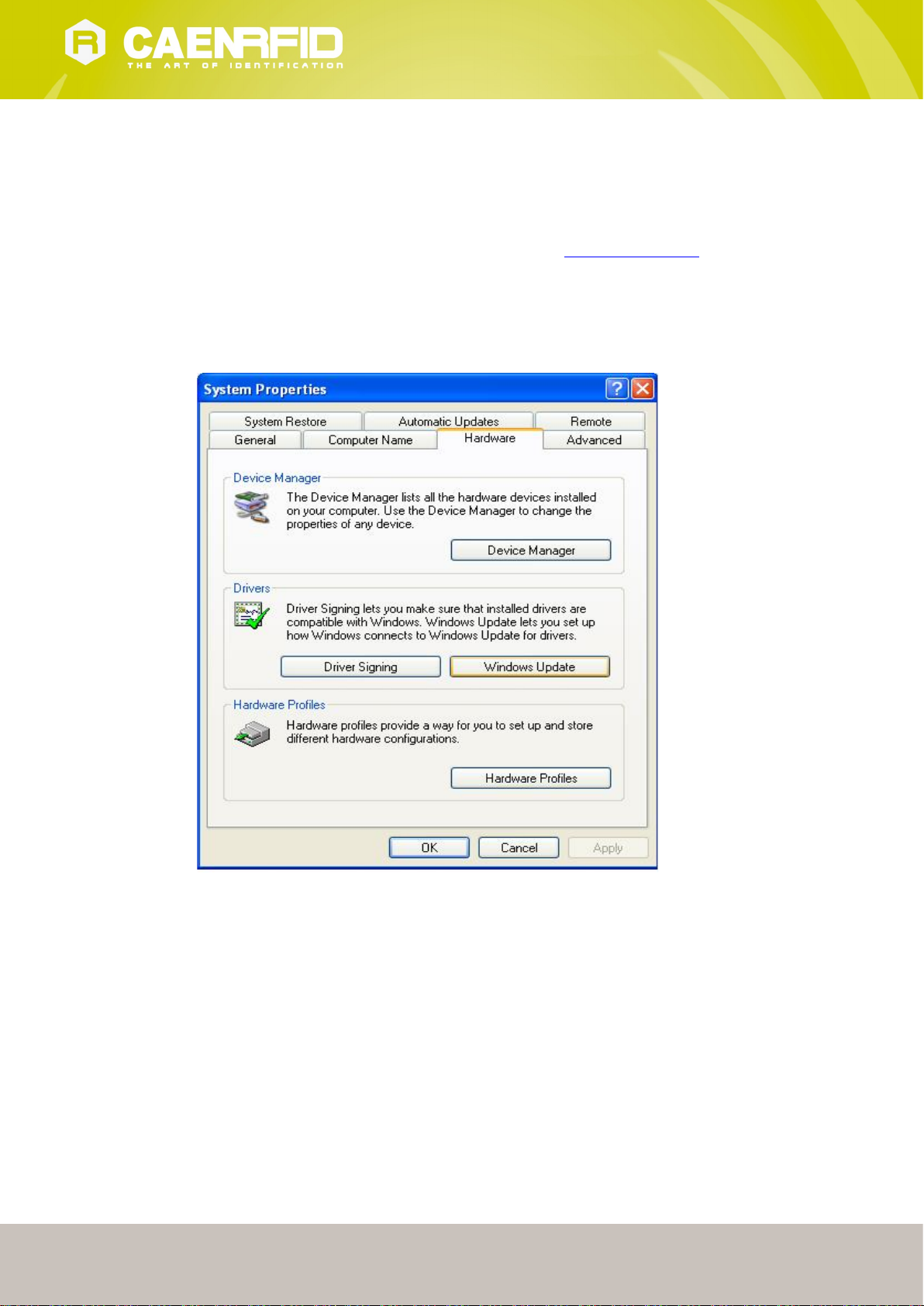
4. Open the System properties (right click on My computer icon) → Hardware → Device Manager.
5. See the emulated serial port in the “USB serial port (COM X)”, in the case below COM4.
Inhaltsverzeichnis


