
smartCARA PCS 550 Bedienungsanleitung


8. Smart Verbal Narration Function
!
2


Lid
3. What’s inside the box
Body
Storage Container
Power Cable
Steam Cover
Water Tray
Caution: Please empty water tray when full
Filter
Receptacle

Lid
*Warning
Contact with the hot steam
release during operation may
cause servere burns.
PUSH Button
Power Button
Display Lamp
Cleansing Button
Lock/Unlock Slide
Open Button
Filter Cover
Steam Vent
Front View Back View
Push Button
Bottom Cover
Drain Hose & Power Cable
4. How to use
Please keep all surfaces at least 30cm away from the steam vent at the rear side of the product.
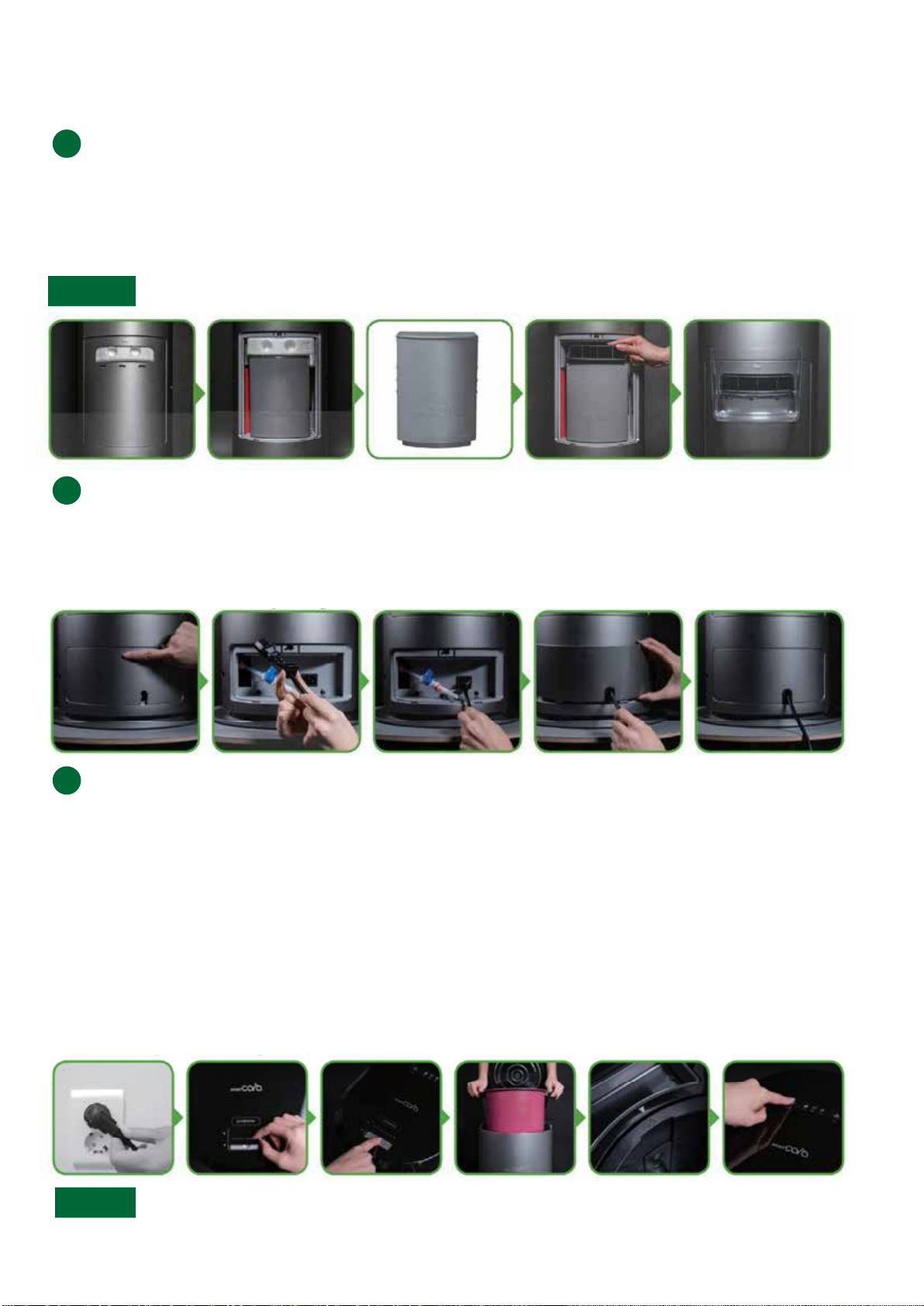
Install the filter according to these instructions before first use.
Connecting the power cord.
1. Open the Filter Cover using the PUSH Button on the rear of the product
2. Remove the packing material then take out the plastic-wrapped filter.
3. Remove the plastic-wrap then place the filter back to its original position.
4. Slide the Filter Cap on top of the filter until it clicks so the filter is tightly fixed. **Very important**
5. Close the Filter Cover then hook the Steam Cover below the steam vent as shown in the picture below.
1. Open the bottom cover using the PUSH Button on the rear of the product.
2. Connect the power cable.
3. Adjust the rubber packing on the cable until it fits with the bottom cover as shown in the picture below.
4. Close the bottom cover by using the PUSH Button.
How to use the product
1. Plug-in the power cord.
2. Slide up to unlock the Lid.
3. Push the Open Button.
4. Lift up the receptacle and remove the sticker from the bottom before first use.
5. Fill the receptacle with food waste up to the recommended fill line.
6. Match the triangular arrow of the receptacle to that of the product to ensure proper closure of the Lid.
(If the Lid does not close after this step, press the Power Button while the Lid is opened, and the
receptacle will automatically adjust itself to fit.)
7. After closing the Lid, slide down to lock then press the Power Button to start operation.
8.The product will announce "Food waste disposal complete" when operation is complete.
The Cooling Lamp will light up when operation is complete. Cleansing complete" when operation is com-
pleted. *If the product is on mute, it will not narrate itself.
Contact with the hot steam released during operation may cause severe burns
1. When the product is unlocked, the Power Button and the Cleansing Button will not operate.
2. If you add more food waste in the middle of operation, the Power Button must be pressed again to
continue operation. (Simply closing and locking the Lid without pressing the Power Button will only
put the product into Storage Mode.)
Warning
!
!
!
Caution

1. Open the Filter Cover using the PUSH Button on the rear of the product.
2. Pull out the Filter Cap.
3. Take out the filter using two hands.
4. Remove the plastic wrap of the new filter then place it in the device.
5. Slide the Filter Cap on top of the filter until it clicks so the filter is tightly fixed. **Very important**
6. Close the Filter Cover then hook the Steam Cover bleow the steam vent as shown in the picture below.
1. Fill water half way up to the receptacle.
2. Close the Lid, lock the slide, press the Cleansing Button to start the process.
3. Cleansing will continue for 60 minutes. The product will narrate itself "Receptacle cleansing complete"
when operation is completed. *If the product is on mute, it will not narrate itself.
1. Food wastes can be stored in the receptacle. While being stored, the volume will slowly decrease
without causing bad odor.
2. Depending on the food type and weather, it can be stored up to 6 days.
3. Storage function will run only if the product is properly connected to power and if the Lid slide is
locked.
4. Power Button's lamp will be on lightly to show that the product is on Storage Mode.
Changing the filter
!
Using the Cleansing function
Cleansing is recommended once every other week.
Smart CARA's receptacles do not have to be cleaned after every operation since it uses very high
heat which will automatically eliminate bacteria. If inappropriate firm object are stuck in the recep-
tacle, the cleansing function will help clean the receptacle more easily.
!
About the Storage funcion
What is the power consumption of the product?
Approximately 2.0kwh of power is consumed per 4 liters of food waste.
(Actual consumption may vary depending on the country)
!

• Avoid processing food waste that is mostly composed of carbohydrates and/ or food with a high
sugar content. Processing mixed food waste from a variety of sources is recommended.
• Do not open the Lid while the device is operating. The high temperatures achieved during opera-
tion may cause severe burns.
• Food waste only : Hard waste such as metal, glass, or firm bone may cause premature breakdown
of the product (fish, chicken bones are okay).
• Device is made to be used indoors.
- Device shall self-diagnose its condition
- Narrates its operating status and the type of errors
Power lamp will light-out automatically 15 seconds after when the
power is connected for the first time or when forced shutdown
while operating, or cleansing is completed.
Precaution
Firm bones such as cow/pig bones
Self-diagnosis function
Power saving function
Error signal can be reset by holding down the Power button for 5
seconds while the Lid is closed and locked.
Error reset function
This helps to preserve and naturally dry the food waste without
having it to operate so the user can keep adding food wastes
until it is filled up to the indicated line in the receptacle. (Maxi-
mum of 6 days of storage is recommended)
Storage function
Alcohol

• Make sure the rubber seal where the filter is placed is not missing.
• If the filter can be moved while in position or if the Filter Cover does notclose, the
filter is not installed properly. Please refer to the filter instructions for proper
installation. (Page 05)
- If the filter is not properly installed, the food waste odor can leak.
• When operated twice a week, filter must be replaced every 3 months.
- Odors and errors may occur if the filter is overused.
• Must use original filters made by Smart CARA.
• As shown below, the Filter Cap must be installed correctly on top of the filter. If
not, the steam may be trapped inside the devive and cause a damage.
For Reference
Inhaltsverzeichnis
Andere smartCARA Müllentsorgung Handbücher


