
SOGEDIS 620 Bedienungsanleitung

620 –ARES DISPLAY
OCTOBER 2021
1
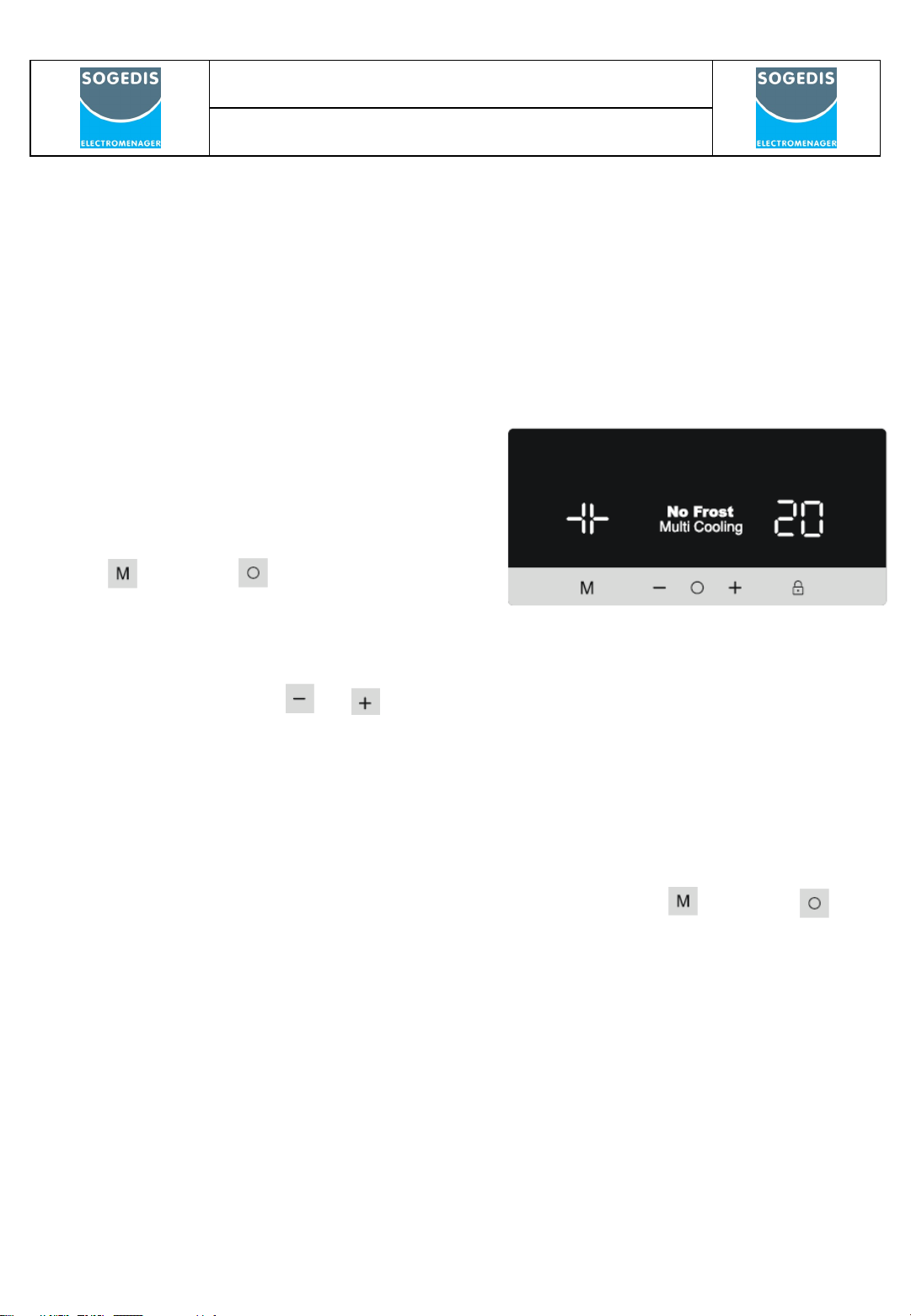
Display and control panel
Using the Control Panel
1. Freezer temperature setting.
2. Super Freeze mode indicator
3. Fridge temperature setting
4. Super Cooling mode indicator
5. Holiday mode indicator
6. Eco mode indicator
7. Alarm indicator
8. Child Lock mode indicator
9. Screen selector
10. Decrease value
11. Increase value
12. Mode Selector
13. Child Lock Selector

620 –ARES DISPLAY
OCTOBER 2021
2
Display and control panel
Super Freeze Mode
Purpose
• To freeze a large quantity of food that
cannot fit on the fast freeze shelf.
• To freeze prepared foods.
• To freeze fresh food quickly to retain
freshness.
How to use
• Press icon, until the ‘Freezer temperature setting’ is selected (#1).
• Once Freezer temperature setting is selected, the temperature will flash.
• Press the icon repeatedly until the ‘Super Freeze logo appears’
in the top left corner.
• Once the Super Freeze mode has been set, the machine will beep to confirm
the mode has been switched on.
• After the beep the original temperature of the freezer will appear on screen.
• Mode can be cancelled by repeating the above instructions from the beginning.
During this mode:
• Temperature of the fridge compartment may be adjusted, this will not impact
Super Freeze Mode.
• Economy and holiday mode cannot be selected whilst Super Freeze is active.
Super Cool Mode
Purpose
• To cool and store a large quantity of food in
the fridge compartment.
• To quickly cool drinks.
How to use
• Press icon , until the ‘Fridge temperature setting’ is selected (#1).
• Once fridge temperature setting is selected, the temperature will flash.
• Press the icon repeatedly until the ‘Super Cool logo appears’ in the
top right corner (#4)
• Once the Super Cool mode has been set, the machine will beep to confirm the
mode has been switched on.
• After the beep the last temperature of the fridge will appear on screen.
• Mode can be cancelled by repeating the above instructions from the beginning.
During this mode:
• Temperature of the freezer compartment may be adjusted, this will not impact
Super Cool Mode.
• Economy and holiday mode cannot be selected whilst Super Cool is active.

620 –ARES DISPLAY
OCTOBER 2021
3
Economy Mode
Purpose
Energy savings. During periods of less
frequent use (door opening) or absence
from home, such as a holiday, Eco program
can provide optimum temperature whilst
saving power.
Display and control panel
How to Use
• Press icon, until the ‘Eco Mode’ icon appears.
• Once the ‘Eco mode’ has been set, the machine will beep to confirm the
mode has been switched on.
• After the beep the both the fridge and freezer temperature setting (#1 and #3)
will display an ‘E’.
• Eco Mode can be cancelled by pressing the icon (#12).
During this mode:
• The freezer and fridge temperature may be adjusted however the adjustment
will not be made until Eco Mode is cancelled. When economy mode is
cancelled, the selected setting values will be activated and the temperature(s)
will be adjusted.
• Super Cool or Super Freeze mode can be selected, however by selecting
either modes Eco Mode is cancelled immediately.
• Holiday mode can only be selected after cancelling the economy mode.
Holiday Mode
Purpose
Holiday mode is to be used if the device
is to be left for an extended period.
.
• Once the ‘Holiday mode’ has been set, the machine will beep to confirm the mode
has been switched on.
• After the beep the fridge will display ‘--’ and the freezer will display the -18 C set
temperature.
• Holiday Mode can be cancelled by pressing the icon (#12).
How to Use
• Press icon , until the ‘Holiday Mode’
icon appears (#5).
620 –ARES DISPLAY
OCTOBER 2021
4
During this mode:
• Freezer and fridge temperature may be adjusted however the adjustment will
not be made until Holiday Mode is cancelled. When Holiday mode is
cancelled, the selected setting values will be activated and the temperature(s)
will be adjusted.
• Super Cool or Super Freeze mode can be selected, however by selecting
either modes Holiday Mode is cancelled immediately.
• Eco Mode can only be selected after Holiday mode has been cancelled.x»
Display and control panel
Drink Cool Mode
Purpose
This mode is used to cool drinks within an
adjustable time frame.
How to Use
• Press icon and icons simultaneously
for five seconds.
• The cooler temperature set indicator will start
showing ‘05’. This value will flash on screen
• Users can either press or buttons to adjust the time period (05, 10, 15,
20, 25 or 30 minutes)
• When you select the time the numbers will blink 3 times on screen and sound
beep beep. If the user do not press any button within 2 seconds the time will be
set.
• The machine will then set the time, the remaining time will be shown on screen
• Once the total time has elapsed, an alarm will sound
• Cool Drink Mode can be cancelled by following pressing the icon and
icons simultaneously for five seconds.
During this mode:
• When drink cool and child lock modes are active, the child lock mode must be
cancelled in order to stop the alarm sound
• While using this mode, you must regularly check the temperature of the bottles.
When the bottles are cool enough, you must take them out of the appliance.
• Bottles can explode if left in the appliance for too long with drink cool mode
active.

620 –ARES DISPLAY
OCTOBER 2021
5
Display and control panel
Screen Saver Mode
Purpose
This mode saves energy by switching off
all control panel lighting when the panel
is left inactive.
How to Use
• Screen saver mode will be activated
automatically after 30 seconds.
• If you press any key while the lighting of the control panel is off, the current
machine settings will reappear on the display to let you make any change you
wish.
• If you do not cancel the screen saving mode or press any key for 30 seconds,
control panel will remain off.
To deactivate the screen saving mode,
• To cancel the screen saving mode, first of all, you need to press any key to
activate the keys and then press and hold the Mode button for 3 seconds.
• To reactivate screen saving mode, press and hold the mode button for 3
seconds.
The Child Lock Function
Purpose
Child lock can be activated to prevent any
accidental or unintentional changes being
made to the appliance settings.
Activating Child Lock
Press and hold child lock button for
5 seconds.
Cancelling Child Lock
Press and child lock button for 5 seconds.
Door Open Alarm Function
If fridge door is opened more than 2 minutes, appliance sounds ‘beep beep’.

620 –ARES DISPLAY
OCTOBER 2021
6
Display and control panel
Freezer Temperature Settings
• Press icon, until the ‘Freezer temperature setting’ is selected (#1).
• Once Freezer temperature setting is selected, the temperature will flash.
• Users can then use the up or down arrow ( / ) to set the temperature
(-16,- 17, -18,-19, -20,-21, -22, -23, -24 °C and Super Freeze Mode).
• If Super Freeze mode or Eco mode is activated, the temperature will not
change until the mode is cancelled.
Cooler Temperature Settings
• Press icon until the ‘Fridge temperature setting’ is selected (#1).
• Once Fridge temperature setting is selected, the temperature will flash.
• Users can then use the up or down arrow ( / ) to set the temperature
(8, 6, 5, 4,3, 2,1 °C and Super Cool Mode).
• If Super Freeze mode or Eco mode is activated, the temperature will not change
until the mode is cancelled
620 –ARES DISPLAY
OCTOBER 2021
7
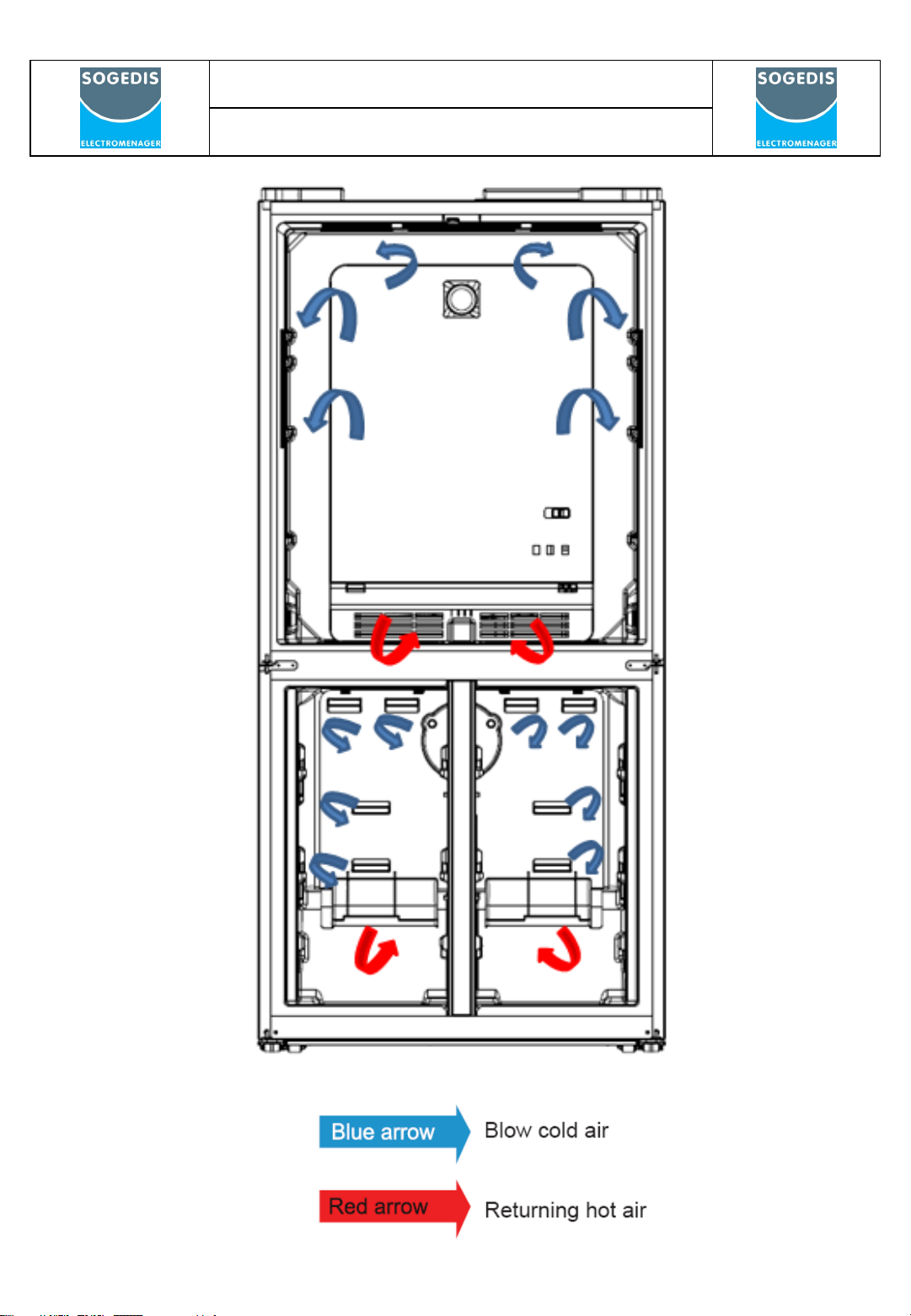
Flow of Air

620 –ARES DISPLAY
OCTOBER 2021
8
Refrigerant Cycle Diagram
HOT
PIPE
CONDANSER
CONDANSER
COMPRESSOR
FREEZER
EVAPORATOR
COOLER
EVAPORATOR

620 –ARES DISPLAY
OCTOBER 2021
9
Used Component
Resistance Values According To The Temperature Sensor (°C/Ohm Rates)
( For The Freezer Defrost and The Cooler Ambient Sensor)
45 °C/1kΩ -1 °C/6.2kΩ
35 °C/1.5kΩ -3 °C/6.8kΩ
30 °C/1.8kΩ -5 °C/7.5kΩ
25 °C/2.2kΩ -7 °C/8.2kΩ
19 °C/2.7kΩ -12 °C/10kΩ
14 °C/3.3kΩ -15 °C/12kΩ
10 °C/3.9kΩ -20 °C/15kΩ
5.5 °C/4.7kΩ -24 °C/18kΩ
1.5 °C/5.6kΩ -31.5 °C/27kΩ
0°C/6kΩ -35.5 °C/33kΩ
Sensor Resistance Values According To The Temperature (°C/Ohm Rates)
(For The Cooler Defrost Sensor)
45 °C/2.15kΩ-1 °C/17.1kΩ
35 °C/3.26kΩ-3 °C/19kΩ
30 °C/4.02k9Ω-5 °C/21.1kΩ
25 °C/5kΩ-7 °C/23.5kΩ
19 °C/6.53kΩ-12 °C/30.8kΩ
14 °C/8.23kΩ-15 °C/36.5kΩ
10 °C/9.95kΩ-20 °C/48.6kΩ
5.5 °C/12.3kΩ-24 °C/61.5kΩ
1.5 °C/15kΩ-31.5 °C/98kΩ
0 °C/16.3kΩ-35.5 °C/12.6kΩ

620 –ARES DISPLAY
OCTOBER 2021
10
Special Programs
Freezer Defrost Program
•According to the conditions of usage, the defrost might be activated after the min
compressor running time; 16 hours or max total time; 48 hours. Below matters are also
effected;
•Consisted ice amount,
•Door open-close,
•Sudden usage variance,
•Cooler sudden temperature rise,
When the refrigerator works on first time;
If the cooler compartment defrost sensor and the freezer compartment defrost sensor are
hotter than -5°C, the test system works automatically. These below components are tested
automatically every 5 seconds.
The defrost resistance stars and stops after 10 seconds.
The balance resistance stars and stops after 10 seconds.
The cooler fan starts and stops after 10 seconds.
The freezer fan starts and stops after 5 seconds.
The back fan starts and stops after 10 seconds.
The ionizer starts and stops after 10 seconds.
The trizbar resistance starts and stops after 10 seconds.
The compressor starts and stops after 10 seconds.
After these steps, the system waits 5 minutes and then it will switch normal mod.
Cooler Defrost Program
The cooler defrost and the freezer defrost are operated parallel except those below.
If the cooler defrost sensor does not feel 5°C three times during a particular period of time.
•Defrost will be activated after the refrigerator works max 9 hours. According to the
conditions of usage, the defrost might be activated (due to mentioned those below) after
the compressor works min 5 hours.
•Consisted ice amount,
•Door open-close,
•Sudden usage variance,
•Cooler sudden temperature rise,
Freezer Defrosting Time
The Defrost is disabled when the defrost sensor temperature feels 8ºC.If defrost time
passes 37 minutes, defrost completing temperature will be rise to 15ºC.
Inhaltsverzeichnis
Andere SOGEDIS Monitor Handbücher


