
SolarPool Solar-breeze NX Bedienungsanleitung

[Phone] 623-582-2825
[Fax] 480-452-1984
SolarPool
T
e c hnol o g i e s
[Email] customerservice@solar-breeze.com
[Web] www.solar-breeze.com
www.solarbreezenx.com
OWNER’S
MANUAL
SEE THE QUICK
START GUIDE ON THE
BACK OF THIS MANUAL

2 SOLAR-BREEZE NX
SAFETY PRECAUTIONS:
The Solar-Breeze NX pool cleaner may look like a pool toy to
some children and may lure children into the swimming pool
when no one is looking.
ALWAYS WATCH CHILDREN AROUND WATER.
NEVER leave children in the pool or around the pool without
supervision.
Do not swim or dive while the Solar-Breeze pool robot is on
the pool surface. The unit must be removed from the water
during swimming. Leaving the Solar-Breeze NX in the pool
while people are swimming presents a potential safety hazard
to swimmers. It can also cause the apparatus to become
swamped or submerged possibly causing damage and
VOIDING THE WARRANTY.
NEVER store the unit with chlorine onboard, as it may present
both a fire and a corrosion hazard.

OWNER’S MANUAL 3
TABLE OF CONTENTS
4 SOLAR-BREEZE NX OPERATION
6 INSPECTION BEFORE OPERATION
8 PLACING THE SOLAR-BREEZE NX
IN THE POOL
11 INDICATOR LIGHTS
13 HEADLIGHTS AND TAILLIGHTS
13 CLEANING THE DEBRIS TRAY AND
COLLECTION CHAMBER
14 ADDING CHLORINE OR SANITIZER
TO THE TRAY
15 CLEANING THE SOLAR-BREEZE NX
16 SOLAR-BREEZE NX TIPS AND
TROUBLE-SHOOTING
19 SUPPORT AND SERVICE
20 LIMITED WARRANTY

4 SOLAR-BREEZE NX
SOLAR-BREEZE NX OPERATION
GENERAL DESCRIPTION AND OPERATION
The Solar-Breeze NX is an intelligent, autonomous robot that navigates
the surface of a swimming pool to collect leaves, debris, dust, pollens and
suntan lotions that float on the surface of the water. It is powered by solar
energy and by a rechargeable Lithium Ion battery. It requires no hoses or
power cords to operate.
POWER AND CHARGING
The Solar-Breeze NX is powered by direct sunlight. While operating
in the sunlight, it will also collect and store surplus solar power in the
rechargeable battery. On a normal sunny summer day, enough power
will be stored in the battery during the daytime to allow the Solar-Breeze
NX to continue to operate for several hours after the pool is no longer in
direct sunlight.
When the battery reaches a pre-determined low-voltage level, the unit
will shut down automatically, primarily after dark. When this happens, the
red “STATUS” light will begin to flash. There is no need to remove the unit
from the pool when this happens. It will float in the pool for the balance
of the night with control panel and blue navigation LED lights flashing. In
the morning, when there is direct sunlight on the pool again, the unit will
re-start automatically.
There is also a low battery “Hunt for Sun” mode (with the Status light
blinking). If the sky is not dark the unit will run intermittently in an attempt
to locate sunlight where it can stop to charge its low battery. See page 10
for further details.

OWNER’S MANUAL 5
PROPULSION AND DEBRIS COLLECTION
The Solar-Breeze NX is propelled through the water by a paddle-wheel
located at the rear of the unit (where the control panel label is located).
The paddlewheel at the front of the Solar-Breeze NX captures debris in the
collection chamber inside the apparatus. As water passes through the col-
lection tray, it passes through a fine mesh filter which removes large and
very small particles, pollens, dust and even suntan oils that may be floating
on the pool surface. The Solar-Breeze NX robot has twice the storage
capacity than that of a skimmer basket in a typical pool skimmer inlet.
NAVIGATION
The bumper-wheels at the front of the unit rotate in opposite directions
towards the outside of the unit. When the Solar-Breeze NX encounters the
edge of a pool, or pool corner, the bumper-wheels will normally cause the
Solar-Breeze NX to turn in one direction or the other and continue to move
around the pool capturing debris.
If the Solar-Breeze NX encounters an obstruction in the pool where the
front bumper-wheels are not in contact with the edge of the pool and
cannot aid with navigation, it will sense that it is stuck on an obstacle and
go into a reverse navigation mode. With the absence of obstacles, the
Solar-Breeze NX will still reverse periodically to help randomize the di-
rection of travel, and ensure that all areas of the pool are cleaned. While
in reverse, the rear paddlewheel will rotate in reverse at twice its normal
speed in order to back away from the obstruction. The front paddlewheel
will continue to rotate forward, but at only half its normal speed. This helps
to ensure that no debris escapes from the collection chamber while the unit
is moving backwards.

6 SOLAR-BREEZE NX
EMPTYING THE DEBRIS COLLECTION TRAY
The clear window on top of the Solar-Breeze NX makes it possible to
see when the debris collection chamber is becoming full. Simply turn the
switch to the “OFF” position, lift the Solar-Breeze NX from the pool using
the front handle, remove the debris tray and empty the tray and collection
chamber into a trash receptacle or your compost bin. If needed, it can
be further cleaned by immersing and swishing in water, or by washing
with a GENTLE stream of water from a garden hose, while it is out of the
unit. Never immerse the Solar-Breeze NX or use a high pressure hose to
clean the body of the unit as damage to the unit may occur. If necessary,
a low-pressure flow from a garden hose is recommended (see page 15,
Cleaning the Solar-Breeze NX).
INSPECTION BEFORE OPERATION
Before Operating the Solar-Breeze NX, be sure to inspect the following
areas of the unit:
DEBRIS COLLECTION TRAY
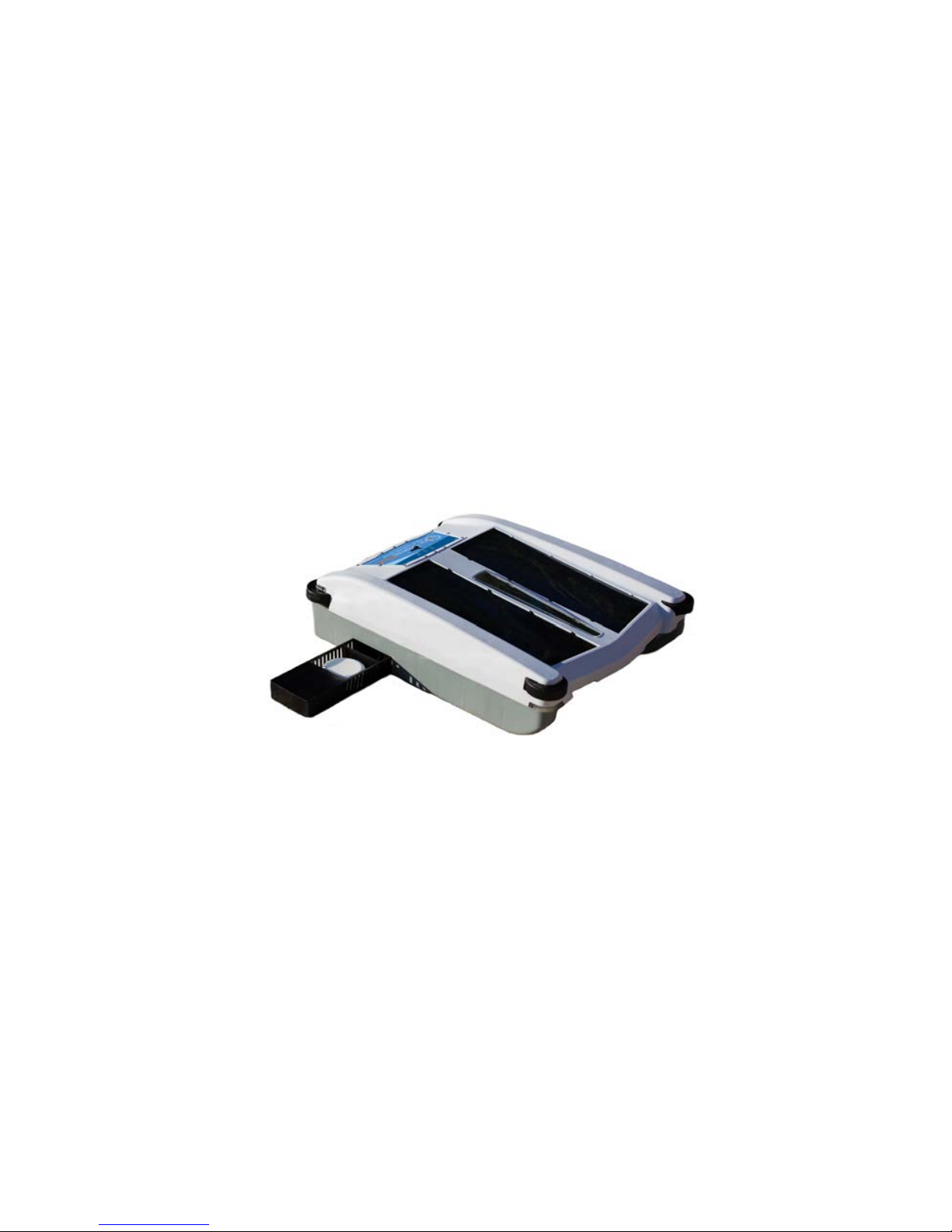
The debris collection tray slides out the front of
the unit, using the grip handle provided on the
front underside of the tray. Before operation,
remove this tray in case it was dislodged
during shipping. Then carefully insert the
whole debris tray back into Solar-Breeze NX,
by engaging the slots on both sides. When
the debris tray is fully inserted, you will hear
a quiet click as it locks into place. This click
lets you know that the debris will be captured
in the collection area and will not simply flow
through the apparatus.
OWNER’S MANUAL 7
CHLORINE DISPENSER
Slide the chlorine dispenser out the starboard side of the Solar-
Breeze NX. Ensure that it slides in and out freely. The chlorine
dispenser is designed to accommodate up to two (2) 3” jumbo
chlorine tablets in the tray. You may wish to add chlorine tablets to
the Solar-Breeze NX before you place the robot in the pool. With
chlorine tablets in the dispenser, the Solar-Breeze NX will sanitize
your pool at the same time it is removing debris from the surface.
NOTE: Placing only one chlorine tablet in the dispenser may
cause the Solar-Breeze NX to navigate slightly to the left or right
depending on placement of the chlorine tablet in the left or right
compartment of the dispenser tray.

8 SOLAR-BREEZE NX
PLACING THE SOLAR-BREEZE NX
IN THE POOL
The Solar-Breeze NX comes equipped with two molded handles, one
at the front and one at the rear of the unit. We recommend that you use
both hands, when placing the unit in the pool, holding the unit at both the
front and the rear and lowering the unit gently into the pool. Launching
the robot properly consists of aiming it into open water (where it won’t
immediately hit a wall) and moving the switch to the “ON” position.
THE ON/OFF SWITCH
After placing the Solar-Breeze NX robot in the pool, slide the
switch to the “ON” position. The front and rear paddle-wheels
should rotate in the forward direction and the robot should begin
moving around the pool collecting debris in the collection chamber.
Cycling the ON/OFF switch resets the microprocessor back to
factory settings, and should undo any unusual behavior that might
occasionally be observed.
OPERATING MODES
After the switch has been placed in the “ON” position, the unit will
operate in the following modes:

OWNER’S MANUAL 9
STANDARD FORWARD OPERATION
The rear paddlewheel and front paddlewheel both rotate in a
forward direction with the rear paddlewheel providing propulsion
and the front paddlewheel scooping debris into the collection
tray. The front bumper wheels should rotate in opposite directions
towards the outside of the unit to assist with navigation and push
the unit in one direction or the other when it encounters the pool
edge. The rear bumper wheels are not motorized, turning only
when in contact with a wall or object.
REVERSE NAVIGATION
If the Solar-Breeze NX gets stuck on an obstruction where the
front bumper wheels cannot assist with navigation, or on smooth
tile that the bumper wheels cannot grip, it should go into a
reverse navigation mode and back away from the obstacle. The
reverse navigation will normally be triggered within the first min-
ute of becoming stuck, but it could take longer depending on the
nature of the obstruction. Be patient – it will reverse.
During a reverse navigation, the rear paddlewheel will turn in
reverse at twice its normal speed in order to back away from the
obstruction. The front paddlewheel will continue to turn forward
at ½ the normal speed to ensure that no debris escapes from the
collection chamber.
A normal reverse navigation should result in the unit moving
backwards by 2 or 3 feet and turning slightly in one direction or
the other. As a result, when the Solar-Breeze NX begins to move
forward again, it should move in a different direction, away from
the obstruction.
The Solar-Breeze NX will also reverse automatically every four
minutes, even if it does not encounter an obstruction. The unit

10 SOLAR-BREEZE NX
remains in reverse mode for about 50 seconds. The robot will
normally turn in a different direction during each navigation
reversal, improving its overall coverage of the pool.
STAND-BY OR SLEEP MODE
This mode occurs when the battery charge has been drawn down
to the Low-Voltage level. This will normally occur in the evening
after the pool has been in shade for some time, however, it could
also occur on a cloudy day when the energy available from
the sun is low. In this mode, the paddlewheels will stop turning,
and the red “STATUS” light will begin to flash – indicating a low
battery.
When solar energy becomes available, the unit will recharge
itself and start operation again on its own, and the red STATUS
light will no longer flash.
HUNT FOR SUN MODE
This intermittent mode occurs when the battery is low (blinking
RED STATUS light) and the sky is illuminated. Typically this will
happen shortly after sunrise or in the late afternoon after a
cloudy day. The unit will operate two minutes “ON” and eight
minutes “OFF” (intermittently) until it finds a spot in the pool
where there is direct sunlight, where it can stop and charge its
battery in the sun. This mode ends near sunset, at which time the
unit will revert to Sleep Mode. If it is charging in the sun while
operating in Hunt for Sun Mode and drifts into shadow, it will
frequently start up and run in an attempt to find the sun and stop
to charge again.
Inhaltsverzeichnis
Andere SolarPool Schwimmbadroboter Handbücher


