
Solight KP07 Bedienungsanleitung
Dear customer, thank you for purchasing our product. Please read the following instructions carefully and follow them to serve you safely
and to your full satisfaction. This will prevent misuse or damage. Avoid unprofessional handling of this appliance and always observe the
electrical appliance usage guidelines. Keep the instruction manual carefully. For use in the home or indoors. This product should only be used
by an adult.
TECHNICAL PARAMETERS
Power - 1100 W, 2000 W
Power supply - 220-240V, 50Hz
Protection - IP22
Power levels - 2
ASSEMBLY
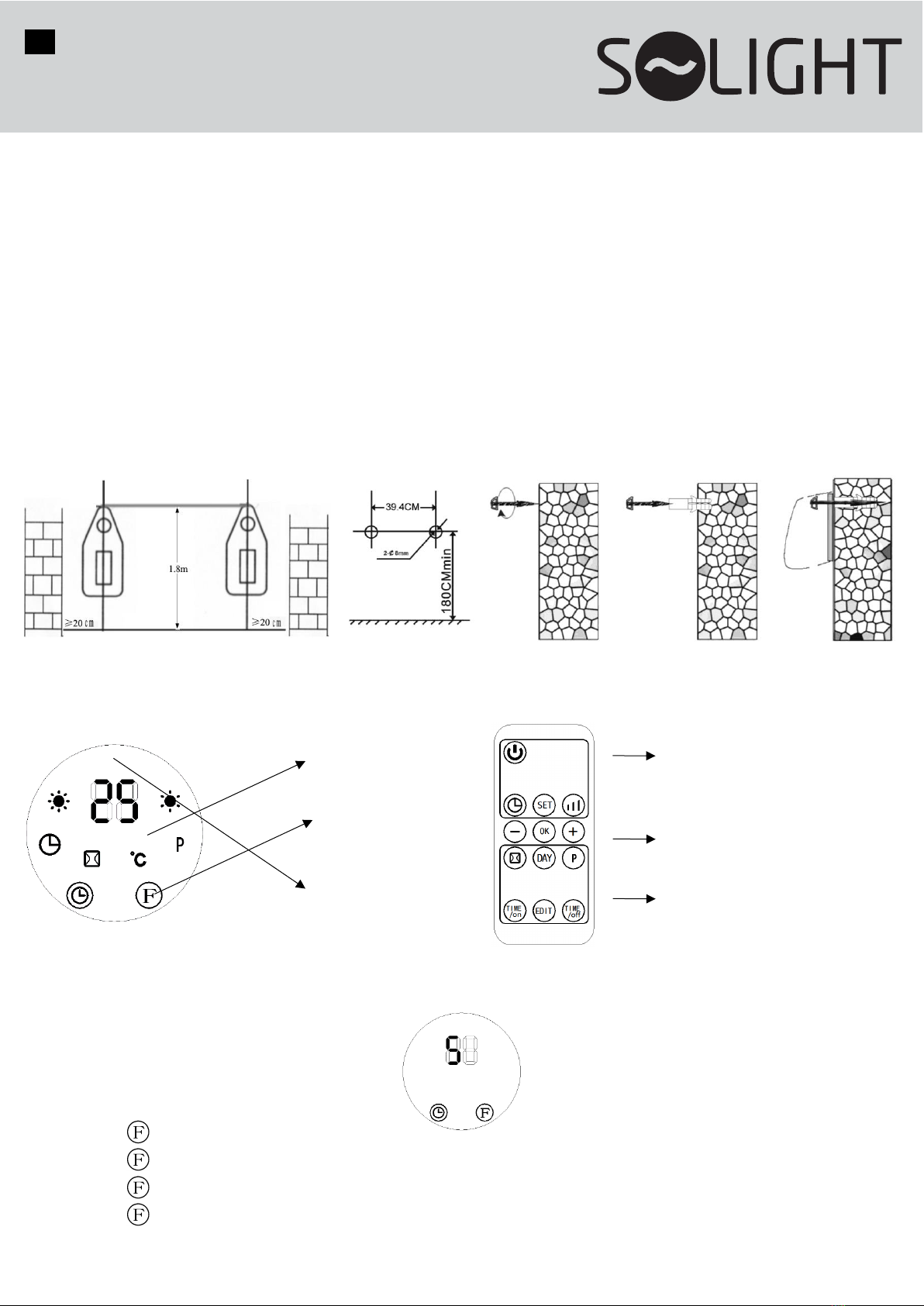
Drill two holes in the wall at a distance of 1.8 m from the ground. The diameter of the hole must be the same as the dowel. After the dowel
has been inserted, fix the hook into the dowel. Make sure the hook is secure and hang the heater. The clip under the hook should be
inserted into the bottom of the heater.
CONTROL
Control panel Remote control
CONTROL VIA DISPLAY
1. Plug the device into a power outlet and turn it on by pressing the red 0/I switch, the device will enter standby mode and the display
will show:
2. Pressing the button 1x - starts the fan mode (Fig.
Pressing the button 2x - starts the low heating mode (Fig. B)
Pressing the button 3x - starts the heating mode (Fig. C)
Pressing the button 4x - enters standby mode and the display shows "--" (as in Fig. A). The fan will run for 30s and enter standby
mode.
EN KP07
Wall mounted ceramic
heater
LED display
Control
button
Remote
control
receiver
Area of functions
Settings and
confirmation area
Area of
programmes

A B C
A B C
3. After starting the device, press the " " button and the device will enter the working state. Use the buttons on the controller
" / " to set the desired temperature. Or set one of the two heating modes on the display.
To start the countdown (1-12h) press the button " " and press it repeatedly to increase the countdown value.
Once the time has been set, the display will show the current set time for 5 seconds, then return to the previous display, and in the
meantime the " " light will come on. The picture below is an example of setting the countdown to 8h.
After the set time has elapsed, the device will switch off and remain in standby mode.
CONTROL BY REMOTE CONTROL
Press the button " " - to enter the working state (Fig. A).
Press the " " - button to start the low heating mode (fig. B).
Pressing the " " button twice - starts the heating mode (Fig. C).
DAY and TIME settings
Press " " once - the display will show the default value "12" , press " / " to set the current hour.
Press " " a second time - the display will show the default value "30" , press " / " to set the current minute.
Then press a third time " " - the display shows " ", press " / " to set the current day. (Mon-Sun : d1-d7).
Then press " " to confirm the setting
Example setup in the picture below: Wednesday, 9:30h, temperature 25°C, heating mode
Note: If you turn off the device, make this setting again when you restart it.

Temperature setting
In operating mode, press " / " , the display will show "23" as the default temperature. Press " / " to set the desired temperature
(10-49°C can be set). Press " " to confirm the setting.
Example of setting:
The current ambient temperature is 15℃, when the temperature is set to 25℃, the display will show the following:
WEEKLY PROGRAM SETTINGS
1. Press " " to enter the working state.
2. Press " " to set the weekly program (Fig. A).
3. Press " " , the display will show d1~d7, set the individual days Mon-Sun (Fig. B). To change, press the button repeatedly.
4. Press " ", the display will show P1~P6, change by pressing the button repeatedly. (A maximum of 6 time periods can be set for
each day, Fig. C.)
5. Press " " , the display will show 00 as default. Press the button repeatedly to set the power-on time. E.g. setting P1 to 7:00 in Fig.
D. When the setting is complete, press " " again to select P1~P6.
6. Press " " to set the power-off time, e.g. 13h (Fig. E). When the setting is complete, press " " again to reach the selection of
P1~P6. (If the power-on time is the same as the power-off time, the device is in standby mode.)
7. In the selection of P1~P6, press the button " / " to select the temperature, confirm the selected temperature with the button "
"
8. Repeat steps 3-7 to set the other days.
9. To cancel the weekly function, press the " " button again, the "P" light will go out. The weekly program is switched off and the
device returns to the working state of the previous function.
Notes:
•Once the setup is complete and the weekly program ("P") is active, press / / /to check each day.
•Power on time: 0-24h, cannot be set in minutes.
•The off time cannot be less than the on time.
OPEN WINDOW DETECTION
(remote control only)
1. Press " " to put the device in working condition.
2. Press " " to activate the open window mode and the display will show " / °C". The default temperature is 23°C, press " / "
to set the desired temperature.
In open window mode, once the ambient temperature drops by 5 to 10℃ within 10 minutes, the device will stop working and enter
standby mode within 30 minutes.
Press the " " button again to turn off the open window mode, the symbol on the display will stop lighting and the device will
return to the previous working mode. For an example of a switched on mode with 23°C, see Fig. F.
3. If this mode is switched on at the same time as the weekly programme, the device will not operate during the time when the
weekly programme is not set . During the working state of the weekly program, the temperature is controlled by the set
temperature of the open window detection (Fig. G).
A B C D E

SAFETY NOTICE
When using this electrical appliance, basic safety regulations must always be observed, including the following:
1. Children (but at least 8 years of age) and persons with reduced physical, sensory or mental abilities or lack of experience and
knowledge may use the appliance if they are supervised by a responsible person or have been instructed in the safe use of the
appliance and understand the dangers involved.
2. If the power cord is damaged, it must be replaced by the manufacturer or by qualified persons to avoid danger.
3. Do not cover the device with anything, as this will cause overheating and a fire hazard.
4. The device must not be placed immediately below the socket.
5. Do not use the device in the immediate vicinity of a bathtub, shower, sink or swimming pool.
6. Do not use the device if:
-you dropped the device
-there are visible signs of damage to the device
7. Some parts of this product can be very hot and cause burns.
8. Do not use this device in small rooms if they are occupied by persons who are unable to leave the room on their own, unless constant
supervision is provided.
9. To reduce the risk of fire, keep fabrics, curtains or any other combustible material at least 1 m away from the appliance.
CLEANING AND MAINTENANCE
Before cleaning, switch off the appliance and unplug it from the power outlet.
1. To remove the cover, first remove the 2 cover mounting screws and remove the cover.
2. To remove the grille, first place the grille attachment in a vertical position and pull the grille out.
3. The device can be wiped externally with a damp cloth and a little neutral detergent. Never clean the device with solvents such as gasoline,
thinner, etc. Keep the reflector clean.
4. The honeycombs can be cleaned with a small brush.
5. After cleaning, reassemble the unit in reverse order. Make sure that the device has dried well.
The product has been issued with a CE declaration of conformity in accordance with the applicable regulations.
At the end of its useful life, the equipment must be disposed of at a designated place.
Solight Holding, s.r.o., Na Brně 1972, Hradec Králové 500 06, Czech Republic.
F G
Inhaltsverzeichnis
Andere Solight Heizung Handbücher


Beliebte Heizung Handbücher anderer Marken


Empire Heating Systems
Empire Heating Systems WCC65 Bedienungsanleitung

Wetekom
Wetekom 92 86 43 Bedienungsanleitung

Desa
Desa SPC170-F Bedienungsanleitung

Watlow
Watlow Watrod Electric Tubular Heaters Bedienungsanleitung

Haverland
Haverland ECO-DRY GPS Series Stücklistenhandbuch

Stelpro
Stelpro ASILVC2060 Series Bedienungsanleitung