Solinst 301 Bedienungsanleitung


Table of Contents
1 Introduction 5
1.1 WLTS SDI-12 Interface Overview 5
1.2 WLTS SDI-12 System Components 6
1.3 Sensor Overview & Measurement Parameters 7
1.3.1 Absolute Level 7
1.3.2 Vented (Gauge) Level 7
1.3.3 Temperature 8
1.4 Communication/Vented Cable 8
1.4.1 Communication Cable Connections 9
2 WLTS Software Utility 10
2.1 Communicating with the WLTS Utility 10
2.2 Programming the Water Level Temperature Sensor 11
3 SDI-12 Wiring Setup and Installation 14
3.1 SDI-12 Wiring Setup 14
3.2 Installation 15
3.2.1 Installation in a 2" Well 17
3.2.2 Biofouling Conditions 19
4 WLTS SDI-12 Operation 20
4.1 The SDI-12 Address 20
4.2 Activation and Verification 20
5 SDI-12 Supported Commands 21
5.1 Acknowledge Active Command: a! 21
5.2 Address Query Command: ?! 21
5.3 Send Identification Command: aI! 21
5.4 Change Address Command: aAb! 21
5.5 Start Measurement Command: aM! 21
5.6 Start Measurement Command with Checksum: aMC! 22
5.7 Send Data Command: aD0! 22
5.8 Start Concurrent Measurement Command: aC! 22
5.9 Start Concurrent Measurement Command with Checksum: 22
5.10 Start Verification Command: aV! 23
6 Maintenance and Troubleshooting 24
6.1 Maintenance 24
6.1.1 Sensor Maintenance 24
6.1.1.1 Changing or Updating WLTS 25
6.1.2 Communication/Vented Cable Maintenance 25
6.2 Firmware Updates 26
6.3 Troubleshooting 27
7 References 28


SDI-12 User Guide for Water Level Temperature Sensor
Page 5
1 Introduction
SDI-12 (Serial Data Interface at 1200 Baud) is a communications protocol designed to allow the interfacing
of a number of low power analog sensors with a common SDI-12 recorder or datalogger.
This User Guide focuses on the Solinst Model 301 Water Level Temperature Sensor (WLTS) for use as a
device in a SDI-12 set up. Configuration, communication, installation and description of the SDI-12 protocol
are included.
1.1 WLTS SDI-12 Interface Overview
To connect the WLTS to the SDI-12 customer equipment, you must ensure correct wire-to-wire connection
of the cables, including a continuous external power supply to the WLTS (12V). The sensor connects to a
Communication Cable (vented or non).
The communication settings for the WLTS comply with the SDI-12 standard at 1200 baud, 1 start bit, 7 data
bits, 1 parity bit (even parity), and 1 stop bit. A simple PC Software Utility is used to specify the device address.
The SDI-12 interface circuitry requires the +12V connection to be powered by customer equipment. The
current draw from the 12 volt source normally peaks at several 10’s of mA, but idles around 2 mA.
Wire Colour SDI-12 Function Connection
Red 12 Volt Line +12V DC at SDI-12 Recorder
Black Ground Line Ground at SDI-12 Recorder
White Serial Data Line SDI-12 Data at SDI-12 Recorder
Table 1-1 SDI-12 Interface Cable Wire Definitions

SDI-12 User Guide for Water Level Temperature Sensor
Page 6
1.2 WLTS SDI-12 System Components
The Solinst Model 301 Water Level Temperature Sensor requires the following components to complete a
SDI-12 monitoring system:
• Sensor
• Communication/Vented Cable
• USB-A Programming Cable
• WLTS Software Utility
(free download on solinst.com)
• (User supplied equipment
Figure 1-1 WLTS SDI-12 System Components
USB-A Programming
Cable
Communication/Vented
Cable
Water Level Temperature
Sensor

SDI-12 User Guide for Water Level Temperature Sensor
Page 7
1.3 Sensor Overview & Measurement Parameters
The Solinst Water Level Temperature Sensor is a compact, all-in-one submersible hydrostatic level transmitter
that provides continuous, accurate water level and temperature readings for a wide variety of applications.
The durable water level pressure sensor provides 0.05% FS accuracy with automatically temperature
compensated readings. There are six pressure ranges to choose from (5-200 m), with options for absolute
and vented (gauge) pressure sensor setups.
Table 1-1 WLTS Technical Specifications
Note: The Model number (e.g. M5) refers to the maximum depth of submergence in meters below water, for that device.
1.3.1 Absolute Level
When submerged, absolute pressure sensors measure total pressure – the pressure of air plus water column
above their zero point. The actual pressure of just water above the sensor is obtained by subtracting barometric
pressure from the total pressure.
1.3.2 Vented (Gauge) Level
When submerged, vented pressure sensors detect both water and barometric pressure. However, a vent tube
to surface allows barometric effects on the pressure sensor to be eliminated. Therefore, they provide readings
of the actual pressure of just water above the pressure sensor zero point.
Water Level Temperature Sensor Specifications
Level Sensor: Piezoresistive Silicon with Hastelloy® sensor
(Absolute or Gauge)
Ranges (metres): Absolute: M5, M10, M20, M30, M100, M200
Gauge: M5, M10, M20
Accuracy: ± 0.05% FS
Resolution: 0.0006% FS
Normalization: Automatic Temperature Compensation
Temp. Comp. Range: 0°C to 50°C
Temperature Sensor: Platinum Resistance Temperature Detector
(RTD)
Operating Temperature: -20°C to 80°C
Temp. Sensor Accuracy: ± 0.05ºC
Temp. Sensor Resolution: 0.003°C
Response Time: 1~2 minutes
Communication: Digital communications – Modbus and SDI-12
Interface Connector: 4-Conductor
Power Consumption: Max 2mA in idle, 10mA while reading sensor
Size: 22 mm x 192 mm (7/8" x 7.55")
Weight: 173 grams (6.1 ounces)
Wetted Materials: Delrin®, Viton®, 316L stainless steel, Hastelloy,
Polyurethane (TPU boot)

SDI-12 User Guide for Water Level Temperature Sensor
Page 8
1.3.3 Temperature
The WLTS records temperature compensated water levels. A Platinum Resistance Temperature Detector is
used to accurately compensate for temperature changes within the range of 0ºC to +50ºC.
1.4 Communication/Vented Cable
Communication Cables contain power and communication wires, as well as a vent tube running the length of
the cable for the vented sensors. The vent tube and wires are jacketed in polyurethane, providing durability
and protection. The cable is 8 mm (0.320") in diameter, while the connectors are 20 mm (0.790") in diameter.
Note: The Vented Communication Cables have a vent tube to surface with a Gore vent cap to ensure airflow through, while
preventing moisture from entering the tube.
Figure 1-2 Communication/Vented Cables
Non-Vented Communication Cable
Vented Communication Cable
Gore vent Cap

SDI-12 User Guide for Water Level Temperature Sensor
Page 9
Table 1-2 Communication Cable Specifications
1.4.1 Communication Cable Connections
To connect the Communication/Vented Cable to the sensor (after programming – see Section 2), line up
the pin and socket. Gently push the connections together and twist slightly until you feel/hear a small click
when the properly aligned connection is made. Only hand-tighten the coupling while holding the cable still.
Tighten the coupling until it seats.
Communication Cable Specifications
Wetted Materials: Polyurethane, Nickel plated Brass, Viton
Diameter: Cable: 8 mm (0.32")
Connector: 20 mm (0.79")
Lengths: Up to 300 m
Max. Bend Radius: 25 mm (1")
Operating Temperature: -20ºC to 80ºC
Vent Tube Moisture
Protection:
Built-in hydrophobic lters at sensor connection
and plug at surface
Communication/Vented Cable
alignment socket
Sensor
alignment pin
Figure 1-3 Communication Cable Connections
Coupling

SDI-12 User Guide for Water Level Temperature Sensor
Page 10
2 WLTS Software Utility
The WLTS PC Software Utility is a simple tool for configuring the SDI-12 protocol settings and measurement
parameters for the Water Level Temperature Sensor. Download the newest version of the WLTS Software
Utility by visiting: https://downloads.solinst.com
Note: The Firmware Upgrade Utility is downloaded along with the WLTS PC Software Utility. See Section 6.2.
The following are the minimal hardware and software requirements for installation and operation:
Hardware Software
Processor: 1 GHz or faster processor or SoC OS: Windows 10 & 11
RAM: 1 GB for 32-bit or 2 GB for 64-bit
Hard disk space: 128 MB
Display: 800 x 600
Ports: USB
2.1 Communicating with the WLTS Utility
The WLTS Utility is Windows®-based, and is therefore used with a desktop or laptop PC.
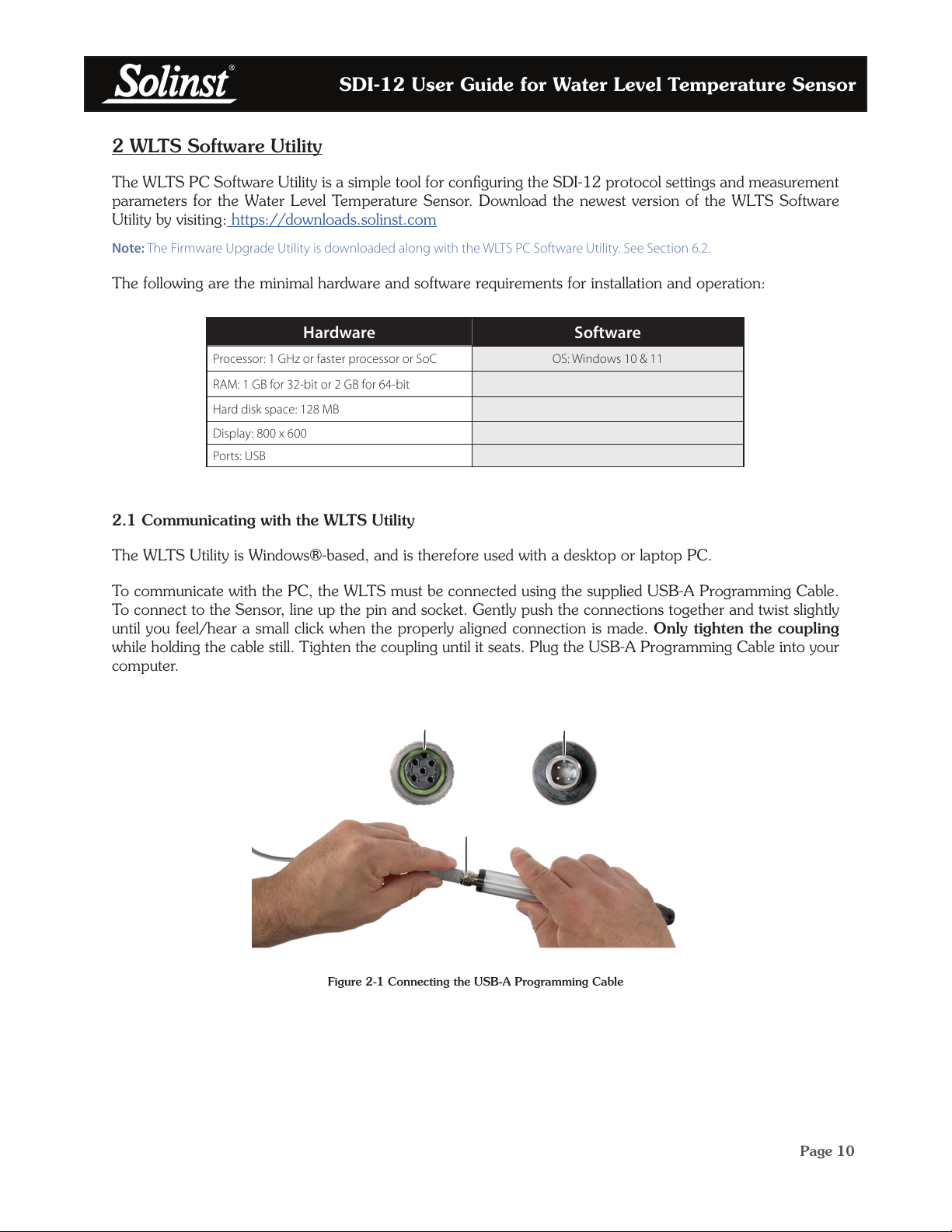
To communicate with the PC, the WLTS must be connected using the supplied USB-A Programming Cable.
To connect to the Sensor, line up the pin and socket. Gently push the connections together and twist slightly
until you feel/hear a small click when the properly aligned connection is made. Only tighten the coupling
while holding the cable still. Tighten the coupling until it seats. Plug the USB-A Programming Cable into your
computer.
Figure 2-1 Connecting the USB-A Programming Cable
USB-A Programming Cable
alignment socket
Sensor
alignment pin
Coupling
Inhaltsverzeichnis