
SONIXX X-TOUCH Bedienungsanleitung


English ….……...................
Deutsch ………...................
Français ………................
Italiano ………..................
Espanol ..……..................
3
8
13
18
23

3
ENGLISH
CONTENTS
Sonixx X-Touch Bluetooth Headset ..............................................................................
Product contents and features .....................................................................................
Quick start ....................................................................................................................
Charging and audio only mode ....................................................................................
Switching on/off ............................................................................................................
Wearing the headset ...................................................................................................
Bluetooth connection ...................................................................................................
Controls ........................................................................................................................
Care and maintenance ................................................................................................
SONIXX X-TOUCH BLUETOOTH HEADSET
The Sonixx X-Touch is a stereo wireless headset system featuring Bluetooth V3.0
technology and X-Touch Swipe control of your music and calls. The light weight,
comfortable t and foldable design make them the perfect choice for portable
headphones.
3
4
5
5
5
5
6
6
7

4
ENGLISH
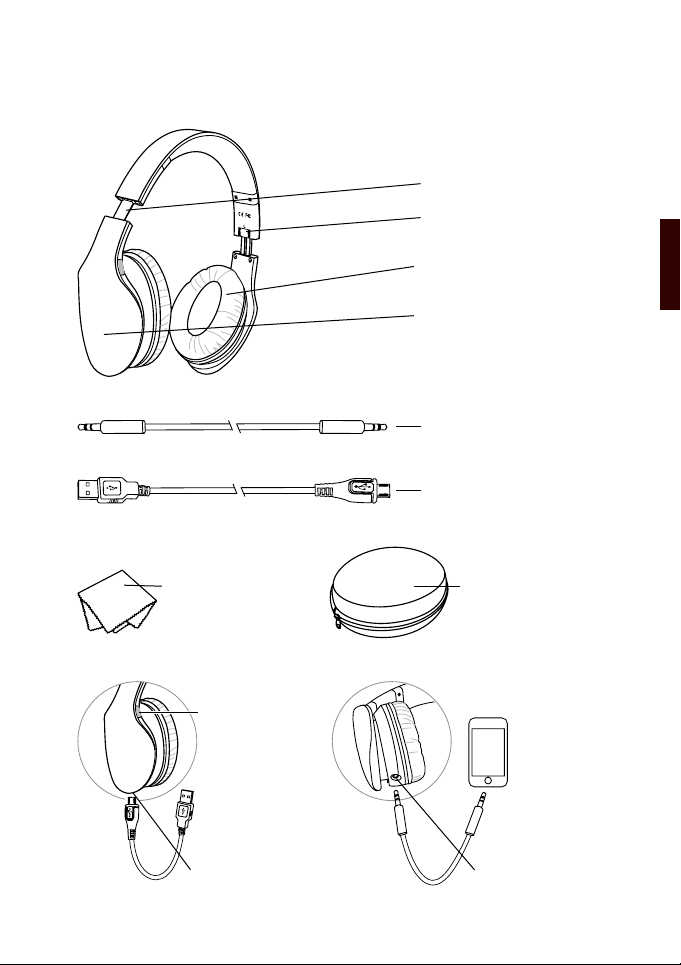
PRODUCT CONTENTS & FEATURES
Adjustable headband
Folding mechanism for
compact storage
Soft-cushioned Circumaural
Earpads
Swipe Control Surface
3.5mm Audio Cable (1m)
Carry Case
3.5mm SocketUSB Charging Socket
Cleaning Cloth
Multi-function
button (MFB)
& LED Indicator
USB Charging Cable

5
ENGLISH
QUICK START
Note:
The X-Touch will also enter pairing mode if it cannot connect to any previously paired
devices.
CHARGING AND AUDIO ONLY MODE
Connect the USB cable to the spare USB port of any PC or Mac with the Micro-USB
connector plugged into the charging socket on the headphones. A full charge from
a at battery should take approximately 2-3 hours. The indicator on the right side of
the earcup lights up red to indicate that the headset is charging. Once charging is
complete, the indicator light will turn off.
When the battery is at you can still use the X-Touch via the included audio cable,
however the X-Touch swipe controls and telephone features are no longer active.
SWITCHING ON/OFF
Press and hold the MFB for 2 seconds to switch the X-Touch on, continue to hold for a
further 2 seconds to enter pairing mode.
Press and hold the MFB for 4 seconds to switch the headphones off, pressing and
holding for 2 seconds will activate voice control on your smartphone.
WEARING THE X-TOUCH
Adjust the band without forcing it, so that the headphones will t comfortably over
your ears. Use the letters L and R on the inside of the headphones to distinguish
between left and right. The Bluetooth antenna is on the right side of the headphones
so for optimal connectivity keep your Bluetooth enabled device on your right hand side
so that the Bluetooth signal does not have to pass through your body. Your body is
approximately 60% water and water blocks low power radio signals such as Bluetooth.
1. Ensure the headphones are
switched off
2. Press and hold the multi-function
button for approximately 4
seconds until the LED ashes
blue and red alternately
3. Search for the X-TOUCH on your
Bluetooth enabled device and
pair accordingly
6
ENGLISH
BLUETOOTH CONNECTION
Before the Sonixx X-Touch can be used with your smartphone or Bluetooth enabled
audio player the two devices must be paired together as instructed via the quick
start guide. Once the two devices have been paired successfully they will now pair
automativally each time the X-Touch is switched on and in range. It is not possible to
simultaneously connect more than one device to the X-Touch.
CONTROLS
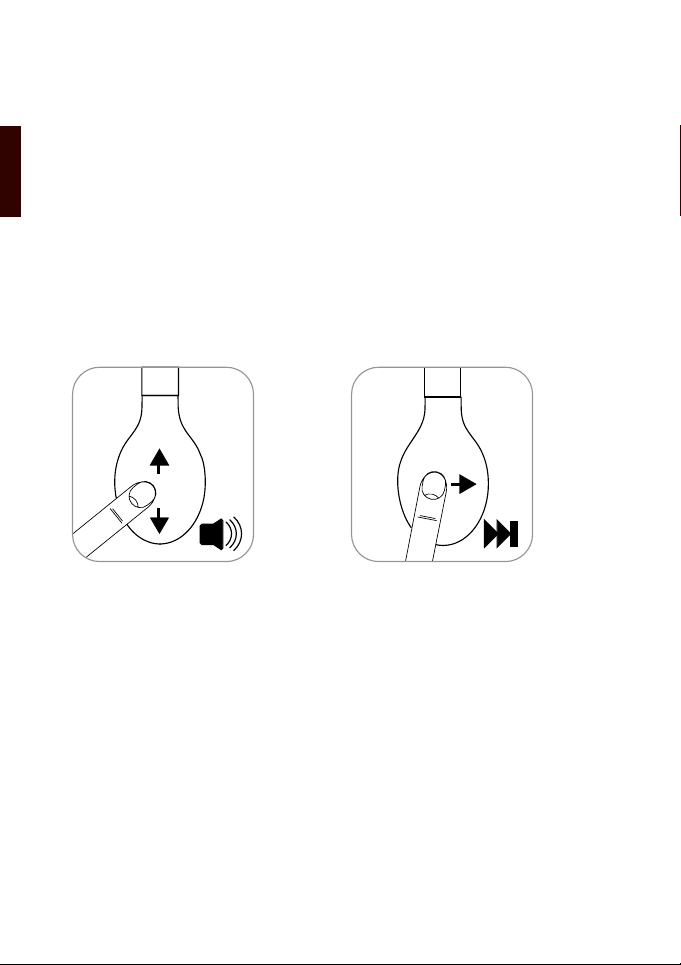
The X-Touch Swipe control feature is on the right hand earpiece.
For best results swipe your nger gently and slowly across the panel either all the
way up, down or side to side. Each swipe is an incremental change in either volume
or track control, therefore a faster or longer swipe will not change the volume or track
number any differently to a slower swipe movement.
Volume
To increase the volume, swipe your nger upward on the touch sensitive panel.
To decrease the volume, swipe your nger downward on the touch sensitive panel.
Next/Previous
To return to the previous track, swipe your nger backward on the touch sensitive
panel.
To move to the next track, swipe your nger forward on the touch sensitive panel.
Play/Pause
Press the MFB button momentarily to play and pause music.
Telephone
Press the MFB button momentarily to answer an incoming phone call
Press the MFB button again to end the call
Press the MFB button twice to call the last number dialled

7
ENGLISH
CARE AND MAINTENANCE
Read the following recommendations before using the headset. Following these you
will be able to enjoy the product for many years.
• Do not expose the headset to liquid, moisture or humidity to avoid the product’s
internal circuit being affected.
• Don’t use abrasive cleaning solvents to clean the headset.
• Do not expose the headset to extremely high or low temperature as this will
shorten the life of electronic devices, destroy the battery or distort certain plastic
parts.
• Don’t dispose of the headset in a re as it will result in an explosion.
• Don’t expose the headset to contact with sharp objects as this will cause
scratches and damage.
• Don’t let the headset fall down onto the oor. The internal circuit might get
damaged.
• Don’t attempt to disassemble the headset as it may get damaged if you are not
a professional.
If the headset doesn’t function properly, please return it to the vendor who will deal
with any warranty replacements.
Warning: Excessive pressure from headphones can cause hearing loss.

8
DEUTSCH
INHALT
Sonixx X-Touch Bluetooth Headset ..............................................................................
Produkt Inhalt und Funktionen .....................................................................................
Schnellstartanleitung ....................................................................................................
Lade-und Audio-Modus ................................................................................................
Ein-/ Ausschalten .........................................................................................................
Tragen Sie das Headset ...............................................................................................
Bluetooth-Verbindung ................................................................................................... .
Bedienelemente ...........................................................................................................
Pege und Wartung ......................................................................................................
Sonixx X-TOUCH BLUETOOTH HEADSET
Die Sonixx X-Touch ist ein Stereo-Headset-System mit Bluetooth V3.0-Technologie
und X-Touch Swipe Kontrolle über Ihre Musik und Anrufe. Das geringe Gewicht,
Tragekomfort und faltbare Design machen sie die perfekte Wahl für portable
Kopfhörer.
8
9
10
10
10
10
11
11
12
9
DEUTSCH
PRODUKT INHALT UND FUNKTIONEN
Einstellbare Kopfbügel
Klappmechanismus für
kompakte Lagerung
Weich gepolstert Circumau-
ral Ohrpolster
Touch-Control-Oberäche
3,5 mm Audio-Kabel (1m)
Kopfhörer Fall
3,5 mm BuchseUSB Ladebuchse
Reinigungstuch
Multi-Funktions-
Button (MFB)
& LED-Anzeige
USB-Ladekabel

10
DEUTSCH
Schnellstartanleitung
Hinweis:
Die X-Touch wird auch in den Pairing-Modus, wenn es zu keinen zuvor gepaarten
Geräte verbinden können.
Lade-und Audio-Modus
Verbinden Sie das USB-Kabel an den freien USB-Port eines PC oder Mac mit dem
Micro-USB-Anschluss eingesteckt in die Ladebuchse am Kopfhörer. Eine vollständige
Ladung aus einer achen Batterie dauert etwa 2-3 Stunden. Die Anzeige auf der
rechten Seite der Hörmuschel leuchtet rot, um anzuzeigen, dass das Headset
aufgeladen wird. Sobald der Ladevorgang abgeschlossen ist, leuchtet die Anzeige
auszuschalten.
Wenn die Batterie leer ist, können Sie immer noch die Sonixx X-Touch über das
mitgelieferte 3,5 mm-Klinke auf Klinke Audiokabel. In dieser Situation sind die X-Touch
Swipe Kontrollen und Telefon-Funktionen sind nicht mehr aktiv.
Ein-/ Ausschalten
Drücken und halten Sie die MFB für 2 Sekunden, um die X-Touch einschalten,
weiterhin für weitere 2 Sekunden gedrückt halten, um den Pairing-Modus zu gelangen.
Drücken und halten Sie die MFB für 4 Sekunden, um die Kopfhörer auszuschalten,
drücken und halten für 2 Sekunden aktivieren Sprachsteuerung auf Ihrem
Smartphone.
TRAGEN DES X-TOUCH
Stellen Sie die Band, ohne dass es, so dass der Kopfhörer wird bequem über die
Ohren. Die Buchstaben L und R auf der Innenseite des Kopfhörers zwischen links
und rechts zu unterscheiden. Die Bluetooth-Antenne ist auf der rechten Seite des
Kopfhörers so für optimale Konnektivität halten Sie Ihre Bluetooth-fähigen Gerät auf
der rechten Seite, so dass das Bluetooth-Signal nicht durch Ihren Körper passieren.
Ihr Körper ist etwa 60% Wasser und Low-Power-Blöcke Funksignale wie Bluetooth.
1. Sicherstellen, dass die Kopfhörer
ausgeschaltet sind
2. Drücken und halten Sie die
Multifunktionstaste für ca. 4
Sekunden, bis die LED blinkt
abwechselnd blau und rot
3. Suchen Sie nach der X-TOUCH
auf Ihrem Bluetooth-fähigen
Gerät und koppeln entsprechend
Inhaltsverzeichnis
Sprachen:


