Sonosax SX-M2D2 Bedienungsanleitung

Table of Contents
1 Introduction...................................................................................................................................
1.1 Key Features.............................................................................................................. 6
1.2 Typical Applications....................................................................................................6
1.3 Functional Block Diagram...........................................................................................7
2 Panel Descriptions........................................................................................................................ 8
2.1 Front Panel................................................................................................................. 8
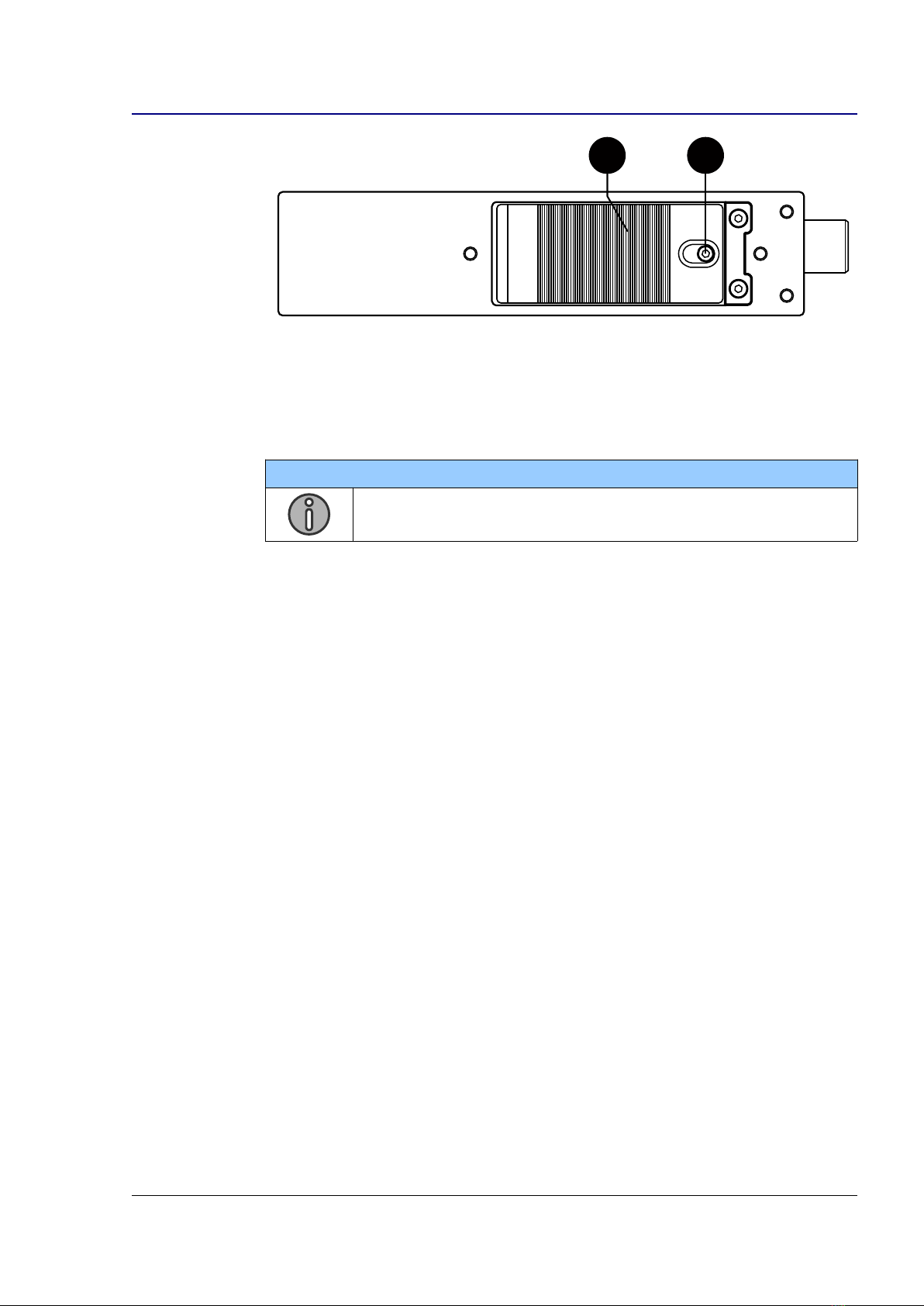
2.2 Rear Panel................................................................................................................. 8
2.3 Left Panel................................................................................................................... 9
3 Powering..................................................................................................................................... 10
3.1 Intelligent Power Management.................................................................................10
3.2 Power Sources.........................................................................................................10
3.3 Li-ion Battery............................................................................................................. 11
3.4 Li-ion Charger........................................................................................................... 11
3. Powering up the SX-M2D2.......................................................................................12
4 User Interface............................................................................................................................. 13
4.1 Interface Overview....................................................................................................13
4.2 Main Screen.............................................................................................................13
4.3 Menu Navigation.......................................................................................................1
4.4 Menu Tree................................................................................................................ 16
4. Main Menu................................................................................................................ 16
4.6 Inputs Menu..............................................................................................................17
4.7 Outputs Menu........................................................................................................... 19
4.8 PHONES, LINE OUT, AES OUT, USB OUT Menus..................................................19
4.9 Output Setup Menu.................................................................................................. 21
4.10 Reference Tone...................................................................................................... 21
4.11 Mixer Menu.............................................................................................................22
4.12 Mix Compressor/Limiter..........................................................................................22
4.13 System Menu..........................................................................................................23
4.14 Meters Menu...........................................................................................................23
4.1 Controls Menu........................................................................................................ 24
4.16 Sampling Frequency Menu.....................................................................................2
4.17 Display Menu..........................................................................................................26
4.18 Factory Default Menu............................................................................................. 26
4.19 Info Menu...............................................................................................................27
4.20 Presets Menu.........................................................................................................27
4.21 Power Menu........................................................................................................... 28
4.22 Power Setup Menu................................................................................................. 28
USB audio interface.................................................................................................................... 29
.1 Supported Hosts....................................................................................................... 29
.2 USB Application examples.......................................................................................29
6 Troubleshooting.......................................................................................................................... 30
6.1 [USB audio] no audio input on Microsoft Windows...................................................30
6.2 [USB audio] USB audio ERROR status....................................................................30
7 Service Mode.............................................................................................................................. 31
7.1 Entering the Service Mode.......................................................................................31
7.2 Firmware Update......................................................................................................31
7.3 Configuration Reset..................................................................................................32
7.4 Test Interface Menu..................................................................................................32
8 Specifications............................................................................................................................. 33
8.1 IN1/IN2 Microphone Preamplifier..............................................................................33
8.2 Digital Domain..........................................................................................................33
8.3 Line Output............................................................................................................... 33
8.4 Phones Output..........................................................................................................34
8. Power....................................................................................................................... 34
8.6 Operating Conditions................................................................................................34
8.7 Mechanical............................................................................................................... 3
9 Connector Pin Assignments........................................................................................................ 36
9.1 Mic/Line analog input (TA-3M)..................................................................................36
9.2 Line output (TA-3M)..................................................................................................36
SX-M2D2+ User Manual 2/37

9.3 AES input/output (TA-3M).........................................................................................36
9.4 Phones 3. mm jack.................................................................................................. 36
9. Power Hirose 4-pin................................................................................................... 36
9.6 USB Audio................................................................................................................36
9.7 USB Power............................................................................................................... 37
SX-M2D2+ User Manual 3/37

Revision History
Revision Date Description
1.0 October 2019 Initial release
1.1 January 2020 Updated to firmware revision 1.1
Fixed document links
1.2 May 2020 Updated to firmware revision 1.2
Le al Notices
Product specifications and features are subject to change without prior notification.
Notes / Warnin s
NOTE
A NOTE provides additional or special information to assist operation
and maintenance personnel
WARNING
A WARNING indicates material to which the reader should play close
attention
Compliances
WEEE Statement
This product is classed as electrical or electronic equipment
within the meaning of the Waste Electrical and Electronic
Equipment (WEEE) Directive 2002 / 96 / EC and must not
be disposed of in domestic household waste.
RoHS
Sonosax complies fully with Restriction of the Use of Certain
Hazardous Substances in Electrical and Electronic
Equipment (RoHS)
SX-M2D2+ User Manual 4/37

1 Introduction
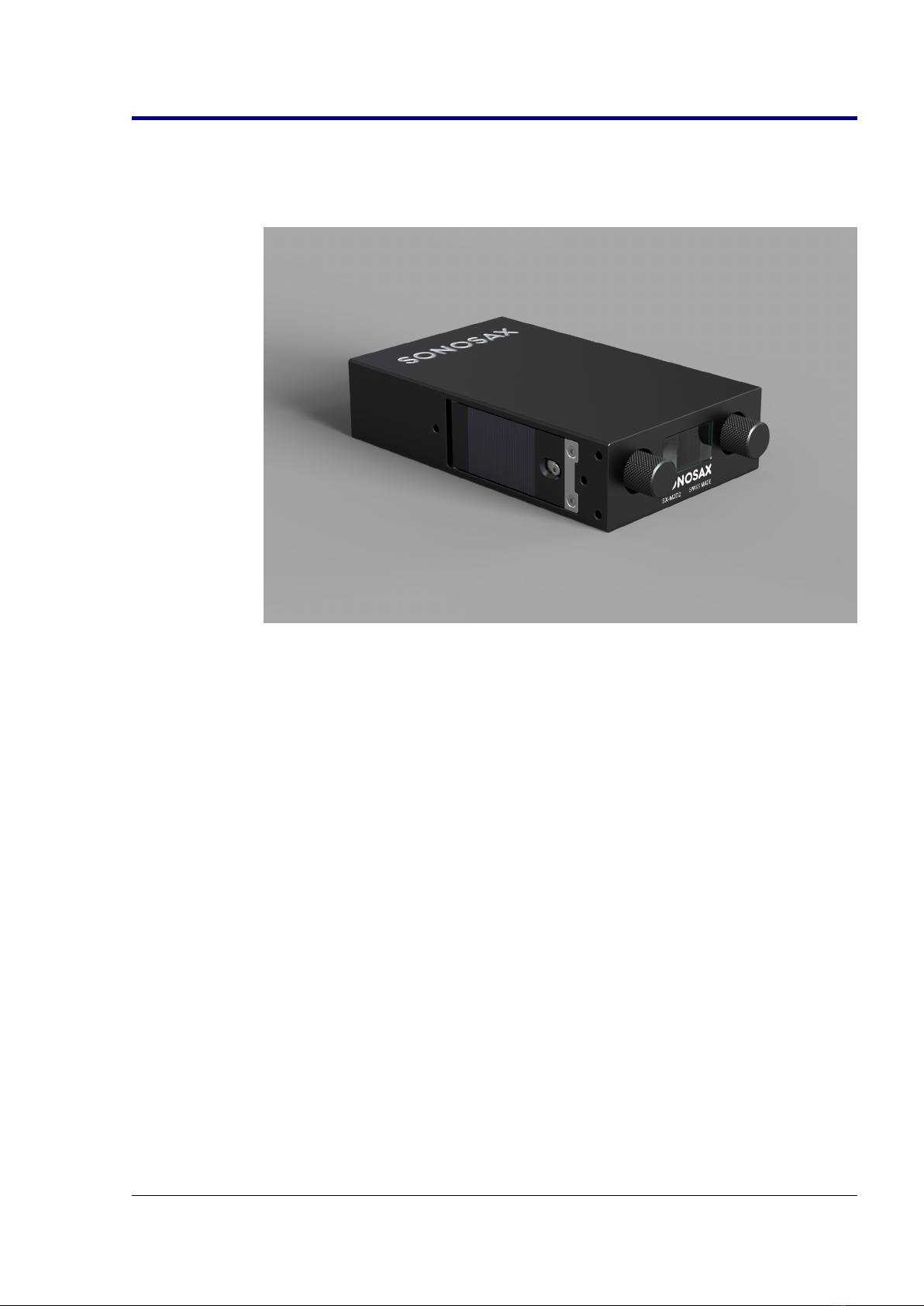
Congratulations! In choosing the SX-M2D2, you have just purchased a very high
quality audio device, the result of the hard work of a team of renowned engineers. For
more than forty years, Sonosax recorders and mixers have been recognized by
professionals around the world for their outstanding technical features and unmatched
musicality.
The tool which you hold in your hands is the latest addition to the range, concentrating
all the brand's know-how into an ultra miniaturized case. It is:
•A very high quality stereo preamplifier
•An analog-to-digital and digital-to-analog converter
•A headphone and monitoring amplifier
•A USB sound card compatible with any type of computer or smartphone
•An audio mixer with integrated compressor-limiter.
An embedded digital matrix allows any input to be routed to any output or to an
internal stereo mixer. The fully digital controls allow menu access to all features with
only two rotary encoders. A high-brightness graphic display shows the available
options and settings as well as four modulometers assignable in pairs to any signal
source. The power supply from a standard battery, recharged in the device,
guarantees hours of autonomy, even if the two power sources available to the SX-
M2D2 are unavailable.
As with all SONOSAX products, the SX-M2D2 is built without any compromise in
quality, using only the best components available and passes stringent quality
controls.
The information and instructions contained in this manual are necessary to ensure
safe operation of your equipment and to maintain it in good working condition; please
read it carefully.
SX-M2D2+ User Manual /37

1.1 Key Features
Inputs / Outputs
•Two mic/line analog inputs with 13 dB dynamic range
•Independent line and headphone outputs
•AES42/AES3 input, AES3 output
•Two Input / Two Output USB audio 2.0 interface (sound card)
•Internal audio matrix allowing complex routing of any input to any output
•Internal six input mixer with fully configurable compressor-limiter
•Powered by removable Li-ion battery, Hirose or USB with intelligent energy
management
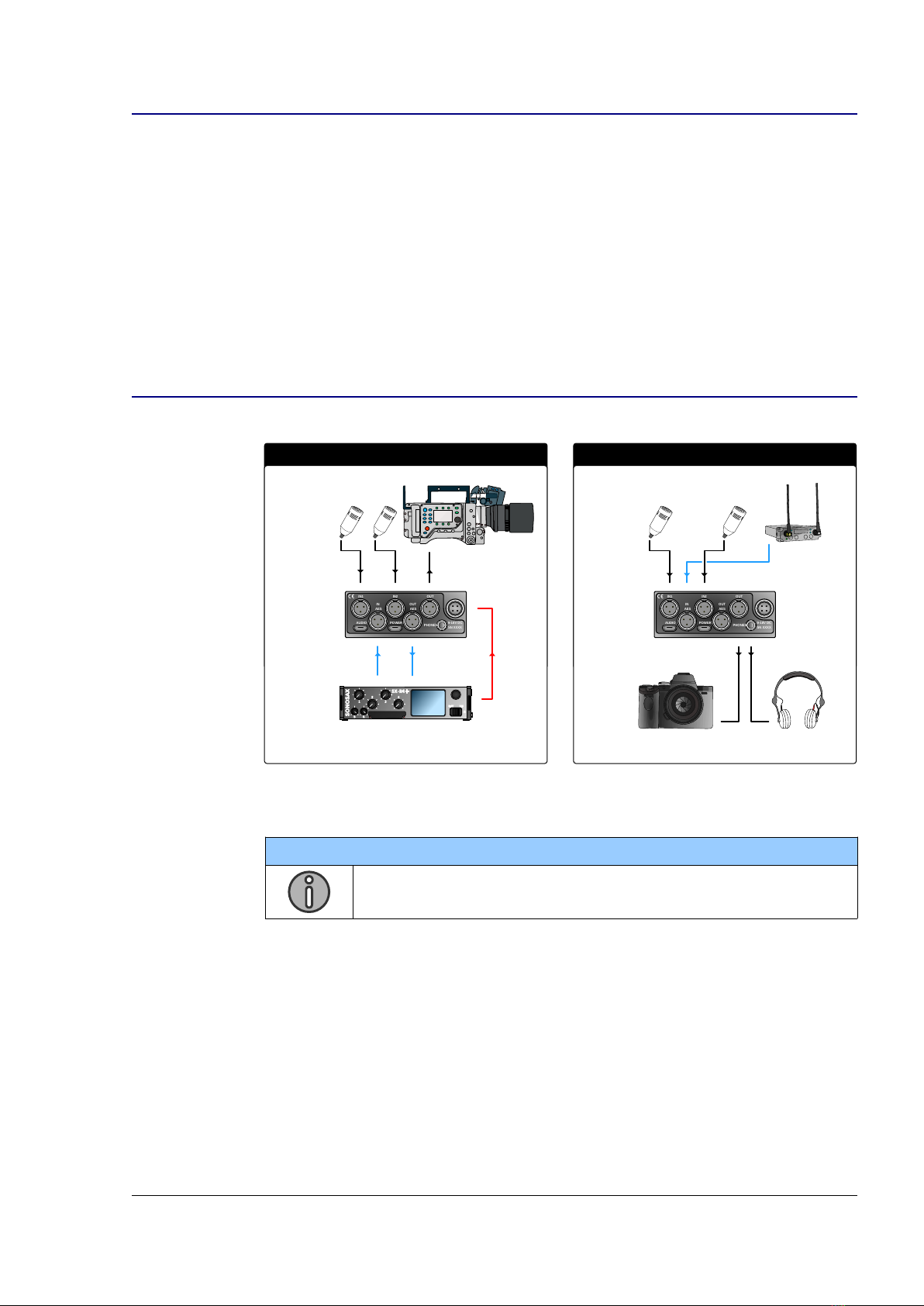
1.2 Typical Applications
2 channels A/D + D/A extension box Preamplifer for Camera
AES
RX1 RX2
PHONES
POWER
IN2
OUT
IN1
AUDIO
IN
AES
AES
OUT
9-18V DC
SN XXXX
PHONES
POWER
IN2
OUT
IN1
AUDIO
IN
AES
AES
OUT
9-18V DC
SN XXXX
PWR
AES
NOTE
See USB Application examples at page 29.
SX-M2D2+ User Manual 6/37

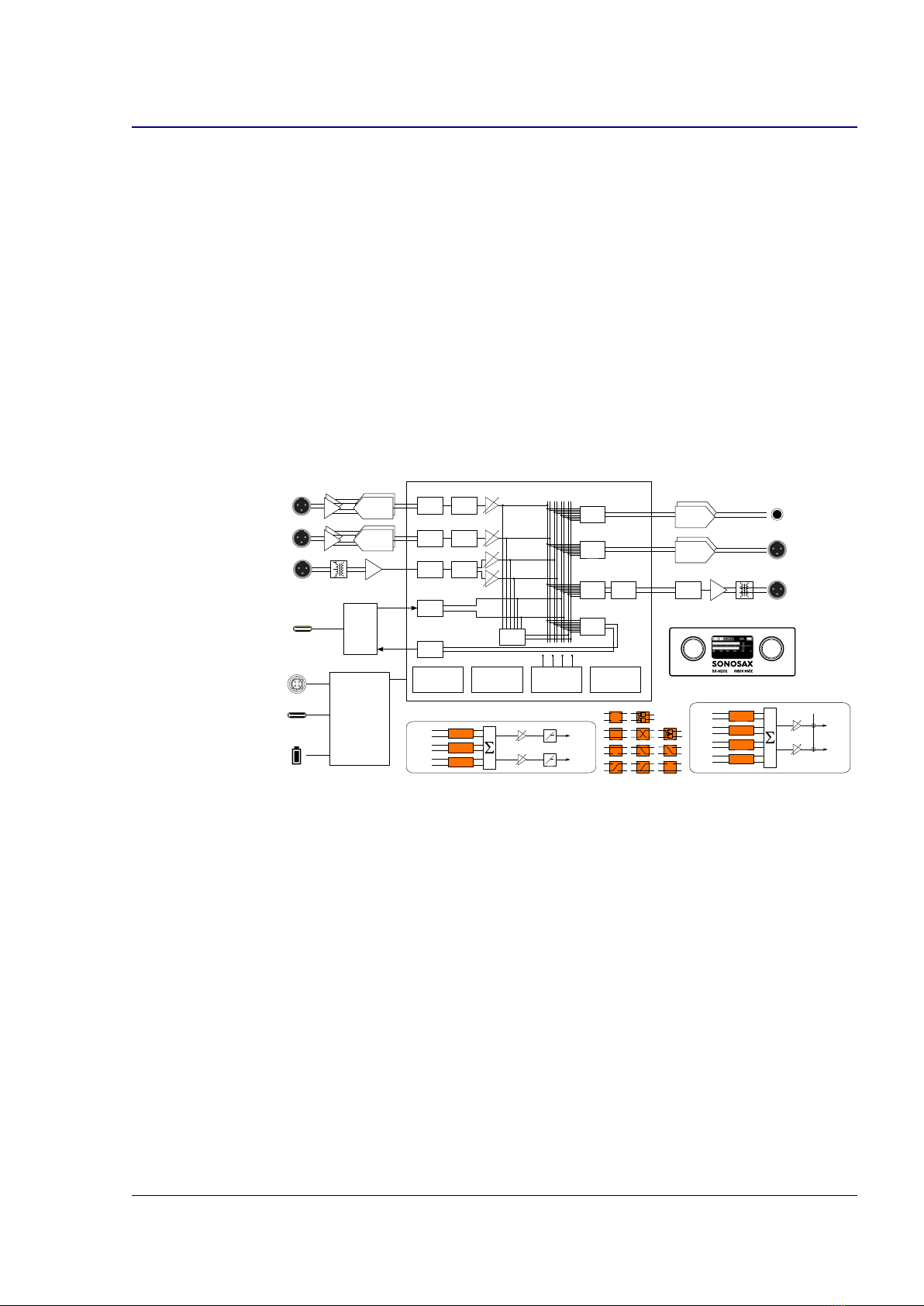
1.3 Functional Block Dia ram
The SX-M2D2 overall block diagram consists of the following:
•2 mic/line inputs with +20dB pre-gain, dual ADC converters, Low Frequency
cut and gain stage
•AES42/AES3 digital input with Asynchronous Sample Rate Converter (ASRC)
and gain stage
•USB audio interface with ASRC
•Phones, Line and AES outputs (AES with its own clock domain)
•Power Supply Unit (PSU)
•6 to 2 channels mixer (MIX) with compressor/limiter
•4x 2 channel output monitoring (MON)
•2 or 4 channels meters
•User Interface: 2 rotary encoders with push buttons and OLED screen
USB
AUDIO
CLASS 2.0
AES OUT
ADC
ADC
0 / +20 dB
ASRC
ASRC
DAC PHONES
DAC
IN 1
IN 2
AES3
AES42
USB
AUDIO
HIROSE DC IN
9-18V
USB POWER
186 0 LI-ION
REMOVABLE
CELL
PSU
DSP
DUAL-ADC INPUTS
DC/DC
CHARGER
BATTERY GAUGE
D-ADC LF CUT
D-ADC LF CUT
MIX
ASRC
IN1
IN2
AES1
AES2
USB1
USB2
MIX1
MIX2
LINE OUT
METERS
MON
MON
AES
RX
AES
TX
MON
MON
ASRC
POWER
MANAGEMENT
MON
2CH
2CH
2CH
2CH
MIC1
MIC2
AES2
AES1
USB1
USB2
MIX1
MIX2
REF TONE
LEFT
RIGHT
OUTPUT
LEVEL
MIX
MIX L
MIX R
COMPRESSOR
OUTPUT
LEVEL
MIC1 2CH
2CH
2CH
MIC2
AES2
AES1
USB1
USB2
MANAGEMENT
AUDIO
USER INTERFACE
INTERFACE
USER
MONO
STEREO
REV-STEREO M/S
--- (NONE)
1 -> L 1 -> C 1 -> R
2 -> L 2 -> C 2 -> R
SX-M2D2+ User Manual 7/37

2 Panel Descriptions
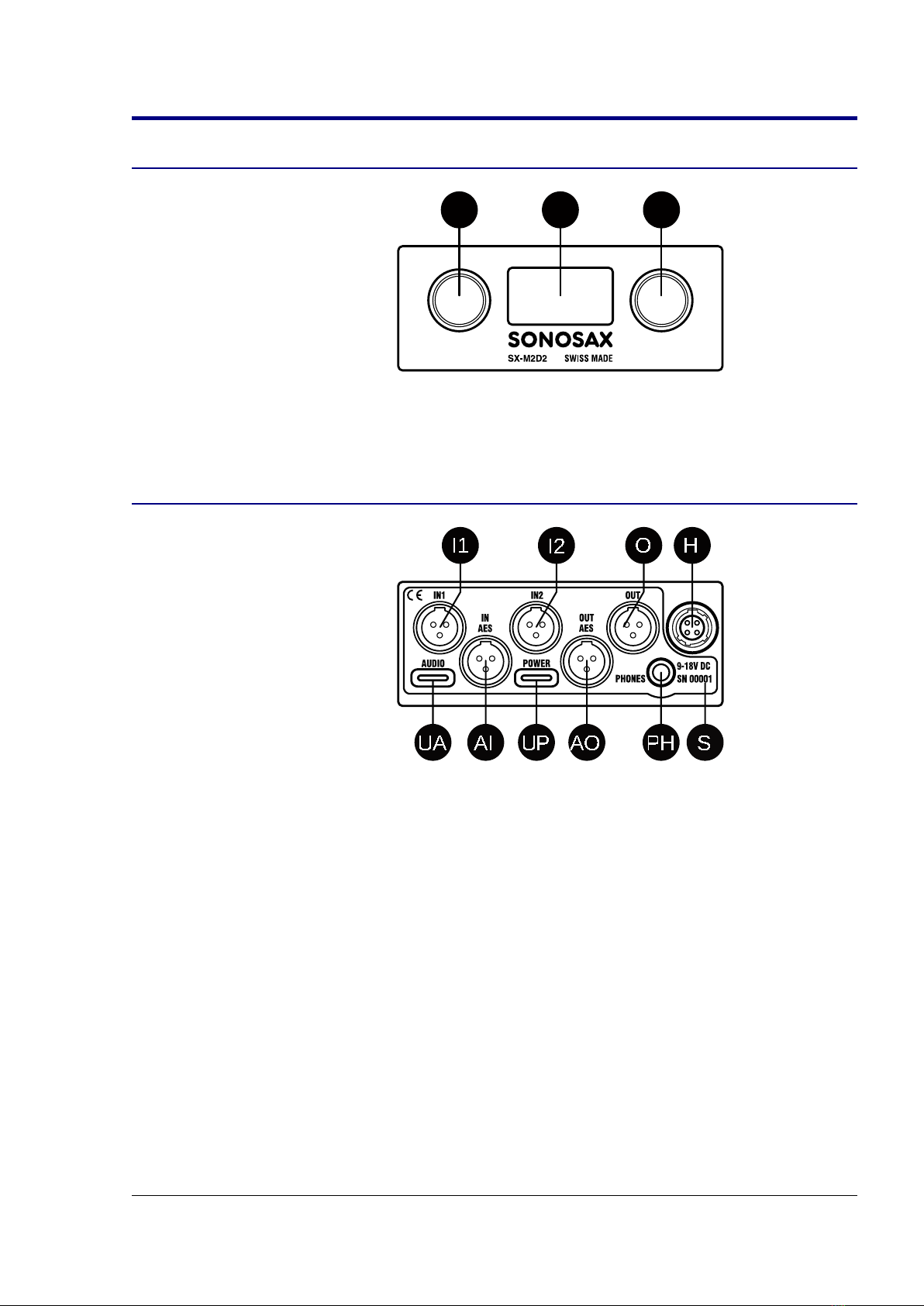
2.1 Front Panel
PL PRD
PL, PR
Left and right rotary encoders with push-
button
D
OLED display
2.2 Rear Panel
I1
I2
O
H
PH
UA
UP
AI
AO
S
I1, I2
Mic/Line analog audio input on TA-3M
O
Line analog audio output on TA-3M
H
External DC input on Hirose 4-pin
S
Serial number marking
UA
USB audio 2.0 on USB type C
UP
External VDC input on USB type C
AI, A0
AES audio input/output on TA-3M
PH
Headphone audio output on 3. mm jack
SX-M2D2+ User Manual 8/37

3 Powerin
3.1 Intelli ent Power Mana ement
The SX-M2D2's intelligent power management is a combination of hardware and
software which optimizes the distribution and use of electrical power.
It includes the following:
•High efficiency current limited switching power supplies with automatic load
prioritization
•Automatic battery charger, low-voltage battery pre-conditioning, detection of
faulty cells and thermal monitoring for charging pause in case of overheating
•Ultra low standby current
•Removable battery charge state and voltage measurement
•Under-voltage automatic power-down
•Smart load shedding, which shuts down unused inputs and outputs
•Display auto-off
3.2 Power Sources
The SX-M2D2 has two external power connectors and an integrated battery.
The battery must be present in the device to ensure that all functions are always
available.
These sources are independent and can be used simultaneously to prevent a power
failure.
When a power source is disconnected (or fails), the SX-M2D2 automatically switches
to an available power source.
This list reflects the SX-M2D2 power sourcing priority:
1. Hirose 4-pin connector
2. USB Power connector
3. Removable Li-ion battery cell
NOTE
USB Power input can drain up to 1.3A
WARNING
The battery must be present in the device to ensure that all functions are
always available.
The SX-M2D2 can be powered by an external source, without a battery
for a few moments when replacing a discharged battery with a charged
one.
SX-M2D2+ User Manual 10/37
Andere Handbücher für SX-M2D2
1
Inhaltsverzeichnis
Andere Sonosax Aufnahmegeräte Handbücher
Beliebte Aufnahmegeräte Handbücher anderer Marken

Strymon
Strymon NIGHTSKY Bedienungsanleitung

Mitsubishi Electric
Mitsubishi Electric 16CH DIGITAL RECORDER DX-TL5000U Bedienungsanleitung

Tews Technologies
Tews Technologies TPMC465 Bedienungsanleitung

Honeywell
Honeywell Excel 50 Bedienungsanleitung

SeaLevel
SeaLevel COMM+8.LPCI Bedienungsanleitung

Arturia
Arturia AUDIOFUSE STUDIO Bedienungsanleitung