sparkfun ESP32 Technisches Dokument

MicroMod ESP32 Processor Board Hookup Guide
Introduction
Introducing the SparkFun MicroMod ESP32 Processor Board! This bad boy pops an M.2 connector onto the
ESP32 so you can take advantage of all that lovely ESP32 power with any of our MicroMod carrier boards. Grab
yourself an ESP32 MicroMod Processor Board and let's dive in!
SparkFun MicroMod ESP32 Processor
WRL-16781
Product Showcase: SparkFun MicroMod EcosystemProduct Showcase: SparkFun MicroMod Ecosystem

Required Materials
In addition to your ESP32 Processor Board, you'll need a carrier board to get started. Here we use the Input and
Display Carrier Board, but there are a number of others you can choose from.
You'll also need a USB-C cable to connect the Carrier to your computer and if you want to add some Qwiic
breakouts to your MicroMod project you'll want at least one Qwiic cable to connect it all together. Below are some
options for both of those cables:
SparkFun MicroMod Machine Learning Carrier
Board
DEV-16400
SparkFun MicroMod ATP Carrier Board
DEV-16885
SparkFun MicroMod Input and Display Carrier
Board
DEV-16985
SparkFun Qwiic Cable Kit
KIT-15081
Qwiic Cable - 100mm
PRT-14427

Depending on which Carrier Board you choose, you may need a few extra peripherals to take full advantage of
them. Refer to the Carrier Boards' respective Hookup Guides for specific peripheral recommendations.
Suggested Reading
The SparkFun MicroMod ecosystem is a unique way to allow users to customize their project to their needs. Do
you want to send your weather data via a wireless signal (eg. Bluetooth or WiFi)? There's a MicroMod processor
for that. Looking to instead maximize efficiency and processing powere? You guessed it, there's a MicroMod
processor for that. If you are not familiar with the MicroMod system, take a look here:
MicroMod Ecosystem
We recommend taking a look through the following tutorials if you are not familiar with the concepts covered in
them:
Reversible USB A to C Cable - 2m
CAB-15424
USB 3.1 Cable A to C - 3 Foot
CAB-14743
Getting Started with MicroMod
Dive into the world of MicroMod - a compact interface
to connect a microcontroller to various peripherals via
the M.2 Connector!
New!
Designing with MicroMod
This tutorial will walk you through the specs of the
MicroMod processor and carrier board as well as the
basics of incorporating the MicroMod form factor into
your own PCB designs!
New!

Hardware Overview
In this section we'll cover what's included on the MicroMod ESP32 Processor Board.
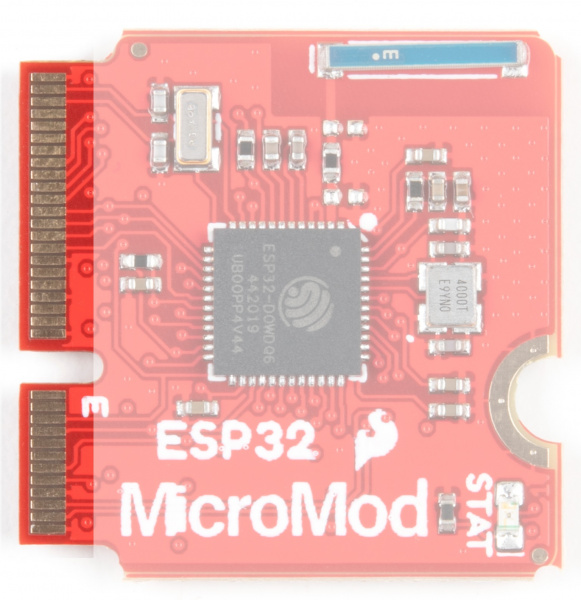
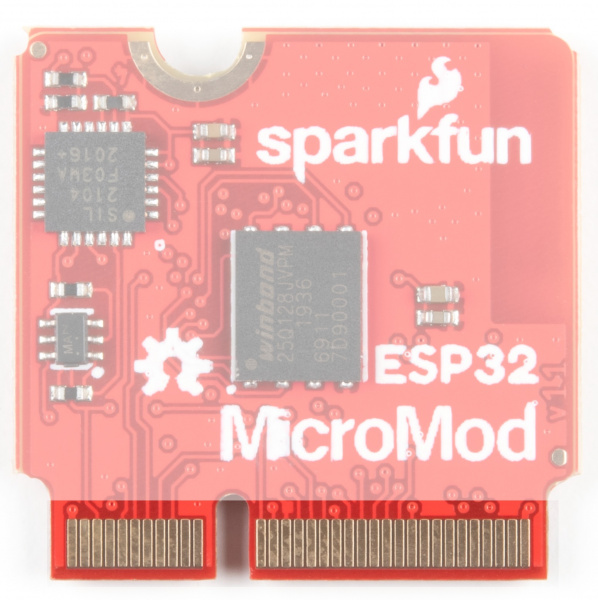
M.2 Connector
All of our MicroMod Processor boards come equipped with the M.2 MicroMod Connector, which leverages the
M.2 standard and specification to allow you to install your MicroMod Processor board on your choice of carrier
board.
M2 Connector from the Front M2 Connector from the Back
Espressif ESP32
Ahhh, the Espressif ESP32. It's one of the most unique microcontrollers on the market. In it's native form, it has a
laundry list of features. On the MicroMod Processor Board, we include the following:
Dual-core Tensilica LX6 microprocessor
Up to 240MHz clock frequency
SparkFun MicroMod Input and Display Carrier
Board Hookup Guide
A short Hookup Guide to get started with the SparkFun
MicroMod Input and Display Carrier Board
New!

520kB internal SRAM
Integrated 802.11 B/G/N WiFi transceiver
Integrated dual-mode Bluetooth (classic and BLE)
2.7 to 3.6V operating range
500µA sleep current under hibernation
10-electrode capacitive touch support
Hardware accelerated encryption (AES, SHA2, ECC, RSA-4096)
16MB Flash Storage
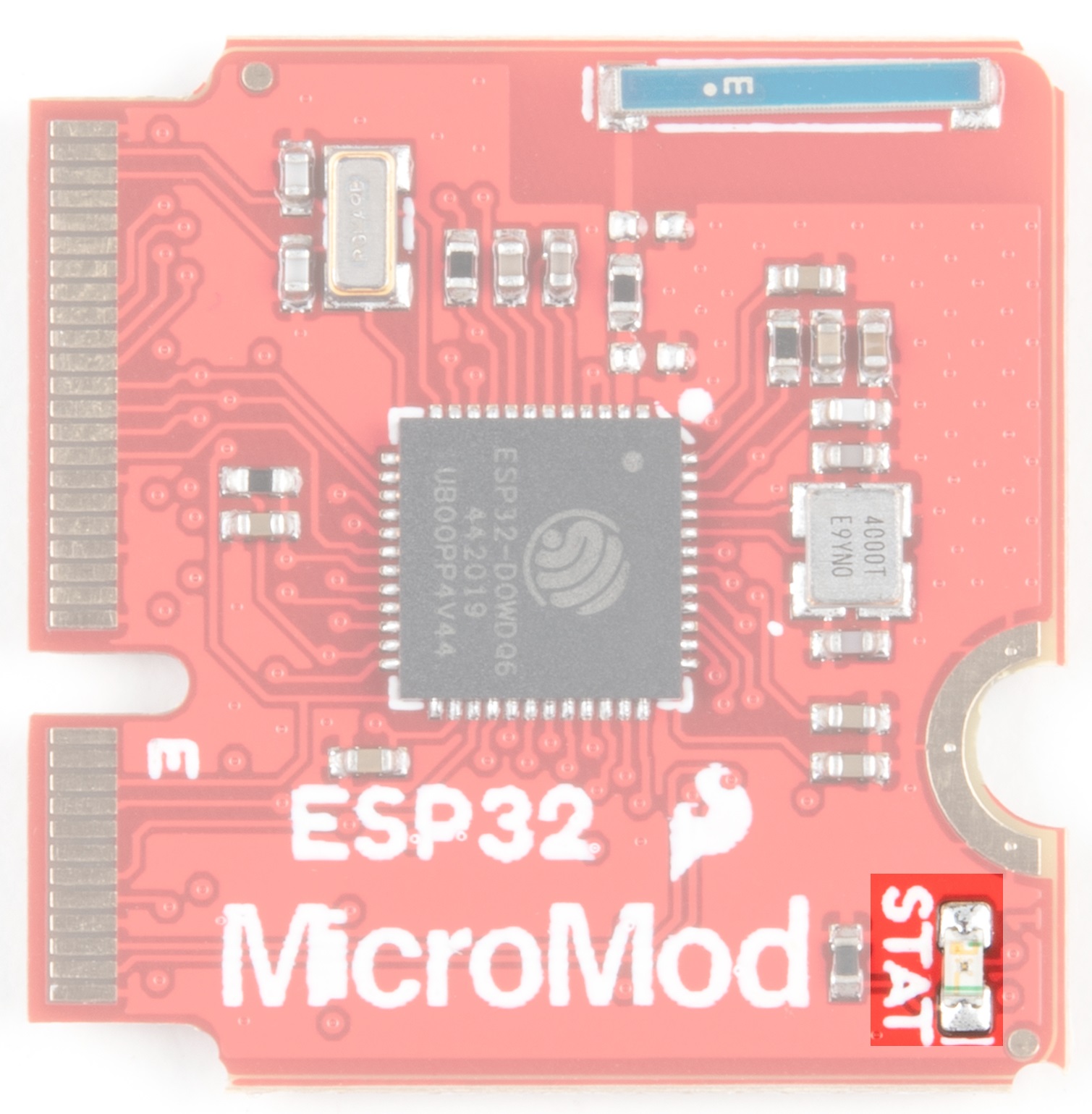
Stat LED
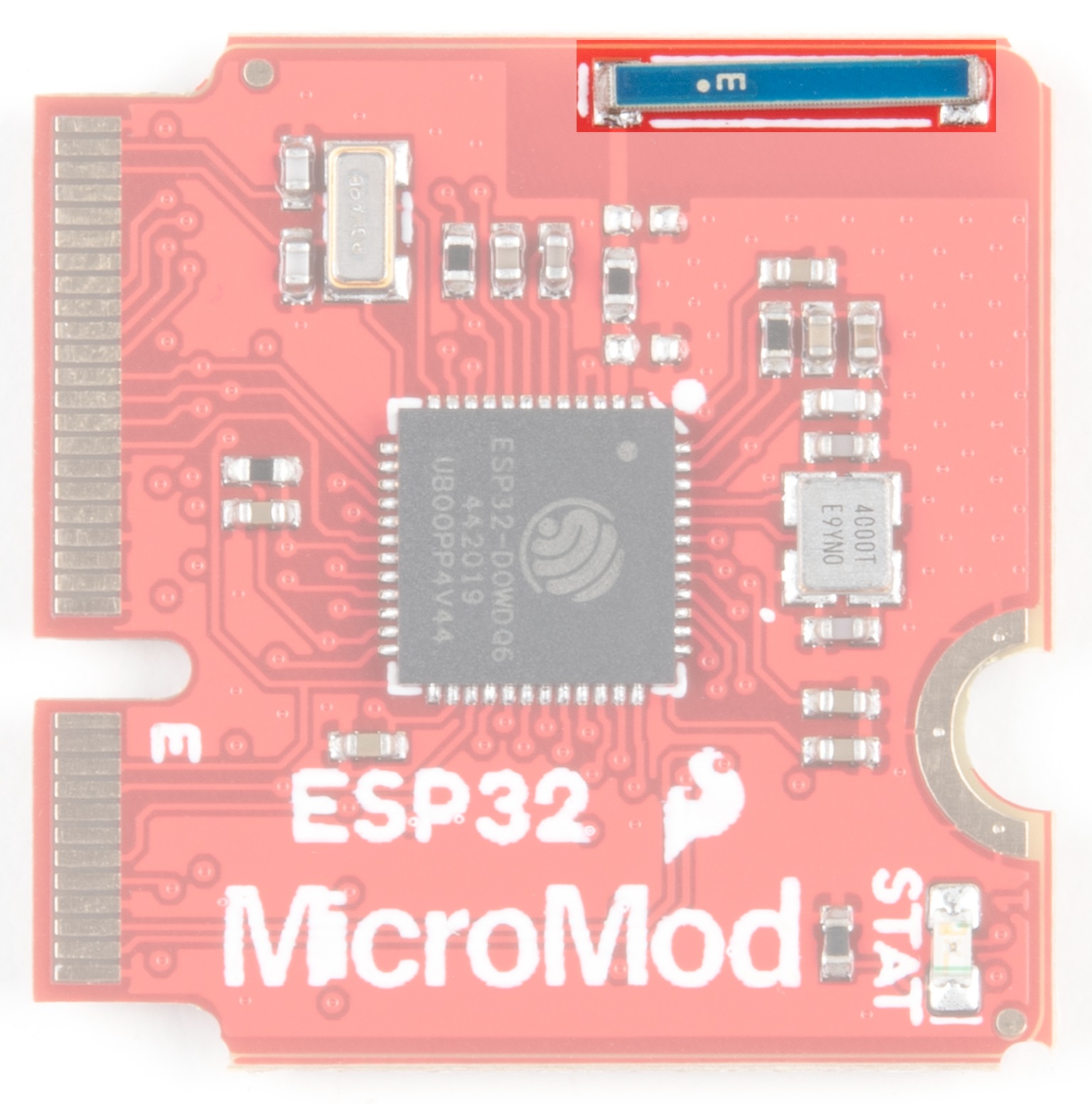
Wireless Antenna
Need wireless? The Espressif chip provides built-in BLE as well as a WiFi transceiver which sends and receives
data through a 2.4GHz Antenna.

PinOut Notes
The ESP32 MicroMod has a few quirks. The ESP32's GPIO pins provide a lot of flexibility with what each pin can
be used for. Whether it's I C, I S, SPI, UART, or PWM, the ESP32 MicroMod can do just about everything!
However, with that flexibility and a fixed number of GPIO pins, the ESP32 isn't able to do it all at the same time.
Below is a list of protocols the ESP32 supports, but pay close attention to the pins used, because some pins are
assigned to two or possibly three functions.
Strapping Pins
One of the unique aspects of the ESP32 is the strapping pins. When the ESP32 comes out of reset, or as power is
supplied, there are a few pins which control the behavior of the board. For a detailed description of these pins,
check out the ESP32 Boot Mode Selection page on espressif's GitHub page. As a summary the strapping pins
are:
GPIO 0
Having GPIO 0 pulled low as the ESP32 comes out of reset will enter the serial bootloader. Otherwise, the board
will run the program stored in flash. On the MicroMod Processor, this pin is pulled high externally through a 10k
resistor, and is connected to the boot button on the carrier boards, which can pull the pin low.
GPIO 2
Having GPIO 2 pulled high as the ESP32 comes out of reset will prevent the board from entering the serial
bootloader. On the MicroMod Processor, this pin is connected to the status LED (active high) and does not
interfere with the board from being able to enter the serial bootloader.
GPIO 12
If driven high, the flash voltage (VDD_SDIO) is set to 1.8V. If unconnected or pulled low, VDD_SDIO is set to 3.3V.
The flash IC used on the MicroMod Processor has a minimum voltage of 2.7V, which would create a brownout
condition and might corrupt the data stored to the flash, or simply prevent the program from running. On the
ESP32 MicroMod Processor, this pin is connected to PWM1.
GPIO 15
2 2

If driven low, the boot messages printed by the ROM bootloader (at 115200 baud) are silenced. If unconnected or
driven high, the messages will be printed as they normally are. On the ESP32 MicroMod Processor, this pin is
connected to G0.
I C
We love us some I C! We've broken out two I C buses, which can be used with our Qwiic system. The main I C
bus has dedicated GPIO pins 21/22 connected to MicroMod pads 12/14, along with a dedicated interrupt pin
connected to GPIO pin 4, which is connected to pad 16 of the MicroMod connector.
If you need a second I C bus, the ESP32 uses GPIO pins 25/26 (pads 42/44 on the MicroMod) for SCL1 and
SDA1.
Note: The secondary I C bus is shared with G1 and G2, as well as the I S bus pins for AUD_LRCLK and
AUD_BCLK.
UART
The ESP32 Processor has two UARTs available. The primary UART has dedicated GPIO pins 1 and 3 which can
be used for programming as well as printing debug messages to a terminal window. These GPIO pins aren't
directly broken out, but instead are converted to USB which is connected to MicroMod pads 3 and 5.
The second UART is connected GPIO pins 16 and 17 (pads 19 and 17 on the MicroMod) for RX1 and TX1.
Note: The secondary UART is shared with G3 and G4, as well as the I S bus pins for AUD_OUT, and
AUD_IN.
GPIO/BUS
The MicroMod connector supports a total of 12 general purpose IO pins, 7 of which are used on the ESP32
Processor, on top of the 6 dedicated pins. The dedicated pins are just that, and are not shared with any other pin,
unlike the general purpose pins which may be shared with other pins. The pins used are:
Dedicated Pins
A0 - GPIO pin 34, pad 34 on the MicroMod (Input Only!)
A1 - GPIO pin 35, pad 38 on the MicroMod (Input Only!)
D0 - GPIO pin 14, pad 10 on the MicroMod
D1 - GPIO pin 27, pad 18 on the MicroMod
PWM0 - GPIO pin 13, pad 32 on the MicroMod
PWM1 - GPIO pin 12, pad 47 on the MicroMod
General Purpose IO pins
G0 - GPIO pin 15, pad 40 on the MicroMod
G1 - GPIO pin 25, pad 42 on the MicroMod - Shared with the I S bus, and secondary I C bus.
G2 - GPIO pin 26, pad 44 on the MicroMod - Shared with the I S bus, and secondary I C bus.
G3 - GPIO pin 17, pad 46 on the MicroMod - Shared with the I S bus, and secondary UART.
G4 - GPIO pin 16, pad 48 on the MicroMod - Shared with the I S bus, and secondary UART.
G5 - GPIO pin 32, pad 73 on the MicroMod - Shared with the 32KHz RTC crystal.
G6 - GPIO pin 33, pad 71 on the MicroMod - Shared with the 32KHz RTC crystal.
2
2 2 2
2
2 2
2
2 2
2 2
2
2

AUDIO
The ESP32 Processor supports audio using the I S standard. The pins used are:
AUD_OUT - GPIO pin 17, pad 56 on the MicroMod, this is the digital audio output.
AUD_IN - GPIO pin 16, pad 54 on the MicroMod, this is the digital audio input.
AUD_LRCLK - GPIO pin 25, pad 52 on the MicroMod. Officially called "word select", and also known as
"frame sync".
AUD_BCLK - GPIO pin 26, pad 50 on the MicroMod. Offically called "continuous serial clock, and also
known as the "bit clock"
Note: The I S bus is shared with the secondary UART, secondary I C bus, and gernal purpose pins G1-G4.
SPI
The MicroMod standard supports two Serial Peripheral Interface (SPI) buses, but because of the limited GPIO pins
here, only the primary SPI bus is used. This primary SPI bus is dedicated to the following pins:
SCK - This is the clock pin, which is connected to GPIO 18, or MicroMod pad 57.
SDO - This is the serial data output of the ESP32, which is connected to GPIO 23, or MicroMod pad 59.
SDI - This is the serial data input of the ESP32, which is connected to GPIO 19, or MicroMod pad 61.
#CS - This is the chip select pin, which is connected to GPIO 5, or MicroMod pad 55.
Note: You may not recognize the COPI/CIPO labels for SPI pins. SparkFun is working to move away from
using MISO/MOSI to describe signals between the controller and the peripheral. Check out this page for
more on our reasoning behind this change.
ESP32 MicroMod Processor Pin Functionality
AUDIO UART GPIO/BUS I C SDIO SPI0 Dedicated
ESP32
Pin
Alternate Function Primary
Function
Bottom
Pin
Top
Pin
Primary
Function
Alternate Function ESP
Pin
73 G5 RTC 32
71 G6 RTC 33
61 SPI_CIPO 19
59 SPI_COPI 23
2
2 2
ESP32 PROCESSOR BOARD PINOUT TABLE
MICROMOD GENERAL PINOUT TABLE
MICROMOD GENERAL PIN DESCRIPTIONS
2

Board Dimensions
57 SPI_SCK 18
17 AUD_OUT TX1 G3 56 55 SPI_CS# 5
16 AUD_IN RX1 G4 54 53 SCL1 G1 AUD_LRCLK 25
25 AUD_LRCLK SCL1 G1 52 51 SDA1 G2 AUD_BCLK 26
26 AUD_BCLK SDA1 G2 50 49 BATT_VIN3 39
16 AUD_IN RX1 G4 48 47 PWM1 12
17 AUD_OUT TX1 G3 46
26 AUD_BCLK SDA1 G2 44
25 AUD_LRCLK SCL1 G1 42
15 G0 40 39 GND
35 A1 38
34 A0 34
13 PWM0 32
19 G4 RX1 AUD_IN 16
27 CAM_TRIG D1 18 17 G3 TX1 AUD_OUT 17
4I C
Interrupt
16
22 SCL 14
21 SDA 12 11 BOOT
14 D0 10 9 USB_VIN
7GND
RESET 6 5 USB_D-
3USB_D+
3.3V 2 1 GND
2

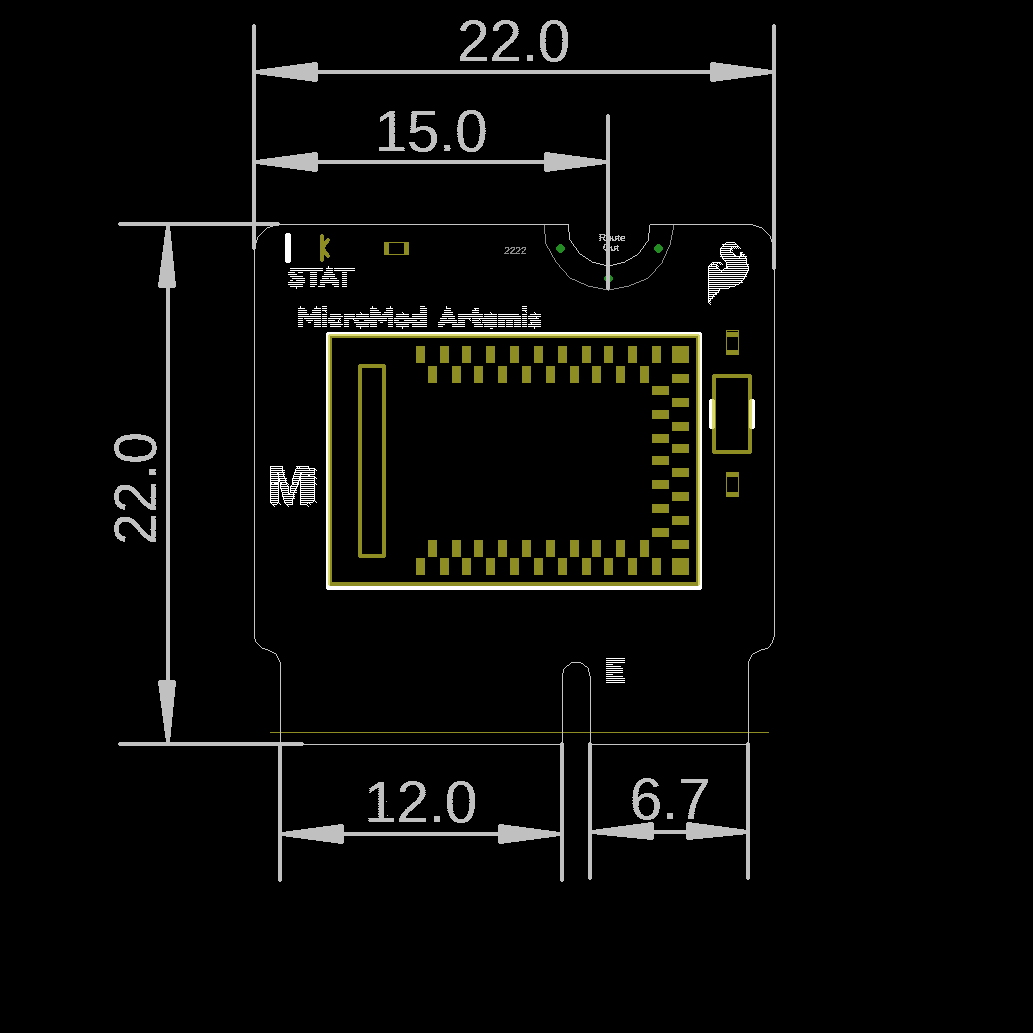
The board measures 22mm x 22mm, with 15mm to the top notch and 12mm to the E key. For more information
regarding the processor board physical standards, head on over to the Getting Started with MicroMod tutorial and
check out the Hardware Overview section.
Hardware Hookup
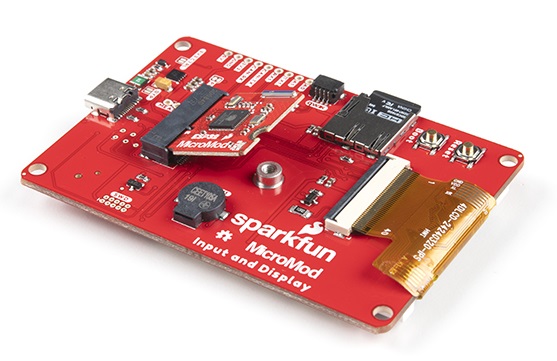
To get started with the ESP32 Processor Board, you'll need a carrier board. Here we are using the MicroMod Input
and Display Carrier Board. Align the top key of the MicroMod ESP32 Processor Board to the screw terminal of the
Input and Display Carrier Board and angle the board into the socket. Insert the board at an angle into the M.2
connector.
Note: There is no way to insert the processor backward since the key prevents it from mating with the M.2
connector and as an extra safeguard to prevent inserting a processor that matches the key, the mounting
screw is offset so you will not be able to secure an improperly connected processor board.
The Processor Board will stick up at an angle, as seen here:
Andere Handbücher für ESP32
1
Inhaltsverzeichnis
Andere sparkfun Steuereinheit Handbücher


Beliebte Steuereinheit Handbücher anderer Marken

Festo
Festo Compact Performance CP-FB6-E Stücklistenhandbuch

Elo TouchSystems
Elo TouchSystems DMS-SA19P-EXTME Bedienungsanleitung

JS Automation
JS Automation MPC3034A Bedienungsanleitung

JAUDT
JAUDT SW GII 6406 Series Kurzanleitung

Spektrum
Spektrum Air Module System Bedienungsanleitung

BOC Edwards
BOC Edwards Q Series Bedienungsanleitung